SSL Certificate Purchase Process
Download
Focus Mode
Font Size
We recommend that you take the time to understand the differences between the different certificate types and domain name types so that you can purchase the appropriate certificate for your actual needs. The following details the process of purchasing a certificate.
Step 1. Go to the SSL certificate purchase page
1. Log in at the SSL certificate purchase page.
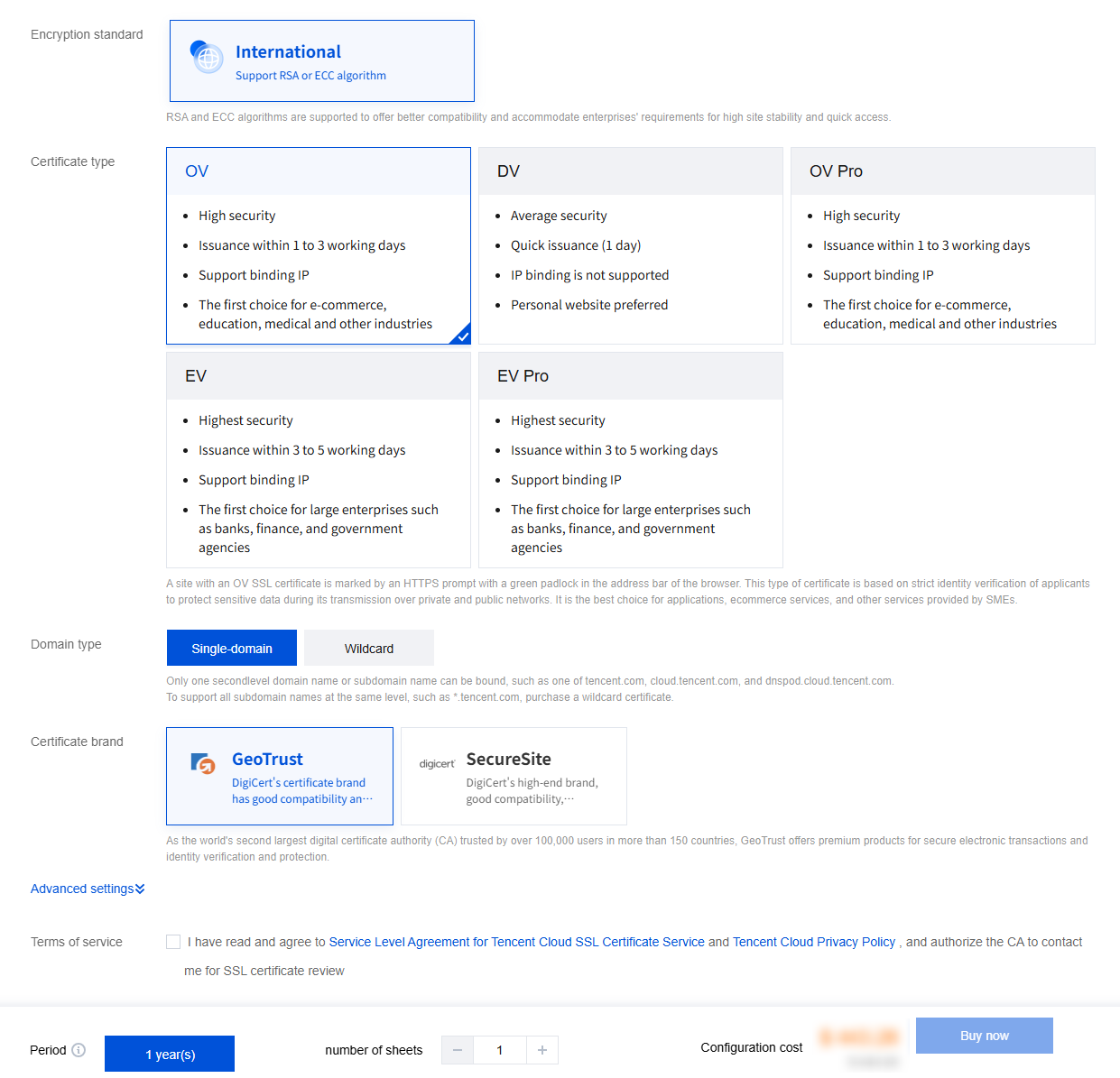
2. Choose the appropriate SSL certificate specification based on your needs, as shown in the following image:
Note:
Click Advanced Settings and set Project and Tag to better manage existing Tencent Cloud resources by category. For detailed directions on how to add a tag, see Querying Resources by Tag.
Step 2. Select the certificate type and brand
1. Select a certificate type that best fits your industry and actual needs. For more information, see Certificate Type Selection Cases.
2. Select a certificate brand. For more information, please see Certificate Brands.
Step 3. Select the domain name type and the number of domain names supported
Domain Type | Description | Notes |
Single-domain | Only one domain can be bound. The domain can be a second-level domain such as tencent.com or a third-level domain such as example.tencent.com. | Binding all subdomains under a second-level domain is not supported.Up to 100 levels of domains are supported.An SSL certificate bound to the domain www.tencent.com (www as the subdomain) supports the second-level domain `tencent.com`. |
Multi-domain | A certificate can be bound to multiple domains, subject to the maximum number of domains displayed in the console. | The prices of SecureSite multi-domain certificates are calculated based on the number of domains.For the GeoTrust, TrustAsia, GlobalSign, WoTrus, and DNSPod multi-domain certificates, there are additional charges for the domains that exceed the default maximum number of domains supported. |
Wildcard domain | One and only one wildcard domain can be bound, and only one wildcard can be added. | For example, \\*.tencent.com and \\*.example.tencent.com support up to 100 levels.Multi-wildcard domains such as \\*.\\*.tencent.com are not supported.An SSL certificate bound to the domain \\*.tencent.com (which must be a second-level wildcard domain) supports the second-level domain tencent.com. |
Multiple wildcard domains | Multiple wildcard domains can be bound. | For example, \\*.tencent.com, \\*.ssl.tencent.com, and \\*.another.com are counted as a total of three wildcard domains, including all the subdomains at the same level, subject to the maximum number of domains displayed in the console. |
Step 4. Select the certificate validity period
Due to changes in Apple and Google root store policies, newly issued SSL/TLS certificates with a validity period greater than 13 months (397 days) have been prohibited by policy since September 1, 2020. Therefore, global CAs have ceased issuing such certificates since September 1, 2020.
Currently, only certain multi-year SSL certificates are available from Tencent Cloud (others available are all SSL certificates with a validity period of 13 months). Within 30 days before expiration of your current multi-year certificate, Tencent Cloud will automatically apply for a new one for you, which will be automatically issued upon CA approval.
Note:
Available multi-year SSL certificate brands and types are as displayed on the purchase page.
If the original certificate is installed at the server website, you need to replace it with a newly issued one as instructed in Selecting an Installation Type for an SSL Certificate.
Step 5. Pay for your order
After selecting the brand, model, supported domain name, and certificate validity period, you can submit your order and complete the payment process.
Step 6. Submit an application
After completing the payment, you can go to the Tencent Cloud SSL Certificate Console to bind the certificate to the domain name and submit relevant information.
Help and Support
Was this page helpful?
You can also Contact sales or Submit a Ticket for help.
Help us improve! Rate your documentation experience in 5 mins.
Feedback