tencent cloud

Cloud Security Center

Audit Logs

Unduh
Mode fokus
Ukuran font
Terakhir diperbarui: 2026-06-09 18:16:21
The Database Risk Monitoring and Audit Log module comprehensively logs all database operations. It includes key traceability information such as SQL statements, operators, source IPs, and timestamps. This module supports multi-dimensional, precise search and detailed viewing, providing end-to-end traceability for database operations.

Log Audit

1. Log in to the CSC console. In the left navigation pane, click Data Security Situation Management > Database Risk Monitor.
2. On the Database Risk Monitoring page, click Audit Logs > Log Audit.
3. On the Audit Logs page, operation records for synchronized database assets are displayed.

4. On the Audit Logs page, you can search logs by instance, database account, client IP, client port, and SQL statement.

SQL Statement Details

1. On the Audit Logs Tag page, click Details in the SQL Statement column of the target log.

2. On the SQL Statement Details page, you can view the complete SQL statement information.

Session audit

Session Audit helps you perform security analysis from the perspective of database connection sessions.
1. Log in to the CSC console. In the left navigation pane, click Data Security Situation Management > Database Risk Monitor.
2. On the Database Risk Monitoring page, click Audit Logs > Session Audit.
3. On the Audit Logs page, synchronized database session connection records are displayed.


Storage Settings

Note:
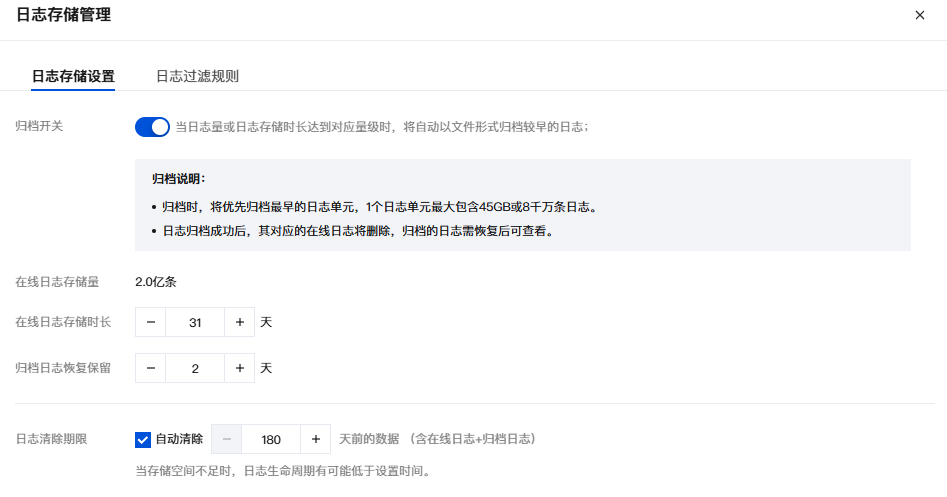
When the log volume or log retention period reaches a corresponding threshold, older logs are automatically archived as files.
During archiving, the earliest log unit is archived first. A single log unit can contain up to 45 GB or 80 million log entries.
After log archiving is successful, the corresponding online logs are deleted. Archived logs must be restored before they can be viewed.
1. On the Audit Logs Tag page, click Log Storage.
2. In the Log Storage Settings window, you can enable/disable archived log storage, and adjust the online log storage duration, restored log retention period, and log lifecycle.


Archive Log Management

Note:
Up to 500 GB of logs can be restored.
Only one restoration task can be processed at a time.
Online logs and archived logs consume storage space, whereas restored logs do not.
1. Log in to the CSC console. In the left navigation pane, click Data Security Situation Management > Database Risk Monitor.
2. On the Database Risk Monitoring page, click the Audit Logs Tag.
3. On the Audit Logs page, click Archived Logs.
4. The Archived Logs window displays all archived audit logs. You can delete or restore (to online logs) the archived logs.


Bantuan dan Dukungan

Apakah halaman ini membantu?

masukan