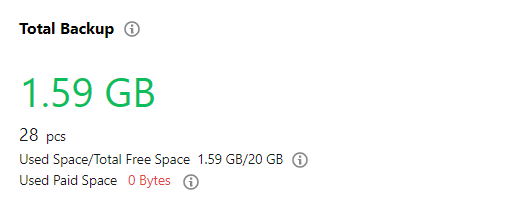
The backup space is used to store the backup files of all TDSQL for MySQL instances in a region, including data backups (cold backups) and log backups (binlog backups).
Note:
Backup space billing will start on April 1, 2023.
Free Backup Space
TDSQL for MySQL offers a free backup space the same size as the storage capacity of the purchased instance by region.
The free backup space in a region equals to the sum of single-node storage spaces of all purchased instances in the region.
Note:
The free backup space is offered for both source and disaster recovery instances.
You can view the size of an instance's backup space on the backup page in the TDSQL console.
Backup Billing
A certain free tier is available for the backup space, and only the excessive backup space is billed.
Note:
Billable space of less than 1 GB is not billed, and a billable time period of less than one hour is counted as one hour.
You can view the size of the excessive backup space on the backup page in the TDSQL console.
Region
Price (USD/GB/Hour)
Chinese mainland (including finance zones)
0.000113
Other regions
0.000127
Backup Lifecycle
The lifecycle of a backup is the same as that of an instance as described in Payment Overdue.
Monthly subscribed instance
The backup feature can be used normally within seven days after an instance expires, during which backups beyond the free tier will still be billed.
From the eighth day after expiration, the instance is isolated and moved into the recycle bin. At this time, automatic backup stops, and rollback and manual backup are prohibited, but backups can still be downloaded. Excessive backup space will still be billed until the instance is eliminated. You can renew the instance in the recycle bin in the console to restore it.
After seven days since the instance has been isolated in the recycle bin, the instance is eliminated (i.e., deleted completely) along with all data backups. Save the needed backups in a timely manner.
Note:
If the monthly subscribed instance has not expired but your account has overdue payments, the backup feature can still be used normally, and automatic backup continues, where excessive backup space is still billed.
If you need to perform rollback, manual backup, or backup download, top up your account to a positive balance.
Pay-as-you-go instance
Backups are subject to change over the instance lifecycle.
Backups can work normally within two hours after the instance payment becomes overdue.
After two hours since the instance payment has been overdue, the instance is isolated and moved into the recycle bin. At this time, automatic backup stops, and rollback and manual backup are prohibited, but backups can still be downloaded. Excessive backup space will still be billed until the instance is eliminated. You can renew the instance in the recycle bin in the console to restore it.
After seven days since the instance has been isolated in the recycle bin, the instance is eliminated (i.e., deleted completely) along with all data backups. Save the needed backups in a timely manner.
Backup Optimization
Reduce the backup retention period: The instance retains backups of the last seven days by default, and you can manually reduce the number of backup retention days to save the backup space.
Log in to the TDSQL console, select Instance Details > Backup and Restoration, and adjust the backup retention period, which can be 1–365 days.
Adjust the backup execution time: Specify a time (usually during off-peak hours) for backup execution, which will improve the backup efficiency. Log in to the TDSQL console, select Instance Details > Backup and Restoration, and adjust the backup execution time.
Note:
Currently, TDSQL backups are automatic backups and cannot be manually deleted.
The backup retention period is seven days by default, which can basically meet the needs in most business scenarios.