Android&iOS&Windows&Mac
Download
Focus Mode
Font Size
Feature Description
A targeted group message is a message sent to specified members in a group, which cannot be received by other group members.
Note
1. Targeted group messages are supported only by the SDK of the Enhanced edition on v6.0.1975 or later.
2. To use this feature, you need to purchase the Pro edition、Pro Plus edition、Enterprise edition.
3. The original message object for creating a targeted group message cannot be a group @ message.
4. The targeted group message feature is not available for community and audio-video (AVChatRoom) groups.
5. By default, targeted group messages are excluded from the unread count of the group conversation.
Effect
By using the targeted group message feature, you can achieve the effect shown in the figure below:
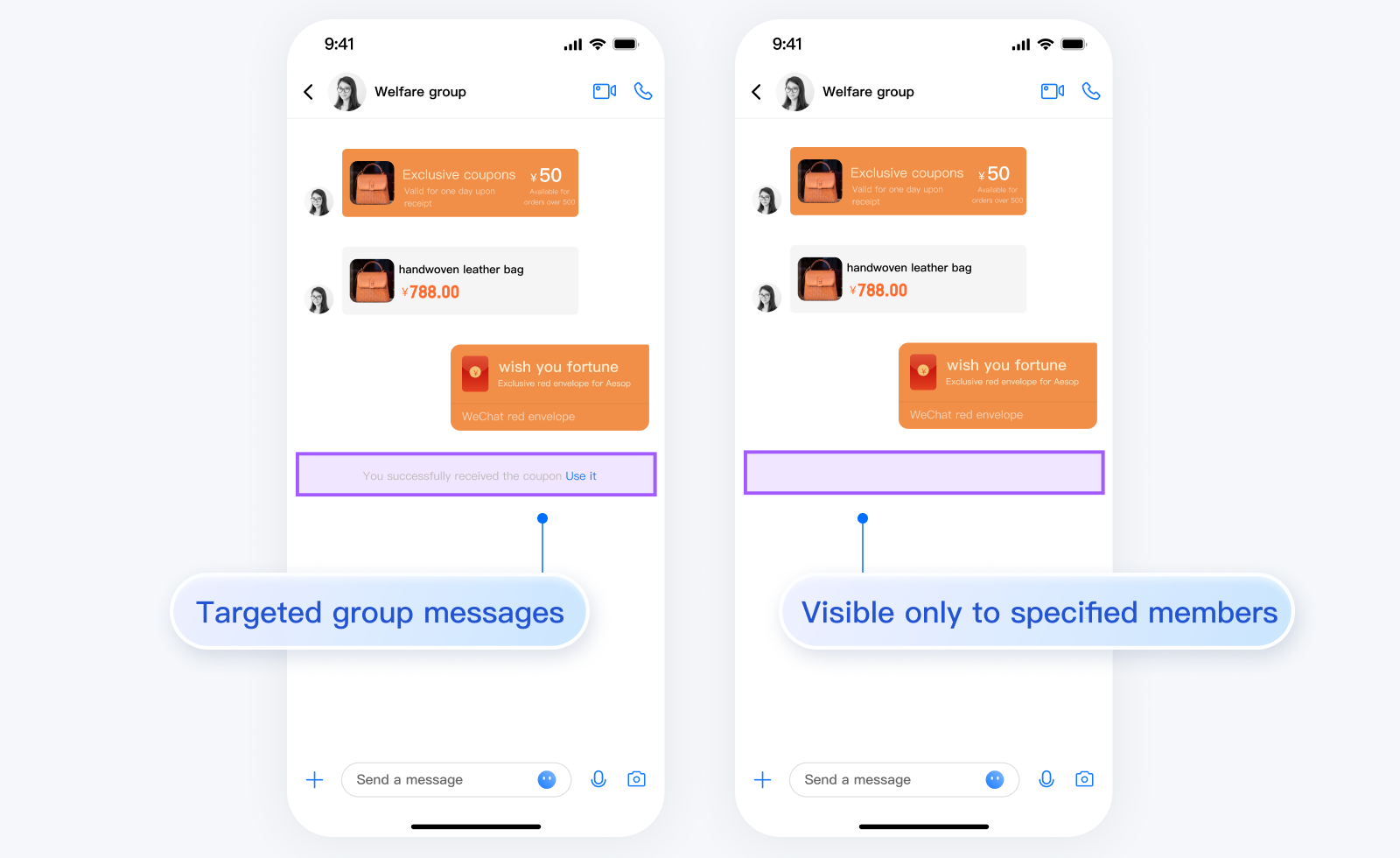
Sending a Targeted Group Message
A targeted group message is a message sent to specified members in a group, which cannot be received by other group members.
To send a targeted group message to a single member in a group, pass in both
groupID and receiver.To send a targeted group message to multiple members in a group, follow the instructions below:
1.1 Call the
createXxxMessage API (here, Xxx indicates the message type) to create an original message object V2TIMMessage.1.2 Call the
createTargetedGroupMessage API (Java / Swift / Objective-C / C++) to create a targeted message object V2TIMMessage based on the original message object and specify the list of group members to receive the message.1.3 Call the
sendMessage API to send the targeted message.Sample code:
// Create an original message objectV2TIMMessage v2TIMMessage = V2TIMManager.getMessageManager().createTextMessage(“This is a targeted group message”);// Create a targeted group message object, and specify the recipients "Vinson" and "Denny"List<String> targetGroupMemberList = new ArrayList<>();targetGroupMemberList.add("vinson");targetGroupMemberList.add("denny");V2TIMMessage targetGroupMessage = V2TIMManager.getMessageManager().createTargetedGroupMessage(v2TIMMessage, targetGroupMemberList);// Send the targeted group message in groupAV2TIMManager.getMessageManager().sendMessage(targetGroupMessage, null, "groupA", V2TIMMessage.V2TIM_PRIORITY_DEFAULT, false, null, new V2TIMSendCallback<V2TIMMessage>() {@Overridepublic void onError(int code, String desc) {// The message failed to be sent}@Overridepublic void onSuccess(V2TIMMessage v2TIMMessage) {// Sent successfully}@Overridepublic void onProgress(int progress) {}});
// Create an original message object// Create a targeted group message object, and specify the recipients "Vinson" and "Denny"if let tmp = V2TIMManager.shared.createTextMessage(text: "this is a targeted message"),let msg = V2TIMManager.shared.createTargetedGroupMessage(message: tmp, receiverList: ["vinson","denny"]) {// Send the targeted group message in groupAV2TIMManager.shared.sendMessage(message: msg, receiver: nil, groupID: "groupA", priority: .V2TIM_PRIORITY_DEFAULT, onlineUserOnly: false, offlinePushInfo: nil) { progress in} succ: {print("createTargetedGroupMessage & send succ")} fail: { code, desc inprint("createTargetedGroupMessage & send fail, \\(code), \\(desc)")}}
// Create an original message objectV2TIMMessage *message = [[V2TIMManager sharedInstance] createTextMessage:@"This is a targeted group message"];// Create a targeted group message object, and specify the recipients "Vinson" and "Denny"NSMutableArray *receiverList = [NSMutableArray array];[receiverList addObject:@"vinson"];[receiverList addObject:@"denny"];V2TIMMessage *targetGroupMessage = [V2TIMManager.sharedInstance createTargetedGroupMessage:message receiverList:receiverList];// Send the targeted group message in groupA[[V2TIMManager sharedInstance] sendMessage:targetGroupMessage receiver:nil groupID:@"groupA"priority:V2TIM_PRIORITY_DEFAULT onlineUserOnly:NO offlinePushInfo:nil progress:^(uint32_t progress) {} succ:^{// Message sent successfully} fail:^(int code, NSString *msg) {// The message failed to be sent}];
class SendCallback final : public V2TIMSendCallback {public:using SuccessCallback = std::function<void(const V2TIMMessage&)>;using ErrorCallback = std::function<void(int, const V2TIMString&)>;using ProgressCallback = std::function<void(uint32_t)>;SendCallback() = default;~SendCallback() override = default;void SetCallback(SuccessCallback success_callback, ErrorCallback error_callback,ProgressCallback progress_callback) {success_callback_ = std::move(success_callback);error_callback_ = std::move(error_callback);progress_callback_ = std::move(progress_callback);}void OnSuccess(const V2TIMMessage& message) override {if (success_callback_) {success_callback_(message);}}void OnError(int error_code, const V2TIMString& error_message) override {if (error_callback_) {error_callback_(error_code, error_message);}}void OnProgress(uint32_t progress) override {if (progress_callback_) {progress_callback_(progress);}}private:SuccessCallback success_callback_;ErrorCallback error_callback_;ProgressCallback progress_callback_;};// Create an original message objectV2TIMMessage message =V2TIMManager::GetInstance()->GetMessageManager()->CreateTextMessage(u8"This is a group text @ message.");// Create a targeted group message object, and specify the recipients "Vinson" and "Denny"V2TIMStringVector receiverList;receiverList.PushBack("vinson");receiverList.PushBack("denny");V2TIMMessage targetGroupMessage =V2TIMManager::GetInstance()->GetMessageManager()->CreateTargetedGroupMessage(message, receiverList);auto callback = new SendCallback{};callback->SetCallback([=](const V2TIMMessage& message) {// Targeted group message sent successfullydelete callback;},[=](int error_code, const V2TIMString& error_message) {// Failed to send the targeted group messagedelete callback;},[=](uint32_t progress) {});// Send the targeted group message in groupAV2TIMManager::GetInstance()->GetMessageManager()->SendMessage(targetGroupMessage, {}, "groupA", V2TIMMessagePriority::V2TIM_PRIORITY_NORMAL, false, {}, callback);
Receiving a Targeted Group Message
By default, targeted group messages are excluded from the unread count of a group conversation.
A targeted group message can be received in the same way as an ordinary message. For detailed directions, see Receiving Message.
Help and Support
Was this page helpful?
You can also Contact sales or Submit a Ticket for help.
Help us improve! Rate your documentation experience in 5 mins.
Feedback