功能介绍
下载
聚焦模式
字号
本文档帮助您全面了解推送服务(Push)的核心概念、推送能力等,明确其在不同平台、不同业务场景下的适配能力与使用边界,助力您合理运用推送服务,实现高效用户触达。
核心概念
在使用推送服务之前,需要先了解以下核心概念:
名词 | 说明 |
SDKAppID (应用 ID) | 腾讯云 IM 后台用来区分不同应用的唯一标识。创建应用时自动生成,不同 SDKAppID 之间的数据不互通。推送服务(Push)沿用 SDKAppID 区分开发者创建的不同应用。 |
客户端密钥 (appKey) | 客户端鉴权密钥,用于在注册推送服务时验证客户端集成的合法性。 |
开发平台 | |
Registration ID | |
在线推送 (自建推送通道) | 腾讯云 IM 推送服务提供的自建长连接消息推送通道,用户在线时通过该通道实时下发消息,具备覆盖全球、高连通、高可靠、强安全的优势。 |
离线推送 (集成全厂商推送通道) | 手机操作系统厂商提供的系统级推送通道,用户离线时通过该通道下发通知。 |
推送能力
推送服务(Push)是您触达用户的核心工具,核心价值在于打破应用闭环,将重要消息、活动通知、业务提醒等精准传递给目标用户,助力提升用户活跃度、转化率及留存率。其核心功能涵盖以下维度:
基础推送能力
推送服务提供全员推送、标签推送、指定用户推送、即时通信 IM 消息推送、音视频通话消息推送5种基础推送能力,全面覆盖各类业务场景,具体说明如下:
推送类型 | 说明 | 典型场景 |
全员推送 | 适用于发布重要公告、营销活动等日常运营场景 | |
标签推送 | 适用于定向促活、优惠券发放等日常运营场景 | |
指定用户推送 | 适用于小范围推送或批量重复推送的场景 | |
即时通信 IM 消息推送 | 在单聊/群聊/社群等即时通信场景下,当应用内用户离线时,可通过离线推送通知用户有新消息,点击离线推送消息即可进入 IM 聊天界面。需和腾讯云即时通信 IM 服务搭配使用。详细介绍和使用方法请查看 接入 IM 离线推送。 | 适用于聊天消息提醒、群通知、社群动态等场景 |
音视频通话消息推送 | 在 1V1 或多人音视频通话场景下,当应用内用户离线时,可通过离线推送呼叫用户,提供 Notification、VoIP 两种样式类型。需和腾讯云实时音视频 TRTC TUICallKit 服务搭配使用。TUICallKit 产品介绍请查看 TUICallKit 组件介绍。 | 适用于来电呼叫、视频会议邀请等场景 |
扩展推送能力
分类 | 能力 | 说明 |
自定义样式 | 支持自定义在应用图标上显示的角标样式和数字。 | |
| 支持为推送设置个性化铃声。 | |
| 为点击推送内容的 App 用户,设置个性化的跳转页面。 | |
| 支持自定义推送显示的小图标样式。 | |
智能推送 | 针对同一条推送支持配置不同语言文案,后台根据用户设备语言偏好,自动推送对应语言文案的功能。 | |
| 提供单群聊触发的推送回调 / IM 消息推送回调,帮助您精细化控制 App 的功能和流程。 | |
| 支持全员/标签推送的撤回。应用场景:推送消息内容有误,终端用户查看后对应用程序会产生负面影响,此时需及时撤回。 | |
| 开发者预先在推送平台创建含固定框架与可替换变量的消息模板,推送时仅传入变量值,由平台自动填充生成最终消息并下发,兼顾标准化、效率与个性化。一次创建可实现多次批量推送,大幅降低开发与运营成本。 | |
各厂商能力项详细支持情况:
能力项 | 华为 | 小米 | OPPO | vivo | 荣耀 | 魅族 | FCM | APNs | 鸿蒙 |
角标 | 跟随系统,默认感知通知栏数量 | 跟随系统,支持红点显示 | 跟随系统,默认感知通知栏数量 | 跟随系统,支持红点显示 | 跟随系统 | 跟随系统,默认的感知通知栏数量 | |||
铃音 | 跟随系统的默认通知铃音 | 跟随系统的默认通知铃音 | 跟随系统的默认通知铃音 | 开发中 | |||||
小图标 | 跟随应用桌面图标 | 跟随应用桌面图标 | 跟随应用桌面图标 | 跟随应用桌面图标 | 跟随应用桌面图标 | 跟随应用桌面图标 | 跟随应用桌面图标 | ||
右侧图标 | - | - | - | - | |||||
点击跳转 | |||||||||
消息分类 | - | ||||||||
在线推送 | |||||||||
控制离线消息忽略角标 | - | - | - | - | - | - | - |
数据统计与分析
提供完善的数据统计功能,帮助您追踪推送触达率、点击率、转化率等核心指标,优化运营策略。
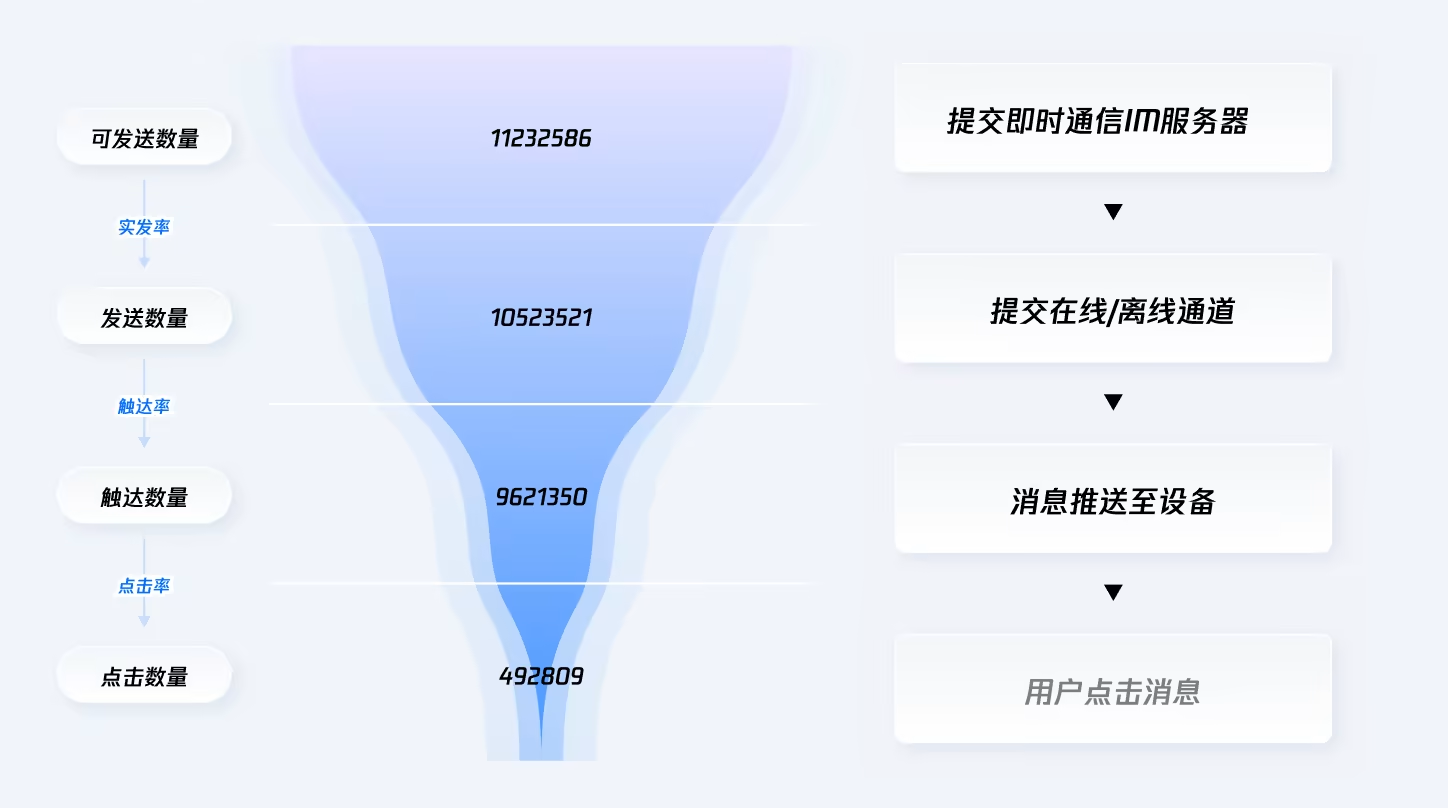
推送数据转化漏斗
包括可发送数量、发送数量、触达数量、点击数量的统计数据,同时提供实发率、触达率、点击率的漏斗转化数据。具体说明如下:
名词 | 说明 |
可发送数量 | 对推送任务所选定的目标人群筛选,得到的可下发的有效设备数量之和。 说明: 已剔除已卸载、Token 无效、设备无效、应用未注册或长期未联网等无法形成有效推送机会的对象。 |
发送数量 | 可发送的有效设备中,已经通过 TIMPush 在线通道、厂商通道确认成功下发的有效设备数量之和。 说明: 已剔除厂商配额或频控限制、通知栏关闭、无效设备等无法形成有效发送或有效展示的场景。 |
触达数量 | 通过 TIMPush 在线通道、厂商通道下发后,消息到达用户设备侧的数量之和。 根据厂商回执特性采用两种统计方式: TIMPush 在线通道及小米等厂商通道按厂商触达成功回执计入; 华为、FCM、魅族、OPPO、vivo、荣耀、APNs 等厂商通道按「厂商成功发送量 − 明确触达失败量」计入。 |
点击数量 | 推送成功展示后,点击推送的回执数量之和。 |
实发率 | 发送数量 / 可发送数量 × 100%。 |
触达率 | 触达数量 / 发送数量 × 100%。 |
点击率 | 点击数量 / 触达数量 × 100%。 |
分析工具
名词 | 说明 |
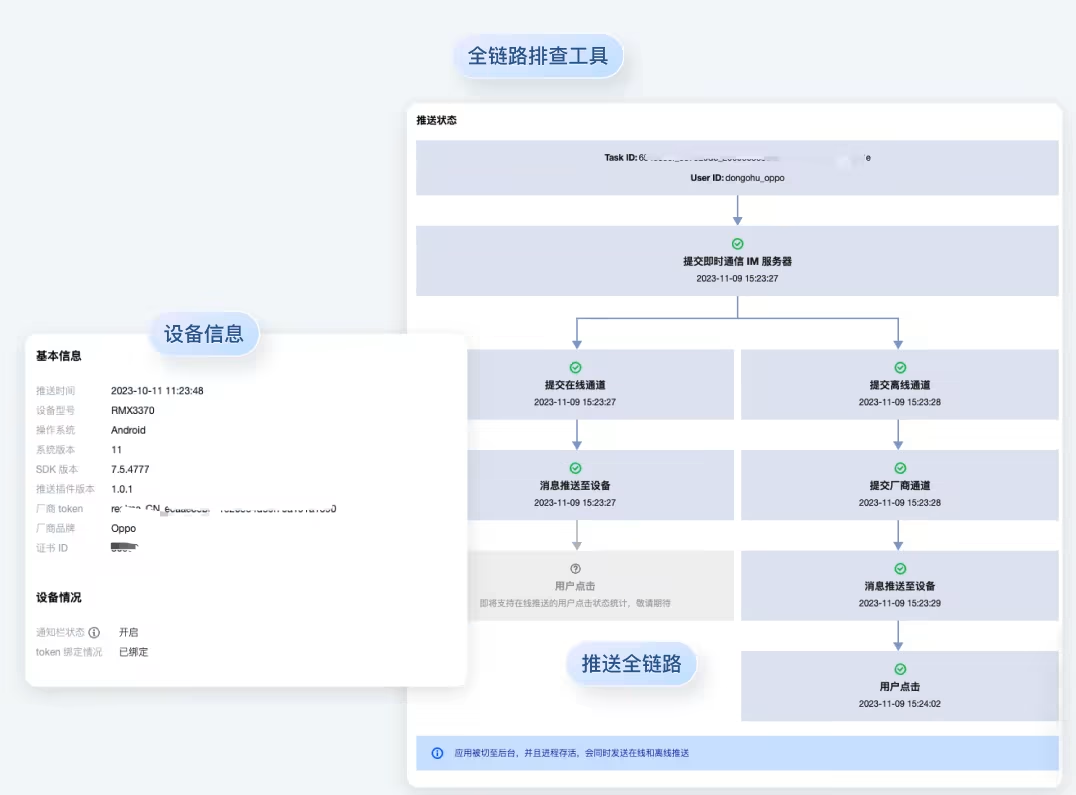
推送记录 | 查询近期某次推送记录的详情,通过控制台推送工具或服务端 API 产生的推送记录均可查询。 |
消息链路 | 查询某个目标用户在某次推送中的推送下发全链路详情、推送消息详情和设备信息。 |
推送折损分析 | 针对推送传输过程中出现的丢失、未触达等情况进行分析的功能。通过统计不同环节的消息折损率,找出推送链路中的问题点,为优化推送策略、提高推送到达率提供数据支持。 |
在线推送和离线推送对比
推送服务支持在线推送和离线推送,两种推送方式在触发条件、适用通道、消息形式和能力边界等维度存在显著差异,详细对比如下:
对比维度 | 在线推送 | 离线推送 |
触发条件 | App 处于前台运行,或后台进程存活 | App 进程被系统终止,或用户主动关闭 App |
使用通道 | 自建推送通道 | 集成全厂商推送通道 Android:小米、华为、荣耀、OPPO、vivo、魅族、Google FCM(境外可用) iOS:APNs |
消息形式 | 支持通知消息和透传消息,开发者可完全自定义处理逻辑 | 仅支持通知栏消息(由厂商系统弹出通知),不支持透传消息 |
实时性 | 毫秒级,通过长连接实时下发 | 秒级~分钟级,受厂商通道调度策略影响 |
到达率 | 极高(连接存活即可到达) | 受厂商通道配额、消息分类、设备设置等因素影响 |
消息格式 | 支持自定义格式 | 受各厂商通道规范限制 |
用户感知 | 可选择弹出通知栏、应用内弹窗,或静默处理 | 系统通知栏展示,用户点击后唤起 App |
是否需要厂商配置 | 不需要 | 需要,须在各厂商开放平台申请推送权限,并在推送服务控制台配置厂商通道参数 |
使用方式 | 1. 集成推送服务 SDK 并完成初始化。 2. App 进程存活时,SDK 自动与推送服务后台建立长连接。 3. 服务端通过推送 API 或控制台下发消息,SDK 自动接收。 4. 通过 SDK 回调方法处理接收到的消息。 | 1. 在各厂商开放平台注册应用并申请推送服务权限 2. 在腾讯云推送服务控制台填写厂商通道配置信息(AppID、AppKey、AppSecret 等)。 3. 按照各平台要求完成客户端 SDK 集成(推送服务 SDK 已内置主流厂商 SDK,一键集成) 4. 服务端发送推送时,设置 PushFlag = 0,推送服务后台将自动判断设备状态并选择最优通道。 |
说明:
推送服务 Push 提供以下两种推送策略:
在线 + 离线全覆盖:用户在线时走自建通道推送,用户离线时自动切换到厂商通道下发离线通知。推荐使用,确保消息最大触达。(PushFlag = 0(默认))
仅在线推送:仅在用户在线时通过自建通道推送,离线时不推送。适用于时效性强、过期无意义的消息场景。(PushFlag = 1)
开发平台支持
针对不同开发者的多样化开发需求,我们提供基于多种开发平台的解决方案。详情如下:
厂商 | 原生语言 | 跨平台 | ||||
| | | Flutter | uni-app | Unity | Unreal Engine |
Android | 小米 | ✓ | ✓ | ✓ | ✓ | ✓ |
| 华为 | ✓ | ✓ | ✓ | ✓ | ✓ |
| OPPO | ✓ | ✓ | ✓ | ✓ | ✓ |
| vivo | ✓ | ✓ | ✓ | ✓ | ✓ |
| 魅族 | ✓ | ✓ | ✓ | ✓ | ✓ |
| 荣耀 | ✓ | ✓ | ✓ | ✓ | ✓ |
| FCM | ✓ | ✓ | ✓ | ✓ | ✓ |
iOS | | ✓ | ✓ | ✓ | ✓ | ✓ |
Harmony | | ✓ | 暂不支持 | 暂不支持 | 暂不支持 | 暂不支持 |
如您有更多开发平台支持的需求,请 提交工单 联系我们。本文档帮助您全面了解推送服务(Push)的核心概念、推送能力等,明确其在不同平台、不同业务场景下的适配能力与使用边界,助力您合理运用推送服务,实现高效用户触达。
文档反馈