Forensic watermarking technology embeds identification information into audio and video, serving as a "digital fingerprint" for tracking infringement. Forensic watermarks can be divided into visible and invisible watermarks. Invisible watermarks leverage data redundancy without affecting content quality. Video content platforms use them to identify illegal redistributors, ensuring content authenticity and traceability. High-quality invisible traceable watermarks should maintain robustness while preserving video visual quality and avoiding user perception. This requires precise control of watermark embedding strength, for example: utilizing the characteristics of the human visual system (HVS) to embed watermarks in areas where the human eye is less sensitive to visual changes (such as regions with complex textures or high/low brightness), thereby enhancing watermark anti-attack capability while ensuring concealment.
Tencent Cloud Stream Services supports the A/B forensic watermark solution in live broadcasting scenarios. Based on deep learning models, it performs joint modeling of spatial features from video frames and audio spectrum features of real-time live streams, dynamically adding invisible watermarks according to the audio and video content.
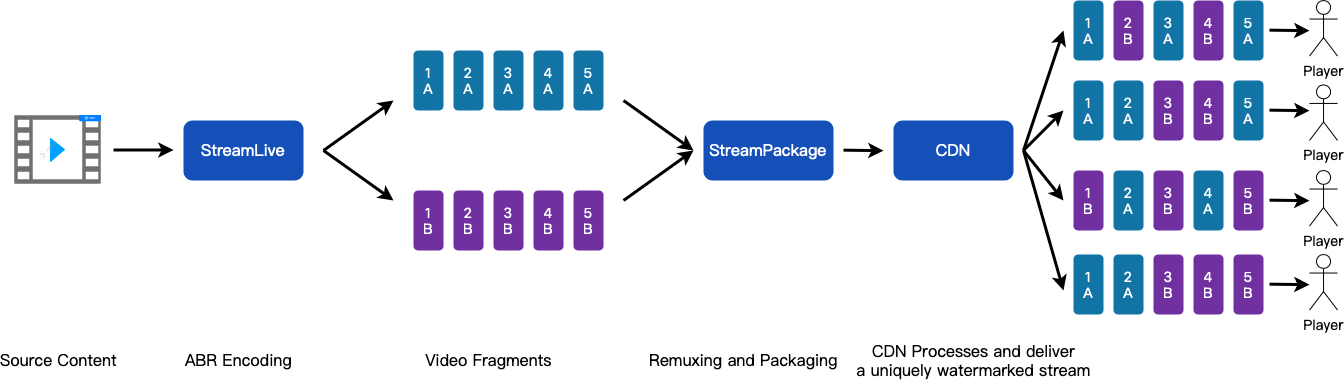
In StreamLive, the input live stream is transcoded into two output groups. The content segments of these two output groups are respectively tagged with A watermark and B watermark, then output to two channels on the StreamPackage. During the content delivery phase, CDN nodes generate A/B sequences containing unique traceable identifiers (uin) for different terminal users based on user identity. Using this unique A/B sequence, the system retrieves the corresponding content segments with A or B watermark from the StreamPackage origin server. Thus, when content is illegally recorded, Tencent Cloud can extract the A/B segment sequence from the pirated video using the watermark detection network, analyze the viewer's (pirater's) uid, and thereby achieve traceability. For common attack methods—such as screen recording, shooting, or certain levels of video compression, format conversion, editing, brightness adjustment, and contrast adjustment—the watermark can still be successfully extracted.
Forensic watermarking technology, as an advanced security protection measure, can be extensively utilized in various content protection scenarios, such as film and television, variety shows, events, online education, short videos, etc.
Function Configuration Process
1. First, read the documentation: "Implementing Live Streaming" to understand the overall configuration process of Stream Services.
2. Read the documentation: "Configuring StreamPackage" or "StreamPackage Console Guide" to understand how to configure StreamPackage. When using the A/B forensic watermark feature, you need to create two channels in StreamPackage with the same input protocol to receive the two output groups of StreamLive (each is added with an A watermark and a B watermark during transcoding). Then create an endpoint in each channel of StreamPackage. Meanwhile, the manifest names of these two endpoints must be the same. This way, when the CDN retrieves the source from StreamPackage, it can obtain the corresponding A/B content segments from the appropriate endpoint based on the user's unique A/B sequence.
3. Read the documentation: "Configuring StreamLive" or "StreamLive Console Guide" to understand how to configure StreamLive. When using the A/B forensic watermark feature, you need to first create A/B watermarks in watermark management. And when creating an output group, create two output groups: one with the A watermark and the other with the B watermark. At the same time, these two output groups must have the same number of outputs, the same output bitrate settings, and the same output name modifiers. In this way, for the same input live stream, an output group with watermark A and another output group with watermark B are generated, and they are output to the two pre-created StreamPackage channels respectively.
5. After the configuration is complete, you can refer to the API doc: "GetAbWatermarkPlayUrl" to generate the playback URL for the A/B forensic watermark channel.
6. During playback, if piracy is detected, the pirated file can be submitted to Tencent Cloud for analysis and traceability.
Taking the HLS protocol as an example, you can refer to the following configuration steps (the configuration process for the DASH protocol is similar).
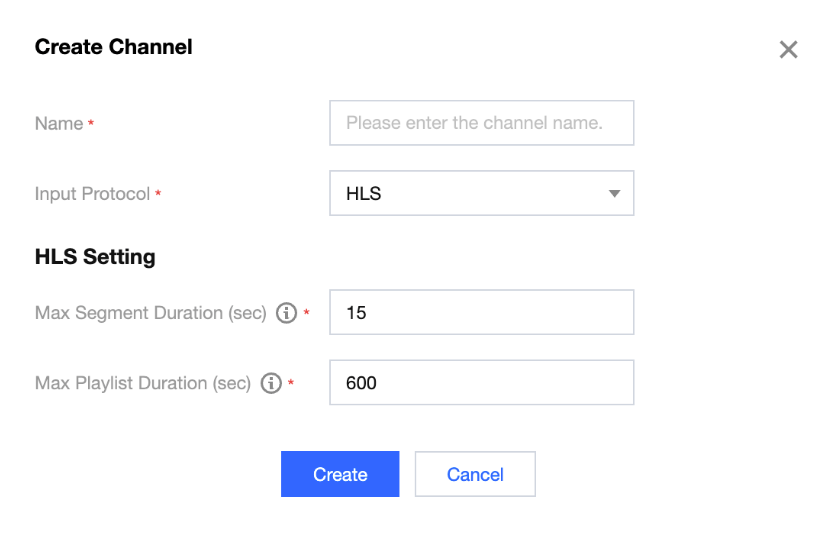
2. Create 2 channels with the Input Protocol set to HLS.
3. For the created channel, go to the Info details page and create an endpoint on the Endpoints page. Meanwhile, for these 2 created Channels, the Manifest Name should be the same.
4. Return to the StreamPackage Channel page and record the ID of the 2 channels for subsequent StreamLive configuration.
2. Refer to Input Management and configure the StreamLive Input based on your business needs.
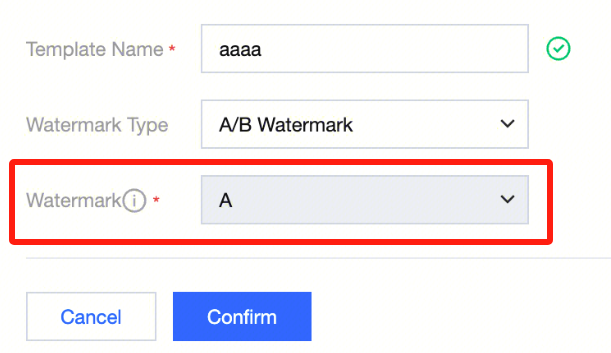
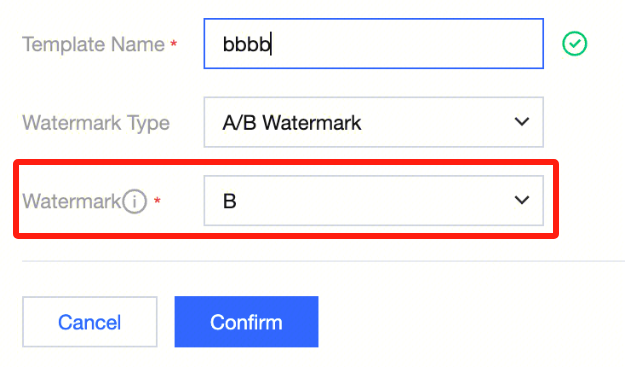
3. From the left sidebar, enter the Watermark management page, click Create Template, select the type as A/B Watermark, create an A watermark, and then create a B watermark.
4. Refer to Channel Management, set basic information, add input, set input, and set output group. Two output groups need to be configured here.
Set the first output group
Set the second output group
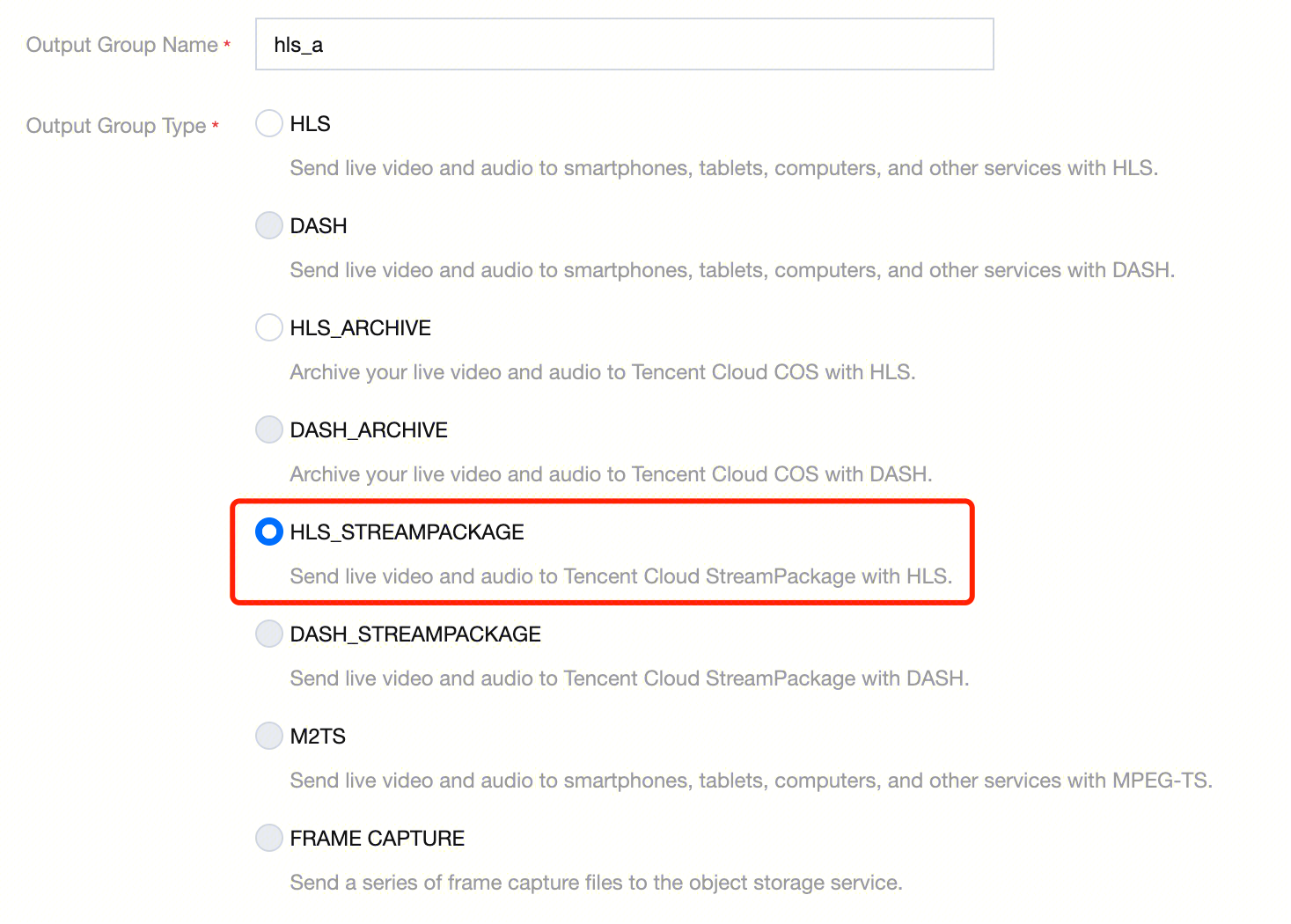
Set the output group type to HLS_STREAMPACKAGE.
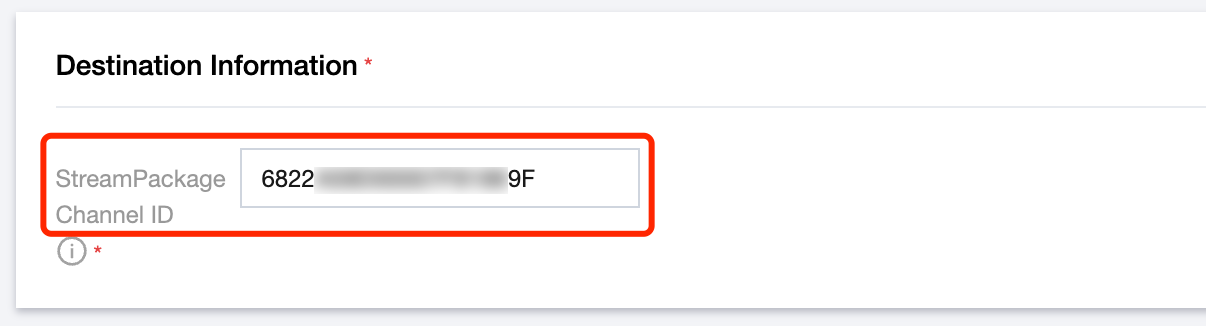
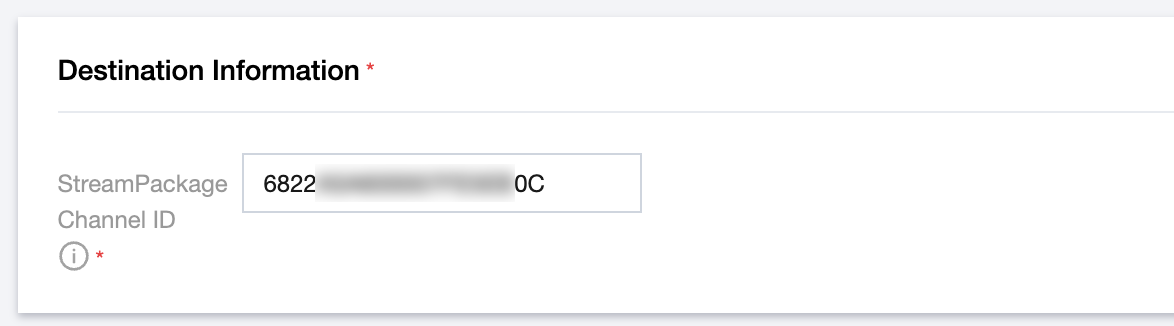
For destination information, fill in the ID of the first channel created in StreamPackage.
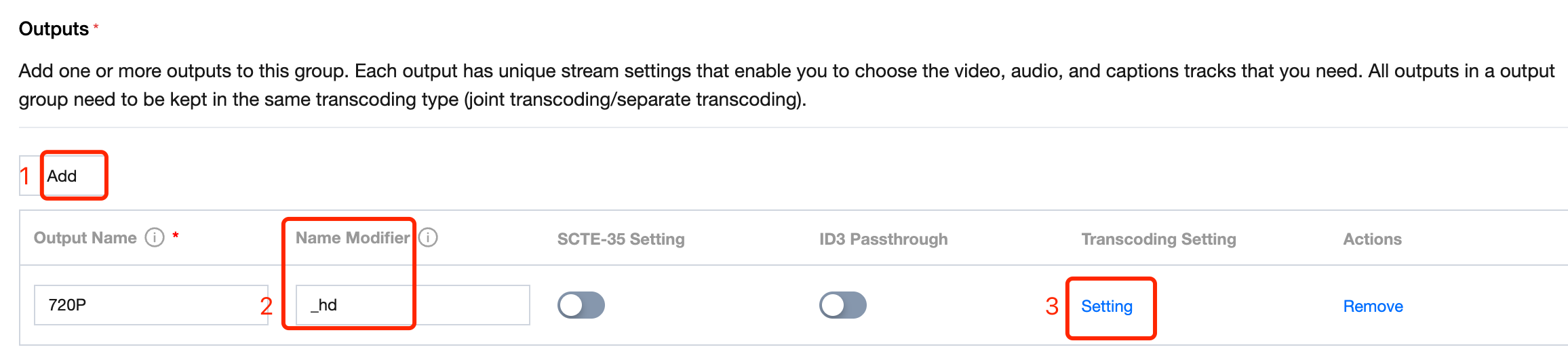
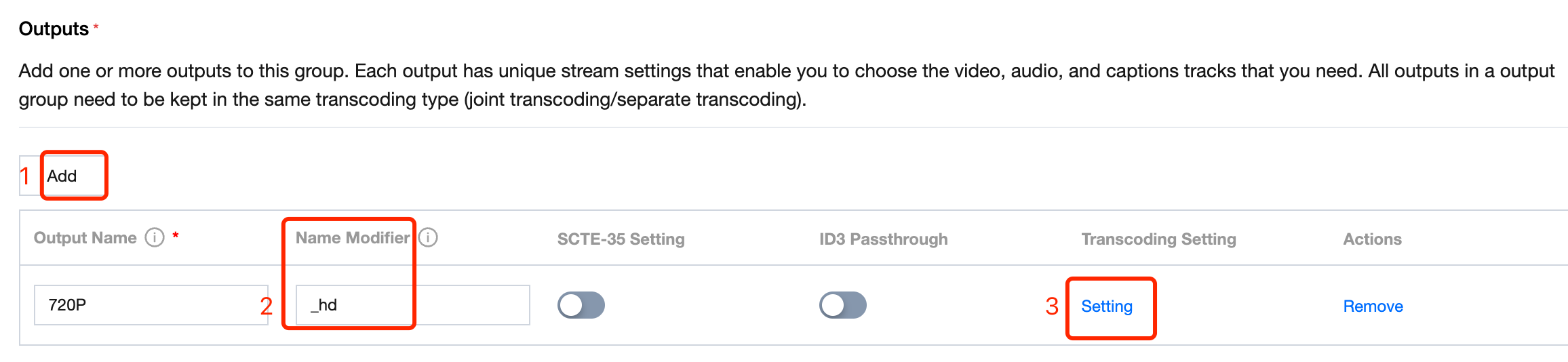
Add outputs to the output group. Set the name modifier. Set the transcoding setting.
Note:
For video-only or audio-video type outputs, outputs with the same resolution in both output groups must have the same name modifier and the same video frame rate/bitrate in the transcoding template.
For audio-only type outputs, outputs with the same audio selector in both output groups must have the same name modifier and the same audio sample rate/bitrate in the transcoding template.
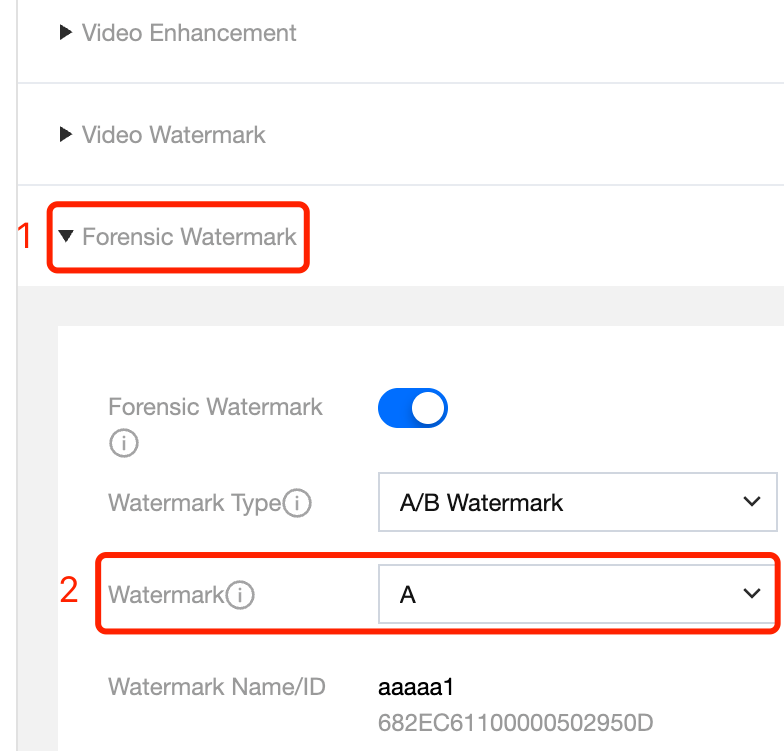
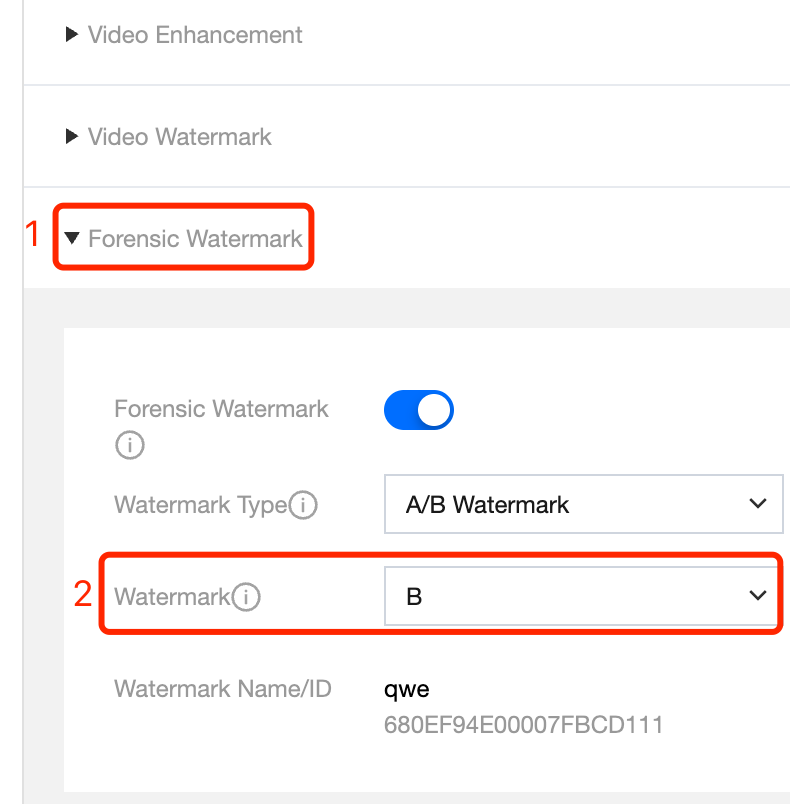
For each output, associate the A watermark in the configuration of the transcoding template.
In the segment information, the segment duration should not be set too high to avoid excessive recording duration requirements for detection files. It is recommended to use 2000ms. In addition, please note that when setting the segment duration for the second output group, the segment duration must be consistent with the value in the first output group.
Set the output group type to HLS_STREAMPACKAGE.
For destination information, fill in the ID of the second channel created in StreamPackage.
Add outputs to the output group. Set the name modifier. Set the transcoding setting.
Note:
For video-only or audio-video type outputs, outputs with the same resolution in both output groups must have the same name modifier and the same video frame rate/bitrate in the transcoding template.
For audio-only type outputs, outputs with the same audio selector in both output groups must have the same name modifier and the same audio sample rate/bitrate in the transcoding template.
For each output, associate the B watermark in the configuration of the transcoding template.
In the segment information, the segment duration must be consistent with the value in the first output group. Additionally, please note that the segment duration should not be set too high to avoid excessive recording duration requirements for detection files. It is recommended to use 2000ms.
5. Complete the channel configuration in StreamLive.
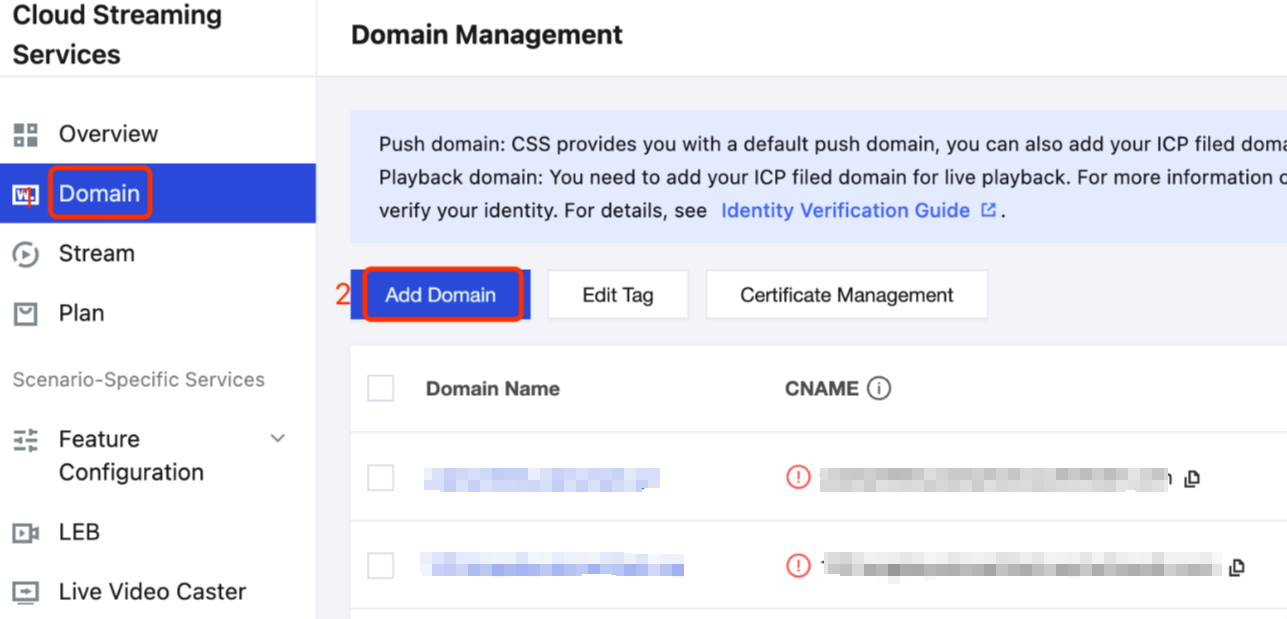
2. Refer to the Adding Your Own Domain documentation to add a playback domain in Cloud Streaming Services.
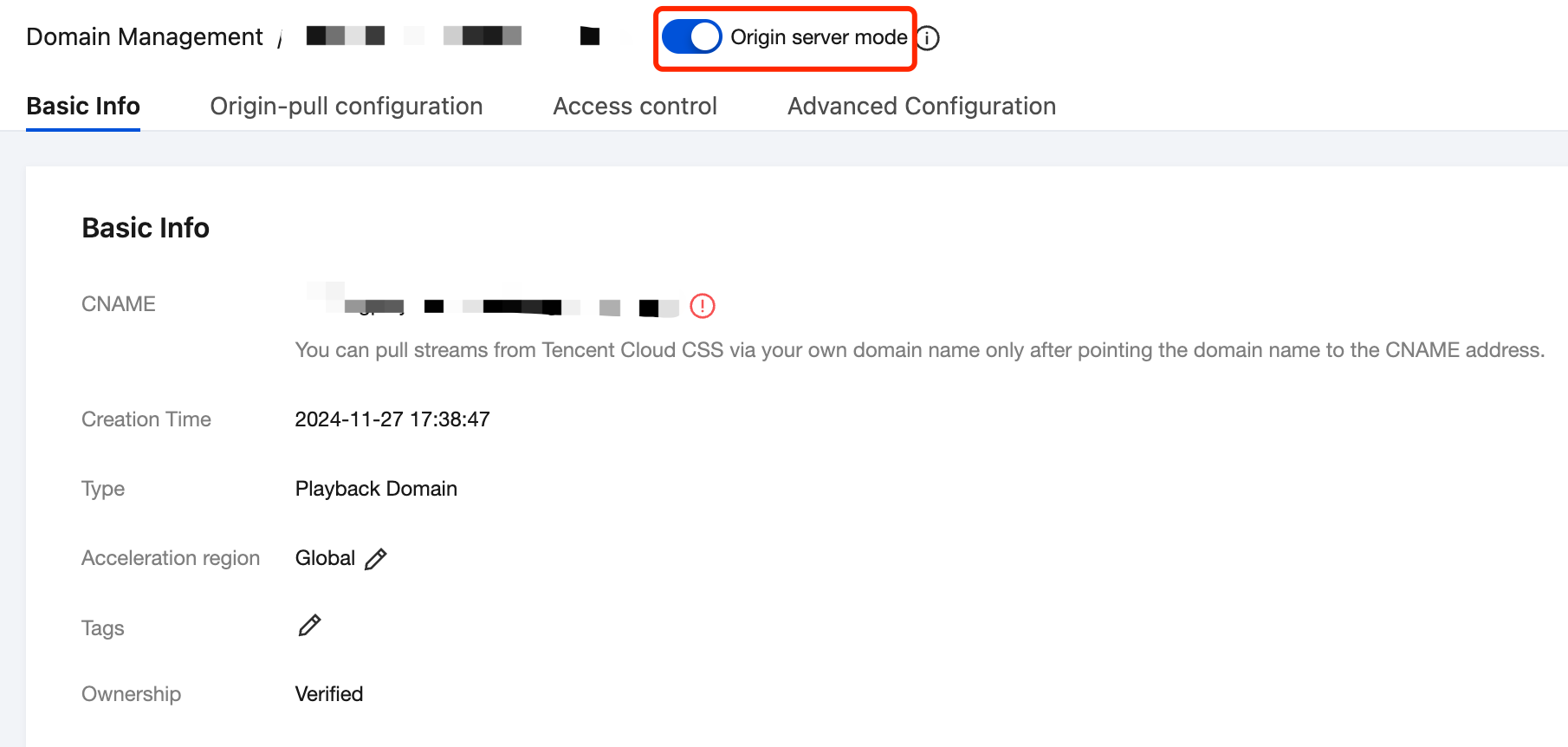
2.1 Select the Type to Playback Domain, and select Outside Chinese mainland for Acceleration region.
2.2 Enable origin-pull mode for this playback domain.
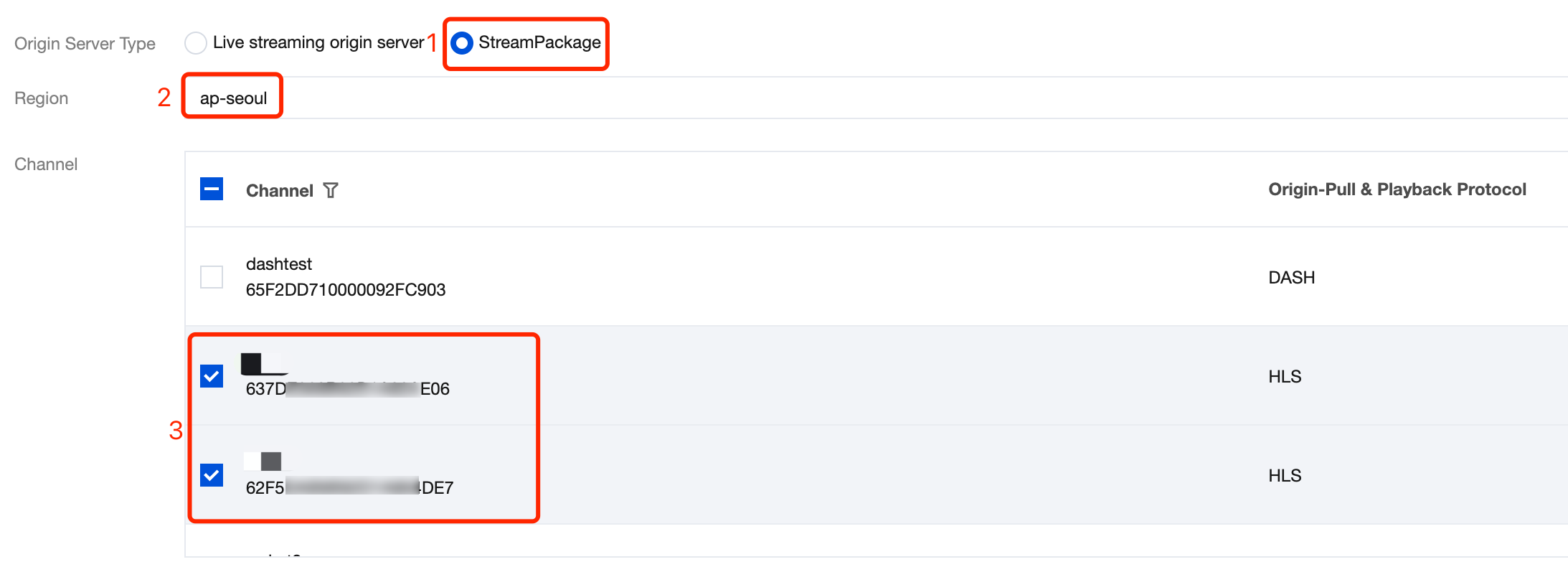
2.3 In the origin-pull configuration, select StreamPackage for Origin Server Type and select the previously configured StreamPackage region and 2 channels.
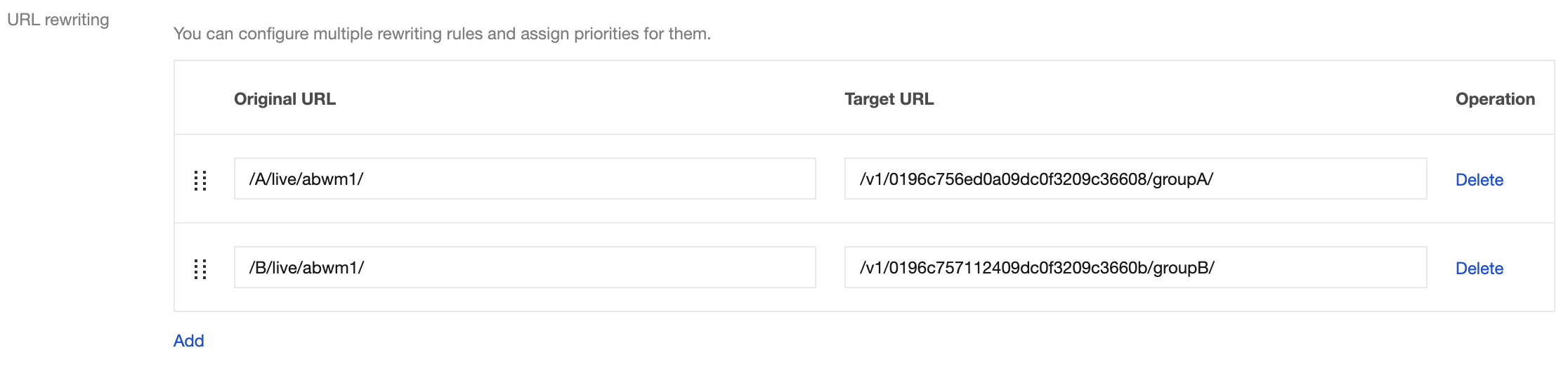
2.4 Then scroll down the page to see the URL rewriting settings.
Take this playback URL as an example: http://playdomain.com/live/abwm1/main.m3u8. Refer to CSS playback configuration, playdomain.com is the playback domain name; live is the application name, defaulting to live and can be customized; abwm1 is the stream id, customized by the user to identify the live stream.
If the endpoint URLs of the 2 channels already created in StreamPackage are:
Rewrite /A/live/abwm1/ as /v1/0196c756ed0a09dc0f3209c36608/groupA/
Rewrite /B/live/abwm1/ as /v1/0196c757112409dc0f3209c3660b/groupB/
In the URL rewriting settings, enter the following information:
Complete the Configuration and Generate a Playback URL
1. After completing the above steps, you can use the Tencent Cloud API to generate a playback URL with A/B watermark: GetAbWatermarkPlayUrl。
2. Complete all configurations, then launch the channel.
Detect Piracy
After enabling A/B watermark, if piracy is detected, obtain the pirated video file and submit it to Tencent Cloud StreamLive product team for video analysis to perform watermark detection and trace the source of the pirated audience.
1. Create a Task
Use the Tencent Cloud API CreateWatermarkDetection to create a watermark detection task. To ensure effective detection, the duration of the video to be analyzed must be at least 90 times the segment duration. Currently, only single-file videos are supported; playlist-based and segmented streaming formats (such as HLS or DASH) are not supported.
CreateWatermarkDetection API Response:
2. Query Task Results
2.1 When initiating a watermark detection task using CreateWatermarkDetection, you can set callback information through the TaskNotifyConfig parameter. After the task is completed, the result will be sent via the configured callback. The meaning of each field in the task result is described in the AbWatermarkDetectionInfo documentation.