广告点击跳转
下载
聚焦模式
字号
概述
StreamPackage 现已支持 SSAI 广告点击跳转功能,允许用户点击广告后跳转到广告指定的页面,同时记录点击数据。该功能具备以下优势:
完整的点击体验:支持广告展示、点击、跳转、追踪全流程。
实时数据同步:可以通过定期轮询获取最新的点击跳转信息。
整体架构流程
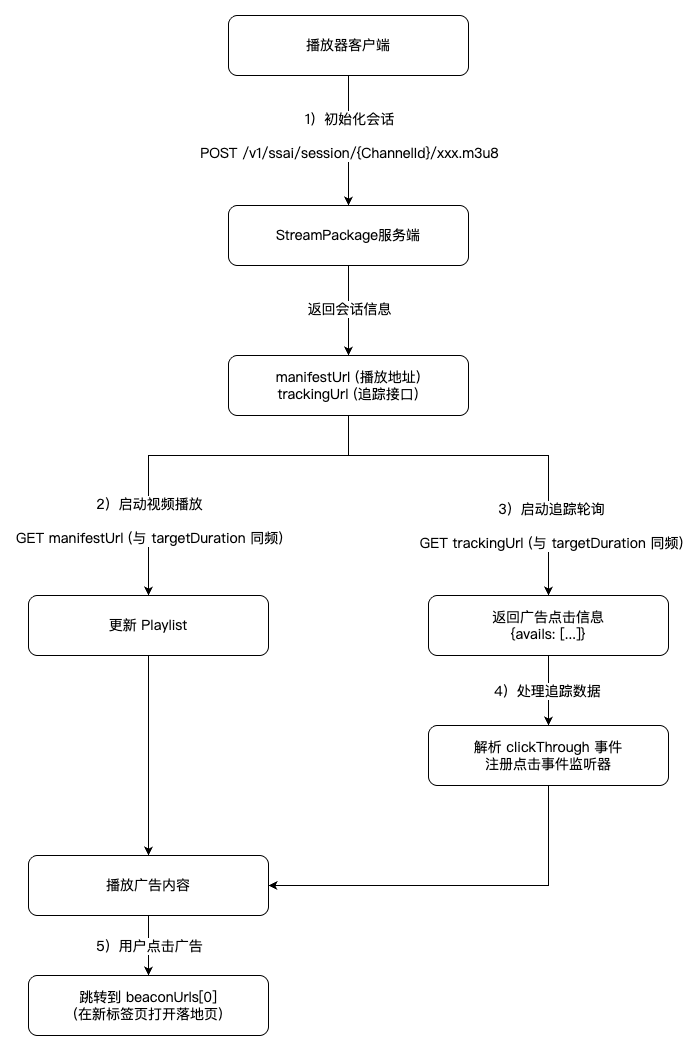
流程说明
1. 初始化会话:播放器请求会话接口,获取 manifestUrl 和 trackingUrl。
2. 启动播放:使用 manifestUrl 开始播放视频,按 targetDuration 频率更新 playlist。
3. 追踪轮询:按相同的 targetDuration 频率轮询 trackingUrl,获取广告点击信息。
4. 处理数据:解析返回的 clickThrough 事件,为广告元素注册点击监听器。
5. 用户交互:用户点击广告时,跳转到 beaconUrls 中的落地页。
关键点
播放器的 playlist 更新和追踪轮询应使用相同的时间间隔(targetDuration)。
追踪接口采用增量更新,已返回的事件不会重复发送。
只有实际插入流中的广告才会返回追踪信息。
快速开始
1. 获取会话信息
播放器初始化时,请求会话初始化接口:
POST /v1/ssai/session/{ChannelId}/xxx.m3u8
响应示例:
{"manifestUrl": "/v1/ssai/master/{ChannelId}/main.m3u8?session_id={SessionId}","trackingUrl": "/v1/ssai/tracking/{ChannelId}/{SessionId}"}
说明:
manifestUrl:播放清单 URL,用于视频播放。
trackingUrl:追踪信息 URL,用于获取点击数据。
{SessionId}:会话的唯一 ID。
2. 启动播放
使用返回的 manifestUrl 启动播放器:
// 初始化播放器player.setSrc(manifestUrl);player.play();
3. 定期轮询追踪信息
播放器应定期请求追踪接口 trackingUrl 获取广告点击数据。建议轮询间隔与 HLS playlist 的 targetDuration 保持一致,就像播放器定期请求 manifestUrl 更新 playlist 一样:
GET /v1/ssai/tracking/{ChannelId}/{SessionId}
响应示例:
{"avails": [{"ads": [{"adId": "ad_001","duration": "PT30.0S","durationInSeconds": 30,"startTime": "PT0.0S","startTimeInSeconds": 0,"adSystem": "广告系统名称","title": "产品宣传","adServerId": "ad_server_001","trackingEvents": [{"eventType": "clickThrough","beaconUrls": ["https://advertiser.com/landing-page"],"startTimeInSeconds": 0}]}],"startTime": "PT0.0S","startTimeInSeconds": 0}]}
请求和响应说明
1. 会话初始化接口
响应字段:
字段 | 类型 | 说明 |
manifestUrl | string | 播放清单 URL。 |
trackingUrl | string | 追踪信息 URL。 |
2. 追踪信息接口
请求参数:
参数 | 类型 | 说明 |
ConfigId | string | SSAI 配置 ID。 |
SessionToken | string | 会话令牌。 |
响应字段:
字段 | 类型 | 说明 |
avails | array | 广告位数组。 |
avails 数组内容:
字段 | 类型 | 说明 |
ads | array | 广告数组。 |
startTime | string | 广告位开始时间(ISO 8601 格式,如 "PT0.0S")。 |
startTimeInSeconds | number | 广告位开始时间(秒)。 |
ads 数组内容:
字段 | 类型 | 说明 |
adId | string | 广告 ID(Creative ID)。 |
duration | string | 广告时长(ISO 8601 格式,如 "PT30.0S")。 |
durationInSeconds | number | 广告时长(秒)。 |
startTime | string | 广告开始时间(ISO 8601 格式)。 |
startTimeInSeconds | number | 广告开始时间(秒)。 |
adSystem | string | 广告系统名称。 |
title | string | 广告标题。 |
adServerId | string | 广告服务器 ID。 |
trackingEvents | array | 追踪事件数组。 |
trackingEvents 数组内容:
字段 | 类型 | 说明 |
eventType | string | 事件类型(目前仅返回 clickThrough)。 |
beaconUrls | array | 点击跳转的 URL 列表。 |
startTimeInSeconds | number | 事件触发时间(秒)。 |
事件类型说明
ClickThrough(点击跳转)
触发时机:用户点击广告时。
用途:重定向到广告主的目标页面(落地页)。
处理方式:直接跳转到 beaconUrls 中的 URL。
字段说明:
eventType:"clickThrough"。
beaconUrls:点击跳转的目标 URL 列表(通常只有一个 URL)。
startTimeInSeconds:事件触发时间点。
注意:
Tracking API 仅返回 clickThrough 事件,用于广告点击跳转。
impression、clickTracking 等其他事件由服务端自动处理,客户端无需关注。
只有实际被插入到流中的广告才会返回 clickThrough 信息。
常见问题
轮询间隔应该设置多少?
建议与 HLS playlist 的 targetDuration 保持一致(通常为6秒-10秒)。就像播放器定期请求 manifest URL 获取更新的 playlist 一样,追踪接口的轮询也应遵循相同的节奏,这样可以:
及时获取最新的广告点击信息。
避免对服务器造成过大压力。
保持与视频播放逻辑的一致性。
点击数据是否实时更新?
是的。追踪接口使用轮询模式,每次请求都会返回最新的、未发送过的广告点击信息。已返回的事件不会重复发送。
如果广告没有点击信息怎么办?
追踪接口返回空的 avails 数组时,说明当前没有新的点击信息。这可能是因为:
广告的 VAST 响应中没有 ClickThrough 数据。
所有点击信息已在之前的轮询中返回。
文档反馈