Configuring an Ad Prefetch Plan
Baixar
Modo Foco
Tamanho da Fonte
Prerequisites
Managing Prefetch Plans
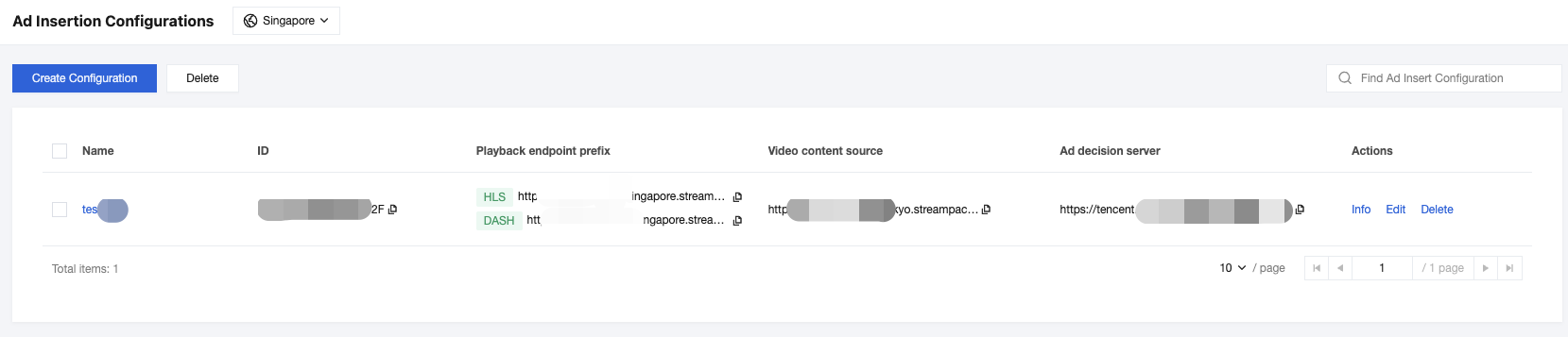
1. For an existing ad insertion configuration, click Info in the Actions column to go to the configuration details page.
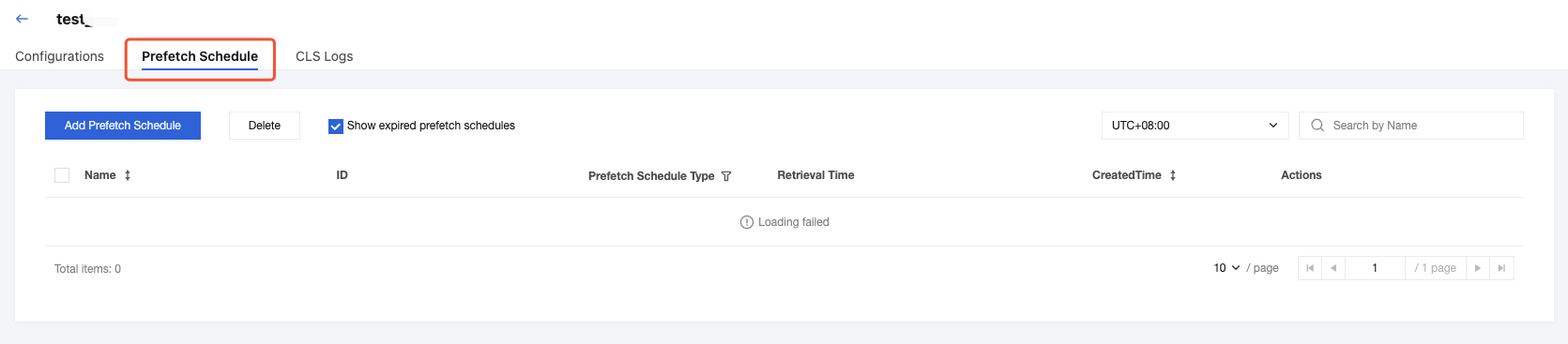
2. On the details page for this ad insertion configuration, you can see the Prefetch Schedule tab. Within this tab, you can view, add, and delete prefetch plans.
Adding a Prefetch Schedule
1. Log in to the StreamPackage console. On the Prefetch Schedule page of the ad insertion configuration details, click Add Prefetch Schedule to configure the prefetch plan.
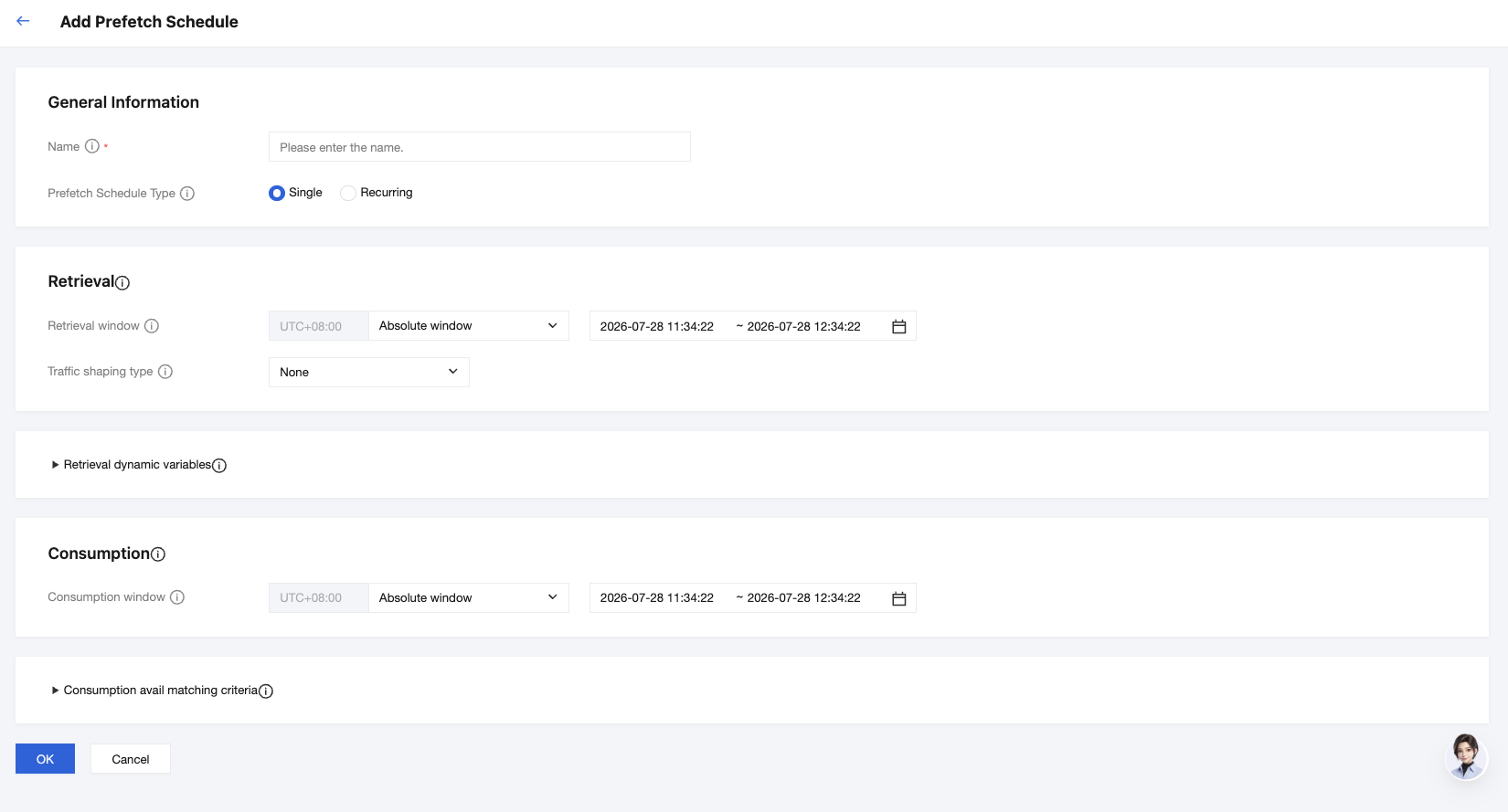
2. The following table describes the configuration information.
Configuration | Description |
Name | Enter a name for the prefetch schedule. Supported characters are numbers, letters, underscores (_), and dashes (-). Maximum 512 characters. The name must be unique among all of the prefetch schedules associated with this ad insertion configuration. |
Prefetch Schedule Type | Single: If an event has ad avails that are on a predictable schedule, use a single prefetch schedule. Each single prefetch schedule defines a single set of ads for StreamPackage to place in a single ad avail. Recurring: If an event has ad avails that aren't on a predictable schedule, use a recurring prefetch schedule. A recurring prefetch schedule automatically creates a schedule and prefetches ads before each ad break in an event. The recurring prefetch schedule retrieves ads for every ad avail within a defined period of time (up to 24 hours before the event ends). You don't need to create a schedule for each ad avail, but you do lose some of the timing control that single prefetch offers. |
The configuration content differs between single and recurring prefetch schedules.
For a single prefetch schedule, the configuration content is as follows:
Configuration | Description |
Retrieval window | Specify the time window during which StreamPackage starts and stops prefetching ads. For the start time, StreamPackage prefetches ads for manifest requests initiated by clients at or after that time. For the end time, StreamPackage prefetches ads for manifest requests that occur at or before that time. This window must be in the future and its duration must be less than 24 hours. You can set it to an absolute time window or a relative time window. |
Traffic shaping type | Traffic shaping limits the number of requests to the ad decision server (ADS) at one time. Retrieval window: StreamPackage spreads requests across the specified number of seconds instead of sending requests for all sessions at one time. This helps prevent the ADS from becoming overwhelmed. Valid values: 30-1800. TPS: StreamPackage limits requests based on transactions per second (TPS) and concurrent users. StreamPackage automatically distributes prefetch requests across time to stay within your specified TPS limit. This approach provides more intuitive configuration based on your ADS capacity limits. |
For a recurring prefetch schedule, the configuration content is as follows:
Configuration | Description |
Recurring prefetch window | StreamPackage prefetches ads for each ad slot within the ad prefetch window. The periodic prefetch window is the time window during which StreamPackage performs ad prefetching and ad insertion. This window must be in the future and its duration must be less than 24 hours. |
Delay after avail end | The number of seconds that StreamPackage waits after an ad avail before prefetching ads for the next avail. |
Traffic shaping type | Traffic shaping limits the number of requests to the ad decision server (ADS) at one time. Retrieval window: StreamPackage spreads requests across the specified number of seconds instead of sending requests for all sessions at one time. This helps prevent the ADS from becoming overwhelmed. Valid values: 30-1800. TPS: StreamPackage limits requests based on transactions per second (TPS) and concurrent users. StreamPackage automatically distributes prefetch requests across time to stay within your specified TPS limit. This approach provides more intuitive configuration based on your ADS capacity limits. |
Retrieval Dynamic Variables
You can add, view, and delete retrieval dynamic variables. If you set dynamic variables, StreamPackage uses the dynamic variables you set during prefetching to make decisions. Prefetched ads are inserted only when the match is satisfied.
Configuration | Description |
Key | Enter a dynamic variable key, such as session.id. You can use any of the session or player variables supported by StreamPackage. The key can contain up to 32 letters, digits, underscores(_), and hyphens(-). |
Value | Enter a dynamic variable value, such as "AnExampleValue". Value can contain up to 32 letters, digits, underscores(_), and hyphens(-). |
The configuration content differs between single and recurring prefetch schedules.
For a single prefetch schedule, the configuration content is as follows:
Configuration | Description |
Consumption window | Specify the time window when StreamPackage start and stop place prefetched ads into the ad break. The end time must be after the start time, and less than one day from now. StreamPackage places prefetched ads into eligible ad breaks during the consumption window. You can set it to an absolute time window or a relative time window. |
For a recurring prefetch schedule, the configuration content is as follows:
Configuration | Description |
Retrieved ad expiration | For a recurring prefetch schedule, StreamPackage places prefetched ads into eligible ad breaks. Retrieved ad expiration time is the number of seconds that the ad is available for insertion after it was prefetched. |
Consumption Aavail Matching Criteria
Configuration | Description |
Dynamic Variable Key | If you set avail matching criteria, StreamPackage only places prefetched ads into an ad break if the ad break (avail) meets the criteria defined by the dynamic variables. |
Ajuda e Suporte
Esta página foi útil?
Você também pode entrar em contato com a Equipe de vendas ou Enviar um tíquete em caso de ajuda.
comentários