tencent cloud

User Generated Short Video SDK

Release Notes and Announcements
Release Notes
The “startPlay” API of the UGSV SDK Renamed
Product Introduction
Overview
Features
Use Cases
Concepts
Purchase Guide
Pricing Overview
Refund Policy
Free Trial License
License User Guide
Adding and Renewing a License
Configuring and Viewing a License
Demo
SDK Download
SDK Download
Release Notes (App)
Integration (UI Included)
UGSV Demo App
Source Code Description (iOS)
Source Code Description (Android)
Integration (No UI)
SDK Integration
Capturing and Shoot
Preview, Clipping, and Splicing
Upload and Playback
Tencent Effect SDK
Advanced Features and Special Effects
API Documentation
Editing
Shooting
Technical Support
Error Codes
Feature FAQs
FAQs
Upload
Android Compilation
Android
iOS
License
UGSV Policy
Privacy Policy
Data Processing And Security Agreement

Android Compilation

PDF
Focus Mode
Font Size
Last updated: 2022-06-24 14:56:48

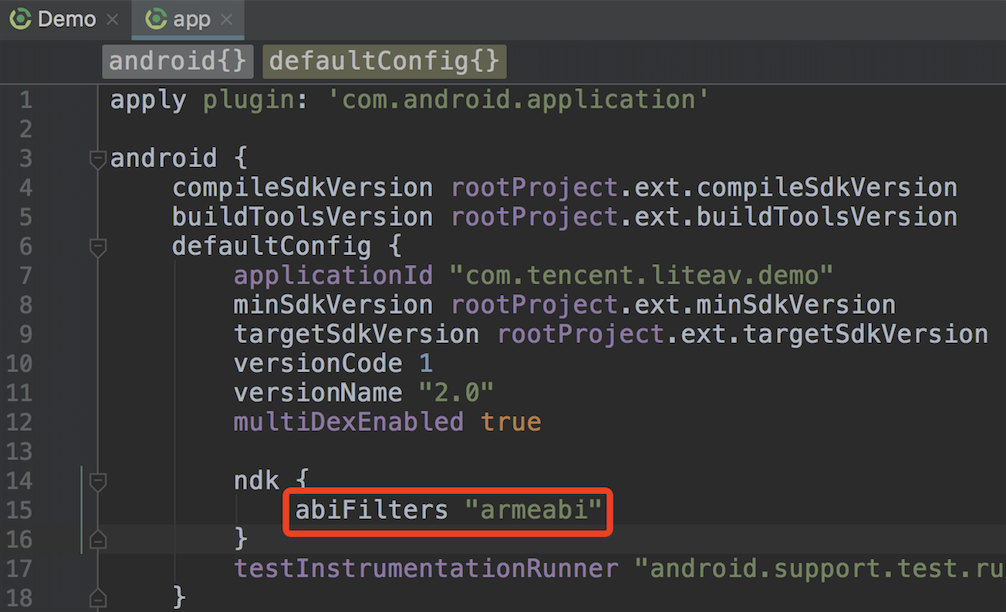
What should I do if the following error occurs when I integrate the SDK?


You can use the armeabi and armeabi-v7a architectures.


As shown above, set abiFilters to armeabi in build.gradle in app.

What should I do if a conflict occurs when I try to integrate two or more LiteAV SDKs?

Because all LiteAV SDKs use the same underlying modules, the duplicate symbol error occurs if you integrate two or more LiteAV SDKs into your project.
To avoid the problem, instead of integrating two SDKs, we recommend you use the full-featured SDK.
Platform
ZIP File
GitHub
64-bit Support
Size
Downsizing Installation Package
iOS
Download
GitHub
Yes
4.08 MB (arm64)
Document
Android
Download
GitHub
Yes
jar: 1.5 MB so (armeabi): 6.5 MB so (armv7): 6.1 MBso (arm64): 7.3 MB
Document

Why can I no longer use UGSV features after updating the SDK?

1. If you use Android Studio, after replacing the AAR file, change the filename in the AAR reference in build.gradle of app to that of the AAR file in /libs of your project. Then, clean your project and build it again.
2. Check the SDK version. You need a license to use v4.5 and later versions of the SDK.
If you don’t have a license, please apply for one. The UGSV SDK comes in Lite edition and Basic edition.

How do I implement playback pause and progress bar in my Android project?

In the UGSV SDK, playback is based on the UGSV player. You need to implement the progress bar by yourself.

Help and Support

Was this page helpful?

Help us improve! Rate your documentation experience in 5 mins.

Feedback