Overview
Download
Focus Mode
Font Size
This document describes what an instance is and how to view the instance list and manipulate an instance.
Instance overview
An instance is a database resource in Tencent Cloud. A cluster is the basic management unit of TDSQL-C for MySQL, which can contain multiple instances of two types: read-write instance and read-only instance.
The types and number of instances supported by a cluster are as described below:
Instance Type | Maximum Instances | Supported IP |
Read-write instance | 1 | The private read-write address is enabled by default, and you can enable the public read-write address manually. |
Read-only instance | 15 | The private read-only address is enabled by default, and you can enable the public read-only address manually. |
Access address
TDSQL-C for MySQL supports read-write and read-only addresses. The former corresponds to the read/write service of a TDSQL-C for MySQL read-write instance, while the latter corresponds to one or multiple read-only instances on the backend for load balancing.
Instance management overview
You can configure and manage instances in a cluster in the console, with the following configuration items:
Instance Configuration Item | Description | Operation |
Instance Name | a. You can rename read-write/read-only instances in the cluster. b. The instance name can contain up to 60 letters, digits, hyphens, underscores, and dots. | |
Character set | a. You can modify the character set of an instance. b. The following character sets are supported: UTF-8, GBK, Latin-1, and UTF8MB4. | |
Adjust Configurations | a. You can adjust the instance configuration as needed. b. You can adjust the computing specification and storage space of an instance. | |
Maintenance Time | a. You can set the maintenance time and window of an instance to schedule maintenance operations. b. The maintenance window can be continuous or discontinuous days between Monday and Sunday. c. You can set the maintenance start time and duration. | |
Restart Instance | a. You can restart an instance for routine maintenance or to clear the database buffer. b. To avoid affecting normal business operations, make sure that the instance has no other ongoing tasks. | |
Delete Instance | You can delete an instance when it is no longer used. | |
Restore Instance | a. You can restore an isolated instance as needed. b. The recycle bin displays the period during which the instance can be restored. |
Viewing the instance list
On the cluster management page, proceed according to the actually used view mode.
1. Log in to the TDSQL-C for MySQL console, and click the target cluster in the cluster list on the left to enter the cluster management page.
2. On the Cluster Details page, view all the read-write instance and read-only instances in the cluster.
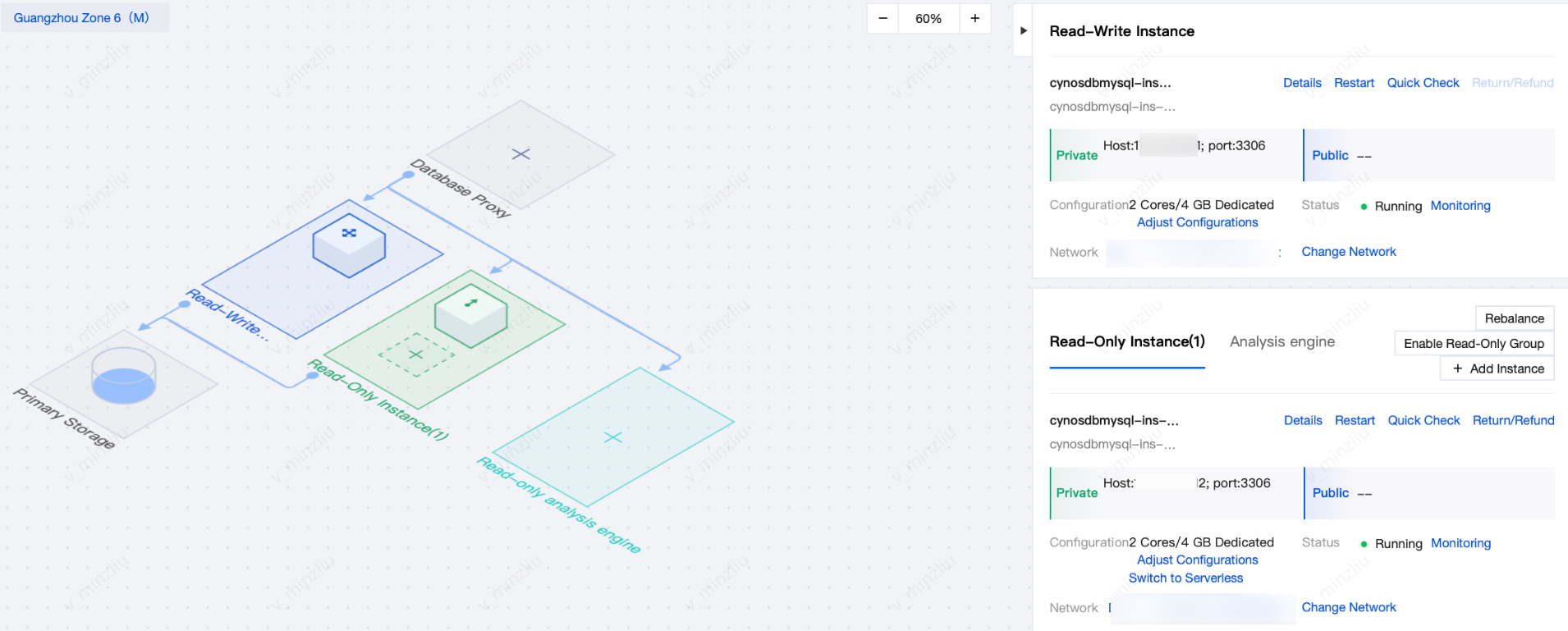
3. If there are many read-only instances under the cluster, you can click the icon under the read-only instance to switch to view.
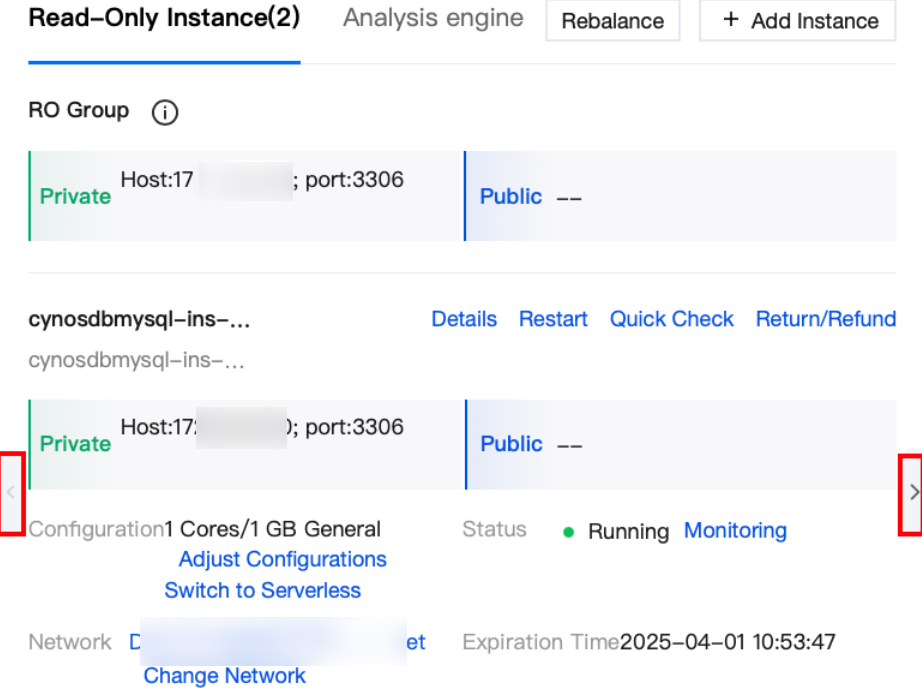
4. You can view the information of the read-write instance and read-only instance: instance ID/name/status, and public/ private read-write/read-only address. You can also perform the following operations on the instance: restart the instance, modify the instance name, modify the private network address, enable or disable the public network address, restart the instance, adjust the configuration, or terminate the instance. Then, you can click Details to enter the corresponding instance details page.
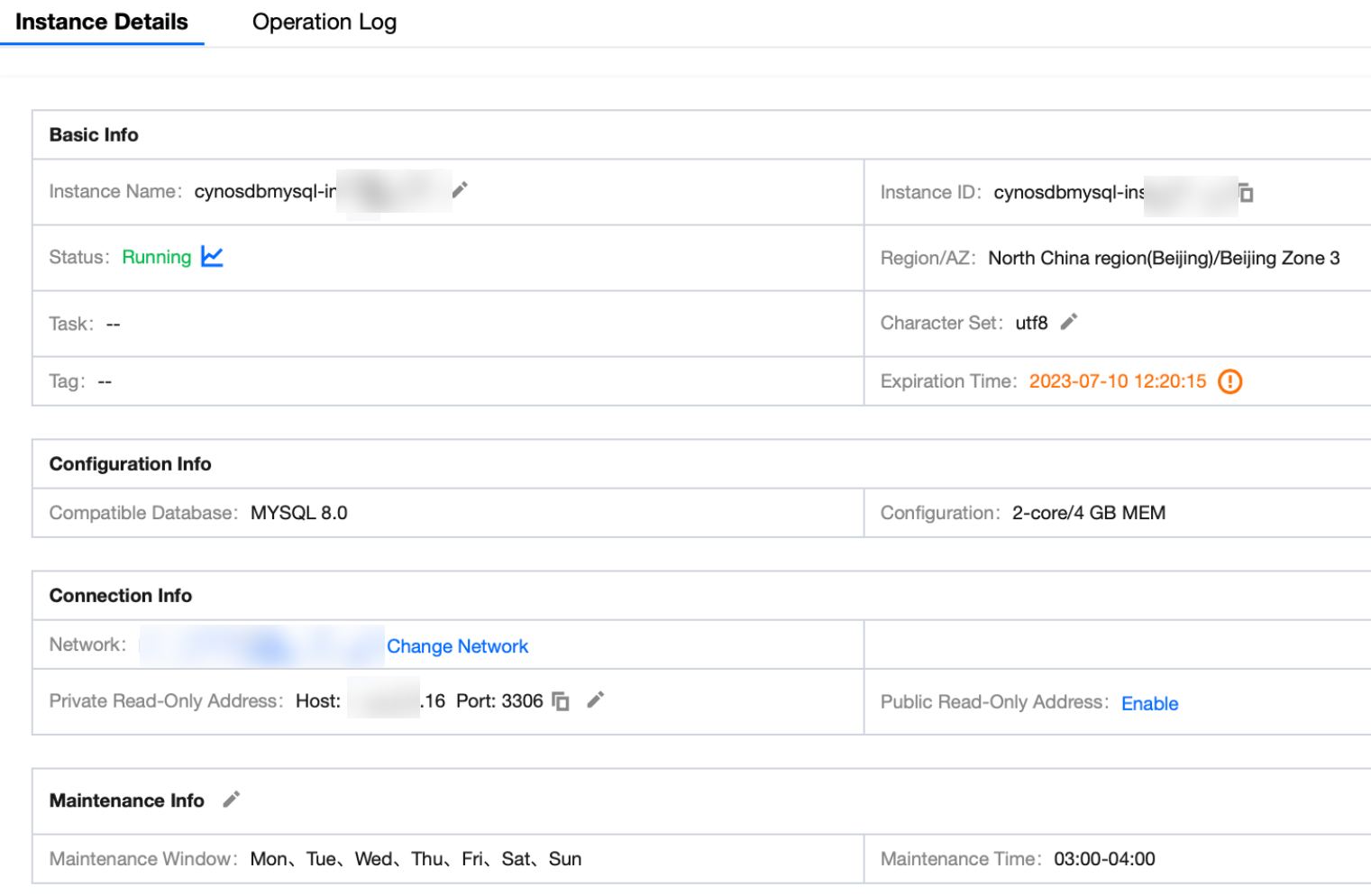
5. On the instance details page, you can view the basic information, configuration information, maintenance information and more of the instance.
1. Log in to the TDSQL-C for MySQL console.
2. Select the region at the top, find the target cluster in the cluster list, and click the Cluster ID or Manage in the Operation column to enter the cluster management page.
3. On the cluster management page, select the Instance List tab to view the list of read-write and read-only instances in the cluster.
The instance list displays the Instance ID/Name, Monitoring, AZ, Private/Public Network Address, Expiration Time, Instance Type, Instance Status, Instance Configuration, and Operation by default.
If there are many instances in the cluster, you can also enter an instance ID or name keyword in the search box on the right to quickly find the target instance.
Click the Instance ID to enter the instance details page, where you can query the instance information and operation logs.

Help and Support
Was this page helpful?
You can also Contact sales or Submit a Ticket for help.
Help us improve! Rate your documentation experience in 5 mins.
Feedback