tencent cloud
プロモーション
製品
ソリューション
価格
パートナー
マーケットプレイス
詳しく知る
Prev
Next
TDSQL-C for MySQL
動向とお知らせ
製品アップデート
製品お知らせ
初心者ガイド
製品概要
プロダクト概要
製品の強み
製品アーキテクチャ
製品アーキテクチャ2.0
製品仕様
製品機能一覧
インスタンスタイプ
データベースのバージョン
リージョンとアベイラビリティゾーン
適用シーン
基本概念
利用制限
利用ガイドの推奨事項
自社開発カーネル
カーネル概要
カーネルバージョンのアップデート情報
カーネル最適化バージョン
機能特性
パフォーマンス関連機能
セキュリティカテゴリの機能
安定性機能
分析エンジン特性
カーネル問題のチェックと修復
購入ガイド
課金概要
製品価格
クラスタを作成する
構成変更説明
未払いについての説明
継続支払いの説明
返金ポリシー
従量課金から年/月単位サブスクリプションへの変換
従量課金からServerlessへの変換
年/月単位サブスクリプションからServerlessへの切り替え
年/月単位サブスクリプションから従量課金への切り替え
付加価値サービスの課金説明
料金請求書の確認
クイックスタート
SQLインサイト(旧データベース監査)
概要
監査インスタンス一覧
監査サービスを有効化する
監査ログの確認
ログ配信
事後アラーム設定
監査ルールの変更
監査サービスを変更する
監査サービスを停止する
監査ルールテンプレート
監査タスクの照会
サブユーザーへのデータベース監査利用権限付与
データセキュリティ監査
データセキュリティ監査の概要
データセキュリティ監査の購入
データセキュリティ監査の有効化または無効化
アクセストポロジー
データ識別
監査ログ
アラーム
リスク
Serverlessサービス
Serverless入門
サーバーレス版クラスタの作成と管理
伸縮性スケーリング管理ツール
Serverlessリソースパック
マルチAZデプロイ
設定を変更する
よくあるご質問
Serverlessコスト見積ツール
操作ガイド
操作概要
コンソールでのクラスタページビューの切り替え
データベース接続
インスタンス管理
設定を変更する
インスタンス形態管理
クラスタ管理
読み取り専用インスタンス管理
データベースプロキシ
アカウント管理
DMC
DMC(データベース管理ツール)
パラメータ設定
マルチAZデプロイ
グローバルデータベース
バックアップとリストア
操作ログ
データマイグレーション
パラレルクエリ
列ストレージインデックス CSI
分析エンジン
データベースセキュリティと暗号化
モニタリングとアラーム
トラフィック再生
AIオプティマイザ
SQLの基本操作
以下のコマンドを実行して、TDSQL-C for MySQLに接続してログインします
Tag
実践チュートリアル
TDSQL-C for MySQL データベース監査の等級保護実践
非InnoDBテーブル問題のワンクリック移行検出処理方法
DTSによるデータベースバージョンのアップグレード MySQL 5.7から8.0へ
TDSQL-C for MySQL 使用規範
新版コンソール
データベースプロキシの複数接続アドレスによる複数ROグループの実現
データベースプロキシのメリット
ストレージの課金モードの選び方
DTSによるリモートディザスタリカバリの構築
クラスタ用VPCの作成
データ復旧の方法
CPU使用率の高騰問題の解決方法
サブユーザーへの監視データ閲覧権限付与方法
ホワイトペーパー
セキュリティホワイトペーパー
性能ホワイトペーパー
トラブルシューティング
接続関連
性能関連
64TB直前の単一テーブルによる書き込み・インスタンス障害
よくあるご質問
基本概念
購入と課金
サポートされるフォーマット
接続とネットワーク
機能特性
コンソールの操作
データベーステーブル
パフォーマンスとログ
データベース監査
TDSQL-C for MySQLとTencentDB for MySQLの違い
関連契約
SLA
利用規約
TDSQL-C ポリシー
プライバシーポリシー
データ処理と安全プロトコル
汎用参考
標準と認証
用語一覧
お問い合わせ
文档
TDSQL-C for MySQL
購入ガイド
料金請求書の確認
料金請求書の確認
下载
聚焦模式
字号
最后更新时间: 2025-12-30 16:37:30
本文档由 AI 翻译
Tencent Cloudコンソールの
コストセンター
で、アカウントの利用可能残高、収支明細、TDSQL-C for MySQLの利用料金情報を確認したり、アカウントのチャージや送金を行ったりできます。 本ドキュメントでは、コンソールでTDSQL-C for MySQLの利用料金明細を照会する方法についてご紹介します。
操作手順
1.
TDSQL-C for MySQLコンソール
にログインします。
2.
右上のナビゲーションバー
料金
で、
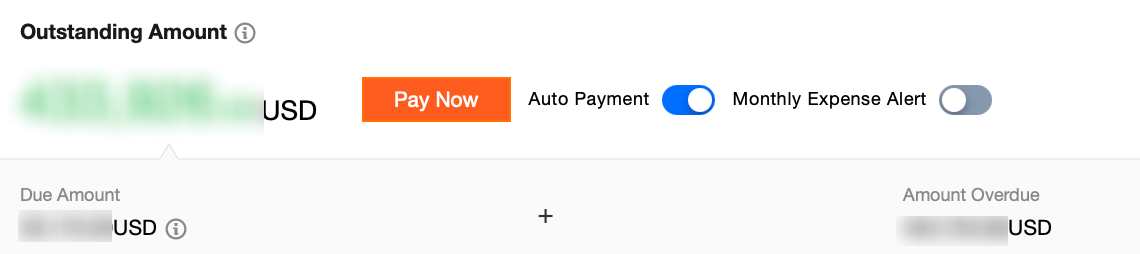
料金センター
をクリックし、料金センターの概要ページに移動します。
説明:
料金センターの概要ページでは、アカウントの利用可能残高、未払い金額、凍結金額などを確認でき、アカウントのチャージや送金も行えます。
3.
左側のナビゲーションバーで、
料金請求書
>
請求書照会
を選択します。
4.
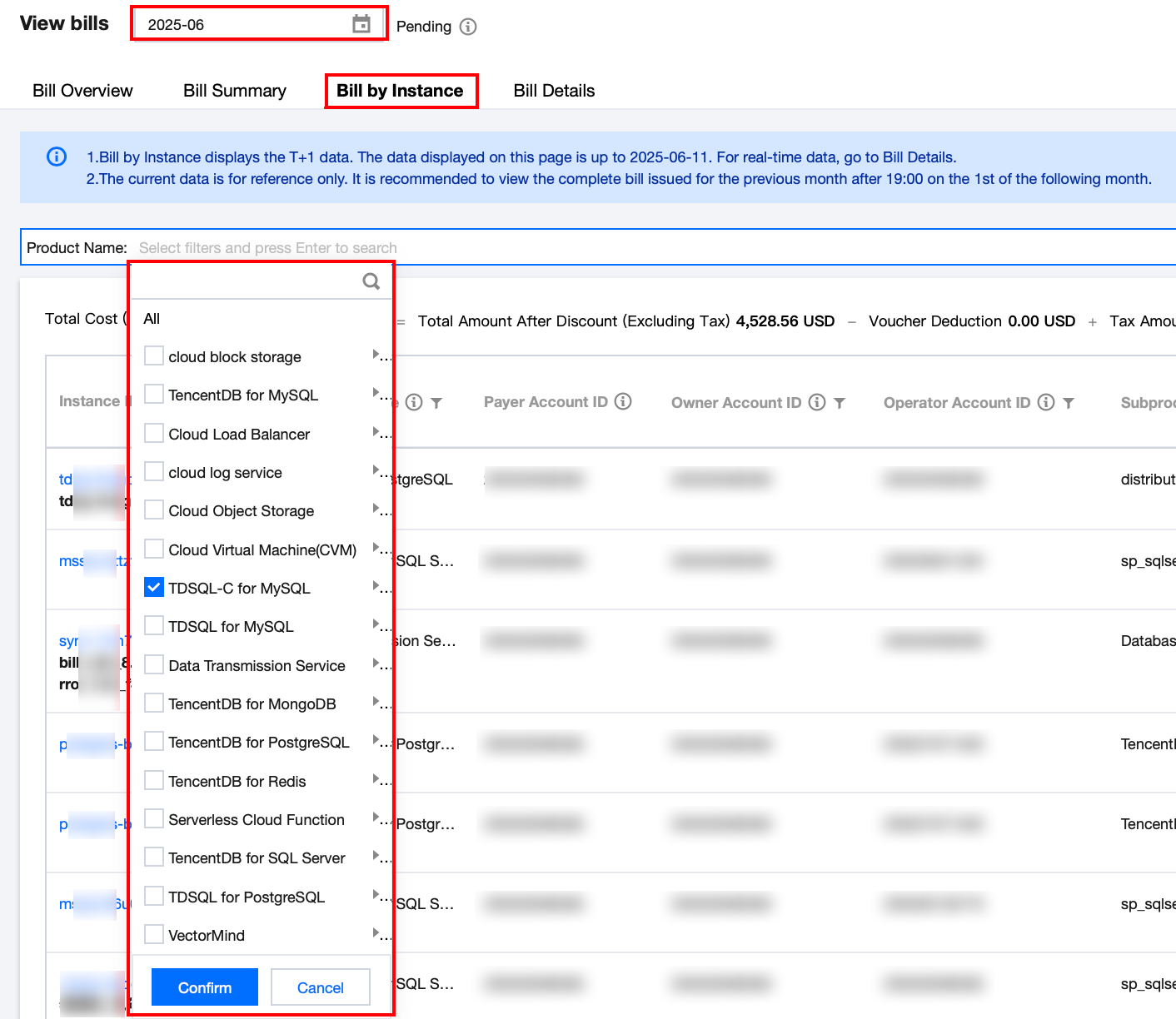
請求書照会ページの上部で照会期間(月次)を選択し、
リソース請求書
を選択します。次に、検索ボックスで
製品名
を選択し、フィルタリングで
TDSQL-C for MySQL
を検索します。
確定
をクリックすると、選択した月に発生した当該製品の料金請求書をリストで確認できます。
説明:
具体的な単一リソースの請求書明細を確認するには、その
操作
列の
詳細
をクリックして確認できます。
請求書明細をダウンロードする必要がある場合は、右側の
アイコンをクリックしてローカルにダウンロードできます。
上一篇: バックアップ領域の課金説明
下一篇: クイックスタート
帮助和支持
本页内容是否解决了您的问题?
是
否
您也可以
联系销售
或
提交工单
以寻求帮助。
填写满意度调查问卷,共创更好文档体验。
点击前往
文档反馈
搜索
仅搜索标题
请输入关键词搜索文档