Overview
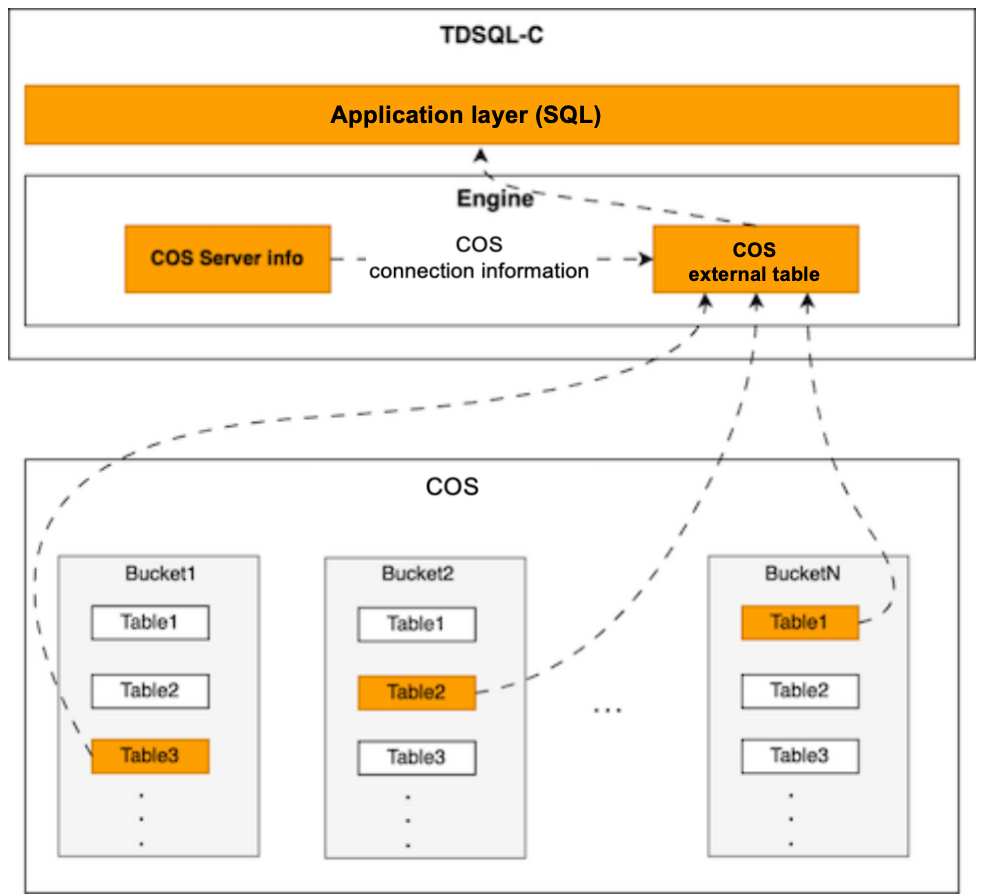
In the field of data processing and storage, managing cold data has always been a challenge. To address this issue, TXSQL has introduced the Tencent Cloud Object Storage (COS) external table feature, referred to as COS external table. This feature allows users to directly query and analyze CSV format data stored on COS within a database. Through this innovative feature, users can efficiently store infrequently accessed cold data on COS, while leveraging the database’s query capabilities for data management and analysis, thereby reducing storage costs and enhancing data processing efficiency.
Supported Versions
Kernel version: TXSQL 8.0 3.1.15.002 and later.
Applicable Scenario
COS external tables are applicable to various scenarios, including but not limited to:
Big data storage: Suitable for storing large amounts of infrequently accessed data, such as log files and historical records.
Data warehouse: Suitable for building a data warehouse for querying and analyzing historical data.
Cost optimization: By migrating cold data to COS, storage costs can be reduced while maintaining data accessibility.
Data analysis: Suitable for scenarios that require complex queries and analysis of CSV data stored on COS.
Use Limits
Only CSV format data is supported.
Only CREATE, SELECT, and DROP operations on COS external tables are supported.
Indexes, partitions, and transactions are not supported.
Geospatial data types are not supported.
ALTER TABLE operations are not supported.
Use Instructions
Creating a COS Server
You can create a COS server using the following command.
CREATE COS_SERVER <server_name> OPTIONS(
"<my_appid>" "<my_secretId>" "<my_secretKey>" "<my_bucket>" "<region>"
);
<server_name>: The name of the COS server, which is globally unique.
<my_appid>: A unique resource identifier for user dimension, which is used to identify resources when a developer accesses the COS server.
<my_secretId>: The ID owned by a developer, which is used for authentication.
<my_secretKey>: The project identity key owned by a developer.
<my_bucket>: A bucket, which is a container used for storing data in COS. For more details about the bucket, refer to Bucket Overview. <region>: Region of the bucket. For regions supported by the bucket, refer to Regions and Access Endpoints. Example: ap-beijing, ap-hongkong, eu-frankfurt. Note:
For detailed explanations of parameters in SERVER_INFO, refer to COS Glossary. The content in SERVER_INFO can be supplemented by referring to COS Glossary. Note:
CREATE COS_SERVER has been masked in the database because it contains sensitive information my_secretKey.
Currently, DROP COS_SERVER and SHOW COS_SERVER operations are not supported. To delete a COS server, you can log in as the tencentroot user, and then perform DELETE/SELECT operations on the records in mysql.cos_server_meta.
Examples
1. Create a COS server.
CREATE COS SERVER cos_s1 options (
"1605222305" "******************" "******************" "dcthxd-cos-test-1308666666" "ap-shanghai" );
2. Export common tables to COS.
SELECT * FROM table_name INTO COSOUTFILE "outfile" COS_SERVER "server_name";
In the COS server, you can see the corresponding outfile file, where the content and format of outfile are equivalent to the following statements:
SELECT * FROM table_name INTO OUTFILE "outfile"
FIELDS TERMINATED BY ',' OPTIONALLY ENCLOSED BY '"' ESCAPED BY '\\\\'
LINES TERMINATED BY '\\n' STARTING BY '';
Note:
FIELDS TERMINATED BY: Delimiter between each field.
OPTIONALLY ENCLOSED BY: Identifier at both ends of a field. With OPTIONALLY added, identifiers will only be added to string-type fields; otherwise, they will be added to all types of fields.
ESCAPED BY: Escape character. Only a single character can be specified here. For example, if ESCAPED BY '' is used, NULL will be output as \\N, and '' will be escaped as '\\'.
LINES TERMINATED BY: Delimiter between each line.
STARTING BY: Padding character at the beginning of each line, which is empty here.
Note:
If you need to access data in COS through a COS external table, the named file format must be database.table.CSV, and it must be in the first-level directory of my_bucket.
3. Create a COS external table.
CREATE TABLE `t1` (
`id` int(11) DEFAULT NULL,
`name` varchar(20) DEFAULT NULL,
`time` timestamp NULL DEFAULT NULL
) ENGINE=CSV COS_SERVER='server_name';
Note:
The switch thread_pool_avoid_thread_starvation is added, which is enabled by default. When it is enabled, the thread pool anti-starvation feature is enabled. The parameter thread_pool_allow_more_wait_threads is added, which is used to configure the total number of threads allowed to wait.
server_name indicates the name used for creating a COS server, which is automatically associated with the database.table.CSV file in the COS server. For example, for the t1 table mentioned above, if its database is test, the COS external table automatically associates with the test.t1.CSV file in the COS server, and will directly access the data of the file.
4. Query data.
The data query syntax of the COS external table feature is consistent with the regular MySQL.
Query the number of records in the t1 table.
SELECT count(*) FROM t1;
Range query
SELECT id FROM t1 WHERE id < 10 AND id > 1;
Point query
SELECT id FROM t1 where id = 5;
Multi-table join
SELECT id FROM t1 left join t2 on t1.id = t2.id WHERE t2.name like "%er%";