Cross-AZ Migration
Download
Focus Mode
Font Size
When you need to transfer your cluster to a different business area, you can use the cross-AZ migration feature to migrate the primary AZ of TDSQL-C for MySQL to another AZ within the same region. After migration, the cluster's attributes, configurations, and connection addresses will remain unchanged. This document introduces how to perform the cross-AZ migration through the console.
Prerequisites
The cluster status is Running.
The region where the cluster is located has multiple AZs.
Instances in the cluster are of the provisioned resource mode.
Feature Overview
After cross-AZ migration, the VIP address of the cluster remains unchanged.
The cross-AZ migration feature is also supported when there are read-only instances under the cluster.
The cross-AZ migration feature is supported regardless of whether the cluster is deployed in a single AZ or multiple AZs.
The application will be impacted briefly during the switch of AZs. Please ensure the application has an automatic reconnection mechanism.
Use Limits
Clusters with SSL encryption enabled do not support cross-AZ migration. If you need to perform the migration, disable SSL encryption first before migration.
Clusters with TDE encryption enabled do not support cross-AZ migration.
When binlog is set to disabled, cross-AZ migration is not supported.
Serverless clusters do not support cross-AZ migration.
Migration is not supported if the target AZ has insufficient inventory during cross-AZ migration. Change to another AZ for migration.
Clusters on Storage Architecture 1.0 support AZ migration when the database proxy is enabled. Clusters on Storage Architecture 2.0 do not currently support the AZ migration feature.
For multi-AZ deployment settings during the cross-AZ migration, available primary and secondary AZs can be seen in Supported Regions and AZs.
To ensure data consistency during cross-availability zone (AZ) migration, a step of pt data comparison is performed, and DDL operations are not supported during comparison.
Cross-AZ migration does not support clusters containing table names or column names with special characters such as line breaks, \\n, and \\a.
Operation Steps
1. On the cluster list page, perform operations based on the actual view mode used and enter the cross-AZ migration settings.
1. Log in to the TDSQL-C for MySQL console and click the target cluster in the cluster list on the left to enter the cluster management page.
2. On the right side of the cluster management page, click Migrate across AZs.

1. Log in to the TDSQL-C for MySQL console.
2. Find the target cluster in the cluster list, and choose More > Migrate across AZs in the Operation column.
2. In the Migrate across AZs pop-up window, complete the following configurations and click OK.
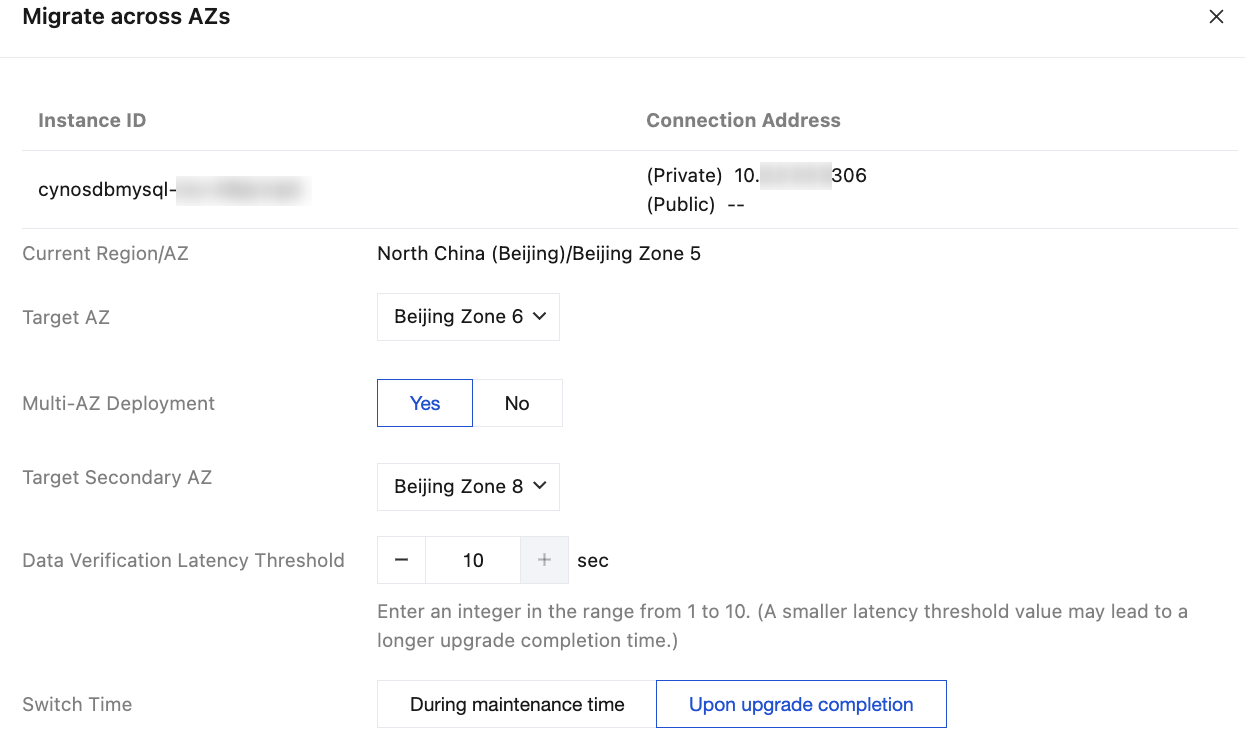
Parameter | Description |
Current Region/AZ | The current region/AZ where the cluster is located is displayed by default. |
Target AZ | Select the target AZ for migration, with the region remaining unchanged. Note: If you want to perform cross-AZ migration, the target AZ should not be the same as the original one. If a prompt "Current AZ does not support migration" appears after the target AZ is selected, it indicates that the inventory of the AZ is insufficient, and you need to change to another AZ for migration. |
Multi-AZ Deployment | Select Yes to deploy the cluster in multiple AZs. Select No to deploy the cluster in a single AZ. |
Target Secondary AZ | When Yes is selected for the Multi-AZ Deployment option, you need to select the target secondary AZ, which means the cluster is deployed in multiple AZs with the primary and secondary AZs being different from each other. |
Data Validation Latency Threshold | This setting is only applicable when the Target AZ option (namely, the primary AZ) is modified. The threshold is an integer ranging from 1 to 10 seconds. Note: Latency may occur during the data consistency verification process, so a data verification latency threshold should be set. When the latency exceeds the set value, the verification will be paused until the value falls below the specified value. The smaller the threshold is set, the longer it may take to complete the upgrade. |
Switch Time | Select the switch time for the cross-AZ migration. During maintenance time: Indicates that a switch will be performed during the maintenance time of instances. To set the instance maintenance time, see Modifying Instance Maintenance Window. Upon upgrade completion: Indicates that a switch will be performed immediately upon the completion of the cross-AZ migration upgrade. |
Help and Support
Was this page helpful?
You can also Contact sales or Submit a Ticket for help.
Help us improve! Rate your documentation experience in 5 mins.
Feedback