This document introduces the concepts, types, and use methods of exchanges in TDMQ for RabbitMQ.
Concepts
An exchange is a message routing agent in TDMQ for RabbitMQ. A producer sends a message to an exchange, which then routes the message to one or more queues based on the message properties or content (or discards it). Then, consumers pull the message from the relevant queues for consumption.
TDMQ for RabbitMQ currently supports four types of exchanges: direct, fanout, topic, and header.
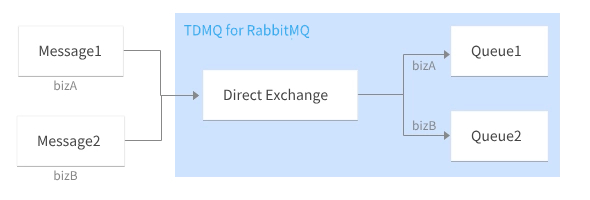
Direct: A direct exchange routes messages to queues where the Routing Key exactly matches the Binding Key.
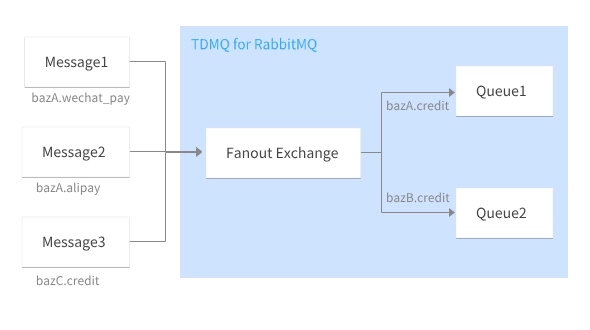
Fanout: A fanout exchange routes messages to all queues bound to it.
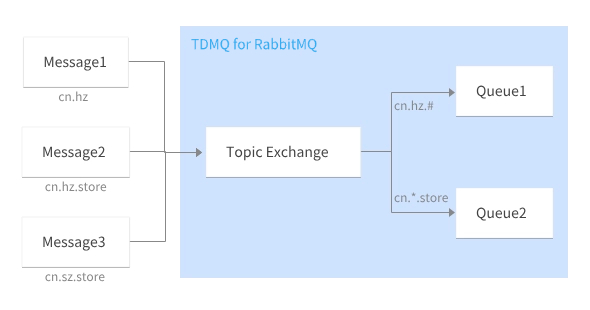
Topic: A topic exchange supports multi-condition matching and fuzzy matching. It routes messages to the queues bound to it by using the Routing Key pattern matching and string comparison methods.
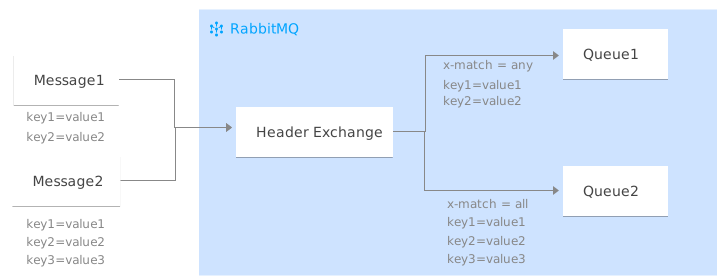
Header: A header exchange is irrelevant to the Routing Key, and its matching mechanism relies on the Headers properties of messages. When you bind a queue to a header exchange, you need to declare a map of key-value pairs to implement the binding.
Direct Exchange
Routing rule: A direct exchange routes messages to queues where the Routing Key exactly matches the Binding Key.
Scenarios: This type of exchange is suitable for filtering messages by simple character identifiers and is often used for unicast routing.
Usage example:
Message
Routing Key
Binding Key
Queue
Message 1
bizA
bizA
Queue 1
Message 2
bizB
bizB
Queue 2
Fanout Exchange
Routing rule: This type of exchange routes messages to all queues bound to it.
Scenarios: This type of exchange is suitable for broadcast message scenarios. For example, a distribution system can use fanout exchanges to broadcast various status and configuration updates.
Usage example
Message
Routing Key
Binding Key
Queue
Message 1
bazA.wechat_pay
bazA.credit,bazB.credit
Queue 1 and Queue 2
Message 2
bazA.alipay
bazA.credit,bazB.credit
Queue 1 and Queue 2
Message 3
bazC.credit
bazA.credit,bazB.credit
Queue 1 and Queue 2
Topic Exchange
Routing rule: This type of exchange supports multi-condition matching and fuzzy matching. It routes messages to the queues bound to it by using the Routing Key pattern matching and string comparison methods.
The wildcards supported by topic exchanges include asterisks (*) and pound signs (#).
An asterisk (*) represents a word, such as sh.
A number sign (#) represents zero, one, or more words separated by periods (.), such as cn.hz.
Scenarios
This type of exchange is often used for multicast routing. For example, topic exchanges are used to distribute data about specific geographic locations.
Usage example
Message
Routing Key
Binding Key
Queue
Message 1
cn.hz
cn.hz.#
Queue 1
Message 2
cn.hz.store
cn.hz.# and cn.*.store
Queue 1 and Queue 2
Message 3
cn.sz.store
cn.*.store
Queue 2
Header Exchange
A header exchange is irrelevant to the Routing Key, and its matching mechanism relies on the Headers properties of messages. When you bind a queue to a header exchange, you need to declare a map of key-value pairs to implement the binding. When a message is sent to the RabbitMQ cluster, the Headers of the message will be retrieved and matched against the key-value pairs specified during the binding of the queue and the exchange. If they match exactly, the message is routed to the queue; otherwise, it is not.
The x-match rule has two types:
x-match = all: A message can be received only if all key-value pairs are matched.
x-match = any: A message can be received as long as any key-value pair is matched.
Message
Message Headers Property
Binding Headers Property
Queue
Message 1
key1=value1
key2=value2
x-match = any
key1=value1
key2=value2
Queue 1
Message 2
key1=value1
key2=value2
key3=value3
x-match = any
key1=value1
key2=value2
,
x-match = all
key1=value1
key2=value2
key3=value3
Queue 1 and Queue 2
X-Delayed-Message
This is a custom exchange type designed for delayed message delivery. When a message is sent to an x-delayed-message exchange, a delay time can be set for the message. RabbitMQ will route the message to its bound queue after the delay time expires. This exchange type allows you to control when messages are sent to consumers, enabling scheduled and delayed message processing.