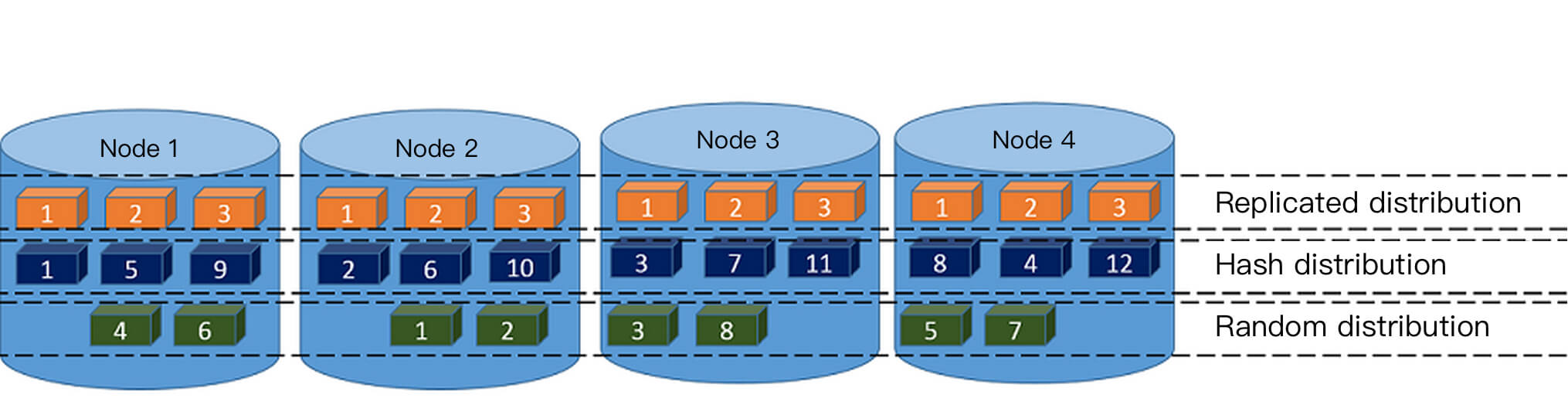
The CREATE TABLE statement supports the following three distribution policy clauses:
DISTRIBUTED BY (column, [ ... ]) specifies to distribute data rows among nodes (segments) according to the hash value of the distribution column. The same value will be always hashed to the same segment. Choosing a unique distribution key (such as the primary key) will ensure a more even data distribution. Hash distribution is the default distribution policy for tables, and if the DISTRIBUTED clause is not provided when the table is created, the primary key or the first eligible column of the table will be used as the distribution key. If there are no eligible columns in the table, the distribution policy will degrade to random distribution.
DISTRIBUTED RANDOMLY specifies to distribute data evenly among nodes (segments) in a circular manner. Unlike in the hash distribution policy, data rows with the same value are not necessarily located on the same segment. Although random distribution ensures an even data distribution, it is only recommended when the table doesn't have a suitable discretely distributed data column that can be used as the hash distribution column.
DISTRIBUTED REPLICATED specifies to distribute data in a replicated manner; that is, each node (segment) has all the data in the table. In this distribution policy, data is evenly distributed as each segment stores the same data rows. When large tables are joined with small tables, specifying a sufficiently small table as replicated may also improve the performance.
Below are examples:
The table creation statement in this example creates a hash-distributed table, where data is distributed to segments according to the hash value of the distribution key.
CREATE TABLE products (name varchar(40),
prod_id integer,
supplier_id integer)
DISTRIBUTED BY (prod_id);
The table creation statement in this example creates a randomly distributed table, where data is circularly placed into each segment. If the table doesn't have a suitable discretely distributed data column that can be used as the hash distribution column, the random distribution policy can be used.
CREATE TABLE random_stuff (things text,
doodads text,
etc text)
DISTRIBUTED RANDOMLY;
The table creation statement in this example creates a replicated distributed table, where each segment stores all the data of the table.
CREATE TABLE replicated_stuff (things text,
doodads text,
etc text)
DISTRIBUTED REPLICATED;
For simple queries by distribution key, including UPDATE and DELETE statements, Tencent Cloud TCHouse-P has the feature of pruning segments by distribution key. For example, if the products table uses prod_id as the distribution key, the following query will only be sent to segments that satisfy prod_id=101 for execution, which greatly improves the SQL execution performance:
select * from products where prod_id =101;
Table Distribution Key Selection
Reasonably planning the distribution key is critical to the performance of table queries. Pay attention to the following principles:
Don't use replicated tables, as they can easily lead to query degradation, which results in slower queries.
Select one or multiple columns with an even data distribution. If the values of the selected distribution column are not evenly distributed, data skew may occur, and some segments may store a lot of data (high query load), in which case, more time will be spent on such segments. Therefore, you should not select data of bool or datetime type as the distribution key.
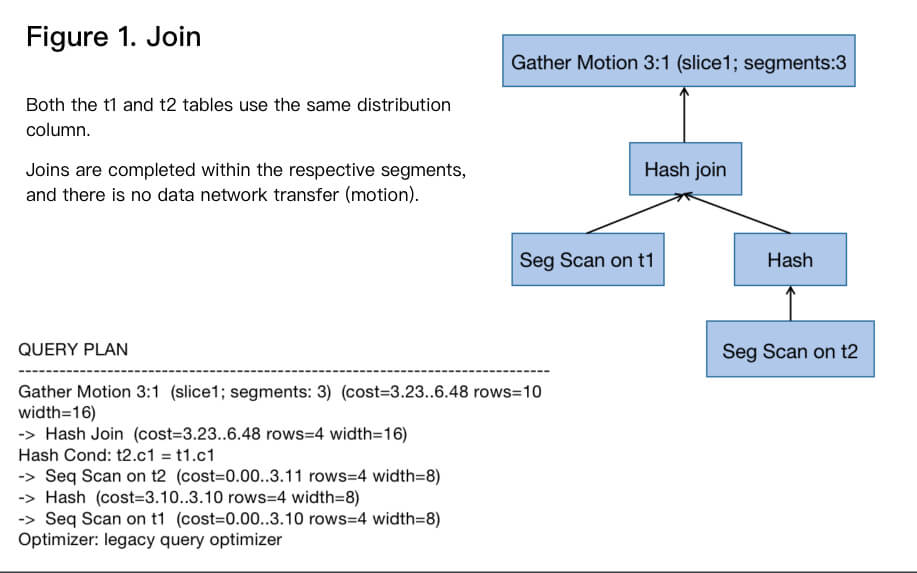
Select a column that often requires joins as the distribution key. This can implement the collocated join calculation as shown in Figure 1; that is, when the join key and the distribution key are the same, the join can be completed inside the segment. Otherwise, the table needs to be redistributed (redistribution motion) to implement the redistributed join as shown in Figure 2, or some small tables can be broadcast (broadcast motion) to implement the broadcast join as shown in Figure 3. The last two methods have a high network overhead.
Select a query condition column that appears frequently as the distribution key, so that it is possible to prune segments by distribution key.
If no distribution key is specified, the table's primary key will be used as the distribution key by default, and if the table doesn't have a primary key, the first column will be used as the distribution key.
A distribution key can be defined as one or more columns; for example:
create table t1(c1 int, c2 int) distributed by (c1,c2);
Table Distribution Key Limits
Primary and unique keys must contain a distribution key; for example: