Tilearn-Angel is upgraded from tiacc_training. It provides large-scale model training acceleration capability compatible with the huggingface ecosystem. It supports computational optimization capability by combining manual cuda operators with automatic compile optimization. It supports 3D hybrid parallelism (TensorParallel, PipelineParallel, DataParallel) compatible with the huggingface ecosystem. It supports communication acceleration capability compatible with native DDP. Users do not need to modify native usage code or convert models and can use it directly. In addition, it supports general training acceleration capabilities such as optimizer fusion, CPU/GPU affinity optimization, and adaptive mixed precision, as well as model compression capability. Users only need to add a few lines of code to enable it.
Tilearn-Angel Large-Scale Model Training Accelerated Image
Recommended for use: the platform's latest built-in image
tilearn-llm0.9-torch2.3-py3.10-cuda12.4-gpu
Update the latest tilearn.llm and tilearn.ops packages (optional) in the image
Mainly introduce the optimization capability of large model calculation and the detailed user documentation of general training acceleration capability (communication optimization, optimizer fusion, CPU/GPU affinity optimization, self-adaptive mixed precision).
Take the llama model as an example. The method of use for computational optimization - code modification is as follows:
### TILEARN.LLM
from tilearn.llm.transformers import LlamaForCausalLM
### The model API is consistent with the standard huggingface
model = LlamaForCausalLM.from_pretrained(...)
Use the AutoModelForCausalLM api.
### TILEARN.LLM
from tilearn.llm.transformers import AutoModelForCausalLM
### The model API is consistent with the standard huggingface
model = AutoModelForCausalLM.from_pretrained(...)
Note
Since baichuan1 13B and baichuan2 13B will cause conflict, currently tilearn.llm.transformers.AutoModelForCausalLM has baichuan1 13B enabled by default. If you need to use baichuan2 13B, you need to set the environment variable in the training startup script: export TILEARN_LLM_BAICHUAN_13B=2.
Currently, acceleration has been applied to supported models such as llama, bloom, baichuan1, and baichuan2. For details, see Tilearn.llm Instructions.
2.2 Tilearn-Angel 3D Hybrid Parallel Acceleration
Tilearn-Angel supports 3D hybrid parallelism (TensorParallel, PipelineParallel, DataParallel) compatible with the huggingface ecosystem. Without the need for model conversion, you can proceed with 3D parallel training using the huggingface trainer. Directions: . For details, see 3D hybrid parallel notebook case collection.
Environment variable configuration
exportTILEARN_HYBRID_TP_SIZE=1
exportTILEARN_HYBRID_PP_SIZE=2
Training code configuration
### Computational optimization
from tilearn.llm.transformers import LlamaForCausalLM
from tilearn.llm.transformers import AutoModelForCausalLM
### 3D parallel
import tilearn.llm.hybrid_parallel
defmain():
### The model API is consistent with the standard huggingface
model = AutoModelForCausalLM.from_pretrained(...)
run_exp()
Parameter setting suggestions for large model fine-tuning
llama3 8b model (seqlength=4096)
# 8 x A100 40G default parameter
GradienAccumulationSteps=64
BatchSize=1
GradientCheckPointing=False
TilearnHybridTPSize=2
TilearnHybridPPSize=2
# 8 x A800 80G Default Parameters
GradienAccumulationSteps=32
BatchSize=1
GradientCheckPointing=False
TilearnHybridTPSize=1
TilearnHybridPPSize=2
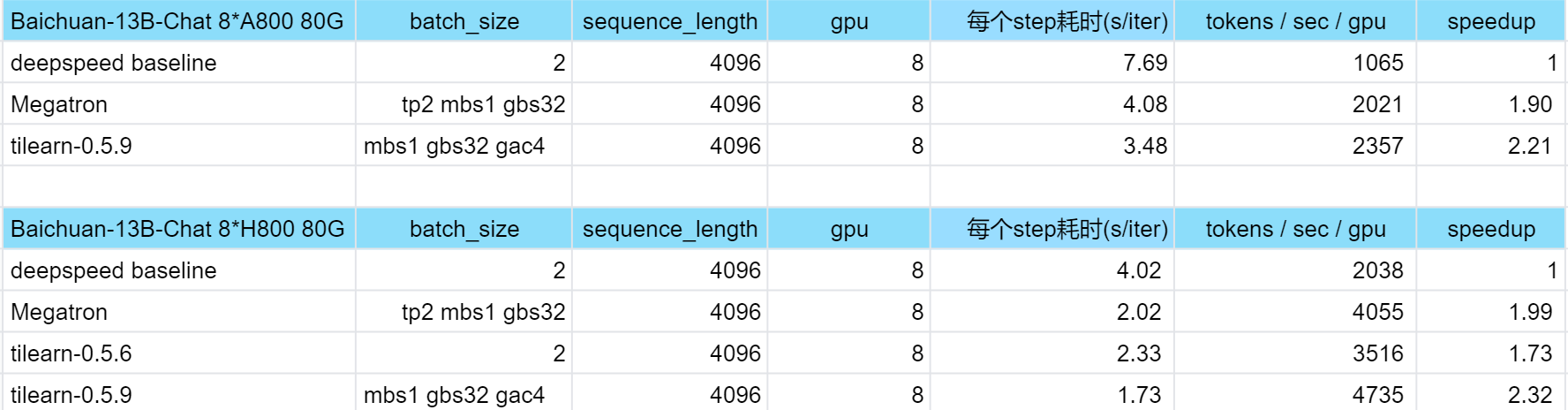
TilearnHybridZeroStage=13. Tilearn-Angel training acceleration effect
Appendix: Earlier Version of Tiacc_training Training Acceleration
tilearn.llm >= 0.7.12, tilearn.ops >= 0.2.0.1 already supports the acceleration capability of the earlier version tiacc_training (Instructions for Tilearn.llm Section 2 - Introduction to Common Training Acceleration Features).
Use the new platform mirror tilearn-llm0.4.2-torch2.1-deepspeed0.10.0-py3.10-cuda12.1-gpu can use earlier version functionality directly.
Environment-Related
Recommended for use: platform built-in torch mirror and tensorflow mirror:
Actual test effect of DDP distributed training communication optimization:
(The acceleration effect is reflected in the multi-machine multi-GPU scenario. There is no difference in performance between the single-machine multi-GPU scenario and native DDP.)
Hardware Environment
Model
GPU Quantity
Native DDP (examples/sec per V100)
TI-ACC Communication Optimization (examples/sec per V100)
Tencent Cloud GN10Xp.20XLARGE320
resnext50_32x4d
1. Standalone
227
227
8 (Standalone)
215
215
16 (Two-node)
116
158.6
Use Adaptive Hybrid Precision Optimization (PyTorch)
import torch.cuda.amp as amp
import tiacc_training.torch
scaler = amp.GradScaler()
#Instantiate an object of the adaptive mixed precision policy class
Tilearn.llm Large-Scale Model Training Acceleration
For the detailed user documentation of training acceleration capability (computational optimization, communication optimization, optimizer fusion, CPU/GPU affinity optimization, self-adaptive mixed precision), refer to Instructions for Tilearn.llm.
1.1 Relevant APIs for Computational Optimization
The computational optimization api is fully compatible with huggingface. Take the llama model as an example. Directions:
### TILEARN.LLM
from tilearn.llm.transformers import LlamaForCausalLM
### The model API is consistent with the standard huggingface
model = LlamaForCausalLM.from_pretrained(...)
1.2 3D Hybrid Parallel Optimization Related APIs
The 3D parallel hybrid optimization feature is fully compatible with the huggingface ecosystem. The huggingface trainer can be used without switching the model. Take the llama3 model as an example. Directions:
Environment variable configuration
exportTILEARN_HYBRID_TP_SIZE=1
exportTILEARN_HYBRID_PP_SIZE=2
Training code configuration
### Computational optimization
from tilearn.llm.transformers import LlamaForCausalLM
from tilearn.llm.transformers import AutoModelForCausalLM
### 3D parallel
import tilearn.llm.hybrid_parallel
defmain():
### The model API is consistent with the standard huggingface
model = AutoModelForCausalLM.from_pretrained(...)
run_exp()
Parameter setting suggestions for large model fine-tuning
llama3 8b model (seqlength=4096)
# 8 x A100 40G default parameter
GradienAccumulationSteps=64
BatchSize=1
GradientCheckPointing=False
TilearnHybridTPSize=2
TilearnHybridPPSize=2
TilearnHybridZeroStage=1
# 8 x A800 80G Default Parameters
GradienAccumulationSteps=32
BatchSize=1
GradientCheckPointing=False
TilearnHybridTPSize=1
TilearnHybridPPSize=2
TilearnHybridZeroStage=1
II. Earlier Version of tiacc_training training Acceleration
tilearn.llm >= 0.7.12, tilearn.ops >= 0.2.0.1 already supports the acceleration capability of the earlier version tiacc_training (Instructions for Tilearn.llm Section 2 - Introduction to Common Training Acceleration Features).
Use the new platform mirror tilearn-llm0.4.2-torch2.1-deepspeed0.10.0-py3.10-cuda12.1-gpu. It can be used directly.
tiacc_training.distributed.launch Function
Initialize DDP communication acceleration optimization. The API is completely consistent with the native torch.distributed.launch. The native DDP-related functions will be adjusted to call the TI-ACC communication acceleration capability by default. The main modules/classes related to the native DDP include: torch.distributed and torch.nn.parallel.DistributedDataParallel().
adaptfp16.MixedPrecision_TrainingPolicy Class
Implement the instantiation of the adaptive policy for automatic mixed precision during the training process. The adaptive policy includes time mixed precision, time learning rate mixed precision strategy, and loss function mixed precision strategy.
Initialization parameters:
Parameter
Type
Required or Not
Description
Example
Default Value
policy
INT
Yes
Self-adaptive mixed precision strategy
0: Time mixed precision, suitable for common adaptive situations;
1: Time learning rate mixed precision strategy, suitable for the situation where loss fluctuation shows exception in a certain stage of the training process;
2: Loss function mixed precision strategy, suitable for the situation where loss decreases too fast or too slow during the training process.
0
None
start_time
INT
No
Set the start time of enabling adaptive mixed precision. It is generally recommended to set it as 10. It is required when the policy is 0 or 1, and optional when the policy is 2.
10
10
end_time
INT
No
Set the end time of enabling adaptive mixed precision. It is generally recommended to set it as the time of the last epoch. It is required when the policy is 0 or 1, and optional when the policy is 2.
1000
None
hold_time
INT
No
The hold time when enabling policy 1. Use a unified policy during the hold time: enable or not enable. It is generally recommended to set it as the duration of exceptional fluctuation of loss during the training process. It is required when the policy is 1, and optional when the policy is 0 or 2.
20
None
interval_time
INT
No
The interval time for enabling policy 2. The default value is 1000, that is, enable policy 2 every 1000 epochs. It is required when the policy is 2, and no need to fill in when the policy is 0 or 1.
1000
1000
interval_hold_time
INT
No
The hold time after enabling policy 2 at the interval_time. The default value is 100. For example, if the interval_time is 1000, enable policy 2 from 1000 to 1100, 2000 to 2100... It is required when the policy is 2, and no need to fill in when the policy is 0 or 1.
100
100
Instantiate objects:
Objects
Type
Object Description
policy
MixedPrecision_TrainingPolicy class
The instantiation object of the adaptive policy for automatic mixed precision during the training process
enable mixed precision Function Method
Belongs to the MixedPrecision_TrainingPolicy Class. Determine whether to enable automatic mixed precision for the current epoch based on the input parameters.
Input parameters:
Parameter
Type
Required or Not
Description
Example
Default Value
epoch
INT
Yes
Current epoch
20
None
scaler
torch.cuda.amp.GradScaler
Yes
Instantiate objects with gradient scaling
scaler
None
lr
float
No
lr is the learning rate of the current epoch.
0.01
None
loss
float
No
loss is the loss of the previous epoch.
0.1
None
Output Parameter:
Output Parameter
Type
Description
mixed_precision
BOOL
The input parameters obtain whether automatic mixed precision is required to be enabled for the current epoch. Return TRUE if yes, otherwise return FALSE.