tencent cloud

Tencent Cloud EdgeOne

Origin Site Failover

Download
Focus Mode
Font Size
Last updated: 2026-08-03 17:01:35

Overview

In real-world business scenarios, an origin site may fail to respond to client requests normally due to failures, overload, or network exceptions, resulting in service access failures. EdgeOne supports origin site failover operations. Based on configured HTTP response status codes, it automatically executes an origin retry policy. When the origin site fails, it redirects requests to a backup origin site or a specified address, thereby improving access success rates. The retry process is transparent to clients.
If a domain name is associated with both the Load Balancer and the rule engine's "Origin Site Failover" operation, EdgeOne first attempts to fetch content from the origin based on the Load Balancer policy. If that attempt still fails, it then executes the "Origin Site Failover" operation.
Note:
"Origin Site Failover" is an allowlist feature. To use it, please contact us to apply for activation.

Feature Overview

1. Supported matching conditions: all request characteristics and the "HTTP Response Status Code". The "HTTP Response Status Code" must be specified in the fields of the "Origin Site Failover" operation (see the operation sample below for details).
2. Supported Response Status Codes:
When the origin site returns specific response status codes, such as 404 or 502, you only need to specify the corresponding status codes.
When the origin site does not return a specific response status code, such as in scenarios like origin TCP connection failure, HTTP response timeout, or SSL handshake failure, EdgeOne does not receive a response status code. If you want to retry for these scenarios, you need to match using a converted status code.
Scenario
Converted Status Code
After the node successfully establishes a TCP connection with the origin site and initiates an HTTP/HTTPS request to it, the origin site directly responds with an RST packet.
520
The node requests the origin site, and during the TCP connection establishment phase, the origin site directly sends an RST packet.
521
The node requests the origin site, and during the TCP connection establishment phase, the origin site does not respond until the node times out.
522
If the origin site configured for the domain name is a domain name, then when the node returns to the origin, it needs to resolve the domain name to obtain the origin site server IP address, but the resolution fails, causing the node to be unable to return to the origin.
523
After the node successfully establishes a TCP connection with the origin site and initiates an HTTP/HTTPS request to it, the origin site does not respond until the node times out.
524
If the origin protocol is HTTPS, the node needs to perform an SSL handshake with the origin site when returning to the origin, but the handshake fails.
525
3. Supported Retry Modes
"Origin Site Failover" provides the following five modes. Based on business needs, you can select and configure one or multiple modes (currently up to two are supported). These modes take effect in order of priority from top to bottom: when the current policy fails to fetch content from the origin, the system automatically retries the next policy according to the priority order.
Attention:
Within a single rule, you can only choose one between "Redirect to a Specified URL" and "Use a Custom Response Page". Furthermore, these two modes can only be set to the lowest priority, serving as a fallback policy.

Mode 1: Origin to a Specified IP address/Domain

Field
Description
Origin IP address/Domain Name
Supports entering an IP address or domain name. The value supports variables, as well as concatenation of constants & variables.
Target Hostname
The enumerated values are "Follow Request" and "Custom". When "Custom" is selected, the input value supports variables, as well as concatenation of constants & variables.
Target Request Protocol
Enumerated values: "Follow Request" (default value), "HTTP", "HTTPS" .
HTTP Origin Port
The default value is 80. Customization is supported.
HTTPS Origin Port
The default value is 443. Customization is supported.
Target Path
Enumerated values: "Follow Request" (default value), "Add Path Prefix", "Remove Path Prefix", "Custom Full Path", "Regex Replacement".
HTTP/2 Origin Fetch
Off (default value), On
Origin Request Parameter Configuration
By default, all query strings and cookies are retained. Customization is supported.

Mode 2: Origin to Tencent Cloud COS

Field
Description
Bucket.
Select a bucket that your account has permission to access from the drop-down list.
Bucket Access Method
Default domain name, static website
Private Access Authorization
Enable this option if the bucket is set to private read.
Target Path
Enumerated values: "Follow Request" (default value), "Add Path Prefix", "Remove Path Prefix", "Custom Full Path", "Regex Replacement"
HTTP/2 Origin Fetch
Enable, Disable (default value)
Origin Request Parameter Configuration
By default, all query strings and cookies are retained. Customization is supported.

Mode 3: Origin to AWS S3-Compatible Object Storage

Field
Description
Bucket address
S3 origin site domain, for example, example.s3.ap-northeast.amazonaws.com
Private Access Authorization
Enable this option if the bucket is set to private read.
Signature Authentication Version
AWS signature v4,AWS signature v2
Access Key ID
Enter the actual value for signature calculation.
Secret Access Key
Enter the actual value for signature calculation.
Target Path
Enumerated values: "Follow Request" (default value), "Add Path Prefix", "Remove Path Prefix", "Custom Full Path", "Regex Replacement".
HTTP/2 Origin Fetch
Enable, Disable (default value)
Origin Request Parameter Configuration
By default, all query strings and cookies are retained. Customization is supported.

Mode 4: Redirect to a Specified URL

Field
Description
URL address
Supports variables, as well as concatenation of constants & variables.
Status code.
Enumeration values: 301, 302, III, 307, 308.

Mode 5: Using a Custom Response Page

Field
Description
Page
Select a custom response page that your account has permission to access from the drop-down list.
Status code.
Specify the status code for the response page. Supported codes are 2XX, 4XX, and 5XX, excluding 499, 514, 101, 301, 302, 303, 509, and 520-599.

Operation Steps

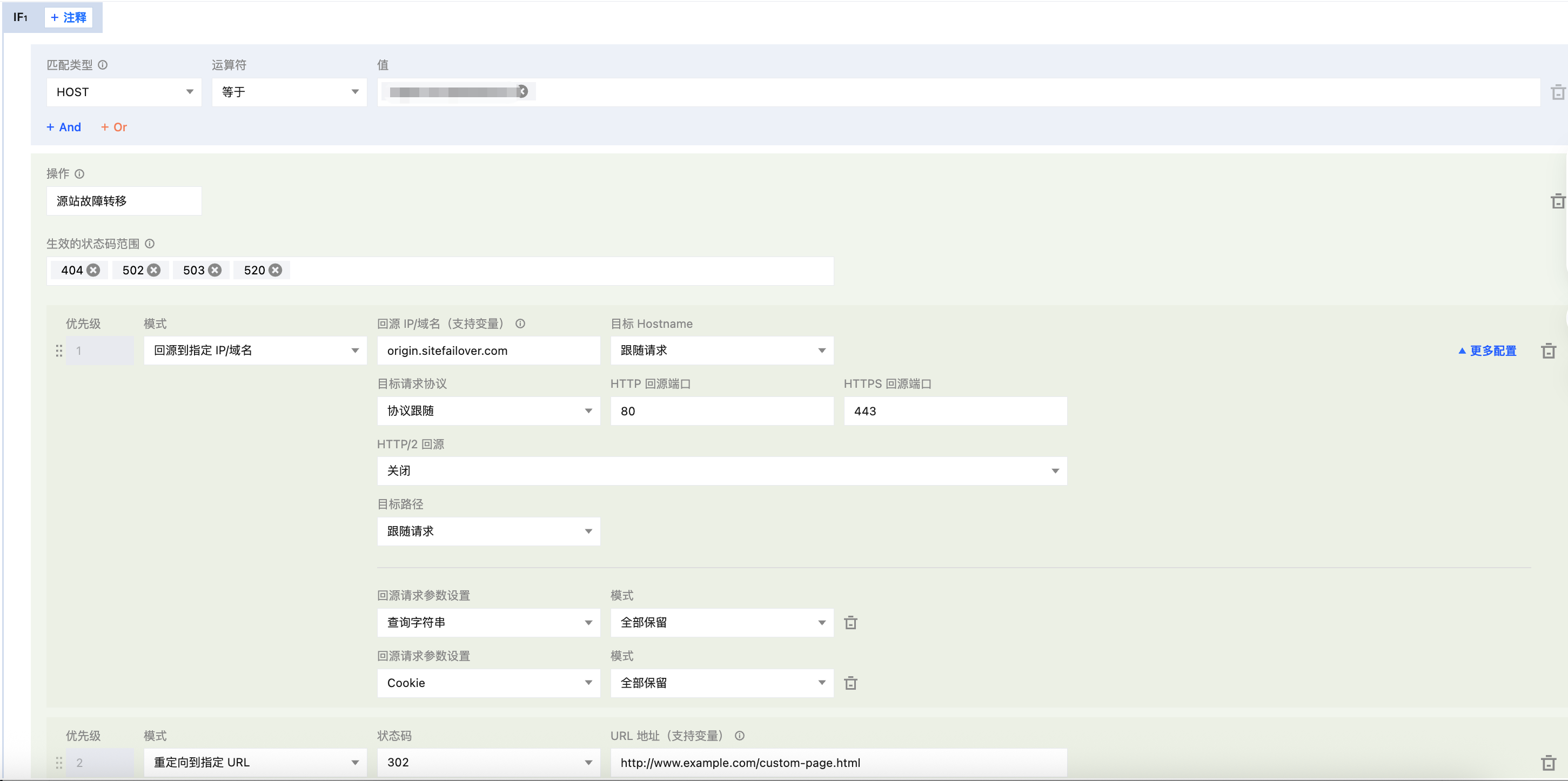
For example, your self-built e-commerce service website currently provides online payment capabilities via shop.example.com. During peak user traffic periods, the origin site may become overloaded and return status codes such as 503/522/544. To avoid user churn, you might want the system to automatically retry another origin site, origin.sitefailover.com, when these status codes are detected (the origin protocol, path, parameters, and so on, remain unchanged by default). If the retry still fails, the request is then redirected via a 302 status code to a specified URL, https://www.example.com/error.html. You can follow the steps below to configure this.
1. Log in to the EdgeOne console. In the left-side menu bar, go to Service Overview and click the site that you need to configure within Website SCDN. On the site details page, click Rule Engine to enter the rule engine management page.
2. On the site details page, click Site Acceleration to go to the site global configuration page, and then click the Rule Engine Tab.
3. On the Rule Engine page, click Create Rule, select Add Blank Rule, and go to the editing page for the new rule.
4. On the rule editing page, set the match type to HOST equals shop.example.com.
5. Choose Operation > Selection Box. In the pop-up operation list, select Origin Site Failover as the operation.
6. Status Code Range for Which the Rule Takes Effect: You can select from a dropdown list or enter a custom value.
7. Select the mode as Origin to Specified IP/Domain, enter origin.sitefailover.com for the origin IP/domain, and keep the other configurations at their default values without modification.
8. Click the Add button, select the mode as Redirect to Specified URL, choose 302 for the status code, and enter http://www.example.com/custom-page.html for the URL address.
9. The complete rule configuration is shown below. Click Save and Publish to complete the rule configuration.


Feature Activation Behavior & Limitations

1. The "Origin Site Failover" operation incorporates all origin-related features, each of which has a corresponding independent Action (such as origin URL rewrite, origin request parameter configuration, HTTP/2 origin, and so on). When the "Origin Site Failover" operation is executed, the origin behavior follows the settings defined within this operation and is not affected by other independent Actions. Only the origin request headers inherit the behavior of the "Modify HTTP Origin Request Headers" operation.
2. The "Origin Site Failover" operation conflicts with the following features and cannot be enabled simultaneously:

Help and Support

Was this page helpful?

Help us improve! Rate your documentation experience in 5 mins.

Feedback