Mirror Vulnerability Scanning and Vulnerability Management
Download
Focus Mode
Font Size
Last updated: 2025-04-11 18:03:17
Image security is a necessary condition for the stable operation of containers. When a mirror has security risks, the containers running the risk mirror may be attacked at any time, affecting the stability of online business operations. Therefore, before the business is launched, perform a Security Risk Assessment on the mirrors to be applied to, and put them into use only after confirming that they are risk-free.
Image security risks mainly involve vulnerabilities, Trojans and sensitive information exposure. Among them, the issues related to image vulnerabilities and vulnerability management are particularly important. When scanning and managing image vulnerabilities, it is mainly managed in two stages: before launch and post-launch.
Before launch: Images are stored in a repository. Customers need to guarantee the security of repository images.
Post-launch: The image pulled to the Cloud Virtual Machine (CVM) is called a local image. The business side needs to promptly assess whether new vulnerabilities, emergency vulnerabilities, etc. affect the mirror running the business.
Repository Storage Phase
Before the mirror goes live, customers store the packaged or downloaded mirror in the repository. During warehousing, perform an overall security assessment on the newly warehoused mirror. If there is a security issue, it is recommended to perform suggested repairs before managing it in the warehouse.
Pull Repository Image
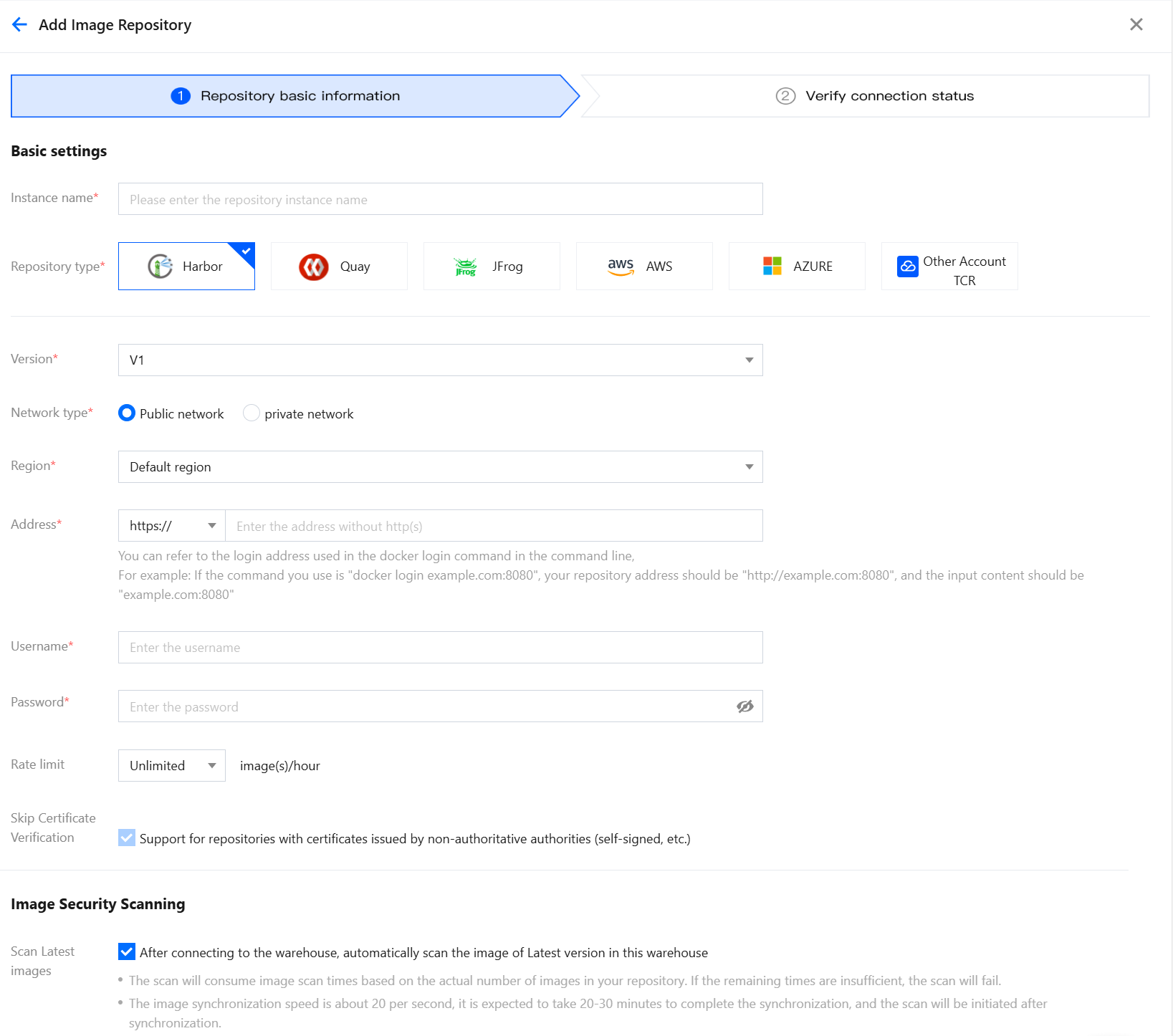
The repository types supported by Tencent Container Security Service (TCSS) include: Tencent Cloud TCR Mirror, Tencent Cloud CCR Mirror, Harbor Image.
TCR and CCR mirrors are automatically pulled by default. When there is a new image warehousing, on the repository images page, click sync assets in the upper-right corner of the single page to update assets.
When a customer's image is stored in a Harbor repository, the customer needs to manually access the repository and then pull image assets. On the repository images page, in the upper-right corner of the page, image repository management > add image repository. Just verify the basic information of the repository, connection status as required.
Scan and View Repository Image Vulnerabilities
On the repository images page, after connecting to the warehouse, automatically scan the images of latest version in this warehouse. After the scan is completed, enter vulnerability management page to view the scanned vulnerabilities.
If you need to view all vulnerabilities, click system vulnerabilities and application vulnerabilities sequentially, export the list of all vulnerabilities, and view the vulnerabilities that impact the repository images in the list. Generally, there are considerable vulnerability data in image scanning, and the workload for full repair is large. It is recommended to prioritize and repair them sequentially, for example: by emergency vulnerabilities, by those with EXP, POC, remote exploitation, exploitation in the wild tags, etc.
POC (Proof of Concept): The existence of a vulnerability can be proven by a description or sample.
EXP (Exploit): A detailed explanation or a demonstration of attack code on how to exploit a vulnerability, which can make readers fully understand the mechanism and method of exploitation of the vulnerability.
Remote exploitation vulnerability: Refers to a software vulnerability that attackers can directly initiate attacks and exploit through the network. For example, RCE (Remote Code Execution) vulnerabilities in such software vulnerabilities are extremely harmful. Attackers can remotely control remote computers at will through this vulnerability. Such vulnerabilities are also the main vulnerabilities exploited by worm viruses.
Local exploit: Refers to a software vulnerability that attackers can attack and exploit only if they have access permissions on the local machine. Typical ones are local software vulnerabilities without network service functions and local privilege escalation vulnerabilities. For example, a local privilege escalation vulnerability can let ordinary users obtain the highest administrator privilege and even the permission of the system kernel.
Exploitation in the wild: Such vulnerabilities have exploitation in the wild or there are wild attacks on Tencent Cloud (Data source: we-detect and cisa).
Emergency Vulnerability
It is advisable to prioritize the repair of emergency vulnerabilities. After scanning all emergency vulnerabilities, when the scan is completed, click
, view the vulnerabilities affecting the repository images in the list, and repair the repository images with emergency vulnerabilities.
By Tags Such As EXP, POC, Remote Exploit, Exploitation in the Wild
After the repair of emergency vulnerabilities is completed, customers can preferentially select system vulnerabilities and application vulnerabilities with tags such as EXP, POC, Remote Exploit, and Exploitation in the Wild for repair. Filter by risk tags, click
, select Only Export Filtered Results, view the vulnerabilities affecting the repository images in the list, and repair the repository images with these tags.
Besides the above tags, when filtering repository image vulnerabilities, customers can also perform comprehensive filtering using conditions such as "only display images affected by the latest version", "threat level", and "CVSS" score.
Local Application Stage
After the security risk issues of images are monitored and repaired during the repository storage phase, only the issue of newly discovered vulnerabilities needs to be addressed during the local application stage. If the local image has serious vulnerability issues, it may directly affect online services.
Scanning Images
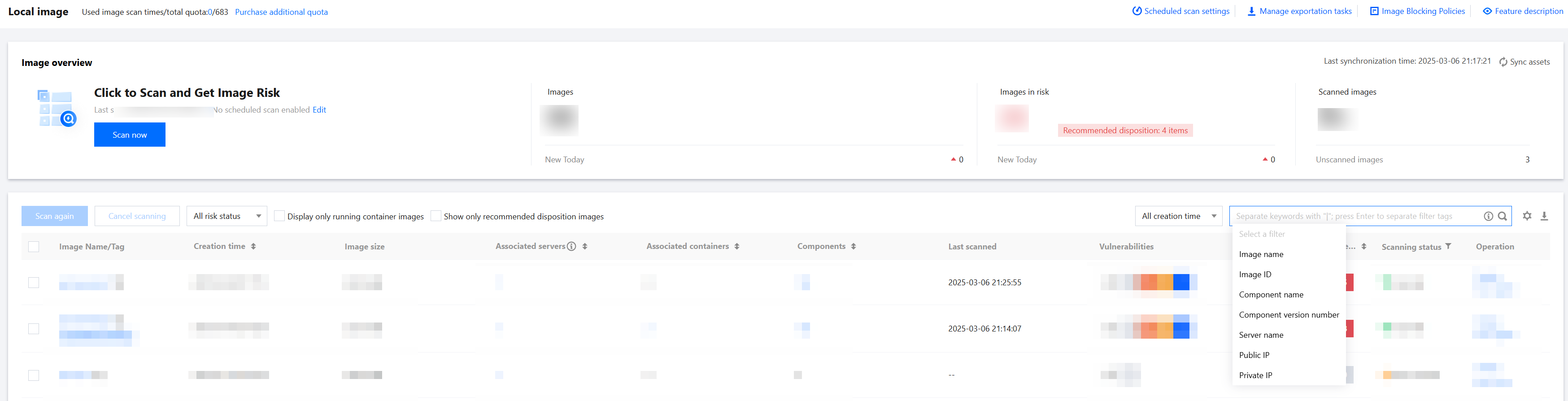
Customers can select the local image that needs to be scanned for vulnerability risks via the Private IP search way on the Local Image Page.
View Local Image Vulnerabilities
After the vulnerability scanning task is completed, enter vulnerability management page to view the scanned vulnerabilities.
If you need to view all vulnerabilities, sequentially click System Vulnerability and Application Vulnerability, export the complete vulnerability list, and view the vulnerabilities affecting the local image in the list. Generally, there are considerable vulnerability data in image scanning, and the workload for full repair is large. It is advisable to prioritize and repair them sequentially, such as by emergency vulnerabilities, or by tags including EXP, POC, remote exploitation, exploitation in the wild, etc.
Urgent Vulnerability
It is advisable to prioritize the repair of emergency vulnerabilities. After scanning all emergency vulnerabilities, when the scan is completed, click
, view the vulnerabilities affecting the local image in the list, and repair the local images with emergency vulnerabilities.
By Tags Such As EXP, POC, Remote Exploit, Exploitation in the Wild
After the emergency vulnerability repair is completed, customers can preferentially select system vulnerabilities and application vulnerabilities with tags such as EXP, POC, remote exploitation, and exploitation in the wild for repair. Filter by risk tags, click
, select Only Export Filtered Results, view the vulnerabilities affecting the local image in the list, and repair the local images with these tags.
Besides the above tags, when customers are filtering vulnerabilities in local images, if they only need to view vulnerabilities in local images of running containers, they can toggle on the "Only Show Vulnerabilities Affecting Containers" switch, or filter images with associated containers larger than 0 in the exported vulnerability list. At the same time, they can also perform comprehensive filtering using conditions such as "threat level" and "CVSS" score.