Image Chat or File Chat (Real-time Document Parsing + Chat)
Download
Focus Mode
Font Size
Last updated: 2026-02-12 11:34:21
AI-Translated
1. Overview
During conversations, you can upload images to perform QA, as well as upload documents for file summarization and content extraction.
Image Q&A:
Note:
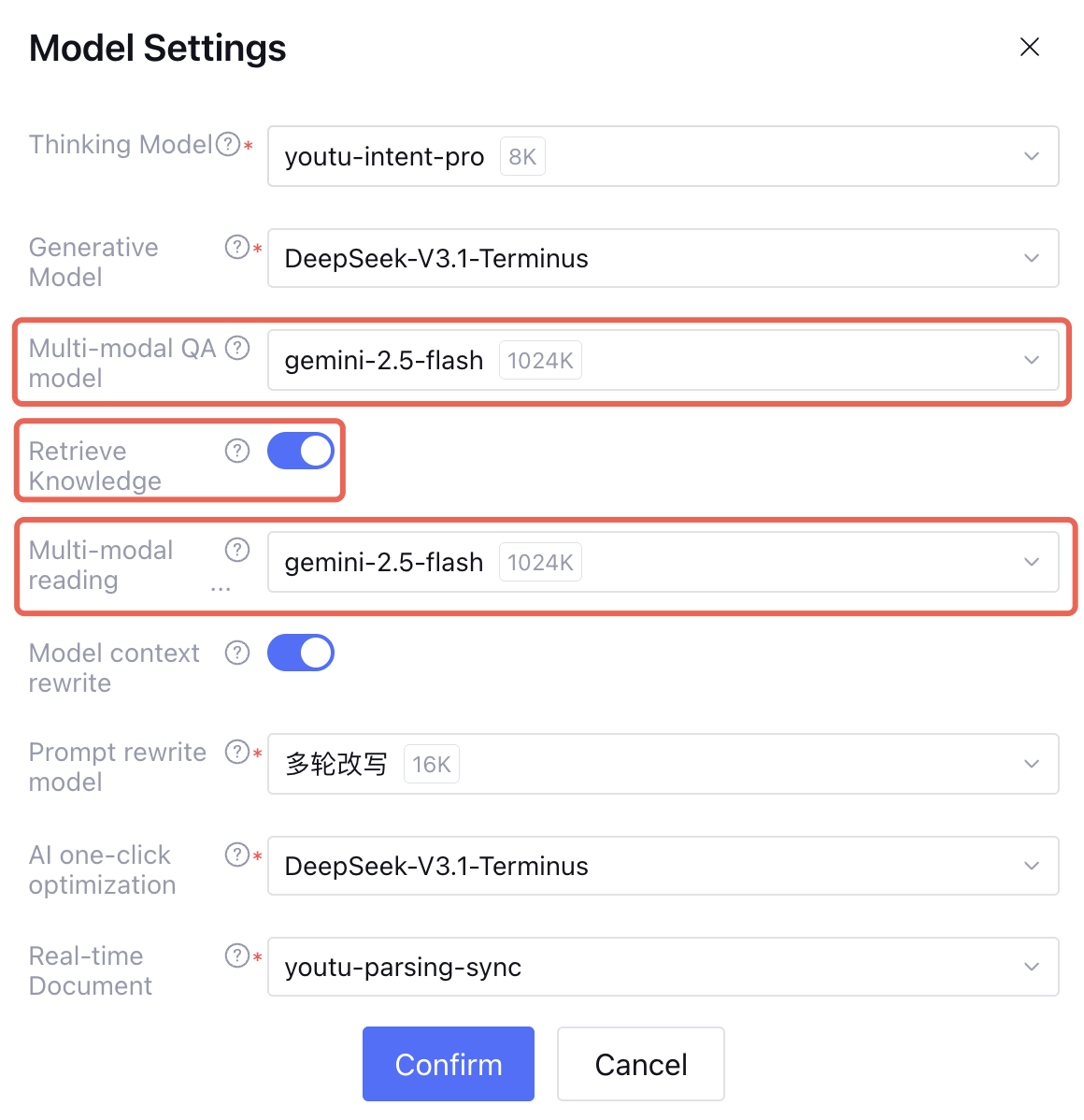
First, you need to set up a multimodal model in the model settings.
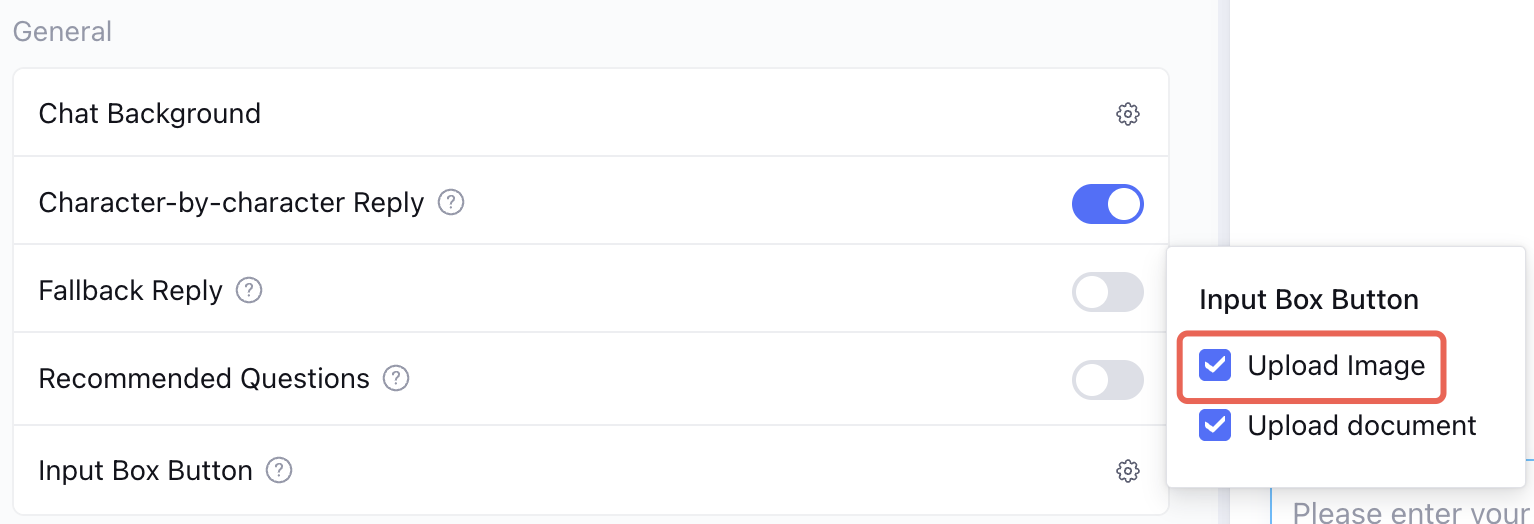
Then, enable image uploads in the dialogue settings.
File Q&A:
Note:
As product capabilities evolve, limitations on file types and sizes will be gradually lifted. For details, see the limitations on the Intelligent Agent Development Platform page.
Document Q&A requires document parsing, followed by filling parameters and using WebSocket or HTTP SSE for dialogue.
2. Upload to COS using the SDK with a temporary key.
Note:
The method of operating COS on the Tencent Cloud Agent Development Platform (Tencent Cloud ADP) may not be the same as the direct method of using a fixed key. For detailed steps, please refer to the Tencent Cloud Agent Development Platform COS Operation Guide.
3. Fill parameters and use WebSocket or HTTP SSE for dialogue.
3.1 The concatenation method for image COS domain names or IP addresses is as follows:
https:// +
{DescribeStorageCredential.Response.Bucket} +
"." +
{DescribeStorageCredential.Response.Type} +
"." +
{DescribeStorageCredential.Response.Region} +
".myqcloud.com" +
{DescribeStorageCredential.Response.UploadPath}
If sending images, pass the Markdown-formatted image link here, such as . Note the IsPublic field when obtaining temporary keys.
"content":"Describe the following image"
"content":"Describe the following images"
}
3. Document QA Implementation Steps
For knowledge QA, if you need to upload documents for real-time QA, you must first connect to the real-time document parsing API. The process is as follows:
2. Upload to COS using the SDK with a temporary key.
Note:
The method of operating COS on the Tencent Cloud Agent Development Platform (Tencent Cloud ADP) may not be the same as the direct method of using a fixed key. For detailed steps, please refer to the Tencent Cloud Agent Development Platform COS Operation Guide.
3. Call the real-time document parsing docParse API to get the doc_id.
4. Fill parameters and use WebSocket or HTTP SSE for dialogue.
3.1 Real-Time Document Parsing
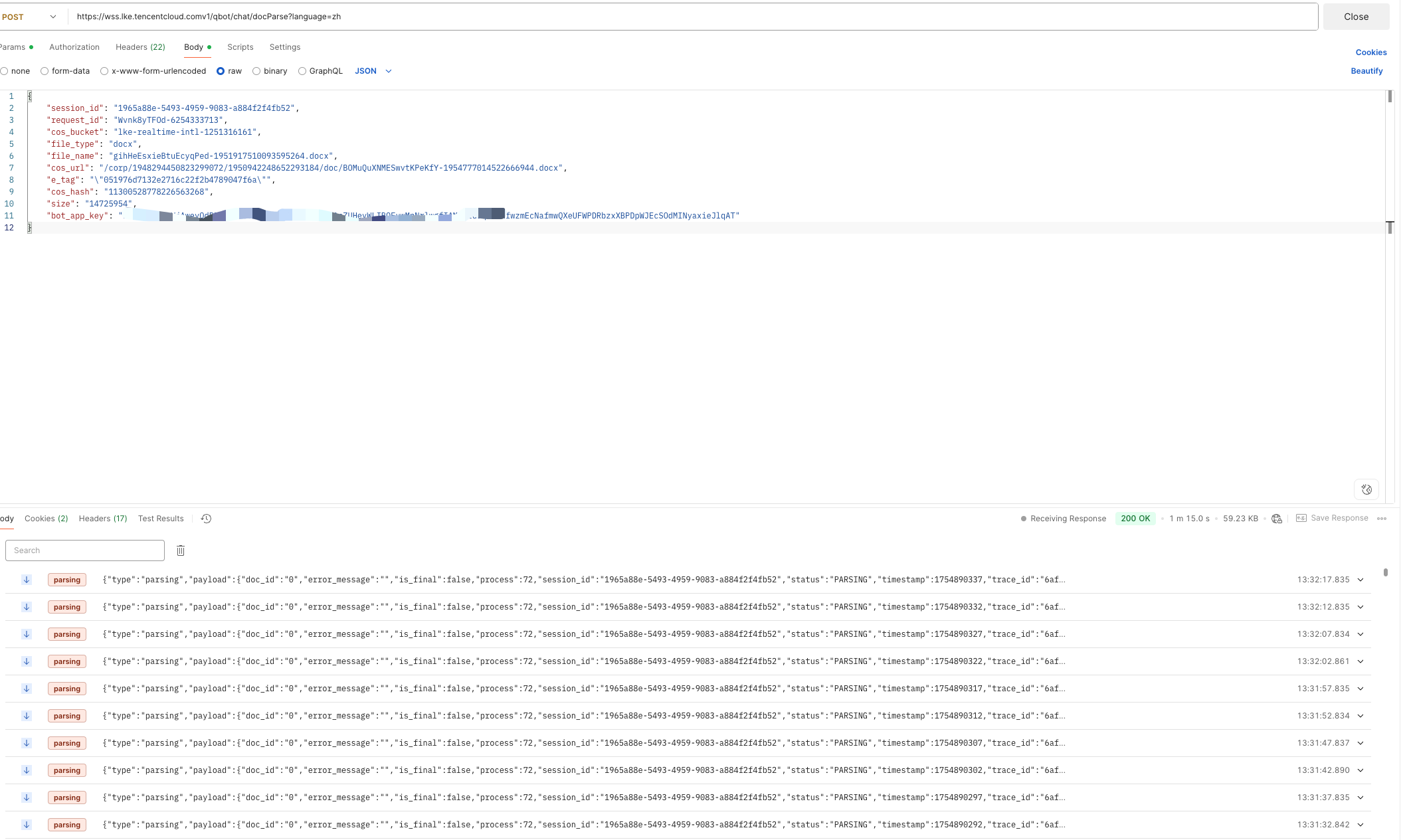
Real-time document parsing API address: https://wss.lke.tencentcloud.com/v1/qbot/chat/docParse
Request Method: POST.
3.1.1 Request Parameter
Place it in the HTTP Body and send it in the form of JSON, as follows:
Name
Type
Required or Not
Description
session_id
string(64)
Yes
Session ID, used to identify a session (provided by an external system, it is advisable for different user clients to import different session IDs, otherwise messages from different users within the same application may get mixed up).
Parameter length: 2-64 characters
Verification rule: ^[a-zA-Z0-9_-]{2,64}$. You can use uuid to generate this value.
The session_id for document parsing should be consistent with the session. If a multi-round session involves multiple document uploads, the session_id must remain the same and will be validated during the session.
bot_app_key
string(8)
Yes
Application key (provided by operations)
request_id
string(255)
Yes
Unique request ID. Recommend using UUID to ensure uniqueness.
cos_bucket
string
Yes
Get the cos bucket from the API response for obtaining a temporary key.
file_type
string
Yes
File type (txt|doc|docx|pdf|ppt|pptx)
Example value: txt|doc|docx|pdf|ppt|pptx
file_name
string
Yes
File Name
Example: test.docx
cos_url
string
Yes
Platform cos path, maintain parameter consistency with the UploadPath parameter in the DescribeStorageCredential API query
cos_hash x-cos-hash-crc64ecma Verify the consistency between the file uploaded to the cloud and the local file by checking the CRC64 code in the header. After successful upload to COS, obtain from the return header.
e_tag
string
Yes
ETag, short for Entity Tag, is an information Tag that identifies the object content when the object is created. It can be used to check whether the content of the object has changed. After successful upload to cos, obtain it from the return header.
Example value: "6886efe263f34c9f9401c2d910b02635".
"content":"extract the main points from the document"
}
}
3.3 Special Notes
After parsing the document is completed, assemble it into the file_infos field for WebSocket or HTTP SSE dialogue, then call the dialogue to use it. Here are some simple file_infos field examples.
Note:
1. doc_id and file_size are of string type; if integer type is passed, it will result in a parameter error.
2. Do not include the file extension in file_name.
3. The session_id used in the conversation should be consistent with the session_id passed when the docParse interface is called; otherwise, the uploaded files will be unable to be retrieved.
4. Documents uploaded for real-time document parsing have a limit on conversation turns. The conversation turns should be consistent with the context turns configured on the page. The default retention period is 24h; if a new conversation based on the document occurs within 24h, it will be renewed for another 24h. Do not repeatedly use the same document id for Q&A.
For other programming languages, Demo is currently not available. You can refer to the documentation and existing Demos to implement it yourself.
The purpose of the Demo is for quick verification, using the HTTP SSE dialogue method. Users can choose the Websocket dialogue method based on actual business needs.