tencent cloud

Tencent Cloud Agent Development Platform

Release Notes and Announcements
Release Notes
Product Announcement
Product Introduction
Product Overview
Advantages
Use Cases
Model Introduction
Purchase Guide
Package Subscription
Previous Version
Getting Started
Agent Application and Its Three Modes
Creating a "Content Summary Assistant" in Standard Mode
Creating a “Webpage Scraping Assistant” in Single Workflow Mode
Creating a “Stand-up Comedy Content Creation Assistant” in Multi-Agent Mode
Operation Guide
Application Development
Workflow
Multi-Agent
Knowledge Base
Widget
Plugin Marketplace
Model List 
Prompt Templates
Application Templates
Platform Management
Business, Workspace and Permissions
API Documentation
History
API Category
Making API Requests
Atomic Capability APIs
Operation Optimization APIs
Document Library APIs
Q&A Database APIs
Knowledge Tag APIs
Application Management APIs
Enterprise Management APIs
Billing APIs
Release Management APIs
Dialogue Endpoint APIs
Data Statistics APIs
Data Types
Error Codes
Application API Documentation
Dialogue API Overview
Dialog API Documentation (WebSocket)
Dialog API Documentation (HTTP SSE)
Image Chat or File Chat (Real-time Document Parsing + Chat)
Offline Document Upload
Tencent Cloud Agent Development Platform Operation COS Guide
ADP Document Parsing Protocol
FAQs
Product FAQs
Technical FAQs
Related Agreements
Tencent Cloud Agent Development Platform Service Level Agreement
Tencent Cloud Agent Development Platform Service Specific Terms
Tencent Cloud Agent Development Platform Privacy Policy
Tencent Cloud Agent Development Platform Data Processing and Security Agreement
Open-Source License Statement
Lighthouse OpenClaw Connector Plugin Service Agreement
Contact Us
Glossary

Create Application

PDF
Focus Mode
Font Size
Last updated: 2026-01-26 11:45:18
By creating a new Agent application, you can leverage large model technology to achieve autonomous orchestration and decision-making, or efficiently execute tasks through fixed workflows.

Application Modes

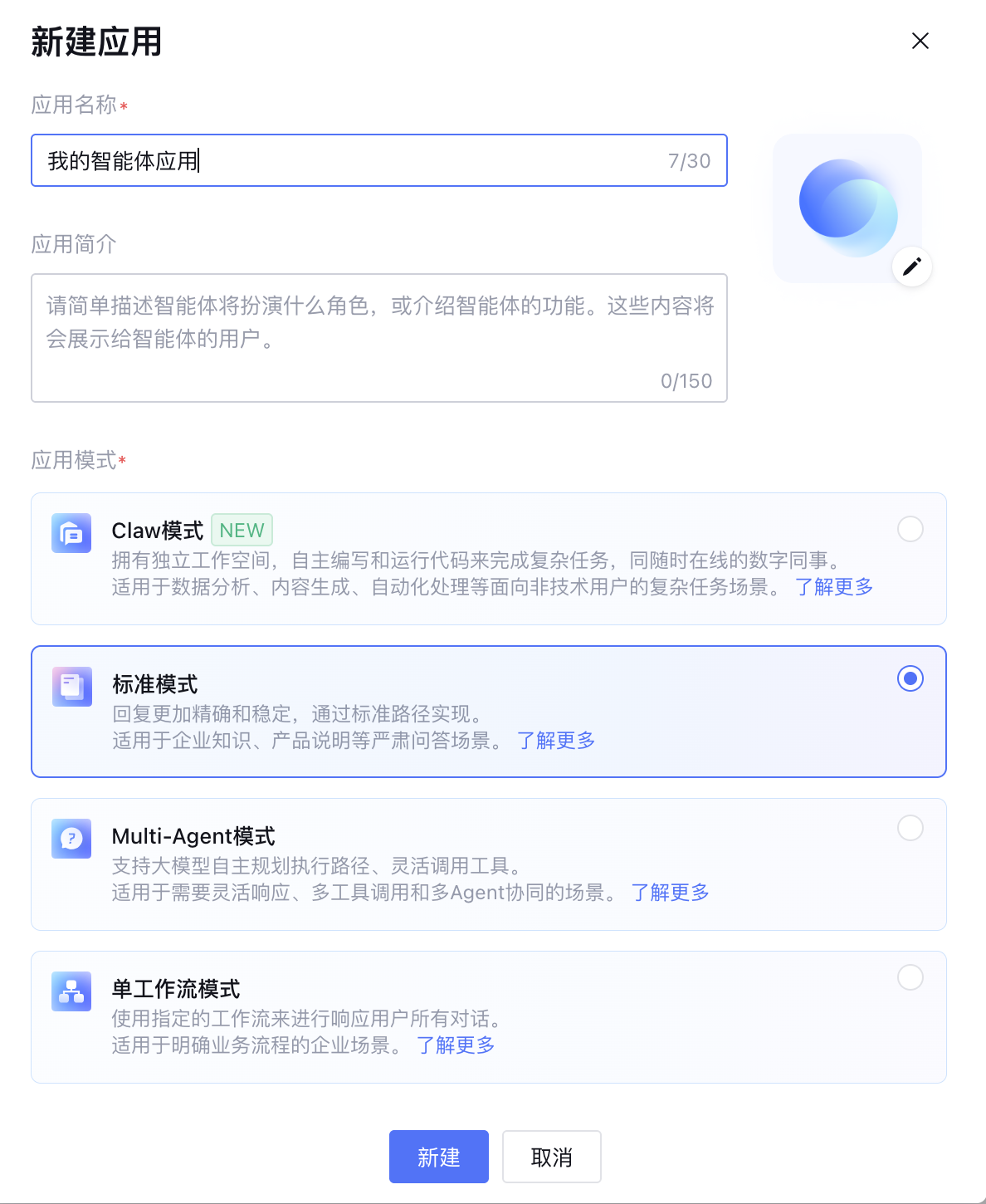
The Agent Development Platform supports three types of application modes: Standard Mode, Single-Workflow Mode, and Multi-Agent Mode.
Mode name
Description
Standard Mode
Standard mode applications use the platform's preset standardized processing flow. Combines a reasoning model with a generative model for stable and accurate Q&A results. Workflows can also be added to handle complex business processes.
Single-Workflow Mode
Single-Workflow mode applications execute a specific workflow for all user interactions, ensuring the integrity and standardization of business processes. This mode is ideal for enterprise service scenarios where business goals are clear and operations follow a unified procedure.
This mode supports two invocation methods: synchronous & asynchronous:
Synchronous Invocation (Default)
Runs the workflow in real-time and responds to the user step by step. A new request can only be initiated after the workflow has fully completed. Example: In banking customer service workflow for credit card installments, the user must follow the steps sequentially (choosing installment parameters, confirming service fees, and waiting approval). Only after the full workflow is complete can the user begin a new request.
Asynchronous Invocation
Returns an immediate response while workflow continues executing in the background. The user can proceed to initiate new requests without waiting. This effectively prevents issues such as long execution times, limited client resources (e.g. unstable networks), or the inability to maintain long connections (e.g. stateless HTTP requests). Example: When asynchronously invoking a workflow for video analysis, the user immediately receives a confirmation message. The user can then leave the app or start analyzing another video without waiting for completion.
Note:
Asynchronous calls is only supported for Single-Workflow applications without parameter extraction, tab, or reply nodes. It is designed for tasks that do not require multi-turn interaction.
Concurrency for asynchronous calls depends on the account’s permissions. Multiple simultaneous tasks will be queued.
Asynchronous tasks return results within 24 hours.
Multi-Agent Mode
Multi-Agent Mode applications utilize large models to coordinate multiple agents to complete complex tasks, and offer flexible invocation tools where specific agents that can autonomously initiate actions or request assistance from other agents to complete subtasks. This mode is ideal for scenarios requiring adaptive responses, multi-tool usage, and Multi-Agent collaboration. For more details, see What Is Multi-Agent.

Create a New Application

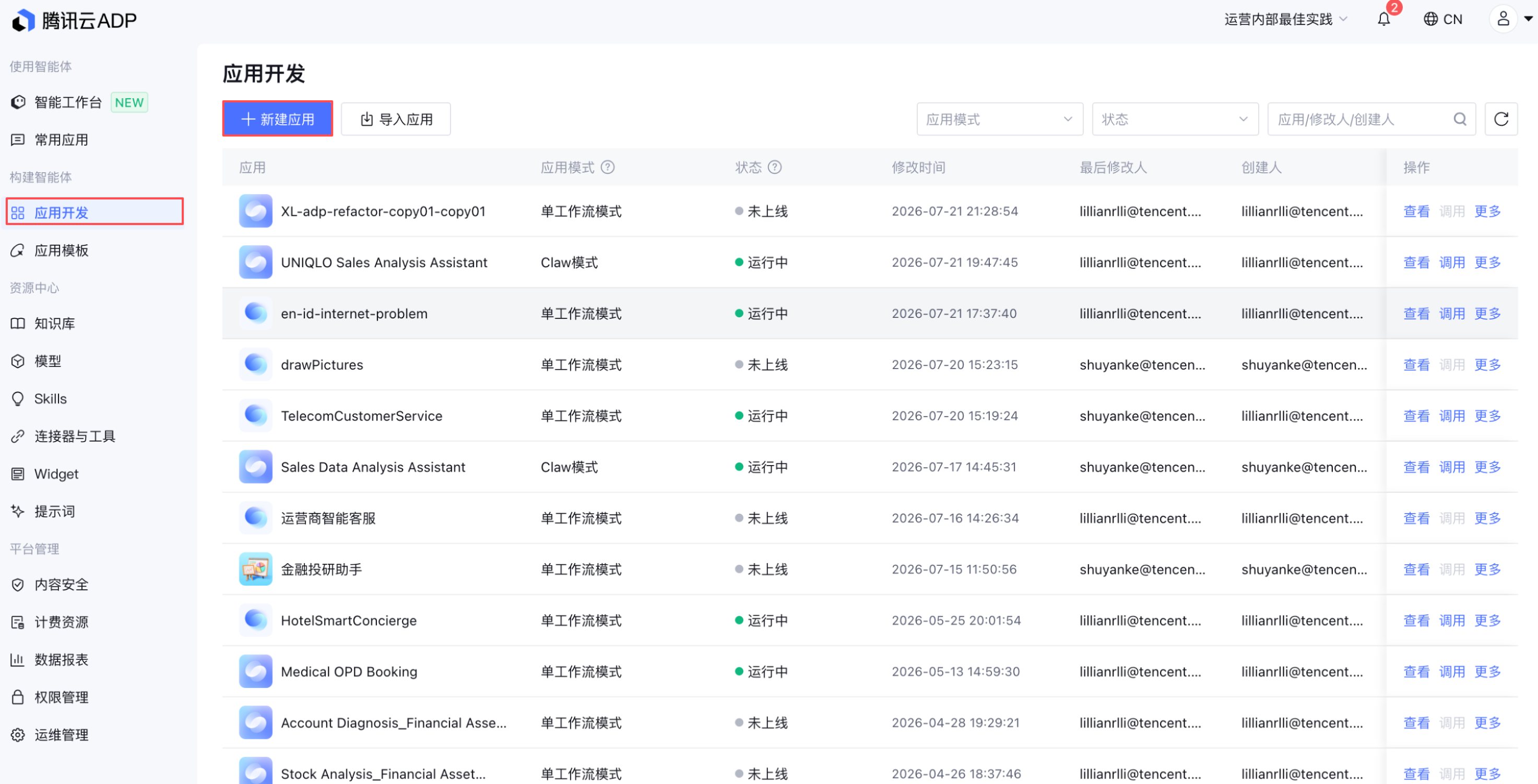
1. Go to Agent Development Platform Console and click App Dev in the Menu.

2. Click New Application, enter the New Application interface, select the application mode, fill in the application name, application description, upload the app avatar, then click Create.
Application avatar: supports JPG, PNG. Image size must be less than 500 KB.
Application name: Up to 90 characters, must be unique.
Application description: up to 150 characters.

3. After creating an application, click View on the right side of the application to enter the settings page. From there, you can configure, evaluate, test, publish, and operate the application.


Help and Support

Was this page helpful?

Help us improve! Rate your documentation experience in 5 mins.

Feedback