Renewal Instructions
Download
Focus Mode
Font Size
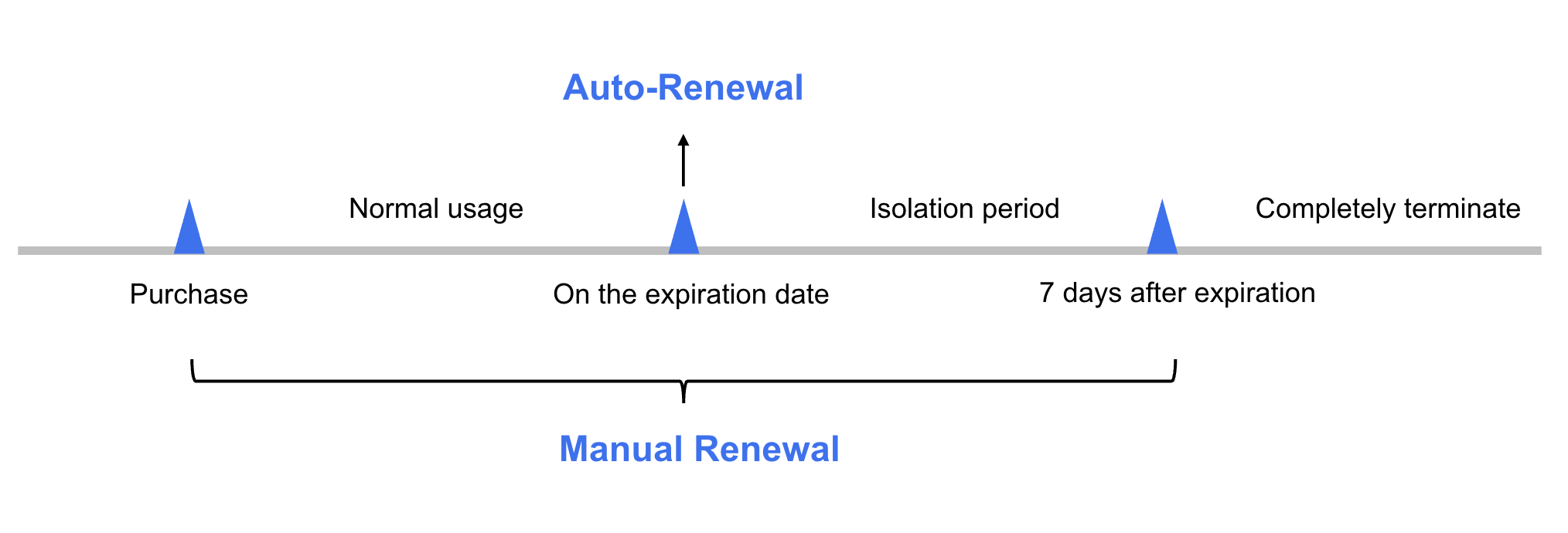
For monthly subscription clusters, if renewal is not completed in advance or auto-renewal fails due to insufficient account balance before expiration, the cluster enters an isolated state. You need to promptly complete renewal to restore the cluster to its normal state. If renewal is not completed during the isolation period, the system automatically releases the cluster resources after the isolation period ends, and all data is permanently deleted and cannot be recovered.
Note:
Pay-as-you-go clusters do not require renewal. You only need to ensure a sufficient available account balance. For specific steps to top up your account, see Online Recharge.
Renewal Instructions
Renewal supports two methods: Manual Renewal and Auto-Renewal. Details are as follows:
Manual Renewal: For monthly subscription clusters, you can manually renew them at any time during the period from purchase to complete termination to extend their usage time.
Auto-Renewal: For monthly subscription clusters with auto-renewal enabled, if the account balance is sufficient, renewal is automatically performed on the day of cluster expiration.
Note:
Manual Renewal
Renewing Manually in the MQTT Console
1. Log in to the TDMQ for MQTT Console.
2. In the left sidebar, select Cluster List, select an appropriate region, and choose More > Renew in the Operation column of the target cluster.
3. Select the renewal period in the pop-up window. You can also enable Auto-Renewal for the cluster.
4. Click OK, and complete payment on the order payment page to finish the renewal.
Renewing Manually in the Billing Center
1. Log in to the TDMQ for MQTT Console.
2. In the upper-right corner of the page, hover over Billing, and click Renewal Management in the dropdown list to go to the Billing Center.
3. On the Renewal Management page, select the expiry time range, search for and select Message Queue TDMQ. Under the Manual Renewal tab, choose TDMQ for MQTT as the subproduct, and renew your cluster:
Single renewal: Click Renew in the Operation column of the target cluster.
Batch renewal: Select the clusters for batch renewal, and click Batch Renewal in the upper-left corner.
4. Select the renewal duration in the pop-up window, click OK, and complete payment on the Order Payment page to finish the renewal.
Auto-Renewal
Auto-renewal reduces manual renewal management costs and prevents clusters from being automatically deleted due to missed manual renewal.
Enabling Auto-Renewal When Purchasing a Cluster
You can enable auto-renewal on the MQTT Cluster Purchase page. For specific steps, seeCreating a Cluster.
Enabling Auto-Renewal in the Billing Center
If you did not enable auto-renewal when purchasing a cluster, you can enable it while the cluster has not expired and its status is "Running". The specific steps are as follows:
1. Log in to the TDMQ for MQTT Console.
2. In the upper-right corner of the page, hover over Billing, and click Renewal Management in the dropdown list to go to the Billing Center.
3. On the Renewal Management page, select the expiry time range, search for and select Message Queue TDMQ. Under the Manual Renewal tab, select TDMQ for MQTT as the sub-product. You can then enable auto-renewal for the cluster:
Single activation: Click Set to Auto-Renewal in the Operation column of the target cluster.
Batch activation: Select the clusters for batch activation, and click Set to Auto-Renewal in the upper-left corner.
4. In the pop-up window, select I have read and agree to the Auto-Renewal Rules, and click OK to complete enabling auto-renewal.
Setting a Unified Expiry Date
If you have multiple MQTT clusters with different expiration dates, you can set a unified expiry date for easier daily management and renewal.
Help and Support
Was this page helpful?
You can also Contact sales or Submit a Ticket for help.
Help us improve! Rate your documentation experience in 5 mins.
Feedback