Access Point Format
Download
Focus Mode
Font Size
Scenario Description
This article introduces common methods for obtaining TDMQ for MQTT access points and the MQTT access point format for each language SDK under different protocols, helping you quickly configure and connect MQTT services in various development environments to ensure secure and reliable communication between devices and the cloud.
Access Point Obtaining Method
1. Log in to the MQTT Console.
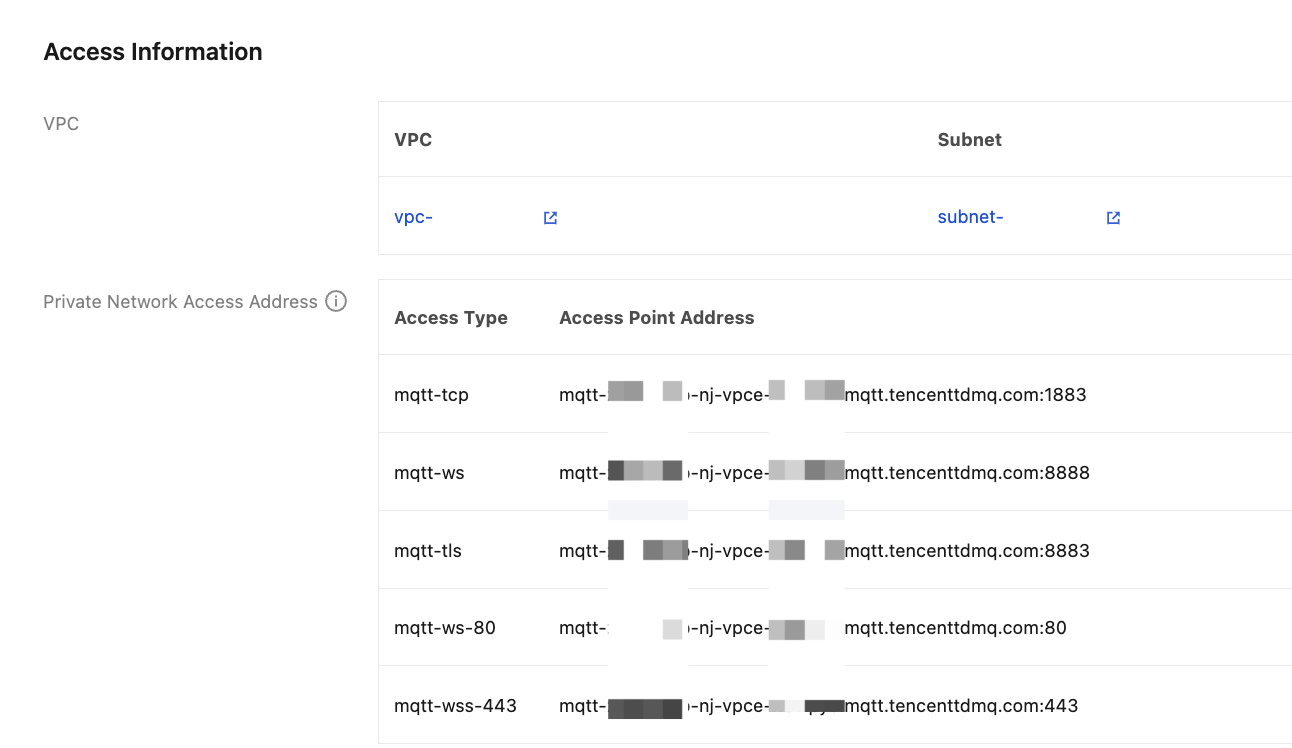
2. In the left sidebar, choose Resource > Cluster, select a region, and click the ID of the target cluster to go to the basic information page.
3. In the information module, you can obtain the MQTT access point.
Java SDK
Environment Preparation:
<dependency><groupId>org.eclipse.paho</groupId><artifactId>org.eclipse.paho.client.mqttv3</artifactId><version>1.2.5</version></dependency>
implementation group: 'org.eclipse.paho', name: 'org.eclipse.paho.client.mqttv3', version: '1.2.5'
Access Point Format
String serverUri = "tcp://mqtt-xxx.mqtt.tencenttdmq.com:1883";
String serverUri = "ssl://mqtt-xxx.mqtt.tencenttdmq.com:8883";
String serverUri = "ws://mqtt-xxx.mqtt.tencenttdmq.com:80/mqtt";
String serverUri = "wss://mqtt-xxx.mqtt.tencenttdmq.com:443/mqtt";
C
Environment Preparation:
git clone https://git.eclipse.org/r/paho/org.eclipse.paho.mqtt.cmakesudo make install
Access Point Format
/*** Return code: protocol prefix in serverURI should be:* @li @em tcp:// or @em mqtt:// - Insecure TCP* @li @em ssl:// or @em mqtts:// - Encrypted SSL/TLS* @li @em ws:// - Insecure websockets* @li @em wss:// - Secure web sockets** The TLS enabled prefixes (ssl, mqtts, wss) are only valid if the TLS* version of the library is linked with.*/
tcp://mqtt-xxx.mqtt.tencenttdmq.com:1883ormqtt://mqtt-xxx.mqtt.tencenttdmq.com:1883
ssl://mqtt-xxx.mqtt.tencenttdmq.com:1883ormqtts://mqtt-xxx.mqtt.tencenttdmq.com:1883
ws://mqtt-xxx.mqtt.tencenttdmq.com:80/mqtt
wss://mqtt-xxx.mqtt.tencenttdmq.com:443/mqtt
C++
Environment Preparation:
$ git clone https://github.com/eclipse/paho.mqtt.c.git$ cd paho.mqtt.c$ git checkout v1.3.13$ cmake -Bbuild -H. -DPAHO_ENABLE_TESTING=OFF -DPAHO_WITH_SSL=ON -DPAHO_HIGH_PERFORMANCE=ON$ sudo cmake --build build/ --target install
Access Point Format
The library supports connecting to an MQTT server/broker using TCP, SSL/TLS, and websockets (secure and insecure). This is chosen by the URI supplied to the connect() call. It can be specified as:"mqtt://<host>:<port>" - TCP, unsecure"tcp://<host>:<port>" (same)"mqtts://<host>:<port>" - SSL/TLS"ssl://<host>:<port>" (same)"ws://<host>:<port>" - Unsecure websockets"wss://<host>:<port>" - Secure websocketsThe "mqtt://" and "tcp://" schemas are identical. They indicate an insecure connection over TCP. The "mqtt://" variation is new for the library, but becoming more common across different MQTT libraries.Similarly, the "mqtts://" and "ssl://" schemas are identical. They specify a secure connection over SSL/TLS sockets.Note that to use any of the secure connect options, "mqtts://, "ssl://", or "wss://" you must compile the library with the `PAHO_WITH_SSL=ON` CMake option to include OpenSSL. In addition, you _must_ specify `ssl_options` when you connect to the broker - i.e. you must add an instance of `ssl_options` to the `connect_options` when calling `connect()`.
Golang
Environment Preparation:
go get github.com/eclipse/paho.mqtt.golang
Access Point Format
import ("fmt"mqtt "github.com/eclipse/paho.mqtt.golang")var broker = "mqtt-xxx.mqtt.tencenttdmq.com"var port = 8883opts := mqtt.NewClientOptions()opts.AddBroker(fmt.Sprintf("ssl://%s:%d", broker, port))opts.SetClientID("golang_mqtt_client")
import ("fmt"mqtt "github.com/eclipse/paho.mqtt.golang")var broker = "mqtt-xxx.mqtt.tencenttdmq.com"var port = 8883opts := mqtt.NewClientOptions()opts.AddBroker(fmt.Sprintf("ssl://%s:%d", broker, port))opts.SetClientID("golang_mqtt_client_ssl")
Rust
Environment Preparation:
cargo add paho-mqtt
Access Point Format
use std::time::Duration;use anyhow::Context;use paho_mqtt::{Client, ConnectOptionsBuilder, CreateOptionsBuilder, DisconnectOptionsBuilder, Message,};fn main() -> Result<(), anyhow::Error> {env_logger::init();let connect_options = ConnectOptionsBuilder::new_v3().connect_timeout(Duration::from_secs(3)).clean_session(true).max_inflight(128).user_name("xxx").password("XXXX").automatic_reconnect(Duration::from_secs(1), Duration::from_secs(3)).server_uris(&["tcp://mqtt-xxx.mqtt.tencenttdmq.com:1883"]).finalize();let client = Client::new(CreateOptionsBuilder::new_v3().client_id("rust-quick-start").finalize(),).context("Failed to create client")?;Ok(())}
use std::time::Duration;use anyhow::Context;use paho_mqtt::{Client, ConnectOptionsBuilder, CreateOptionsBuilder, DisconnectOptionsBuilder, Message,SslOptionsBuilder,};fn main() -> Result<(), anyhow::Error> {env_logger::init();let ssl_opt = SslOptionsBuilder::new().finalize();let connect_options = ConnectOptionsBuilder::new_v3().connect_timeout(Duration::from_secs(3)).clean_session(true).max_inflight(128).user_name("xxx").password("XXX").automatic_reconnect(Duration::from_secs(1), Duration::from_secs(3)).server_uris(&["ssl://mqtt-xxx.mqtt.tencenttdmq.com:8883"]).ssl_options(ssl_opt).finalize();let client = Client::new(CreateOptionsBuilder::new_v3().client_id("rust-ssl").finalize(),).context("Failed to create client")?;Ok(())}
MQTT.js
Environment Preparation:
npm install mqtt
Access Point Format
import mqtt from 'mqtt';var opts = {username: 'my-username',password: 'my-password'};const client = mqtt.connect('mqtt://mqtt-xxx.mqtt.tencenttdmq.com', opts);
import fs from 'fs';import mqtt from 'mqtt';const options = {protocol: 'mqtts',host: 'mqtt-xxx.mqtt.tencenttdmq.com',port: 8883,ca: [fs.readFileSync('/path/to/ca.crt')],cert: fs.readFileSync('/path/to/client.crt'),key: fs.readFileSync('/path/to/client.key'),};const client = mqtt.connect(options);
import mqtt from 'mqtt';var opts = {username: 'my-username',password: 'my-password'};const client = mqtt.connect(‘ws://mqtt-xxx.mqtt.tencenttdmq.com:80/mqtt’, opts);
import mqtt from 'mqtt';var opts = {username: 'my-username',password: 'my-password'};const client = mqtt.connect(‘wss://mqtt-xxx.mqtt.tencenttdmq.com:443/mqtt’, opts);
Dart
Environment Preparation:
dart pub add mqtt_client
Access Point Format
import 'dart:async';import 'dart:io';import 'package:mqtt_client/mqtt_client.dart';import 'package:mqtt_client/mqtt_server_client.dart';final client = MqttServerClient('mqtt-xxx.mqtt.tencenttdmq.com', '1883');Future<int> main() async {client.logging(on: true);client.keepAlivePeriod = 60;client.onDisconnected = onDisconnected;client.onConnected = onConnected;client.pongCallback = pong;final connMess = MqttConnectMessage().withClientIdentifier('dart_client').withWillTopic('willtopic').withWillMessage('My Will message').startClean().withWillQos(MqttQos.atLeastOnce);print('client connecting....');client.connectionMessage = connMess;try {await client.connect();} on NoConnectionException catch (e) {print('client exception - $e');client.disconnect();} on SocketException catch (e) {print('socket exception - $e');client.disconnect();}if (client.connectionStatus!.state == MqttConnectionState.connected) {print('client connected');} else {print('client connection failed - disconnecting, status is ${client.connectionStatus}');client.disconnect();exit(-1);}return 0;}/// The unsolicited disconnect callbackvoid onDisconnected() {print('OnDisconnected client callback - Client disconnection');if (client.connectionStatus!.disconnectionOrigin ==MqttDisconnectionOrigin.solicited) {print('OnDisconnected callback is solicited, this is correct');}exit(-1);}/// The successful connect callbackvoid onConnected() {print('OnConnected client callback - Client connection was sucessful');}/// Pong callbackvoid pong() {print('Ping response client callback invoked');}
Python
Environment Preparation:
pip install paho-mqtt
Access Point Format
import paho.mqtt.client as mqtt# The callback for when the client receives a CONNACK response from the server.def on_connect(client, userdata, flags, reason_code, properties):print(f"Connected with result code {reason_code}")# Subscribing in on_connect() means that if we lose the connection and# reconnect then subscriptions will be renewed.client.subscribe("$SYS/#")# The callback for when a PUBLISH message is received from the server.def on_message(client, userdata, msg):print(msg.topic+" "+str(msg.payload))mqttc = mqtt.Client(mqtt.CallbackAPIVersion.VERSION2)mqttc.on_connect = on_connectmqttc.on_message = on_messagemqttc.connect("mqtt-xxx.mqtt.tencenttdmq.com:1883", 1883, 60)# Blocking call that processes network traffic, dispatches callbacks and# handles reconnecting.# Other loop*() functions are available that give a threaded interface and a# manual interface.mqttc.loop_forever()
Help and Support
Was this page helpful?
You can also Contact sales or Submit a Ticket for help.
Help us improve! Rate your documentation experience in 5 mins.
Feedback