This document describes how to create a policy to resolve a fault according to the fault report. After the fault is resolved, the sub-account will be able to manage the resources of the root account within the scope of the newly configured permissions.
Example
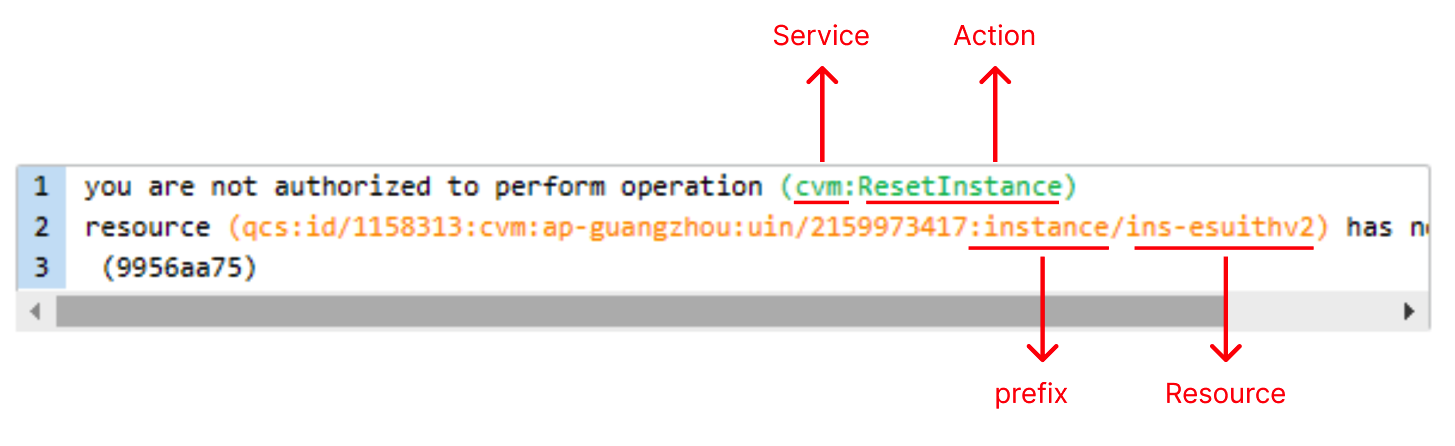
When a sub-account associated with the QcloudCVMReadOnlyAccess policy attempts to reinstall a CVM instance, the following error is reported:
If you want to authorize the sub-account to proceed with this operation, you can create and associate a custom policy according to this error message.
Prerequisites
Use the root account or a sub-account with full read-write access to Access Management (QcloudCamFullAccess) to perform operations.
Directions
1. Log in to the CAM console, enter the Policies page, and click Create Custom Policy.
2. In the selection window that pops up, click Create by Policy Generator to enter the Edit Policy page.
3. On the Edit Policy page, set the following information:
Effect (required): select whether the operation is allowed. In this example, select "Allow".
Service (required): select the product based on the abbreviation to authorize. In this example, it is CVM corresponding to cvm in the operation field of the error message.
Action (required): select the operation to authorize. In this example, select ResetInstance corresponding to the operation field of the error message.
Resource (required): for products that don't support resource-level authorization, you can only select all resources as the authorization granularity. For products that support resource-level authorization, you can select a specific resource. To do so, click Add a six-segment resource description and enter the resource prefix and resource. In this example, the error message is for a specific resource, so you need to authorize it: select the specific resource, click Add a six-segment resource description, and then you can directly copy the prefix and resource in qcs:id/1158313:cvm:ap-guangzhou:uin/2159973417:instance/instance/ins-esuithv2 and paste them.
Condition (optional): set the conditions that must be met for the permission to take effect, such as a specified access IP. In this example, leave it empty.
4. Click Next to enter the Associate Users/User Groups page.
5. On the Associate Users/User Groups page, add the policy name (automatically generated by the console) and description.
Note:
The policy name is `policygen` suffixed with the creation time by default, which is customizable.
The policy description corresponds to the service and operations selected in step. You can modify them as needed.
6. Click Done to complete the custom policy creation.
7. Authorize the sub-account as instructed in Authorization Management. After authorization, the sub-account will be granted the needed permission, and the fault will be resolved.