Viewing Default Logs
Download
Focus Mode
Font Size
Scenarios
The Cloud Native Intelligent Gateway provides you with real-time gateway logging and basic search capabilities by default, and you can use them for free.
By default, logs are primarily categorized into user access logs and gateway error logs. You can view the Cloud Native Intelligent Gateway's user access logs to understand information related to user requests, which facilitates data analysis, audit, business troubleshooting, or review. You can also view the Cloud Native Intelligent Gateway's gateway error logs to troubleshoot issues.
User access logs (accessLog) record information related to user requests and can be used for data analysis, audit, and business troubleshooting.
Gateway error logs (errorLog) are error logs of the gateway, which are used for gateway troubleshooting.
This document describes how to use the default logging feature of the Cloud Native Intelligent Gateway.
Prerequisites
The Cloud Native Intelligent Gateway instance has been created. For specific operations, see Create Gateway.
Viewing Default Logs
1. Log in to the TSF console.
2. In the left sidebar, choose Cloud Native Gateway > Instance List. Select the gateway instance for which you want to view default logs. Click the instance ID/name to go to the instance details page. Then, select the Data Observation tab and click the Default Logs page.
3. Set the logs you want to view. Related log content is displayed on the page. You can query related logs by keywords. For example, enter "info" to query related logs. Note that log search is case-sensitive.
Editing Default Log Rules
On the Default Log page, click Edit Log Rule in the upper right corner to modify the default log rules. You can choose to continue to use the default rules or customize log rules based on your business requirements.
When editing the default log rules, after selecting Custom Rule, you can enable or disable HTTP(S) log and TCP/UDP log output. After you modify the default log rules, the log rules delivered to CLS are also modified accordingly. Please proceed with caution.
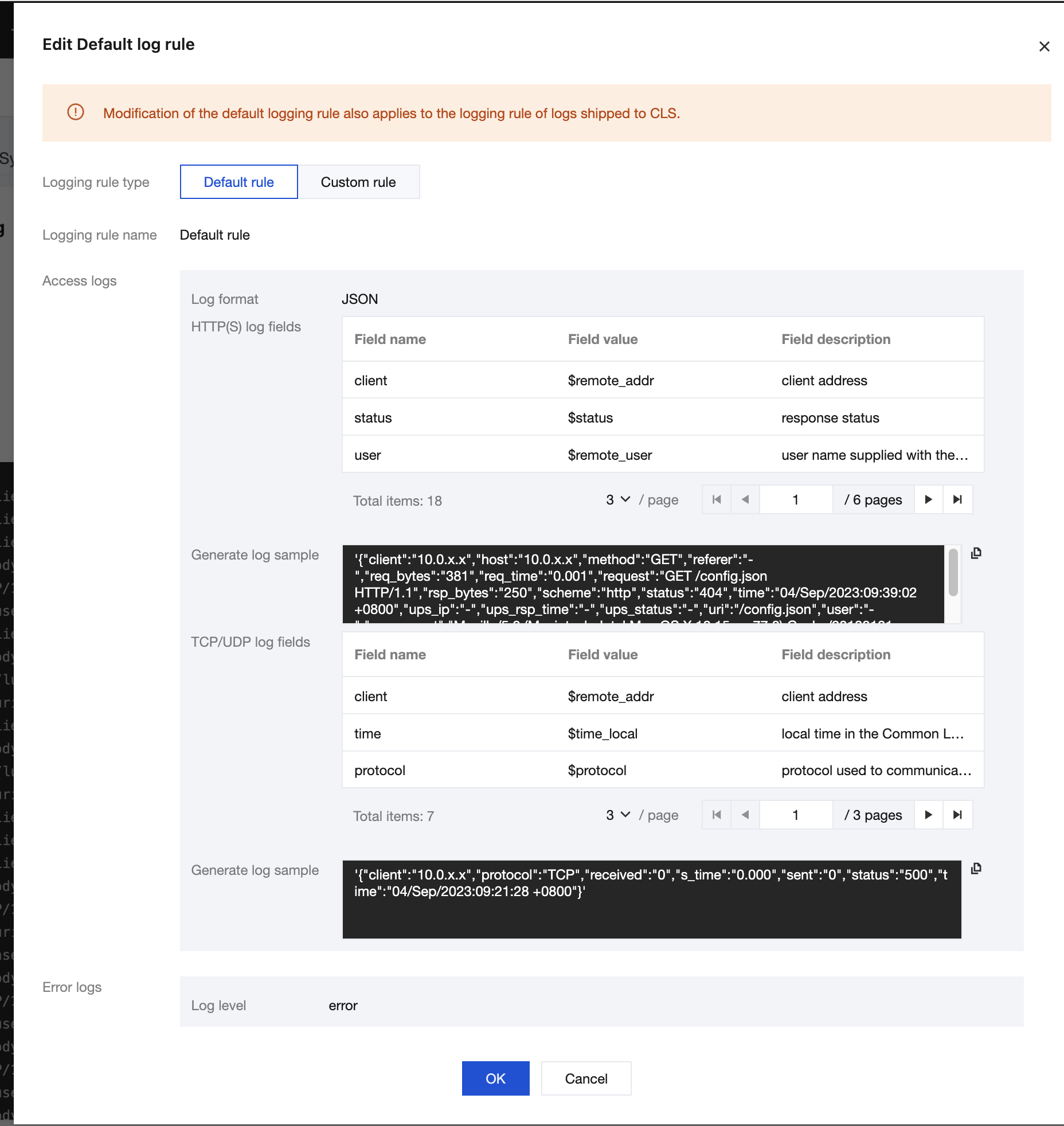
Log Fields
The following table lists the user access log fields supported by the Cloud Native Intelligent Gateway. You can configure them as needed.
HTTP/HTTPS Log Fields
Field | Description |
$remote_addr | Client address. |
$status | HTTP status code. |
$remote_user | Username provided in Basic Authentication. |
$time_local | Request time. |
$request | Complete request line. |
$body_bytes_sent | Body size of the file sent to the client. |
$request_method | Request method. |
$host | Value of the Host field when a request carries the Host request header or the virtual domain name of the host when the request does not carry the Host request header. |
$upstream_addr | IP address of the backend service. |
$upstream_status | HTTP response code in the response returned by the upstream service. |
$upstream_response_time | Upstream service response duration (in milliseconds), from when the gateway establishes a connection to the backend service and receives data to when it disconnects the connection. |
$scheme | HTTP or HTTPS protocol. |
$url | Request URL. |
$request_length | Request data size, in bytes, including the request line, request header, and request body. |
$bytes_sent | Number of bytes of the response. |
$http_referer | Page source, that is, the URL of the page referenced by the header Referer. |
$http_user_agent | Client agent information. |
$request_time | Request duration, from when a request is received to when response data is sent, including receiving request data, processing the request, and returning response data. |
TCP/UDP Log Fields
Field | Description |
$remote_addr | Client IP address. |
$time_local | Request time, that is, the time required for processing the request and printing logs. |
$protocol | Layer 4 protocol: TCP or UDP. |
$status | Connection status. Options: 200, 400, 403, 500, 502, and 503. |
$bytes_sent | Number of bytes of the response from the gateway to the client. |
$bytes_received | Number of bytes received by the gateway from the client, including the response header and response body. |
$session_time | Session duration (in milliseconds). |
Nginx Variables
The following Nginx variables are currently not supported:
1. The following specific variables:
$connection_time
$http3
$jwt_claim_
$jwt_header_
$jwt_payload
$memcached_key
$mqtt_preread_clientid
$mqtt_preread_username
$otel_parent_id
$otel_parent_sampled
$otel_span_id
$otel_trace_id
$proxy_protocol_tlv_
$proxy_protocol_tlv_aws_vpce_id
$proxy_protocol_tlv_azure_pel_id
$proxy_protocol_tlv_gcp_conn_id
$secure_link
$secure_link_expires
$session_log_binary_id
$session_log_id
$slice_range
$ssl_alpn_protocol
$ssl_curve
$upstream_queue_time
2. Variables starting with geo
Help and Support
Was this page helpful?
You can also Contact sales or Submit a Ticket for help.
Help us improve! Rate your documentation experience in 5 mins.
Feedback