Quota-Aware Degradation
Download
Focus Mode
Font Size
Scenarios
Quota-aware degradation is configured at the model API level. When a consumer's Token quota or request quota is about to be exhausted, requests are automatically downgraded to a fallback service to prevent request failures due to insufficient quotas. This applies to the following scenarios:
Cost Control: When the Token quota for a high-cost model service is about to be exhausted, the system automatically downgrades to a low-cost fallback service to avoid exceeding the budget.
Quota Sharing: When multiple consumers share the same quota pool, the system automatically downgrades rather than directly reporting an error after the quota is exhausted.
Tiered Service: VIP consumers use services with high quotas, while regular consumers are downgraded to basic services when their quotas are insufficient.
Budget Management: It controls model invocation volume based on monthly/quarterly budgets to prevent overspending.
Note:
Quota-aware degradation is an enhanced feature for global cross-service Fallback. You must enable it in the Fallback configuration of the model API.
Prerequisites
1. The AI gateway instance has been created and is in a running state.
2. A consumer has been configured and assigned quotas, such as a Token limit or a request limit.
3. At least two model services (a primary service and a fallback service) have been created.
4. Global cross-service Fallback has been enabled and a fallback service chain has been configured.
Operation Steps
Configuring Quota-Aware Degradation in the Model API
Step 1: Go to the Model API Configuration Page
1. Log in to the Microservices Platform console. In the left sidebar, click AI Gateway > Instance List.
2. On the instance list page, click the ID of the gateway instance you want to configure to go to its basic information page.
3. In the left sidebar, click Model Management, and then click the Model API tab.
4. Click New or edit an existing API.
5. After completing the basic information configuration, go to Step 2: Select Model Service.
Step 2: Enable Global Cross-Service Fallback
1. In the Global Cross-Service Fallback section, enable the Global Cross-Service Fallback switch.
2. Configure a fallback service chain.
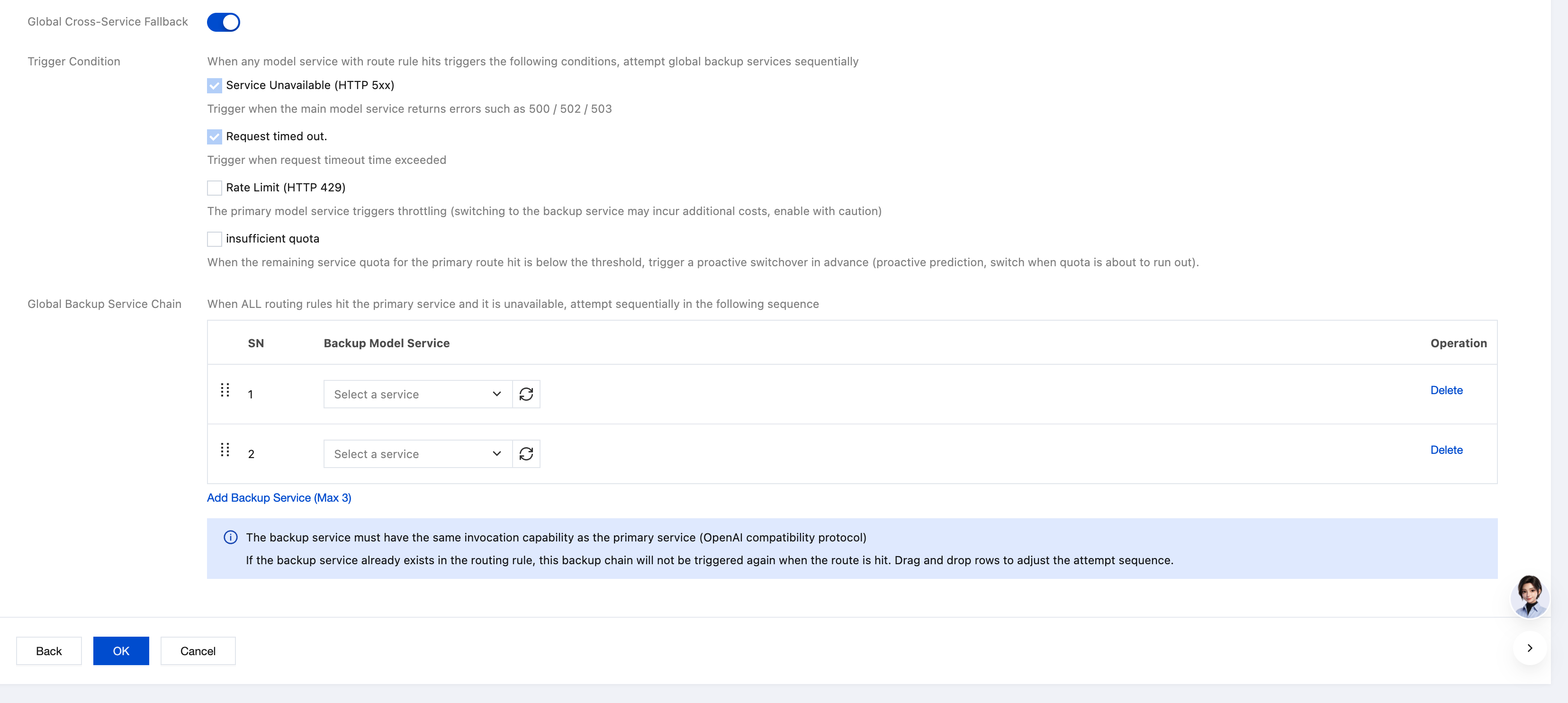
Step 3: Configure Insufficient Quota Trigger Conditions
After the Quota Insufficiency trigger condition is enabled, you need to configure specific quota thresholds:
Configuration Parameter Description:
Parameter | Required | Description |
Quota Threshold | Yes | Triggers degradation when the remaining quota falls below this percentage. Default: 10%. Recommended: 10%-20%. |
Check Dimension | Yes | Supports two types: Recommended policy: Trigger when either RPM or TPM is insufficient. Strict policy: Trigger only when both RPM and TPM are insufficient. |
Recommended Quota Threshold:
Threshold | Description | Applicable Scenarios |
5% | Aggressive degradation trigger timing, aiming to use up quota as much as possible. | Cost-sensitive scenarios aiming to maximize utilization of purchased quotas. |
10% | Recommended degradation trigger timing | Recommended value for most scenarios |
20% | Conservative degradation trigger timing with advance preparation. | High-availability-first scenarios requiring buffer reservation. |
50% | Very conservative degradation trigger timing | Critical business scenarios where degradation begins when quota is sufficient. |
Step 4: Save the Configuration
Click OK to save the Model API configuration. The quota-aware degradation rule takes effect immediately.
Viewing Fallback Records
On the Fallback Records Tab of the Model API details page, you can view all Fallback events, including those triggered by quota-aware degradation.
Must-Knows
1. Quota Pre-configuration: Quota-aware degradation depends on the quota configuration of consumers or APIs. If no quota is configured, quota-aware degradation is not triggered.
2. Threshold Setting: It is recommended to set the quota threshold to 5%-20%. A threshold that is too low may cause a large number of requests to fail due to quota exhaustion, while a threshold that is too high may cause the system to switch to the fallback service too early.
3. Difference Between Degradation and Rate Limiting:
Rate Limiting: Requests that exceed the quota are directly rejected (returning 429).
Quota-aware Degradation: When the quota is about to be exhausted, requests are migrated to a fallback service (returning a normal response).
4. Dual Degradation Combination: Quota-aware degradation can be combined with trigger conditions such as service unavailability and connection timeout to achieve a more comprehensive degradation policy.
5. Cost Control: Quota-aware degradation is particularly suitable for cost-sensitive scenarios. It can automatically switch to a low-cost service when the quota for a high-cost service is exhausted, thereby avoiding budget overruns.
Help and Support
Was this page helpful?
You can also Contact sales or Submit a Ticket for help.
Help us improve! Rate your documentation experience in 5 mins.
Feedback