Security Assertion Markup Language (SAML)
ダウンロード
フォーカスモード
フォントサイズ
SAML, which stands for Security Assertion Markup Language, is a markup language for security assertions. Its latest version is 2.0.
It is an XML-based standard for exchanging authentication and authorization data between different security domains. SAML 2.0 can help us implement Single Sign-On (SSO) across domains.
Term Description
Service Provider (SP): an entity that provides services. For example, the software services we use in our daily lives, such as email services, Tencent Cloud, and Tencent Meeting, are all provided by SPs.
Identity Provider (IdP): an entity that provides identity services and has the capability to verify the identity of users. For example, when we use WeCom to scan a QR code to log in to Tencent Meeting, WeCom can be understood as the IdP. The SAML protocol strictly specifies the format of tokens transmitted between the IdP and the SP.
SAMLRequest: an identity verification request generated by the SP and sent to the IdP, so it is also commonly called AuthnRequest.
SAMLResponse: SAMLResponse is an authentication result envelope issued to the SP by the IdP, encapsulating the actual identity assertion SAMLAssertion.
SP-initiated: indicates that the entire authentication process is initiated by the SP. When a client directly accesses the SP's resources or website, the process of redirecting to the IdP and then back is called SP-initiated SSO.
IdP-initiated: indicates that the entire authentication process is initiated by the IdP, which directly provides a SAML response to the SP to verify the user identity.
SAML Authentication Process
The following describes a complete SP-initiated authentication process. IdP-initiated can be understood as a simplified version of SP-initiated.
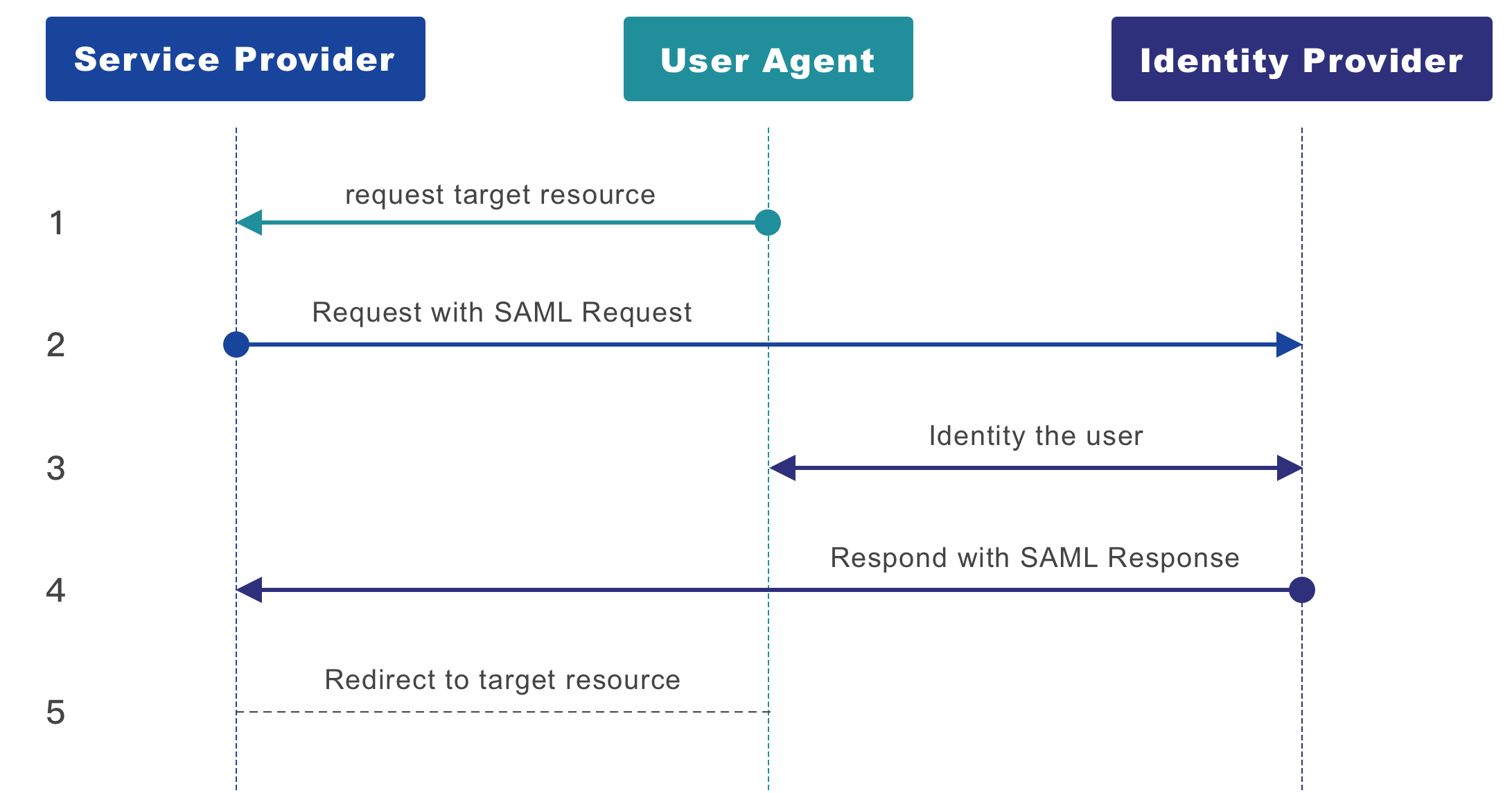
1. The user opens the SP URL, for example, accessing Tencent Cloud.
2. After receiving the request, the SP carries the SAMLRequest to the IdP. The format of SAMLRequest will be provided later.
3. After receiving the SAMLRequest, the IdP verifies the user identity. Tencent OneID checks whether the current user is logged in. If not, it redirects to the login page.
4. After the IdP verifies the identity, it redirects to the SP with a SAMLResponse. The format of SAMLResponse will be provided later.
5. The SP verifes the SAMLResponse. After verifcation, it extracts the user information carried in the SAMLResponse and alows the corresponding
user to access.
The following is an XML example of a SAMLRequest.
<saml2p:AuthnRequest xmlns:saml2p="urn:oasis:names:tc:SAML:2.0:protocol" AssertionConsumerServiceURL="https://www.sp.com/saml/acs" Destination="https://www.Idp.com/saml/authn" ForceAuthn="false" ID="_7xvtiohf7xupg9ulo8an1g4bemeranpifvup" IsPassive="false" IssueInstant="2019-07-25T09:59:02.467Z" ProtocolBinding="urn:oasis:names:tc:SAML:2.0:bindings:HTTP-POST" Version="2.0"><saml2:Issuer xmlns:saml2="urn:oasis:names:tc:SAML:2.0:assertion">https://www.sp.com</saml2:Issuer></saml2p:AuthnRequest>
SAMLRequest typically uses
saml2p:AuthnRequest as the top-level XML element name, along with some attribute descriptions.xmlns:saml2p is generally fixed as urn:oasis:names:tc:SAML:2.0:protocol.AssertionConsumerServiceURL indicates the API address where the SP receives SAML assertion responses, such as https://www.sp.com/saml/acs in this example.Destination indicates the address where the IdP receives SAML requests, such as https://www.idp.com/saml/authn in this example.saml2:Issuer indicates the identity of the SP that initiates the SAML request. In this example, it is https://www.sp.com.In actual requests, the SAMLRequest also needs to be Base64-encoded. The SAMLRequest from the example above, after Base64 encoding, is as follows:
fZFBT8JAEIXvJv6Hzd5pSwPWbigJSowkGhuoHryYpQywSTu77uwWfr6lYISYcJ158+bNNyOSdRUbMfFui3P49kCO7esKSRw7GfcWhZakSKCsgYQrxWLy+iLiIBLGaqdLXXE2IQLrlMZHjeRrsAuwjSrhff6S8a1zhkQY7na7gExQ6jo8uIeyJM6m7UqF8jB7qVSrc+khIGdP2pbQhc34WlYEnM2mGf9K9k1rsF0ne282qa/0vcT+ZrCENolEo9aNN62UckmkGvgbJvIwQ3ISXcbjqJ/2oqQXD4soFcNURHEwuEs+OctPhz4oXCncXKeyPIpIPBdF3svfFgVnH2Cpu7AV8PHtDWOjDrDoEthz5tfN5S9oPv6PdRSem7ZrToXLB49/AA==
When the SP is not logged in, it needs to redirect to the IdP's address for identity verification. The final generated URL is as follows:
https://www.Idp.com/saml/authn?SAMLRequest=fZFBT8JAEIXvJv6Hzd5pSwPWbigJSowkGhuoHryYpQywSTu77uwWfr6lYISYcJ158+bNNyOSdRUbMfFui3P49kCO7esKSRw7GfcWhZakSKCsgYQrxWLy+iLiIBLGaqdLXXE2IQLrlMZHjeRrsAuwjSrhff6S8a1zhkQY7na7gExQ6jo8uIeyJM6m7UqF8jB7qVSrc+khIGdP2pbQhc34WlYEnM2mGf9K9k1rsF0ne282qa/0vcT+ZrCENolEo9aNN62UckmkGvgbJvIwQ3ISXcbjqJ/2oqQXD4soFcNURHEwuEs+OctPhz4oXCncXKeyPIpIPBdF3svfFgVnH2Cpu7AV8PHtDWOjDrDoEthz5tfN5S9oPv6PdRSem7ZrToXLB49/AA==
SAMLResponse Description
When the IdP receives a SAMLRequest initiated by the SP, it performs identity verification within the IdP's domain. After the login is completed, it will send the SAMLResponse to the SP, carrying the identity of the current logged-in user.
The following is an XML example of a SAMLResponse:
<saml2p:Response xmlns:saml2p="urn:oasis:names:tc:SAML:2.0:protocol" Destination="https://www.sp.com/saml/acs" ID="_80ff50f0-73e9-4357-934e-15939aa197ae" InResponseTo="_7xvtiohf7xupg9ulo8an1g4bemeranpifvup" IssueInstant="2019-07-25T09:59:01.653Z" Version="2.0"><saml2:Issuer xmlns:saml2="urn:oasis:names:tc:SAML:2.0:assertion">https://www.Idp.com</saml2:Issuer><saml2p:Status><saml2p:StatusCode Value="urn:oasis:names:tc:SAML:2.0:status:Success"/></saml2p:Status><saml2:Assertion xmlns:saml2="urn:oasis:names:tc:SAML:2.0:assertion" ID="_ee51e413-cb8c-4cff-a833-8e5ab5a65712" IssueInstant="2019-07-25T09:59:01.653Z" Version="2.0"><saml2:Issuer>https://www.Idp.com</saml2:Issuer><ds:Signature xmlns:ds="http://www.w3.org/2000/09/xmldsig#"><ds:SignedInfo><ds:CanonicalizationMethod Algorithm="http://www.w3.org/2001/10/xml-exc-c14n#"/><ds:SignatureMethod Algorithm="http://www.w3.org/2000/09/xmldsig#rsa-sha1"/><ds:Reference URI="#_ee51e413-cb8c-4cff-a833-8e5ab5a65712"><ds:Transforms><ds:Transform Algorithm="http://www.w3.org/2000/09/xmldsig#enveloped-signature"/><ds:Transform Algorithm="http://www.w3.org/2001/10/xml-exc-c14n#"/></ds:Transforms><ds:DigestMethod Algorithm="http://www.w3.org/2000/09/xmldsig#sha1"/><ds:DigestValue>SeLenKpDFTFSrd4RodgCxUbXi1I=</ds:DigestValue></ds:Reference></ds:SignedInfo><ds:SignatureValue>fEN31jRzjpGPSFEazXSYIu8mlhSrB/2rhlGmkQw8vbgUlHveU4BfX91knG11yF4HcLd5686WYWCS9P9szLvcxuQlVi1z5NiIFs967Z3hCZuU6mP86/5qEJVOVeUnaS39YtP8Jwxoev2d4QJjJ0+9+9ifOQkf4bhM+9b8Q1/3A5Q4xqjvArHTwGQMnjpi5hJQprkreChvNXGu3vemzHb5HEGkQHsbwavuA65VDwQ3sxdQbbDjQrXMIZWlKt51IXHhDVrlCwVIDXPCrN1e3wJrkLPitAUbhDCcRdVvmc8a5lcmvX4SkDn7PwzmFAf1rXACCyvKft5YycYnN7zHkymLCA==</ds:SignatureValue><ds:KeyInfo><ds:X509Data><ds:X509SubjectName>C=CN,L=Beijing,CN=com,CN=yufuid</ds:X509SubjectName><ds:X509Certificate>MIIC/DCCAeSgAwIBAgIIBjRkHLoMipUwDQYJKoZIhvcNAQEFBQAwPjEPMA0GA1UEAwwGeXVmdWlkMQwwCgYDVQQDDANjb20xEDAOBgNVBAcMB0JlaWppbmcxCzAJBgNVBAYTAkNOMB4XDTE5MDcyMzEwNDA1NloXDTIwMDcyMjEwNDA1NlowPjEPMA0GA1UEAwwGeXVmdWlkMQwwCgYDVQQDDANjb20xEDAOBgNVBAcMB0JlaWppbmcxCzAJBgNVBAYTAkNOMIIBIjANBgkqhkiG9w0BAQEFAAOCAQ8AMIIBCgKCAQEA0dk/S9XEiBio3CRccVIsjFX4KBGZPfz47jrm9TF1v3t+7Cy7WkYD6EW/rQYi7ORfRTVx8m8UsiB04MjwHARtVdDPP9COxfjkVp5h5nQv1P6WYtZjIFDiIBbS0of1YmeHzCixxGQDk+PL/M19aey9DoRVg9MjcQYppjoiYbJhqj/YL2kCO5QgaquPptBCVKcMpqE1BCggPLyH3M1V7/QJXzRKBs/iOO/3yUnapftK/ysZeWMZ2hEGlB/AW3OP9pO2vijONqxbHqTFyngyYof+QRl7F5KsmZNP5Pd6SoYo0MtrEsDVIchdx9Mb1iCLZfiHqbq8s4mr7+alvuyBE1lW+QIDAQABMA0GCSqGSIb3DQEBBQUAA4IBAQAdz05eOepSmE+IFMdwLkkD5oDBBwC16ie5BpXBxFAYxEYrQ8sZPmjTIhG+tQe3lnkxmrgyPbq1pevybGl3aR9dPWysg3ps2pK+pJQt6aRHQbNhy+fFT4uqZzVXy/61LPt8OhhhzjGVoApIh53A4OuffV2B1PueBChjrrKEZGHk5iVuzv1kEtGu0NIKbTXBcG7ZfX+2pKYYKw3AKllFDSBL/ePFjUh5iXJWwwGflqwtQjmZYZt4k+UMDIW7L6r5FlDNc4JGjH1gWOXpCZ6EkGR1rAmK2Fnv1/5LTRVYrMlGYlCx29DhM7GVnpgfTmua15E3dW+WyS4TOM8UnjavAIBa</ds:X509Certificate></ds:X509Data></ds:KeyInfo></ds:Signature><saml2:Subject><saml2:NameID Format="urn:oasis:names:tc:SAML:1.1:nameid-format:unspecified">sanzhang</saml2:NameID><saml2:SubjectConfirmation Method="urn:oasis:names:tc:SAML:2.0:cm:bearer"><saml2:SubjectConfirmationData InResponseTo="_7xvtiohf7xupg9ulo8an1g4bemeranpifvup" NotOnOrAfter="2019-07-25T10:54:01.647Z" Recipient="https://www.sp.com/saml/acs"/></saml2:SubjectConfirmation></saml2:Subject><saml2:Conditions NotBefore="2019-07-25T09:54:01.647Z" NotOnOrAfter="2019-07-25T10:54:01.647Z"><saml2:AudienceRestriction><saml2:Audience>https://www.sp.com</saml2:Audience></saml2:AudienceRestriction></saml2:Conditions><saml2:AuthnStatement AuthnInstant="2019-07-25T09:59:01.653Z"><saml2:AuthnContext><saml2:AuthnContextClassRef>urn:oasis:names:tc:SAML:2.0:ac:classes:Password</saml2:AuthnContextClassRef></saml2:AuthnContext></saml2:AuthnStatement></saml2:Assertion></saml2p:Response>
There are many parameters here, so we will not introduce them one by one. Instead, we will highlight a few key fields for explanation:
The
Destination here actually indicates the address where the SP receives SAML responses, such as https://www.sp.com/saml/acs in the example. Be sure to distinguish it from the Destination in the SAMLRequest.NameID indicates the identity of the logged-in user. In this response, the logged-in user is sanzhang.A SAMLResponse has a specified validity period, which is indicated by
NotBefore and NotOnOrAfter. In the example above, the validity period of the response is from 9:54 AM on July 25, 2019 to 10:54 AM on July 25, 2019 (UTC, add eight hours for Beijing time).How SAML Ensures the Response Validity
The IdP needs to generate a key pair and use it to generate a matching certificate, which is then provided to the SP. The SP needs to store the certificate. When the IdP issues a SAMLResponse, it signs the response. When the SP receives the SAMLResponse issued by the IdP, it uses the certificate to verify the validity of the signature.
フィードバック