Best Practices for GB/T 28181 Protocol Access
Download
Focus Mode
Font Size
This document describes how to connect devices that support the GB/T 28181 protocol to ISS.
Prerequisites
IPC or NVR devices that support the GB/T 28181 protocol are prepared.
To ensure successful device access, see Summary of Device Access Failure Causes.
Operation Steps
Creating a Device
1. Log in to the ISS console and click Device Access.
2. Select the target organization and click Add Device. Both manual addition and batch import are supported. This document uses manual addition as an example.
3. After a device is created, its initial status is "Unregistered".
Obtaining Device GB/T 28181 Configuration Information
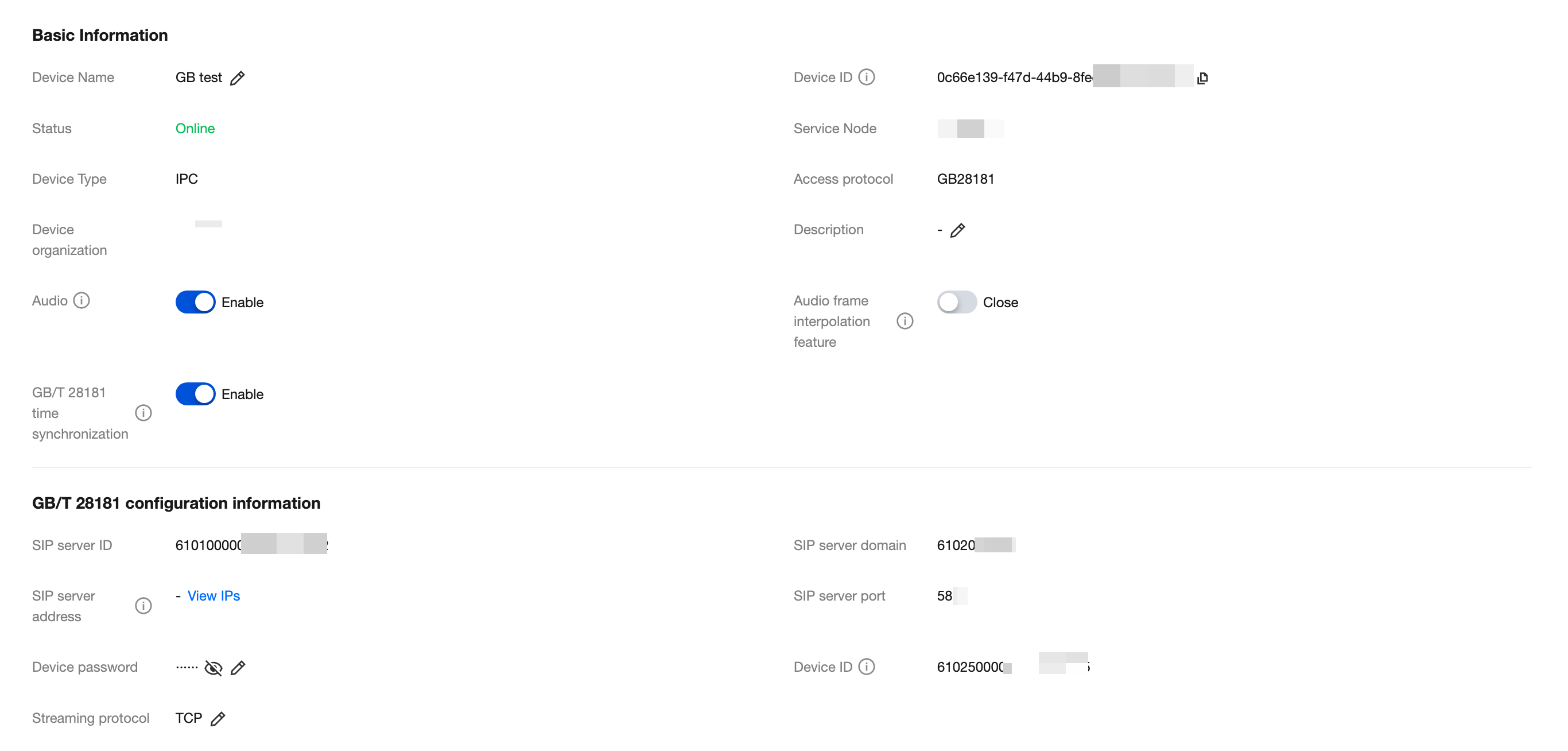
Click the target device name to go to the device details page, and view and record the national standard configuration information generated by the platform.
Note:
When there are many devices, you can use the Export Device Information feature to export device configuration information in batches.
Configuring a Device
Log in to the device Web management page and configure the GB/T 28181 access parameters by referring to the following sections based on the device vendor.
Hikvision Devices (IPC as an Example)
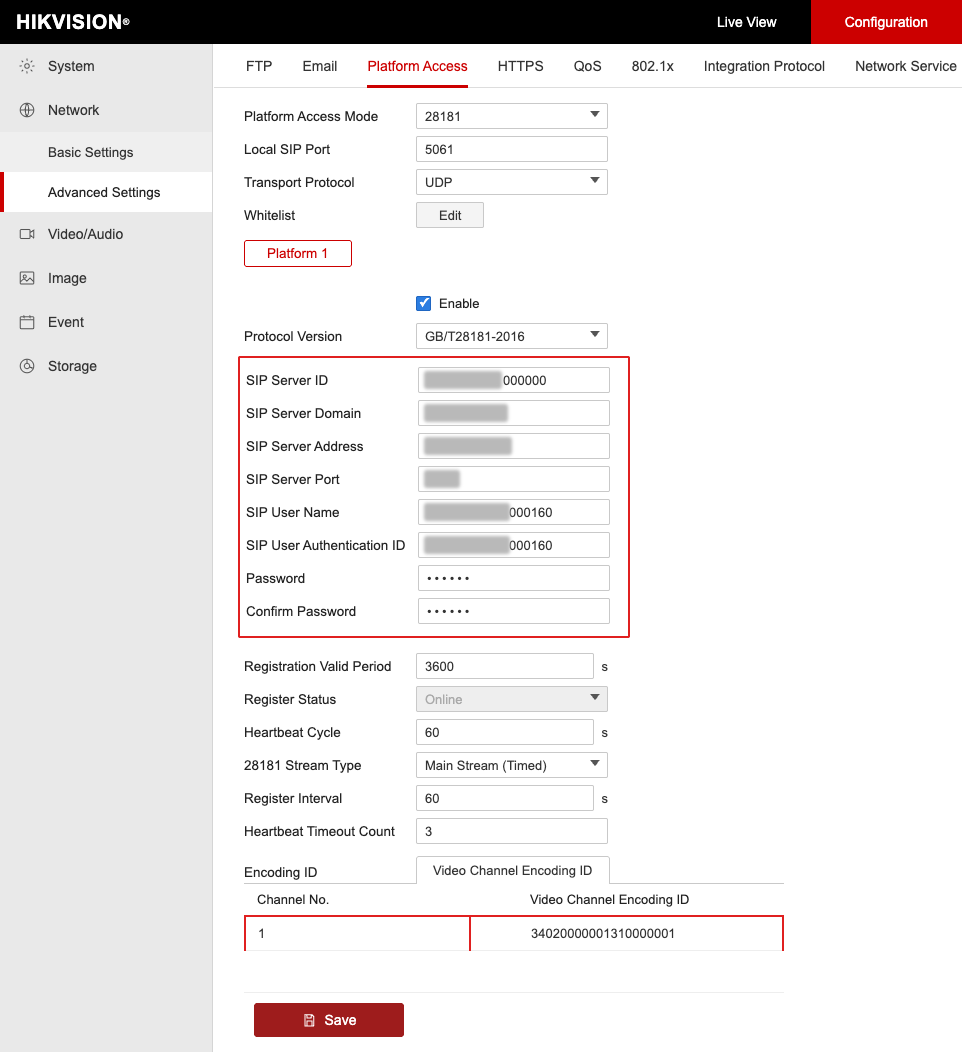
The configuration page is shown in the following figure:
Parameter | Configuration Description |
Local SIP Port | Change it to another port number such as 5061 or 5062, with a value range of 0 to 65535. |
Transport Protocol | If the configuration page provides this option, select TCP. |
Protocol Version | Select GB/T28181-2016. |
SIP Server ID | Enter the SIP server ID generated by the platform. |
SIP Server Domain | Enter the SIP server domain generated by the platform. It is the first 10 digits of the SIP server ID. |
SIP Server Address | Enter the SIP server domain name or IP generated by the platform. |
SIP Server Port | Enter the SIP server port number generated by the platform. |
SIP User Name and SIP Authentication ID | Enter the device ID generated by the platform, for example, 34020000001320000001. |
Password and Password Confirmation | Enter the device password set when the device was created. |
Registration Validity Period | Validity period for device registration on the platform. It is recommended to use the default value of 3600s. |
Heartbeat Interval | Time interval at which the device sends heartbeat information. It is recommended to use the default value of 60s. |
Maximum Number of Timeouts | After the number of consecutive heartbeat timeouts reaches this value, the device cannot establish a connection with the platform. It is recommended to use the default value of 3 times. |
Video Channel ID | Consistent with the SIP user name rule, change digits 11 to 13 to 131, set them in ascending order by channel number without duplication, for example, 34020000001310000001 and 34020000001310000002. |
Dahua Devices (IPC as an Example)
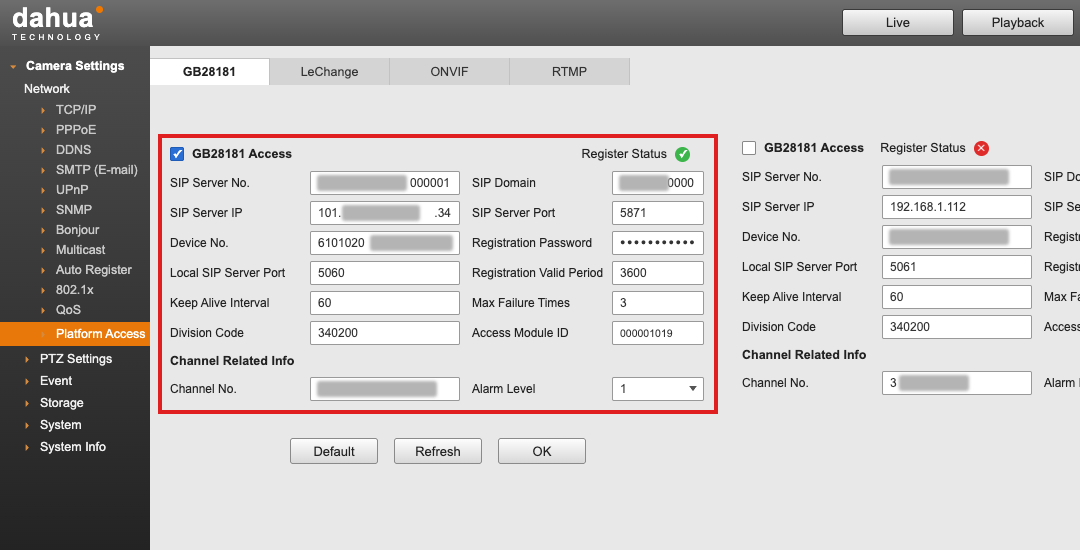
The configuration page is shown in the following figure:
Parameter | Configuration Description |
SIP Server ID | Enter the SIP server ID generated by the platform. |
SIP Server Domain | Enter the SIP server domain generated by the platform. It is the first 10 digits of the SIP server ID. |
SIP Server IP | Enter the SIP server IP address generated by the platform. |
SIP Server Port | Enter the SIP server port number generated by the platform. |
Device ID | Enter the device ID generated by the platform, for example, 34020000001320000001. |
Registration Password | Enter the device password set when creating the device. |
Local SIP Server Port | Change it to another port number such as 5061 or 5062. |
Registration Validity Period | Validity period for device registration on the platform. It is recommended to use the default value of 3600s. |
Heartbeat Interval | Time interval at which the device sends heartbeat information. It is recommended to use the default value of 60s. |
Maximum Number of Timeouts | After the number of consecutive heartbeat timeouts reaches this value, the device cannot establish a connection with the platform. It is recommended to use the default value of 3 times. |
Video Channel ID | Consistent with the device ID rule, change digits 11 to 13 to 131, set them in ascending order by channel number without duplication, for example, 34020000001310000001 and 34020000001310000002. |
Uniview Devices (NVR as an Example)
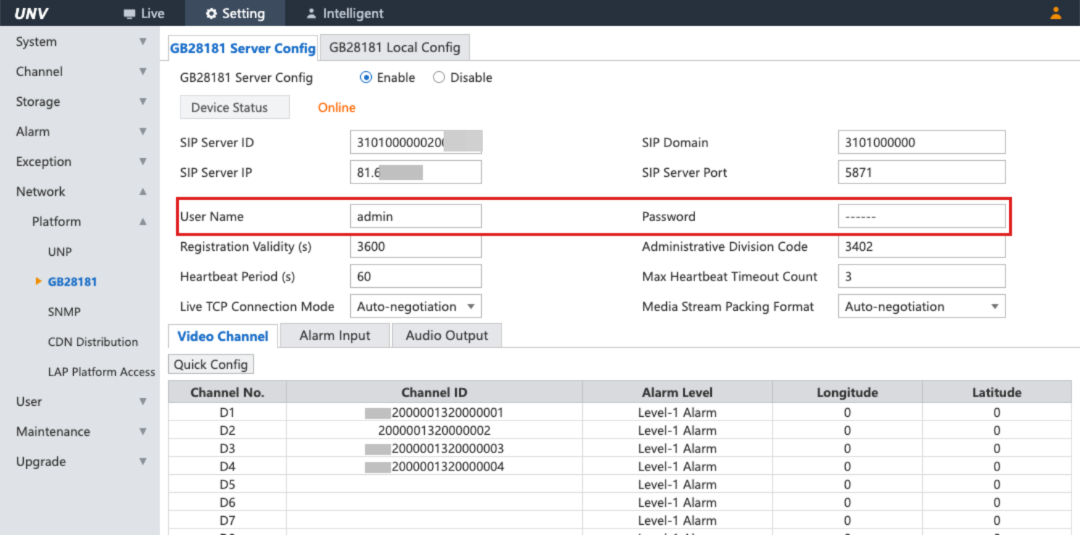
The configuration page is shown in the following figure:
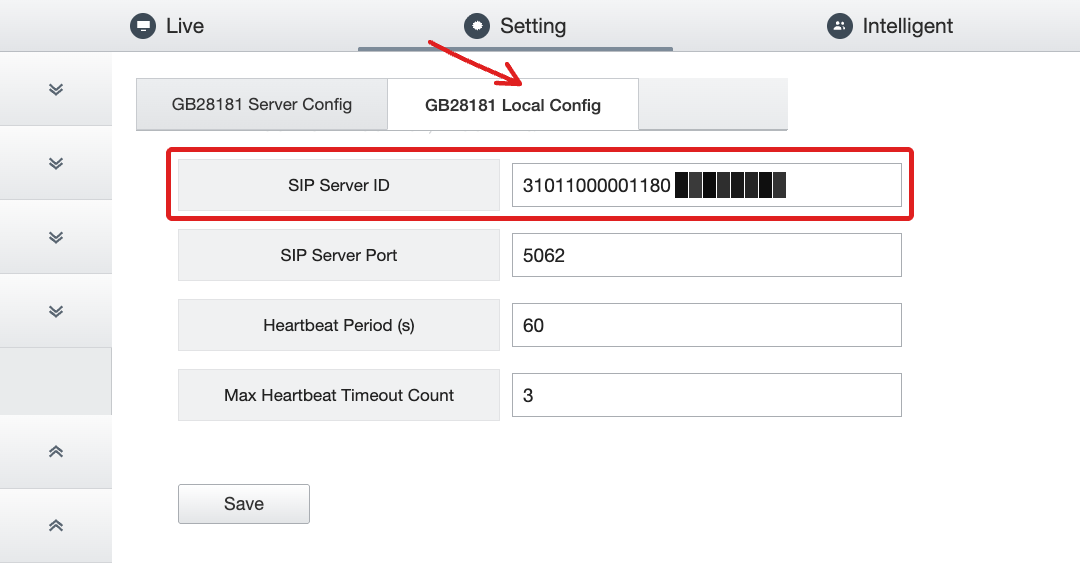
Parameter | Configuration Description |
SIP server ID | Enter the SIP server ID generated by the platform. |
SIP server domain | Enter the SIP server domain generated by the platform. It is the first 10 digits of the SIP server ID. |
SIP Server IP address | Enter the SIP server IP address generated by the platform. |
SIP Server Port | Enter the SIP server port number generated by the platform. |
Username. | Enter the username for logging in to the device Web management page. |
Password | Enter the password for logging in to the device Web management page. |
Registration Validity Period | Validity period for device registration on the platform. It is recommended to use the default value of 3600s. |
Heartbeat Interval | Time interval at which the device sends heartbeat information. It is recommended to use the default value of 60s. |
Maximum Number of Timeouts | After the number of consecutive heartbeat timeouts reaches this value, the device cannot establish a connection with the platform. It is recommended to use the default value of 3 times. |
Video Channel ID | Consistent with the SIP user name rule, change digits 11 to 13 to 131, set them in ascending order by channel number without duplication, for example, 34020000001310000001 and 34020000001310000002. |
Local GB/T 28181 Configuration | Enter the device ID generated by the platform, for example, 34020000001320000001. |
Configuring Audio and Video Parameters (Optional)
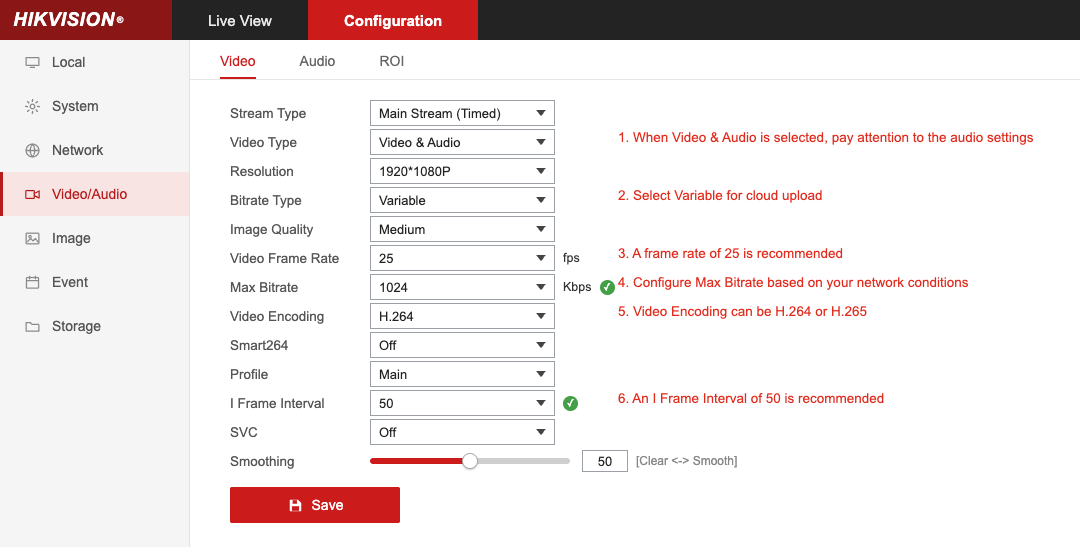
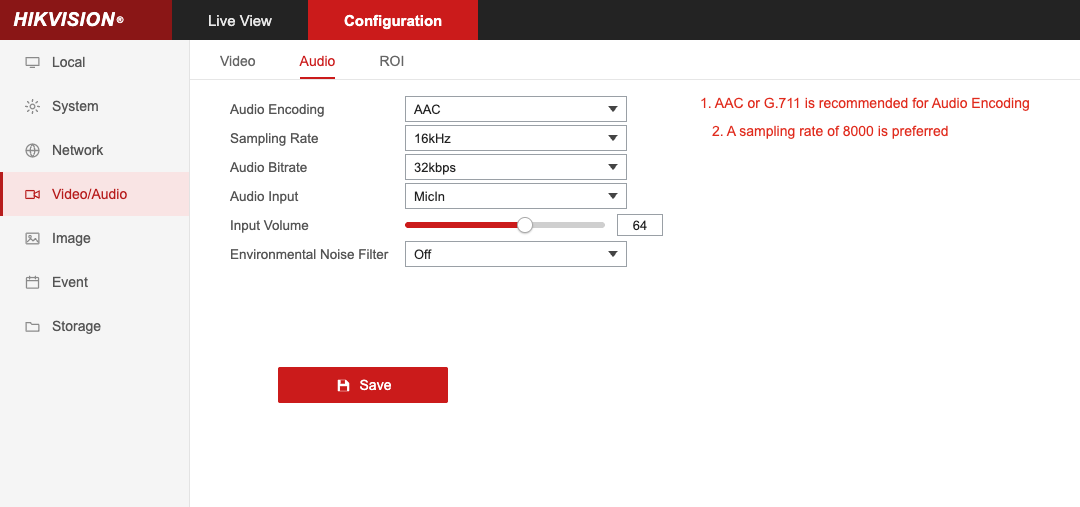
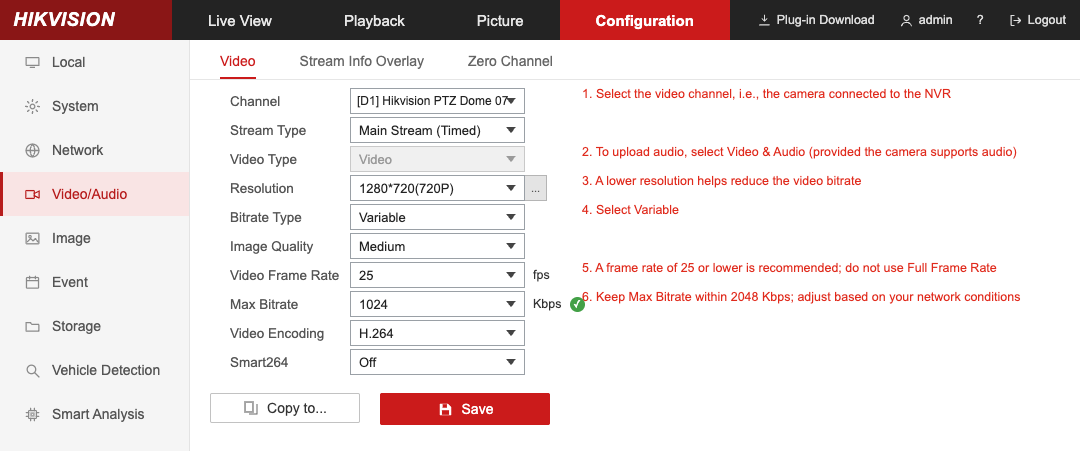
When network resources are insufficient or fluctuate significantly on the same network, video stuttering or live streaming failures may occur. It is recommended to configure audio and video parameters by referring to the following methods.
IPC Audio and Video Parameters (Hikvision as an Example)
The configuration methods for devices from other vendors are similar.
NVR Audio and Video Parameters (Hikvision as an Example)
The configuration methods for devices from other vendors are similar.
Verifying Access Results
After completing the device configuration, return to the ISS console and refresh the Device Access page. If the device status is displayed as Online, the device registration is successful.
Must-Knows
Do not enable any proprietary encoding from the vendor, or encoding formats such as smart264, smart265, and SVC. Otherwise, the device cannot be registered successfully.
Do not use the default local SIP port 5060 of the device, because this port may be blocked by the router. It is recommended to change it to another port number such as 5061 or 5062.
The video channel ID must not be the same as the SIP user name (device ID) used for device registration. Otherwise, a "parameter error" will be prompted. The channel IDs of different devices are independent of each other and are not affected.
Some vendors' devices do not support modifying the configuration of their connected cameras on the NVR configuration page. It is recommended to log in to the IPC device's Web management page for configuration.
Help and Support
Was this page helpful?
You can also Contact sales or Submit a Ticket for help.
Help us improve! Rate your documentation experience in 5 mins.
Feedback