tencent cloud

Overdue Payments
Last updated: 2025-12-31 18:30:02
Overdue Payments
Last updated: 2025-12-31 18:30:02
Note:
If you are a customer of a Tencent Cloud partner, the rules regarding resources when there are overdue payments are subject to the agreement between you and the partner.

CVM Overdue Payments

Alarms

Instance Billing Mode
Alarm Type
Description
Yearly/Monthly subscription
Expiration alarm
The cloud resources will push expiration alarm messages to you on the 7th day, 5th day, 3rd day, and 1st day before expiration, as well as on the expiration date. The alarm messages will be sent through email or Short Message Service (SMS) to the creator of the Tencent Cloud account, global resource collaborators, and financial collaborators.
Overdue payment alarm
Tencent Cloud will push alarm messages about isolation due to overdue payment to you on and after the day the cloud resources expire. The alarm messages will be sent through email or SMS to the creator of the Tencent Cloud account and all collaborators.
Pay-as-you-go
Overdue payment reminder
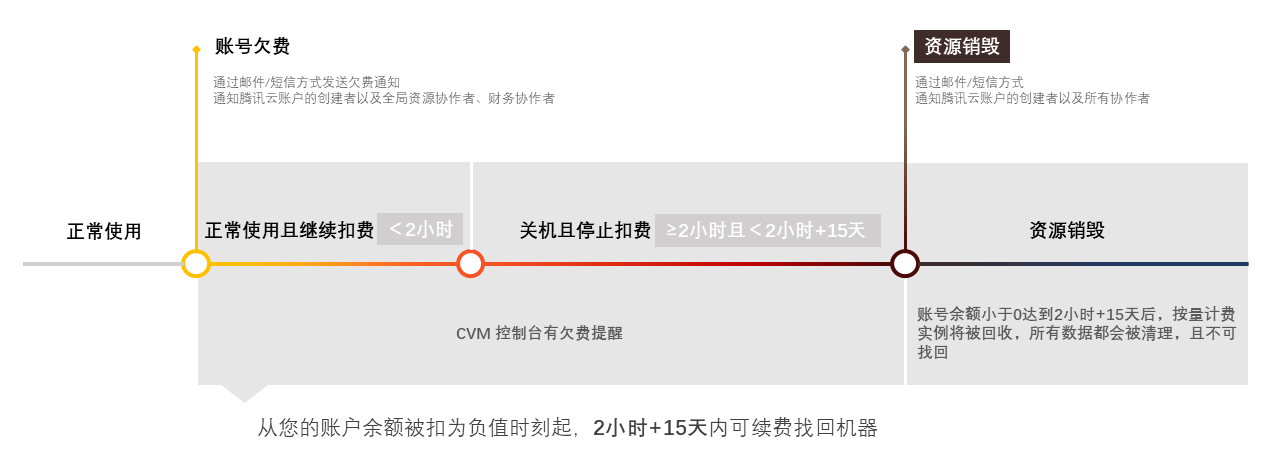
The system will deduct fees for pay-as-you-go resources at each full hour. When your account balance becomes negative, we will notify the creator of the Tencent Cloud account, as well as global resource collaborators and financial collaborators through email and SMS.
Overdue payment alarm
This feature is disabled by default. If you need to use this feature, see Balance Alarm Guide.
Note:
For yearly/monthly subscription instances:
The system will send you renewal reminder notifications 7 days before the expiration of cloud service resources.
If your account balance is sufficient and you have enabled auto-renewal, the auto-renewal will be performed for the instance on the expiration date.

For pay-as-you-go instances:
Promptly terminate
pay-as-you-go
resources when they are no longer used, to avoid further charges.
Your actual resource consumption may change continuously. Therefore, the balance alarm may have a certain degree of error.
When instances are released due to expiration, we will send notifications through email or SMS to the creator of the Tencent Cloud account and all collaborators.

Handling of Expiration and Overdue Payments

When your yearly/monthly subscription instance expires without renewal or when your account has an overdue payment, the process of moving the instance to the recycle bin is described in the following table:
Instance Billing Mode
Yearly/Monthly Subscription
Pay-as-You-Go
Reclaim Mechanism and
Handling of Overdue Payments
If your CVM instances are not renewed before expiration (including the expiration date), the system will suspend the service within about 48 hours after expiration (isolating the device without shutting it down and with data retained), and the CVM instances will be moved to the recycle bin.
From the moment your account balance becomes negative, the CVM instances can continue to be used and charged for up to 2 hours. After 2 hours, the instances will be automatically shut down, billing will stop, and the instances will be moved to the recycle bin.

Fee Description
CPU and memory are not charged.
After service suspension, pay-as-you-go cloud disks are unavailable, and only data is retained. The instances will continue to be charged based on the general billing standard until the data is permanently cleared.
When the network billing mode is postpaid by hourly bandwidth or hourly traffic billing mode, the service can continue to be used and charged within 2 hours after the overdue payment. After 2 hours, the service will be suspended.
Retention Period
Within 15 days after being moved to the recycle bin.
Retention Period
During the retention period, you can still renew and restore the instances in the recycle bin.
Note:
The renewal cycle start time for instances restored via renewal is the end time of the last cycle.
During the retention period, you can top up your account balance to a value greater than 0. At this time, billing will continue, and you can start the instance.
Expiration Handling
After the retention period expires, the following resources will be released automatically:
Common public IP addresses
CPU and memory
Non-elastic cloud disk and data
Warning:
For the impact of overdue payments of the account on elastic cloud disks and EIP instances, see Cloud Disk Overdue Payments and EIP Overdue Payments.
Once CPU, memory, and cloud disk data are released, the data cannot be restored. You can back up your data by creating snapshots or custom images in advance.
Mounting Relationship
After a CVM instance is moved to the recycle bin, its mounting relationships with Cloud Load Balancer (CLB) instances, elastic cloud disks, and basic network connectivity will not be proactively removed for a period of time.
Operation Limits
You can only perform the following operations for instances in the recycle bin: renewing instances, terminating/returning instances and creating images (except for special instance types).
Note:
For pay-as-you-go instances that have been moved to the recycle bin, the restoration operation cannot be performed when the account has an overdue payment. Perform the renewal operation first.

Public Network Bandwidth Overdue Payments

Bill-by-Traffic Network
Monthly Bandwidth Subscription Network

Alarms

Alarm Type
Description
Balance alarm
Due to the high variability and unpredictability of data traffic consumption, the system does not provide the balance alarm feature.
Overdue payment alarm
From the moment the balance becomes negative, you may continue using the bill-by-traffic network and incur charges for 2 hours. After 2 hours, the pay-as-you-go network service will be suspended. When the account balance is topped up to greater than 0, the bill-by-traffic network service will be restored. Check your network settings and restore the binding relationship between the affected hosts and CLB instances.
Note:
For traffic billing details, see Public Network Billing Mode.

Handling of Overdue Payments

If it is a common public IP address, the handling of overdue payments is the same as that of the pay-as-you-go CVM instances mentioned above.
If it is an EIP instance, see EIP overdue payments for the handling of overdue payments.
If it is a common public IP address, the handling of overdue payments is the same as that of the yearly/monthly subscription CVM instances mentioned above.
If it is an EIP instance, see EIP Overdue Payments for the handling of overdue payments.

Custom Image Overdue Payments

When the account has overdue payments, the custom image feature will be disabled, and new custom images cannot be created.
After the account has overdue payments, the capacity of the snapshots associated with custom images that exceed the free quota will continue to be charged until the snapshots are deleted. Except for deletion, image snapshots are retained permanently.
After the deletion of custom images, data cannot be restored.

Was this page helpful?
You can also Contact Sales or Submit a Ticket for help.
Yes
No

Feedback