Setting Up a Tencent SGX Confidential Computing Environment
下载
聚焦模式
字号
最后更新时间: 2026-04-21 11:44:59
本文档由 AI 翻译
Overview
This article introduces how to build a Tencent SGX confidential computing environment in the security-enhanced memory type M6ce instance and use the Intel SGX SDK to verify the SGX feature.
CVM requires public network access. You can choose to assign a public IP address when a CVM is created, or configure EIP for it after the CVM is created.
Note:
This article uses an instance running TencentOS Server 3.1(TK4) as an example. Steps may vary slightly depending on your operating system version. Adjust the steps according to your actual situation.
Install Intel SGXSDK
1. Run the following command to check the kernel version.
uname -a
Check whether the kernel version is earlier than 5.4.119-19.0008.
If yes, run the following command to update the kernel:
Warning:
Upgrading the operating system kernel is a complex and high-risk operation that may lead to system instability or compatibility issues. Before proceeding, it is recommended to back up critical data, familiarize yourself with the upgrade process and potential problems, and proceed with caution.
yum update kernel
If no, proceed to the next step.
2. Run the following command to install the required software packages for SGX runtime, where the default installation directory for the SGX AESM service is /opt/intel/sgx-aesm-service.
When ./sgx_linux_x64_sdk is executed, select an installation directory. It is recommended not to install in the current directory but to /opt/intel/. At this point, the default installation directory for Intel SGX SDK is /opt/intel/sgxsdk. You can refer to the Intel SGX SDK User Manual to develop SGX applications.
4. After installing SGX runtime and Intel SGX SDK, restart the instance. For details, see Restarting an Instance.
Note:
During the restart period, the instance will be unavailable. Therefore, before restarting, make sure that the CVM has stopped processing service requests.
Configure Tencent Cloud SGX remote attestation service
Tencent Cloud SGX remote attestation service adopts a regional deployment. It is recommended that you access the remote attestation service in the region where the SGX CVM instances are located for the best experience.
Must-Knows
Tencent Cloud SGX remote attestation service is deployed in Beijing, Shanghai, Guangzhou, Nanjing, and Singapore regions.
Even if your SGX CVM instances are not in the above regions, you can still properly use the SGX remote attestation service. Simply choose the nearest service in any deployed region to access it, and requests between regions are interoperable, which does not affect feature availability.
Region
[Region-ID]
Beijing
bj
Shanghai
sh
Guangzhou
gz
Nanjing
nj
Singapore
sg
Intel Ice Lake supports only the remote attestation method based on Intel SGX DCAP rather than Intel EPID.
Tencent Cloud SGX remote attestation service upgrade
According to relevant Intel announcements, Intel will completely stop the service of Intel® SGX PCS API version 2 and version 3 at Beijing time 2026-04-30 23:00. If you are currently still using the SGX remote attestation service, please ensure to upgrade to Intel® SGX PCS API version 4 before this time.
To upgrade to Intel® SGX PCS API version 4, you only need to modify the remote attestation service URL in the /etc/sgx_default_qcnl.conf configuration file by replacing v3 with v4. After saving the changes, re-validate the SGX remote attestation feature. For specific configuration modifications, see the Procedure.
Operation Steps
Please follow the steps below to manually modify the file /etc/sgx_default_qcnl.conf
Note:
After the Intel SGXSDK is installed, the default configuration file for the remote attestation service /etc/sgx_default_qcnl.conf will be automatically generated.
/etc/sgx_default_qcnl.conf belongs to the rpm package libsgx-dcap-default-qpl. Its format supports both toml and JSON file formats. The following section will describe how to configure it in both cases.
If you are using JSON to configure /etc/sgx_default_qcnl.conf: Use the VIM editor to open /etc/sgx_default_qcnl.conf, locate pccs_url, and modify the line to the following content:
# To accept insecure HTTPS cert, set this option to FALSE
USE_SECURE_CERT=TRUE
Examples of SGX Feature Verification
Example 1. Start an enclave
The Intel SGX SDK provides sample SGX code for verifying SGX features in the default directory of /opt/intel/sgxsdk/SampleCode. The effect of this sample code (SampleEnclave) is to start an enclave to check whether the installed SGX SDK works normally and whether the confidential memory resource of your SGX CVM instance is available.
1. Run the following command to set the environment variables related to the Intel SGX SDK:
source /opt/intel/sgxsdk/environment
2. Run the following command to compile the sample code
cd /opt/intel/sgxsdk/SampleCode/SampleEnclave &&make
3. Run the following command to run the complied executable file:
./app
If the following result is returned, it indicates that the service has been started successfully.
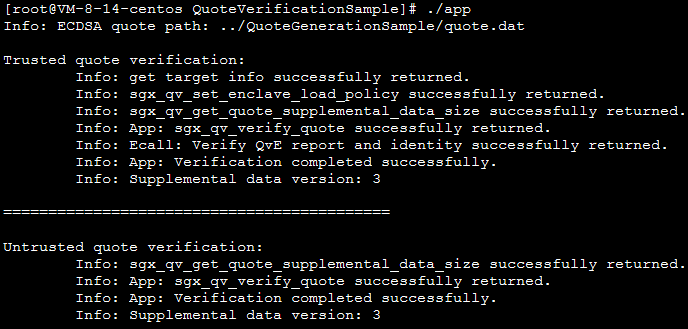
Example 2. Perform remote SGX verification
The Intel SGX code tree provides sample code to verify the SGX remote attestation feature (DCAP). This sample involves generating and verifying quotes, including the quote generator (
1. Run the following command to set the environment variables related to the Intel SGX SDK:
source /opt/intel/sgxsdk/environment
2. Run the following commands in sequence to install Git and download the Intel SGX DCAP code tree: