Enabling Transparent Data Encryption
Download
Focus Mode
Font Size
Scenarios
TencentDB for MySQL provided the TDE feature. Transparent encryption indicated that the data encryption and decryption operations are invisible to users. It supported real-time I/O encryption and decryption of data files, encrypting data before the data is written to disks and decrypting data when the data is read into the memory. This feature met compliance requirements for static data encryption.
Key Management Notes
TencentDB for MySQL does not provide the keys and certificates required for encryption. The keys used by the transparent data encryption feature are generated and managed by KMS. The following describes the key-related instructions.
The transparent data encryption feature is free of charge, but KMS incurs additional fees. For more information, see Billing Overview.
KMS (postpaid edition) was discontinued on December 30, 2024. This means that KMS no longer supports the pay-as-you-go postpaid billing mode and only supports the prepaid billing mode.
For existing users of KMS (postpaid edition), when their accounts are in arrears, they will be unable to obtain keys from KMS, which may prevent tasks such as migration and upgrade from proceeding normally.
For users who have newly purchased KMS (prepaid edition), if their accounts are in arrears, obtaining KMS keys will not be affected during the prepaid period because KMS has already been prepaid for a certain period. Tasks such as migration and upgrade will not be affected either. Pay attention to the KMS key renewal time. If the KMS key is not renewed after expiration, the use of the transparent data encryption feature will also be affected. To manage KMS keys, go to the KMS console.
TencentDB for MySQL instances and Key Management Service (KMS) support different regions. When a key is created, if there is no corresponding region in China in KMS, you can choose to create it in the Guangzhou region; if there is no corresponding region outside China, you can choose to create it in the Hong Kong (China) region.
After the TDE encryption feature is enabled, if no encrypted tables have been created under an account (UIN), the corresponding key information may not be displayed in the key list. If encrypted tables have been created under an account (UIN), the corresponding key information can be viewed. For operations on creating encrypted tables, see FAQ.
Prerequisites
The instance architecture must be a general or dedicated two-node or three-node architecture.
The database versions of the instances must be MySQL 5.7 or MySQL 8.0.
KMS has been activated. If not, you can activate KMS by following the instructions during the data encryption activation process.
KMS key permissions have been granted. If not, you can grant them by following the instructions during the data encryption activation process.
The operating account must have the QcloudAccessForMySQLRole permission. If it does not have this permission, you can grant it by following the instructions during the data encryption activation process.
Precautions
After the authorization relationship is revoked, a restart will make the MySQL database unavailable.
The TDE encryption feature cannot be disabled after it is enabled.
After the TDE encryption feature is enabled, if you want to restore data to a local environment, you need to decrypt the data first.
After the TDE encryption feature is enabled, the security of static data is improved, but the read/write performance of accessing encrypted databases is affected. Enable the TDE encryption feature based on your actual needs.
If the primary instance is associated with read-only instances or disaster recovery instances, you only need to enable the TDE feature for the primary instance. Data encryption for the read-only instances and disaster recovery instances will be enabled automatically.
When using the TDE feature, ensure that the KMS key is in a normal state. Otherwise, the key cannot be obtained from KMS, which may prevent tasks such as migration and upgrade from proceeding normally.
After the TDE encryption feature is enabled, CPU resource consumption increases, affecting performance by approximately 5%.
After the TDE encryption feature is enabled, applications and users that have passed database authentication can access application data transparently.
After the TDE encryption feature is enabled, the backup compression ratio may decrease.
After the transparent data encryption (TDE) feature is enabled, MySQL 8.0 instances are automatically encrypted, which means that tables created after the feature is enabled are encrypted by default.
Operation Steps
Enabling TDE Encryption
1. Log in to the TencentDB for MySQL console. On the instance list page, click the Instance ID or Manage in the Operation column to go to the management page.
2. Go to the Data Security tab and click the switch next to Encryption Status.
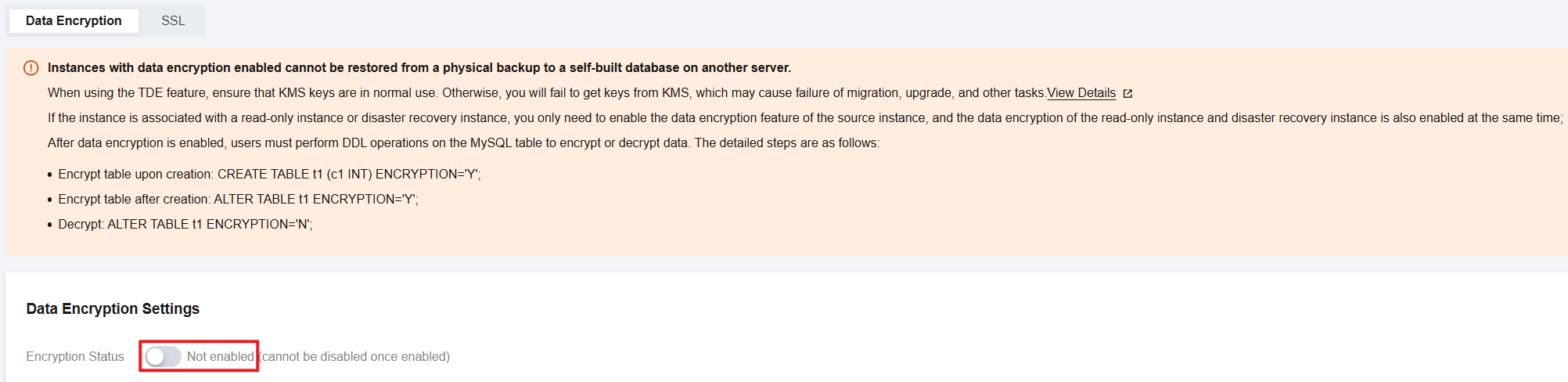
Attention:
Instances with the data encryption feature enabled do not support using physical backups to restore to self-built databases on other hosts.
The data encryption feature cannot be disabled after it is enabled.
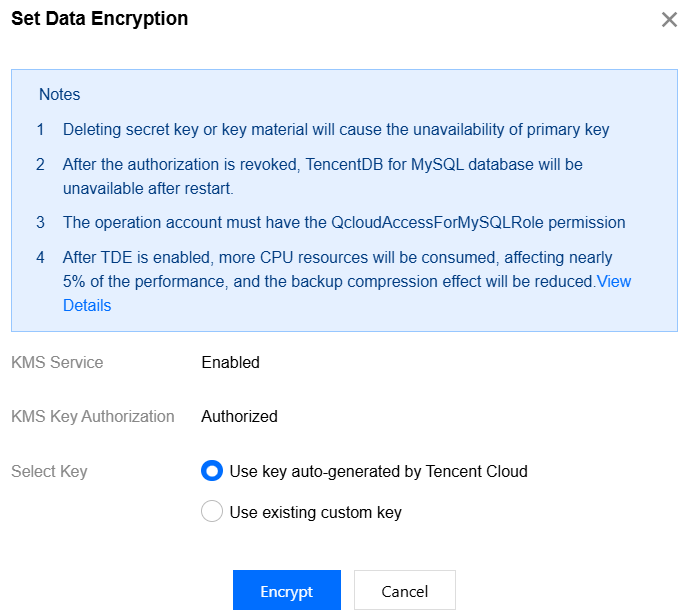
3. In the dialog box that appears, activate the KMS service and grant KMS key permissions. After selecting a key, click Encrypt.
When you select Use key auto-generated by Tencent Cloud, the key is automatically generated by Tencent Cloud.
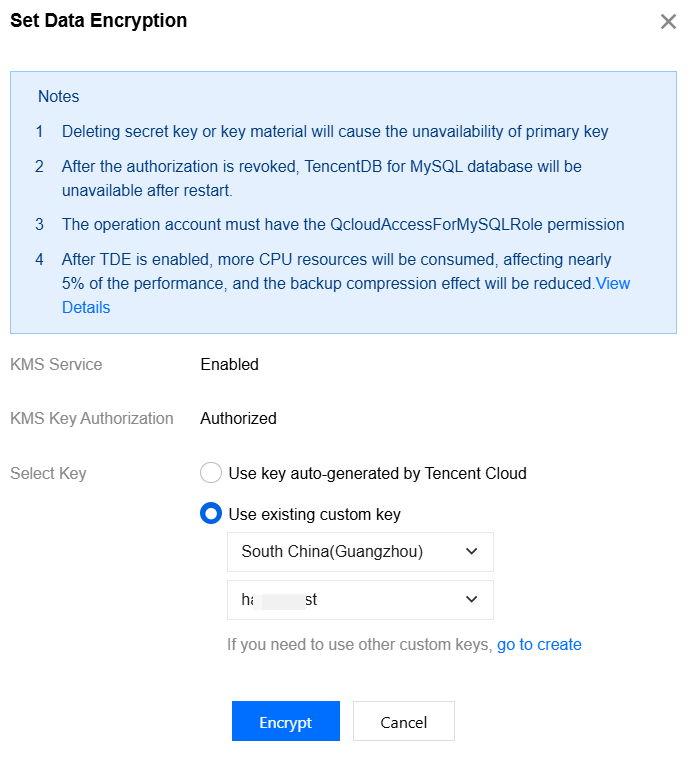
When you select Use existing custom key, you can choose a key that you created.
Note:
If you do not have a custom key, click go to create to create a key in the KMS console. For details, see Creating a Key.
Encrypting Data Tables
After the TDE encryption feature is enabled, you need to perform the following DDL operations on MySQL tables to encrypt data.
If you want to encrypt a table when creating it, run the following command:
CREATE TABLE t1 (c1 INT) ENCRYPTION='Y';
If you want to encrypt an existing table, run the following command:
ALTER TABLE t1 ENCRYPTION='Y';
Decrypting Data Tables
After the TDE encryption feature is enabled, you also need to perform the following DDL operations on MySQL tables to decrypt data.
If you want to decrypt an encrypted table, run the following command:
ALTER TABLE t1 ENCRYPTION='N';
FAQs
Why Is No Key Information Displayed in the Key List After TDE Encryption Is Enabled?
Symptom

Normal key list after TDE encryption is enabled

Recommended Solution
1. First, check whether the KMS encryption status is normal, whether the account has overdue payments, and whether the TencentDB for MySQL instance and KMS have any unpaid expired subscriptions. Retry only after ensuring that all the above items are normal.
2. If you are using TDE encryption for the first time and no encrypted tables have been created under your account (UIN), the key list will not contain any key information. In this case, see the following command to create an encrypted table in your data instance and then retry.
CREATE TABLE `user_test` (`id` bigint(20) NOT NULL AUTO_INCREMENT,`userId` int(11) NOT NULL,`age` int(11) NOT NULL,`name` varchar(64) DEFAULT NULL,`ins_date` varchar(10) DEFAULT NULL,PRIMARY KEY (`id`),KEY `idx_ins_date` (`ins_date`),KEY `idx_userId` (`userId`)) ENGINE=InnoDB DEFAULT CHARSET=utf8 ENCRYPTION='Y';
Why Is the Key Unavailable After TDE Encryption Is Enabled?
Confirm whether your KMS encryption status is normal, whether your account has overdue payments, and whether the TencentDB for MySQL instance and KMS have any unpaid expired subscriptions. Since KMS (postpaid edition) can no longer be created and newly purchased KMS only supports the prepaid edition, existing users of KMS (postpaid edition) will be unable to use their keys when the KMS encryption status is abnormal or the account is in arrears. In this case, top up the account and try again.
Help and Support
Was this page helpful?
You can also Contact sales or Submit a Ticket for help.
Help us improve! Rate your documentation experience in 5 mins.
Feedback