TencentDB for MySQL utilizes open-source MySQL's native binlog replication technology for default replicas, disaster recovery instances, and read-only instances. Therefore, there may be a delay during async or semi-sync data replication.
Impact
If a replica node has a delay, the source-replica switch cannot be completed promptly. In this case, the business may take some time to return to normal.
If a disaster recovery instance has a delay, it cannot be promoted to a master instance before the heaped binlogs run out. During this period, business continuity will be affected.
If the read business has a high requirement for data consistency, you can set a read-only instance removal policy to automatically remove a read-only instance from the read-only instance group (RO group) when its delay with the source instance exceeds the specified threshold. However, once the read-only instance is removed, the business cannot access it through the RO group.
Common Causes
No primary key or secondary index
When DML operations (e.g., DELETE, UPDATE, and INSERT) are performed on big tables, the rows to be modified will be retrieved based on the primary key or secondary index when the replica node applies the binlog. If the binlog is in the row format and the corresponding table has no primary key or secondary index, a large number of full-table scans will be caused, slowing down the binlog application and leading to data delays.
For detailed solutions, see No primary key or secondary index.
Large transactions
A large transaction refers to a transaction performing INSERT, UPDATE, DELETE, REPLACE operations on millions of rows of data, or a single SQL statement modifying millions of rows of data, whose execution time exceeds 30 seconds.
When the source instance executes DML operations involving massive volumes of data, a large number of binlogs will be transferred to the replica instance, which needs the same time consumed by the source instance to complete corresponding transactions, leading to data delays in the replica instance. For detailed solutions, see Large transactions
DDL operations
As users' queries are run at the read-only node, if the read-only node is running a very time-consuming query, the query will block the DDL operations from the source node until the query completes, resulting in data delays at the read-only node. For detailed solutions, see DDL operations.
Lower instance specifications
For read-only and disaster recovery instances, lower specifications than that of the master instance and higher loads will result in data delays.
For detailed solutions, see Lower instance specifications.
The "Waiting for table metadata lock" error
A running large transaction or an uncommitted transaction blocks DDL operations, resulting in blocking all operations on this table.
For detailed solutions, see The "Waiting for table metadata lock" error.
Troubleshooting
No primary key or secondary index
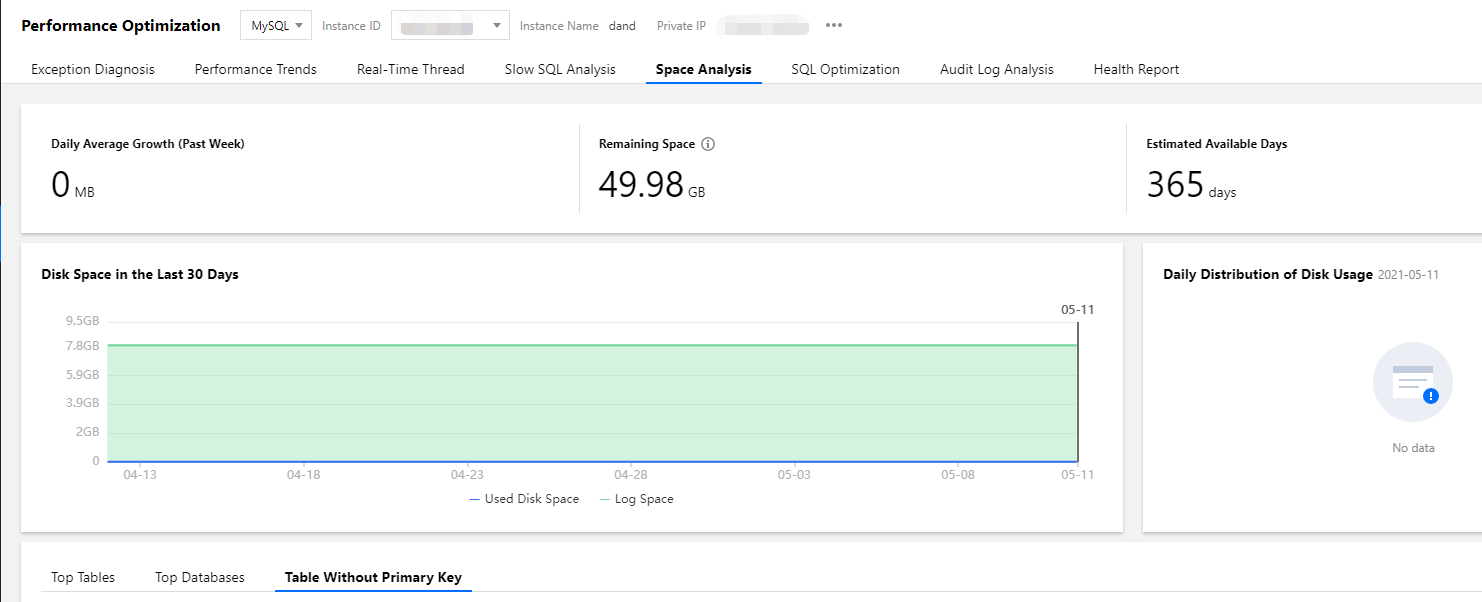
1. Log in to the DBbrain console and select Performance Optimization on the left sidebar. On the displayed page, select a database type and an instance at the top, and select the Space Analysis tab.
2. On the Table Without Primary Key tab, click a table to view its fields and indexes.
Note:
The list of tables without a primary key is automatically refreshed once a day and can be manually refreshed.
3. Create a primary key for the table without a primary key listed in Step 2. If the primary key cannot be created, we recommend that you create a secondary index on a column with a high cardinality.
Large transactions
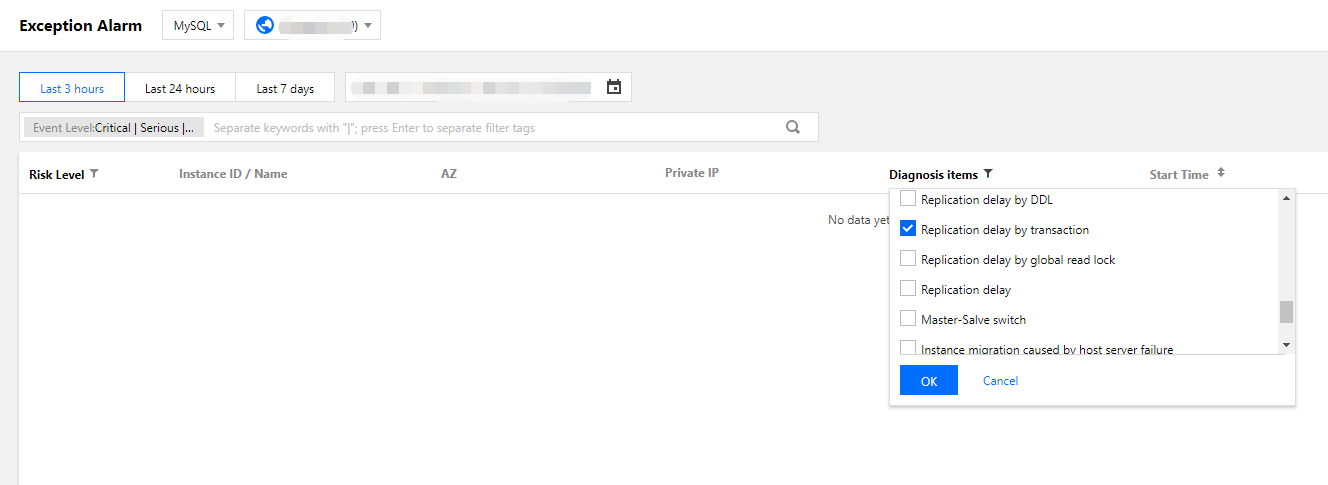
1. Log in to the DBbrain console and select Monitoring & Alarm > Exception Alarm on the left sidebar. On the displayed page, select a database type and region at the top, and select Replication delay by transaction from the drop-down list of the Diagnosis items column to filter large transaction alarms.
2. Split a large transaction into smaller ones by using the WHERE clause to restrict the amount of data processed by each SQL statement.
Note:
After the large transactions are located in DBbrain and split into smaller ones, the read-only nodes can run the smaller transactions quickly to avoid data delays.
DDL operations
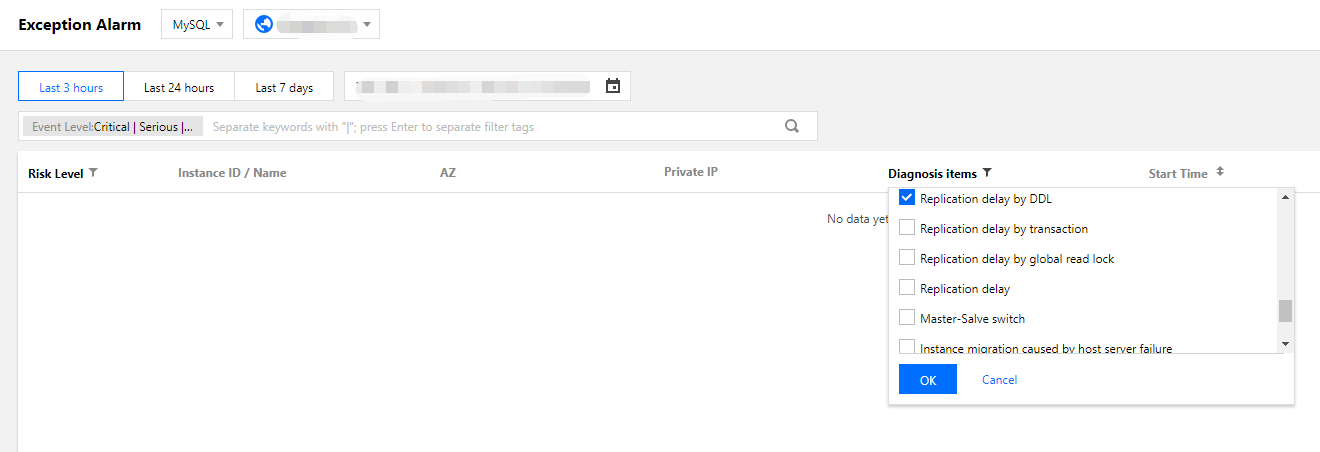
1. Log in to the DBbrain console and select Monitoring & Alarm > Exception Alarm on the left sidebar. On the displayed page, select a database type and region at the top, and select Replication delay by DDL from the drop-down list of the Diagnosis items column to filter DDL alarms.
2. Click Details in the Operation column to enter the event details page for troubleshooting.
Event Details: Include the Diagnosis Items, Time Range, Risk Level, Duration, and Overview.
Description: Includes problem snapshots and performance trends of the exception or health inspection event.
Intelligent Analysis: Analyzes the root cause of the performance exception to help you locate the specific operation.
Optimization Advice: provides optimization advice, including but not limited to SQL optimization (index and rewrite), resource configuration optimization, and parameter fine-tuning.
Lower instance specifications
1. We recommend that the specification of a read-only or disaster recovery instance be larger than that of the source instance. You can view the instance specification in the instance list in the TencentDB for MySQL console.
2. If the load of a read-only instance is too high due to a large number of analytical businesses, you can upgrade its configurations or optimize inefficient SQL statements.
For more information about SQL statement optimization, see SQL Optimization.
We recommend that you use DBbrain to diagnose your business and instances to locate large transactions based on monitoring metrics such as the slow query metric.
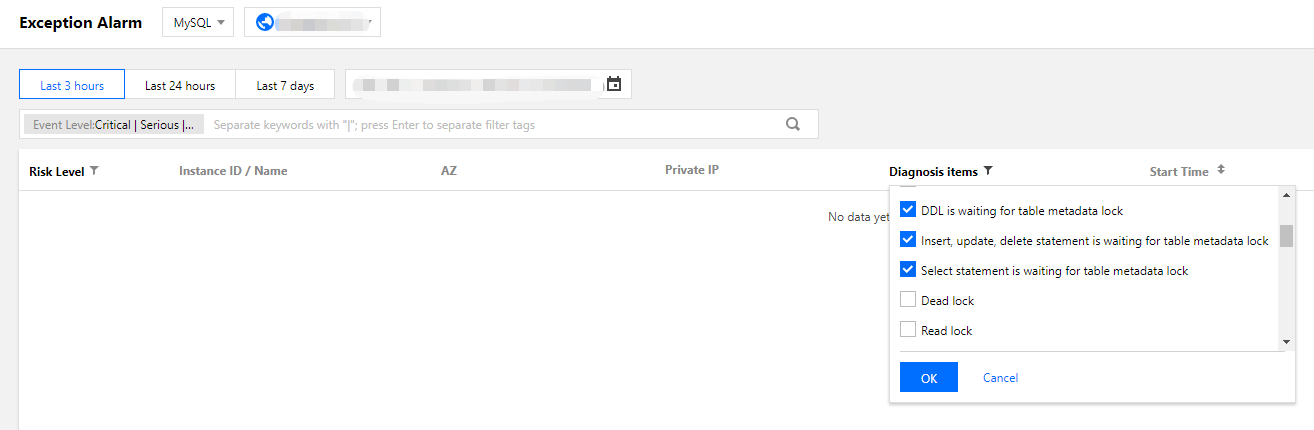
1. Log in to the DBbrain console and select Monitoring & Alarm > Exception Alarm on the left sidebar. On the displayed page, select a database type and region at the top, and select the following items from the drop-down list of the Diagnosis Items column to filter large transaction alarms.
2. Take the solutions below to solve different issues:
If a running large transaction blocks DDL operations, resulting in blocking all operations on this table, you can kill the transaction according to its ID provided in the DBbrain exception diagnosis result.
If an uncommitted transaction blocks DDL operations, resulting in blocking all operations on this table, you can kill the transaction according to its ID provided in the DBbrain exception diagnosis result, check your program, and commit transactions in a timely manner.
In an explicit transaction, a failed operation (e.g., querying a non-existing field) was performed on the table; at this moment, the transaction does not begin but the lock obtained by the failed statement is still held. You can kill the session according to its ID provided in the DBbrain exception diagnosis result.