tencent cloud
最新优惠
产品
解决方案
价格中心
合作伙伴网络
云市场
探索更多
Prev
Next
云数据库 SQL Server
动态与公告
产品动态
产品公告
新手指引
产品简介
产品概述
产品架构
产品优势
应用场景
地域和可用区
大版本生命周期说明
功能概览及差异
实例类型
实例规格
存储类型
常用概念
网络环境
许可声明
购买指南
计费概述
产品价格
购买方式
续费说明
欠费说明
退费说明
按量转包年包月
调整实例费用说明
本地备份空间收费说明
跨地域备份收费说明
数据库审计计费说明
磁盘额外 I/O 性能计费说明
查看账单明细
快速入门
创建 SQL Server 实例
连接 SQL Server 实例
管理 SQL Server 实例
数据库审计
数据库审计简介
查看审计实例列表
开通审计服务
查看审计日志
日志投递
修改审计服务
关闭审计服务
授权子用户使用数据库审计
操作指南
约束与限制
使用规范与建议
维护管理实例
调整实例配置
只读实例
网络管理
账号管理
数据库管理
数据安全
参数配置
监控与告警
备份与回档
日志管理
发布订阅
数据集成服务(SSIS)
数据迁移(新版)
数据迁移(旧版)
数据同步(DTS)
实践教程
tencentdb_ChangeLoginPassword 存储过程使用手册
COS Bulk Insert 存储过程使用手册
云数据库 SQL Server 定期维护方法
云数据库 SQL Server 慢 SQL 优化
如何更好地使用 Tempdb
跨账号备份恢复
为云数据库 SQL Server 创建 VPC
金蝶K/3 WISE 接入云数据库 SQL Server
账号权限和权限控制
变更数据捕获功能的开启和关闭
收缩数据库
API 文档
History
Introduction
API Category
Making API Requests
Sales and fee related APIs
Instance Management related APIs
Operation and maintenance management related APIs
Network management related APIs
Account management related APIs
Database management related APIs
Security group management related APIs
Data security encryption related APIs
Parameter configuration related APIs
Extended Event related APIs
Log management related APIs
Read only instance management related APIs
Publish and subscribe related APIs
Backup related APIs
Rollback related APIs
Data migration (cold standby migration) related APIs
SQL Server Integration Services (SSIS) related APIs
Data migration (DTS old version) related APIs
Data Types
Error Codes
常见问题
常见问题概览
选购咨询
计费与选购
连接与网络
账号与权限
备份与回档
数据迁移
发布订阅
只读实例
版本架构升级
磁盘扩缩容与规格升降级
监控与告警
日志相关
参数修改
功能特性相关
性能空间内存相关
相关协议
服务等级协议
服务条款
性能测试
性能测试报告
词汇表
联系我们
文档
云数据库 SQL Server
购买指南
续费说明
续费说明
下载
聚焦模式
字号
最后更新时间: 2025-09-04 11:16:25
云数据库 SQL Server 支持控制台续费和续费管理中心续费两种方式。
控制台续费
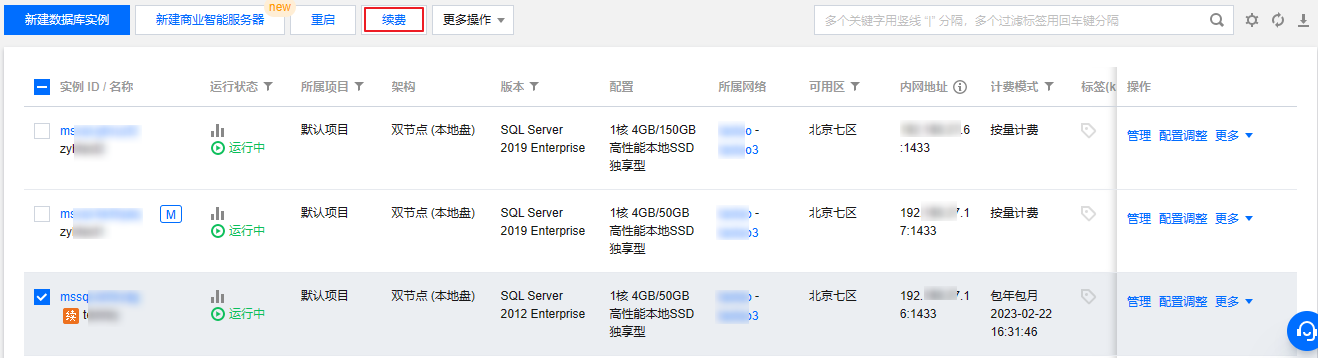
批量续费
1.
登录
SQL Server 控制台
,在实例列表,选择一个或多个需要续费的实例,单击
续费
。
2.
在弹出的续费对话框选择续费时长,单击
确定
。
3.
确认订单信息后,单击
确认购买
。
4.
订单支付成功,可继续查看订单,或返回控制台。
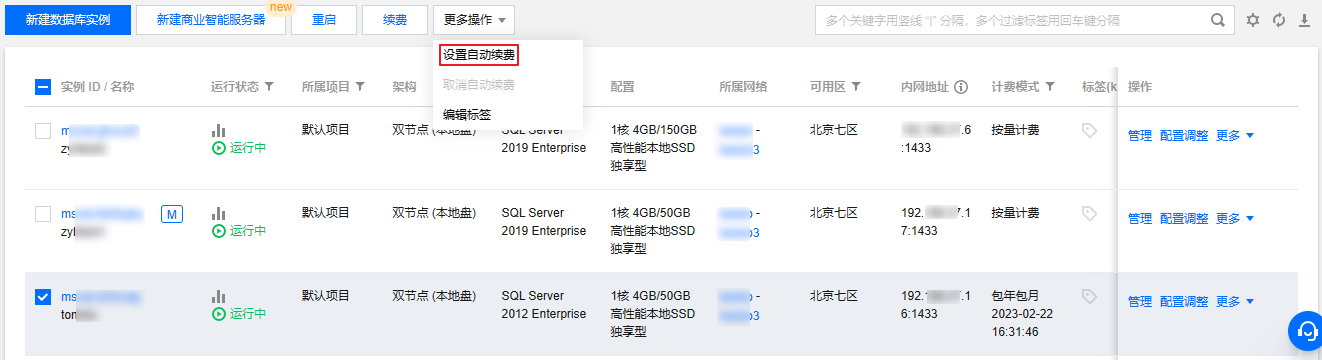
自动续费
在
实例列表
,选择一个或多个需要设置自动续费的实例,选择
更多操作
>
设置自动续费
。
续费管理中心续费
在
续费管理页面
,提供实例的
批量续费
、
设为自动续费
、
统一到期日
等功能 ,详见
续费管理
。
相关 API
API
描述
查询实例续费价格
接口(InquiryPriceRenewDBInstance)用于查询包年包月实例的续费价格。
续费实例
接口(RenewDBInstance)用于续费实例。
修改实例续费标记
接口(ModifyDBInstanceRenewFlag)用于修改实例续费标记。
上一篇: 购买方式
下一篇: 欠费说明
帮助和支持
本页内容是否解决了您的问题?
是
否
您也可以
联系销售
或
提交工单
以寻求帮助。
填写满意度调查问卷,共创更好文档体验。
点击前往
文档反馈
搜索
仅搜索标题
请输入关键词搜索文档