tencent cloud

Tencent Cloud Distributed Cache (Redis OSS-Compatible)

Release Notes and Announcements
Release Notes
Announcements
User Tutorial
Product Introduction
Overview
Product Strengths
Use Cases
Storage Engine
Product Series
Product Versions
Specifications and Performance
Read/Write Separation
Multi-AZ Deployment
Regions and AZs
Terms
Service Regions and Service Providers
Purchase Guide
Billing Overview
Pricing Center
Instance Purchasing
Renewal (Yearly/Monthly Subscription)
Refund (Yearly/Monthly Subscription)
Overdue Payments
Switching from Pay-as-You-Go to Yearly/Monthly Subscription
Getting Started
Quickly Creating an Instance
Connecting to Redis Instance
Operation Guide
Operation Overview
Connecting to a Database Instance
Managing Instances
Upgrade Instance
Management Node (Redis/ValKey Edition)
Multi-AZ Deployment Management
Backup and Restoration
Managing Accounts
Parameter Configuration
Slow Query
Access Management
Network and Security
Monitoring and Alarms
Event Management (Redis/ValKey Edition)
Data Migration
Global Replication for Redis Edition
Database Audit
Performance Optimization
Sentinel Mode
Development Guidelines
Naming Rules
Basic Usage Guidelines
Design Principles of Key and Value
Command Usage Guidelines
Design Principles of Client Programs
Connection Pool Configuration
Command Reference
Command Reference Overview
Redis Edition and Valkey Edition Command Compatibility
Version Command Usage Differences
Differences Between the Proxy Architecture and Direct Connection Mode
More Command Operations (Redis/Valkey Edition)
Memcached Edition Command Compatibility
Practical Tutorial
Building TencentDB for Redis® Client Monitoring Based on Spring Boot
Redis Client Connection Configuration Policy and Practice
Global SCAN Guide for Cluster Architecture
Eliminating Instances Securely
Hot Key and Big Key
AZ Migration Scheme
Troubleshooting
Connection Exception
Exception Analysis and Solution of Redisson Client Timeout Reconnection
Performance Troubleshooting and Fine-Tuning
API Documentation
History
Introduction
API Category
Making API Requests
Instance APIs
Parameter Management APIs
Other APIs
Backup and Restoration APIs
Region APIs
Monitoring and Management APIs
Log APIs
Data Types
Error Codes
FAQs
General
Connection and Login
Purchase
Service Agreement
Service Level Agreement
Terms of Service
Glossary
Contact Us

Read/Write Separation

PDF
Focus Mode
Font Size
Last updated: 2026-03-17 16:36:35

Overview

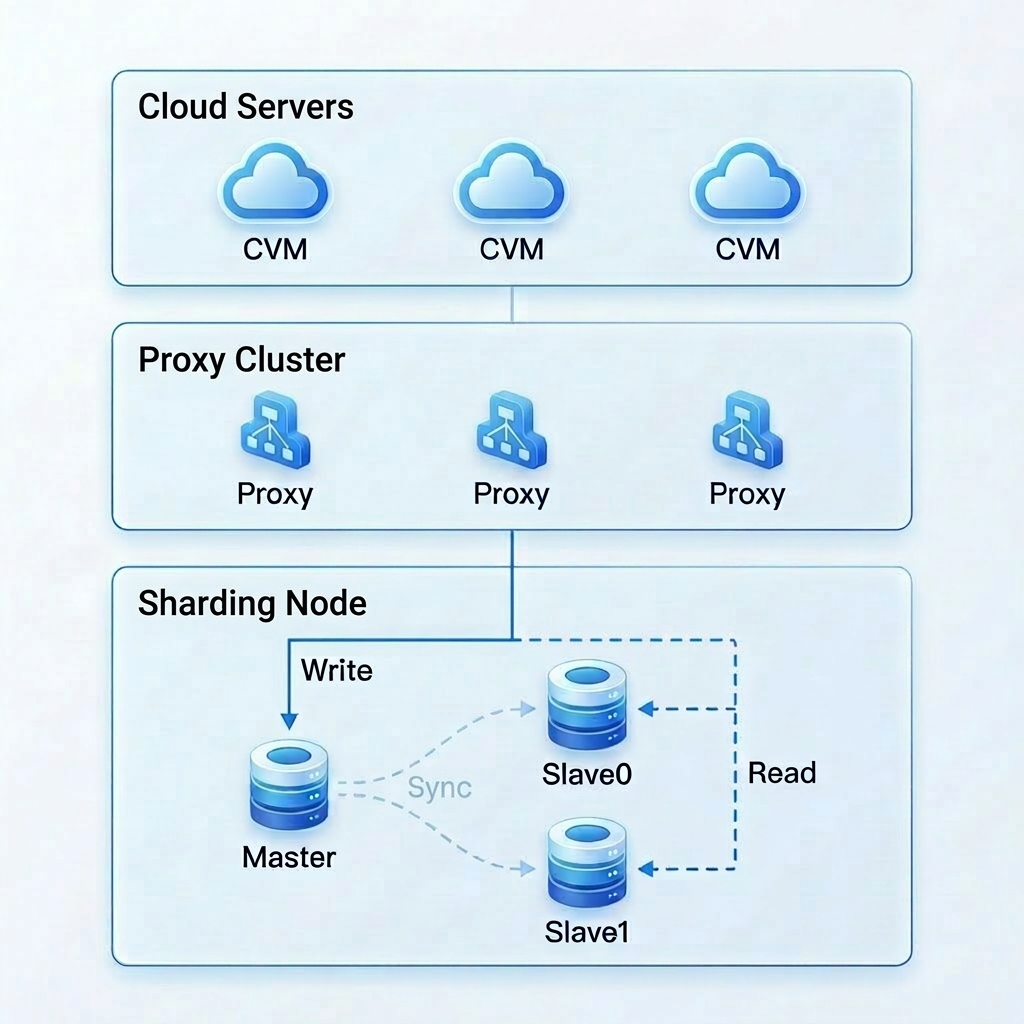
Read/write separation is a performance scaling solution for read-intensive, write-light workloads. By distributing read requests to replica nodes, it alleviates pressure from concentrated reads on hotspot data. It supports up to one master node and five replica nodes, delivering up to 5x read performance scaling capability.

Architecture Principles

Read/write separation is implemented through a built-in proxy component for automatic routing and distribution of requests. Client requests are uniformly sent to the proxy, which automatically identifies the request type, routes write requests to the master node for processing, and distributes read requests to replica nodes according to the load balancing policy. After read/write separation is enabled, the master node only handles write requests, while read requests are handled by replica nodes, thus achieving linear scaling of read performance.


Supported Versions

Read/write separation is compatible with Redis 4.0, 5.0, 6.2, and 7.0 as well as Valkey 8.0. It applies to both standard and cluster architectures, and can be enabled when the number of replicas is greater than or equal to 1.

Enabling Methods

Console: On the Node Management page, you can enable the read/write separation feature. For specific operations, see Read-Only Replica.

TencentCloud API: You can enable read/write separation through the API EnableReplicaReadonly and disable read/write separation through the API DisableReplicaReadonly.

Help and Support

Was this page helpful?

Help us improve! Rate your documentation experience in 5 mins.

Feedback