To ensure that your business can run stably on a continuous basis and avoid service interruptions caused by instance expiration, it is recommended that you promptly renew your yearly/monthly subscription instances before they expire. Tencent Cloud provides two renewal options: manual renewal and auto-renewal. Please choose the method that best suits your business scenarios to complete the renewal.
Renewal Methods
Description Item
Auto-Renewal
Manual Renewal
Definition
In this billing mode, the system automatically charges for the next renewal cycle before the instance expires.
In this billing mode, users proactively initiate renewal operations as needed before the instance expires to flexibly extend the instance's validity period.
Features
Offers flexible renewal cycle settings, supporting monthly or yearly auto-renewal.
Supports enabling or disabling the auto-renewal feature at any time.
Supports flexible selection of the renewal period based on business scenarios.
Supports completing renewal operations in the console or through the API.
Billing Rules
Sufficient balance: The system automatically deducts the fee for the next renewal cycle within 7 days before the instance expires.
Insufficient balance: Within 7 days before expiration, the system pushes an insufficient balance notification every other day until the renewal is completed.
Renewal result: Upon successful deduction, the system automatically extends the instance's expiration time.
Expiration reminder: Within 7 days before the instance expires, the system pushes a reminder notification every other day about the impending resource expiration.
Operation Guide: Upon receiving resource expiration notifications, manual renewal needs to be performed either in the Distributed Cache console or via the manual renewal API RenewInstance. For details, see Manual Renewal.
Renewal result: Upon successful payment, the instance's expiration time will be extended accordingly.
Scenarios
Suitable for instances that require long-term stable operation, such as production environments and core business scenarios. This mode can prevent service interruptions caused by forgetting to renew.
Suitable for temporary projects, short-term testing tasks, or scenarios with specific budget management requirements.
Note:
If an instance expires without a successful renewal and remains overdue beyond both the grace period and retention period, it will be released. For details on the overdue payment handling mechanism, see Overdue Payments.
Enabling Auto-Renewal for Newly Purchased Instances
Log in to the Distributed Cache purchase page to create an instance. In the Auto-Renewal configuration item, select When the account balance is sufficient, the instance will be automatically renewed monthly upon expiration to enable auto-renewal. For specific operations, see Purchase Instances. The instance is created successfully, and there is a mark
2. At the upper part of the Instance List page on the right, select the target region.
3. In the instance list, select one or more instances for which you want to enable auto-renewal.
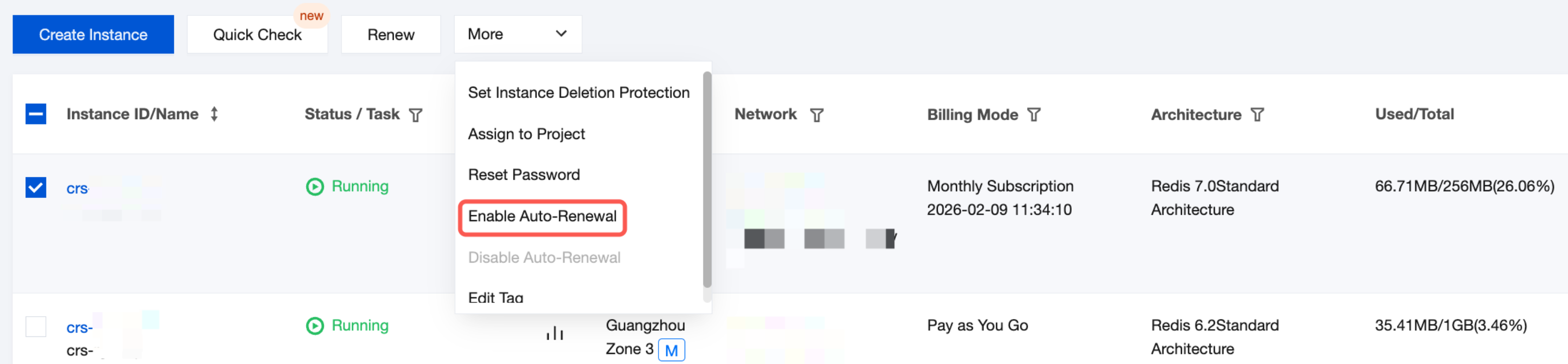
4. Above the list, choose More > Enable Auto-Renewal.
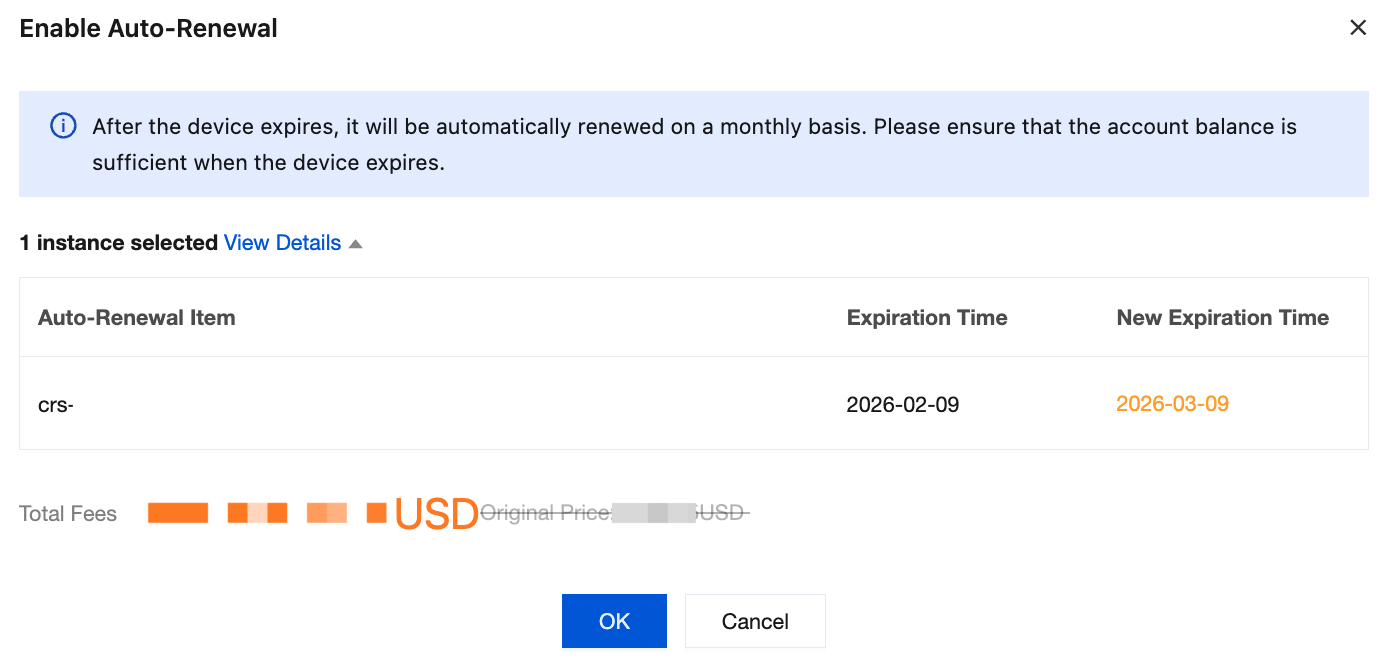
5. In the Enable Auto-Renewal dialog box, confirm information about the instance for auto-renewal and the Expiration Time and New Expiration Time of the instance. The default renewal period is set to the next renewal cycle's expiration time. Verify the amount next to Total Fees, and click OK.
6. In the upper-right corner of the page, choose Fees > Bills to view the order payment information and confirm successful payment.
7. Return to the instance list. In the Billing Mode column, instances with auto-renewal enabled are marked with
, and the instance expiration time has been updated to the next renewal cycle's expiration time.
2. At the upper part of the Instance List page on the right, select the target region.
3. In the instance list, select the instance to be renewed, and click Renew above the instance list.
4. In the Renew Selected Instance dialog box, you need to perform the following operations.
Click View Details to confirm the name, ID, architecture and its edition, expiration time, and post-renewal expiration time of the instance.
In Renewal Period, select the duration of the instance renewal by full month or full year.
Next to Total Fees, confirm the total amount for the instance renewal.
5. Click OK. On the Please confirm the following product information page, confirm information in Product List, and verify the renewal order amount.
6. Click Submit Order, select a payment method, and click Next. The renewal is completed after successful payment.
7. Return to the console. In the Billing Mode column of the instance list, you can confirm that the instance expiration time has been updated to the new expiration time.
2. On the Renewal Management page, search for Tencent Cloud Distributed Cache to view Distributed Cache instances under your account that have expired, are expiring in 7 days, 15 days, or 30 days. As shown in the following figure, you can centrally manage instance renewal. For specific operations, see Renewal Management.