tencent cloud

Tencent Cloud Distributed Cache (Redis OSS-Compatible)

Release Notes and Announcements
Release Notes
Announcements
User Tutorial
Product Introduction
Overview
Product Strengths
Use Cases
Storage Engine
Product Series
Product Versions
Specifications and Performance
Read/Write Separation
Multi-AZ Deployment
Regions and AZs
Terms
Service Regions and Service Providers
Purchase Guide
Billing Overview
Pricing Center
Instance Purchasing
Renewal (Yearly/Monthly Subscription)
Refund (Yearly/Monthly Subscription)
Overdue Payments
Switching from Pay-as-You-Go to Yearly/Monthly Subscription
Getting Started
Quickly Creating an Instance
Connecting to Redis Instance
Operation Guide
Operation Overview
Connecting to a Database Instance
Managing Instances
Upgrade Instance
Management Node (Redis/ValKey Edition)
Multi-AZ Deployment Management
Backup and Restoration
Managing Accounts
Parameter Configuration
Slow Query
Access Management
Network and Security
Monitoring and Alarms
Event Management (Redis/ValKey Edition)
Data Migration
Global Replication for Redis Edition
Performance Optimization
Sentinel Mode
Development Guidelines
Naming Rules
Basic Usage Guidelines
Design Principles of Key and Value
Command Usage Guidelines
Design Principles of Client Programs
Connection Pool Configuration
Command Reference
Command Reference Overview
Redis Edition and Valkey Edition Command Compatibility
Version Command Usage Differences
Differences Between the Proxy Architecture and Direct Connection Mode
More Command Operations (Redis/Valkey Edition)
Memcached Edition Command Compatibility
Practical Tutorial
Building TencentDB for Redis® Client Monitoring Based on Spring Boot
Redis Client Connection Configuration Policy and Practice
Global SCAN Guide for Cluster Architecture
Eliminating Instances Securely
Hot Key and Big Key
AZ Migration Scheme
Troubleshooting
Connection Exception
Exception Analysis and Solution of Redisson Client Timeout Reconnection
Performance Troubleshooting and Fine-Tuning
API Documentation
History
Introduction
API Category
Making API Requests
Instance APIs
Parameter Management APIs
Other APIs
Backup and Restoration APIs
Region APIs
Monitoring and Management APIs
Log APIs
Data Types
Error Codes
FAQs
General
Connection and Login
Purchase
Service Agreement
Service Level Agreement
Terms of Service
Glossary
Contact Us

Refund (Yearly/Monthly Subscription)

PDF
Focus Mode
Font Size
Last updated: 2026-03-18 15:14:46
Tencent Cloud allows users to initiate self-service returns for yearly/monthly subscription database instances. After you initiate a refund request, the system will calculate the refundable amount based on the actual usage of your instance and refund it to your original payment account.
Note:
Pay-as-you-go (postpaid) resources of Tencent Cloud Distributed Cache are released directly without the need to apply for a refund.

Return Notes

Before submitting a refund request, note the following:
1. Resource status: A self-returned instance will be moved to the recycle bin and isolated. The instance cannot be accessed, its status changes to Isolated, and billing stops.
2. Recycle bin mechanism: Instances retained in the recycle bin for 7 days can be renewed to restore service. For specific restoration operations, see Restoring Isolated Instance.
3. Resource impact: Instances isolated in the recycle bin will be permanently terminated after the 7-day retention period expires, and their associated IP address resources will be immediately released.
4. Refund arrival: All refunds will be returned to your Tencent Cloud account balance. The voucher portion is non-refundable.
Note:
In case of suspected abnormal or malicious returns, Tencent Cloud reserves the right to reject your return request.
Self-service return is not supported by some event resources. See the official website for details.

Refund Rules

Feature Dimension
Refund Rules
Core Rules
At any time during the service period of the order, you may initiate self-service subscription cancellation. The system will deduct fees for used resources and provide a pro-rated refund of the remaining value.
Calculation Method
Refund amount = Current effective order amount + Unstarted order amount – Used resource value
Current effective order amount: Refers to the payment amount of orders in effect, excluding discounts and vouchers.
Unstarted order amount: Refers to the payment amount for future-effective orders, excluding vouchers.
The value of used resources shall be calculated according to the following policies:
For the used portion, full months prior to the refund request date are deducted at the monthly rate, while any remaining period less than a full month is deducted at pay-as-you-go rates.
The used portion is calculated with second-level precision.
If the refund amount is less than or equal to 0, it will be calculated as 0, and the resources will be eliminated.
Note:
Up to 199 instances can be returned through regular self-service.
Self-service return is not supported by some event resources. See the official website for details.
Special Notes
Vouchers or discount coupons used for product purchases are non-refundable. Non-discounted fees paid will be refunded to the paying party's Tencent Cloud account based on the original payment method (cash, credit, or cash coupon) and on a pro rata basis.
For products purchased as part of an event, if the refund rules conflict with the event rules, the event rules shall prevail. If the event rules state that refunds are not supported, you are not able to apply for a refund.

Examples of Refund Calculation

Guangzhou Zone 2, Standard Edition with 2 GB memory, USD 21.11/month, using a USD 13.89 voucher, and purchased for 1 year with a 17% discount for yearly subscription. The discounted price is 21.11 × 12 × 0.83 = USD 210.27. The payment amount is 210.27 - 13.89 = USD 196.38.
Example 1: Refund is requested within 5 days of purchase, and it is not the first refund for this account. The total usage duration is 48 hours.
Refund amount = 196.38 - 48 × 0.04 (where 0.04 is the unit price per hour for the same configuration at pay-as-you-go rates) = USD 194.46.
Example 2: Purchased within 5 days, and it is not the first refund for this account. The usage duration is 48 hours; among which, renewed for 1 year with a 17% discount for yearly subscription on the official website. The actual payment amount for renewal is USD 210.27.
The cash refund amount = 196.38 - 48 × 0.04 (where 0.04 is the unit price per hour for the same configuration at pay-as-you-go rates) (effective order refund amount) + 210.27 (unstarted order amount) = USD 404.73.

Return Operation

2. At the upper part of the Instance List page on the right, select the target region.
3. In the instance list, select the yearly/monthly subscribed instance to be returned. In the Operation column, choose More > Return and Refund.
Note:
When the Return and Refund button is unavailable, it means the account has exhausted the self-service return quota for yearly/monthly subscription instances. This indicates that yearly/monthly subscription instances cannot be manually terminated and will be automatically terminated upon expiration.

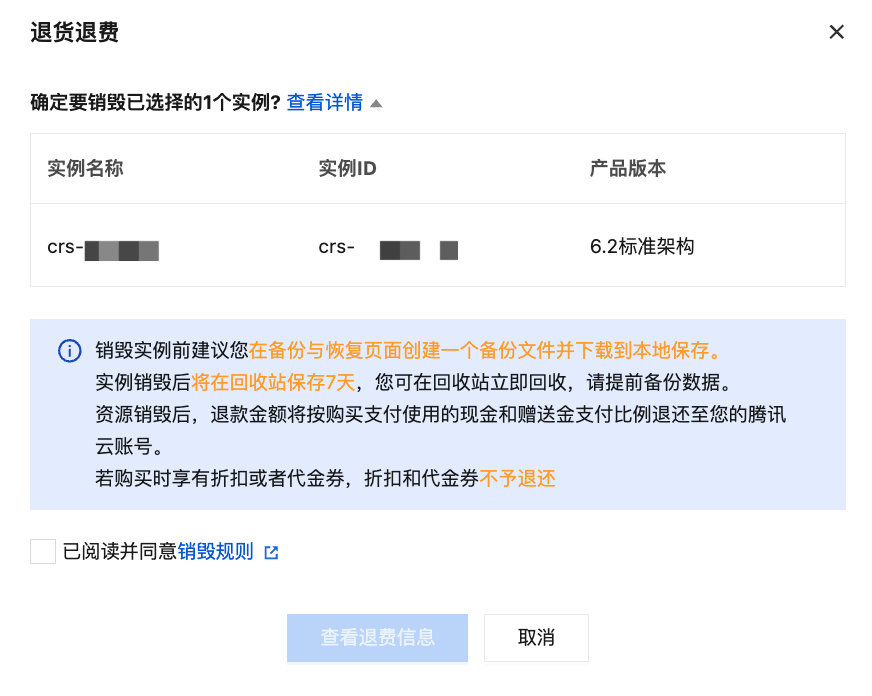
4. In the Return and Refund pop-up window, click View Details to confirm information about the instance to be returned and understand precautions for instance termination. Click Termination Rules to understand the calculation method for refund amounts. Select I have read and agree, and click View Refund Information.

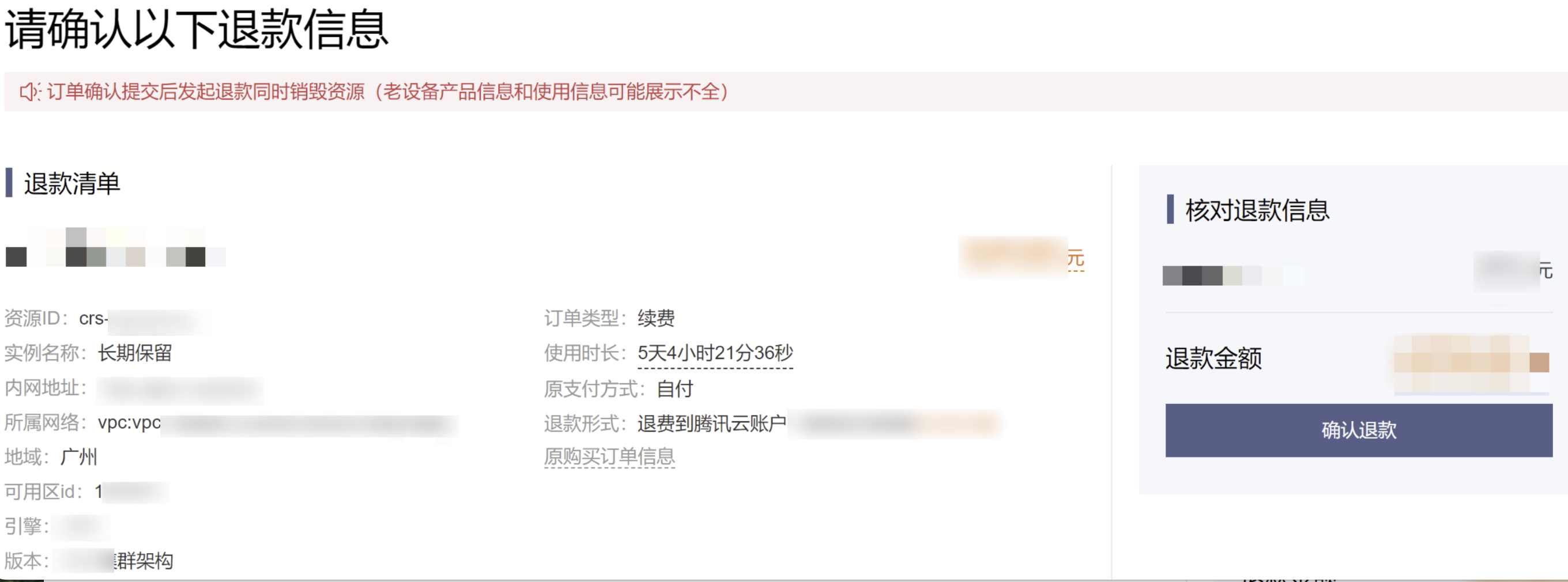
5. On the Please confirm the refund information below page, confirm the refund list, including the instance information, network information, region and availability zone (AZ), refund method, and so on, and verify the refund amount. Then, click Confirm Refund.

6. In the pop-up dialog box, reconfirm the refund method and amount, and click Confirm Refund.
7. On the Transaction succeeded page, you can perform the following operations.
Click View My Orders to go to the Billing Center's Order Management page. On the Prepaid Order tab, you can track refund progress at any time. As shown in the following figure, click Details in the Operation column to view order specifics. Click Transactions in the right sidebar to view the refund receipt.

Click Go to Console. In the left sidebar, select Recycle Bin to view refunded instances isolated there with status Isolated. Click Start Up to recover the instance, or click Eliminate Now to terminate instance resources directly. For details, see Recycle Bin.


Related APIs

API Name
API Description
Returns yearly/monthly subscription instances.
Queries order information.

Help and Support

Was this page helpful?

Help us improve! Rate your documentation experience in 5 mins.

Feedback