tencent cloud

Tencent Cloud Distributed Cache (Redis OSS-Compatible)

Release Notes and Announcements
Release Notes
Announcements
User Tutorial
Product Introduction
Overview
Product Strengths
Use Cases
Storage Engine
Product Series
Product Versions
Specifications and Performance
Read/Write Separation
Multi-AZ Deployment
Regions and AZs
Terms
Service Regions and Service Providers
Purchase Guide
Billing Overview
Pricing Center
Instance Purchasing
Renewal (Yearly/Monthly Subscription)
Refund (Yearly/Monthly Subscription)
Overdue Payments
Switching from Pay-as-You-Go to Yearly/Monthly Subscription
Getting Started
Quickly Creating an Instance
Connecting to Redis Instance
Operation Guide
Operation Overview
Connecting to a Database Instance
Managing Instances
Upgrade Instance
Management Node (Redis/ValKey Edition)
Multi-AZ Deployment Management
Backup and Restoration
Managing Accounts
Parameter Configuration
Slow Query
Access Management
Network and Security
Monitoring and Alarms
Event Management (Redis/ValKey Edition)
Data Migration
Global Replication for Redis Edition
Performance Optimization
Sentinel Mode
Development Guidelines
Naming Rules
Basic Usage Guidelines
Design Principles of Key and Value
Command Usage Guidelines
Design Principles of Client Programs
Connection Pool Configuration
Command Reference
Command Reference Overview
Redis Edition and Valkey Edition Command Compatibility
Version Command Usage Differences
Differences Between the Proxy Architecture and Direct Connection Mode
More Command Operations (Redis/Valkey Edition)
Memcached Edition Command Compatibility
Practical Tutorial
Building TencentDB for Redis® Client Monitoring Based on Spring Boot
Redis Client Connection Configuration Policy and Practice
Global SCAN Guide for Cluster Architecture
Eliminating Instances Securely
Hot Key and Big Key
AZ Migration Scheme
Troubleshooting
Connection Exception
Exception Analysis and Solution of Redisson Client Timeout Reconnection
Performance Troubleshooting and Fine-Tuning
API Documentation
History
Introduction
API Category
Making API Requests
Instance APIs
Parameter Management APIs
Other APIs
Backup and Restoration APIs
Region APIs
Monitoring and Management APIs
Log APIs
Data Types
Error Codes
FAQs
General
Connection and Login
Purchase
Service Agreement
Service Level Agreement
Terms of Service
Glossary
Contact Us
DocumentationTencent Cloud Distributed Cache (Redis OSS-Compatible)Purchase GuideSwitching from Pay-as-You-Go to Yearly/Monthly Subscription

Switching from Pay-as-You-Go to Yearly/Monthly Subscription

PDF
Focus Mode
Font Size
Last updated: 2026-03-17 16:36:35

Scenarios

When pay-as-you-go instances are in stable operation and have been confirmed to have long-term usage requirements, it is recommended that you convert them to the yearly/monthly subscription billing mode. This operation can effectively optimize long-term operational costs and ensure the stability of business resources.
Cost Optimization: The yearly/monthly subscription billing mode offers significant discounts compared to pay-as-you-go, which can substantially reduce your cloud service costs over long-term usage.
Budget Stability: By locking resource costs through prepaid, it avoids cost fluctuations caused by business traffic volatility, making budget management clearer.

Switching Rules

Rules
Description
Billing Rules
Pay-as-you-go Billing Settlement: When switching to yearly/monthly subscription, the system will automatically settle all pay-as-you-go charges incurred before the conversion from your account balance. The billing duration is accurate to the second, and any period less than one minute is calculated based on the actual number of seconds.
Yearly/Monthly Subscription Billing: When switching to a yearly/monthly subscription instance, you need to prepay the fee for the entire billing cycle (such as 1 month or 1 year) of the selected specification for the billing mode switch to take effect.
If the payment is not made or fails, a pending order will appear in your Order Center.
Before the payment is completed, the billing mode of the instance cannot be repeatedly switched.
Before the payment is successfully completed, if the instance configuration changes (such as capacity expansion: adjusting specifications/nodes/shard), the amount of the new order will not match the instance. The unpaid order will be prohibited from payment. You need to first cancel the current unpaid order in the Order Center and then perform a new conversion operation.
After successful payment, the billing mode will be switched to yearly/monthly subscription, and the instance will be billed immediately under the yearly/monthly subscription billing mode.
Auto-Renewal: When the switch from pay-as-you-go to yearly/monthly subscription is performed, auto-renewal can be set. Upon expiration, fees will be automatically deducted from your Tencent Cloud account for the entire month. If auto-renewal is not set during the conversion, you can still configure monthly auto-renewal after the switch. Please monitor the instance expiration time and renew promptly to avoid service disruption.
Refund Policy for Yearly/Monthly Subscription: For cloud databases whose billing mode is switched from pay-as-you-go to yearly/monthly subscription, no reason refund within five days is not supported. Standard self-service refund is supported. The system will deduct the used fees (full months are deducted as entire months; partial months are calculated based on pay-as-you-go rates, accurate to the second), then refund the remaining value proportionally. For specific refund details, see Refund Policy (Yearly/Monthly Subscription).
Upgrade Time
After the billing mode switch and successful payment, the new yearly/monthly subscription billing mode will take effect immediately. The start time of the new billing cycle is based on the time when you successfully complete the payment and receive system confirmation.
Switch Back Directly to Pay-as-You-Go
After an instance is switched from pay-as-you-go to yearly/monthly subscription, it can be switched back to pay-as-you-go. For specific operations
Service Unaffected
During the conversion from pay-as-you-go to yearly/monthly subscription, business access will not be affected, and the service can be used with confidence.

Prerequisites

The Tencent Cloud Distributed Cache instance is running properly.
The instance billing mode is pay-as-you-go.

Operation Steps

2. At the upper part of the Instance List page on the right, select the target region.
3. In the instance list, locate the pay-as-you-go instance to be switched to a yearly/monthly subscription instance.
4. In the Operation column, select Pay-as-You-Go to Monthly Subscription from the More dropdown list.
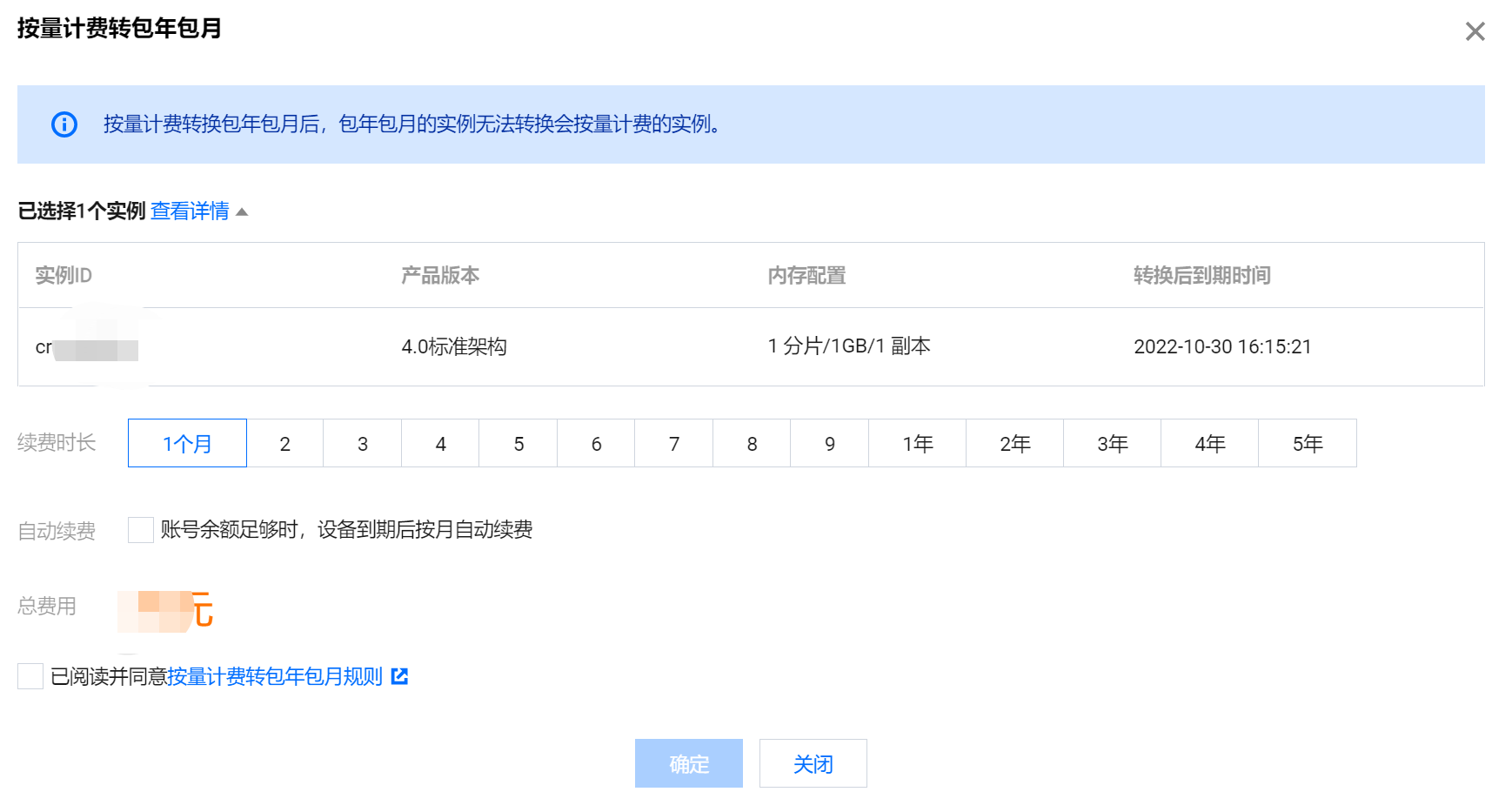
5. In the Pay-as-You-Go to Monthly Subscription dialog box, confirm the instance information to be switched.
Confirm the instance ID, instance edition information, memory configuration, and the expiration time of the yearly/monthly subscription mode.
Select the specific duration in Renewal Period and select Auto-Renewal.

6. Confirm the Total Fees, read the billing mode switch rules, select I have read and agreed to, and click OK.
7. On the product information confirmation page, check the Product List, Check the Fees, and click Submit Order. After the payment is successful, the system goes back to the instance list.
8. The instance is in Status :Processing status. When it changes to Running, it can be used normally.

Help and Support

Was this page helpful?

Help us improve! Rate your documentation experience in 5 mins.

Feedback