Configuring Log Delivery
Download
Modo Foco
Tamanho da Fonte
Scenarios
Log shipping is an extended capability of the Database Audit feature for Tencent Cloud Distributed Cache (Redis-compatible). It is used to push audit logs collected by the audit system to Tencent Cloud Log Service (CLS) in near real-time. Audit logs comprehensively record the command operations on an instance, containing key information such as the executed command content, execution time, client IP address, and access account. After you enable log shipping, the system automatically pushes the audit logs generated by the instance to the specified logset and log topic in CLS. The shipping task runs continuously until it is manually disabled. By leveraging CLS's capabilities for log search, analysis, alarm, and visualization, log shipping overcomes the retention period limit of the built-in audit storage, providing longer log retention and more flexible log usage.
Feature List
After you enable log shipping, Database Audit pushes the audit logs collected from the instance according to the configured audit type (such as write commands) to the specified logset and log topic in CLS in near real-time. After the logs are delivered to CLS, you can use the following capabilities provided by CLS:
Search and Analysis: Supports full-text search, key-value index search, and SQL search to quickly locate target log entries.
Visualization: Builds visual dashboards based on log data to display command execution distribution, Top N operations, client IP address distribution, and more.
Alarm: Configures alarm rules and pushes alarms in real time when abnormal operations (such as high-risk command execution, abnormal access IPs, and so on) are detected.
Data Processing: Cleanses, transforms, and forwards log data to meet personalized processing requirements.
Core Concepts
Logset
A logset is the top-level resource management unit in CLS. It is used to group and isolate logs from different sources or projects. Each logset can contain multiple log topics and supports configuring retention periods and access permissions. During audit log shipping, a logset serves as the target container for log storage: You can select an existing logset to aggregate and manage audit logs with logs from other services, or you can create a dedicated logset to store audit logs independently. For more information, see Logset.
Log Topic
A log topic is the fundamental unit for data writes and management of logs in CLS. Each log topic is an independent data stream that supports independent configuration of partitions, indexes, retention periods, and other settings. Logs written to the same topic can be uniformly searched, analyzed, and alarmed. A log topic is the smallest unit for the actual storage and management of audit logs after delivery: You can select an existing log topic to receive audit logs, or you can create a dedicated log topic for independent storage, making subsequent searches and alarms more targeted. For more information, see Log Topic.
Prerequisites
Condition Type | Specific Requirements |
Audit Status | The target instance has Database Audit enabled. For detailed operations, see Database Audit enabled. |
Instance Status | The instance must be in the "Running" state. Log delivery cannot be configured for instances in states such as "Creating", "Upgrading", "Isolated", or "Terminated". |
Region Availability | The region where the instance is located supports the log shipping feature. The specific supported regions are subject to the actual display in the console. |
CLS | Tencent Cloud Log Service (CLS) has been activated in the target region. To activate the service, go to the CLS console. Note: CLS is a Tencent Cloud product billed independently. Its billing rules are subject to the official CLS billing documentation. For specific information, see CLS Billing Overview. |
Permission Requirements | The current account has been granted operation permissions for CLS-related resources in the target region, including read permissions for logsets, read/write permissions for log topics, and create permissions for log topics. |
Use Limits
A single instance supports only one log shipping task. To change the shipping destination, first disable the existing shipping task and then reconfigure it.
Historical audit logs generated before log shipping is enabled are not automatically delivered to CLS. The shipping task only pushes newly generated audit logs after the feature is enabled.
Directions
1. Log in to the Tencent Cloud Distributed Cache (Redis-compatible) console.
2. In the left sidebar, choose Database Audit under the Distributed Cache (Redis OSS-Compatible) menu.
3. On the Database Audit page, select the region where the target instance is located and set the Audit Log Storage Status to Enabled. The page will then display all instances in that region for which the audit feature is enabled.
4. (Optional) Filter target instances using the search box above the instance list. The search supports Instance ID, Instance Name, Tag key, and Tag value.
5. Locate the target instance, click More in the Operation column, and then select Configure Log Shipping from the drop-down menu.

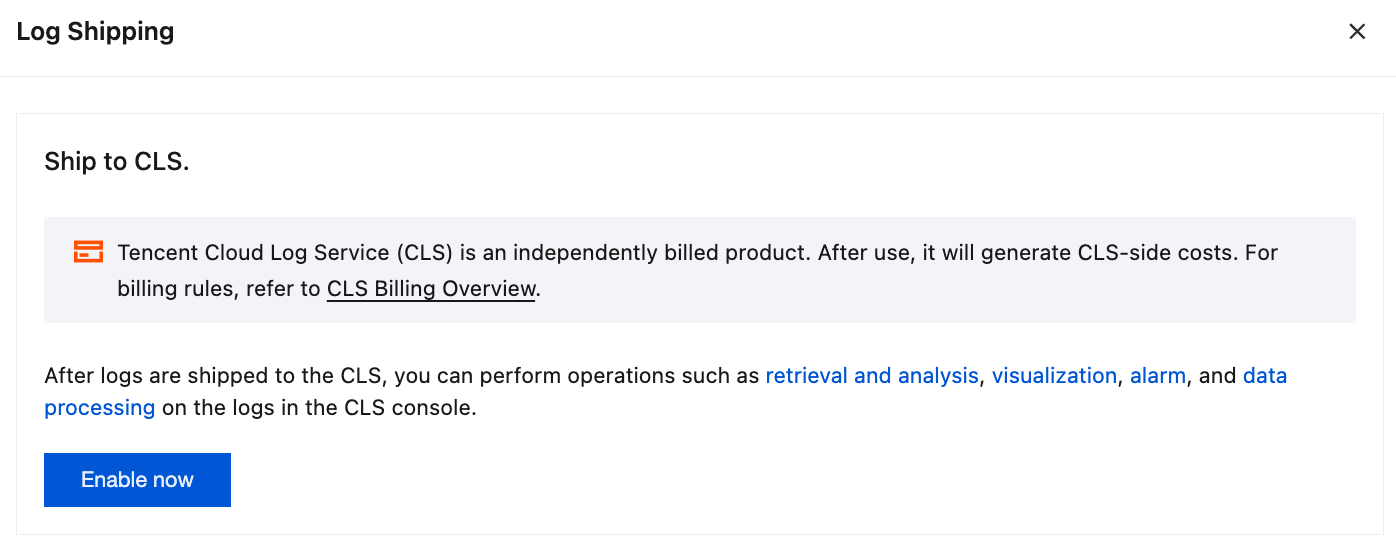
6. In the Log Shipping dialog box, review the instructions for shipping to CLS. After confirming that the information is correct, click Enable Now.
Note:
CLS is a Tencent Cloud product billed independently. After you enable log shipping, CLS usage fees will be incurred based on the actual log volume. For specific billing rules, refer to the official CLS billing documentation.
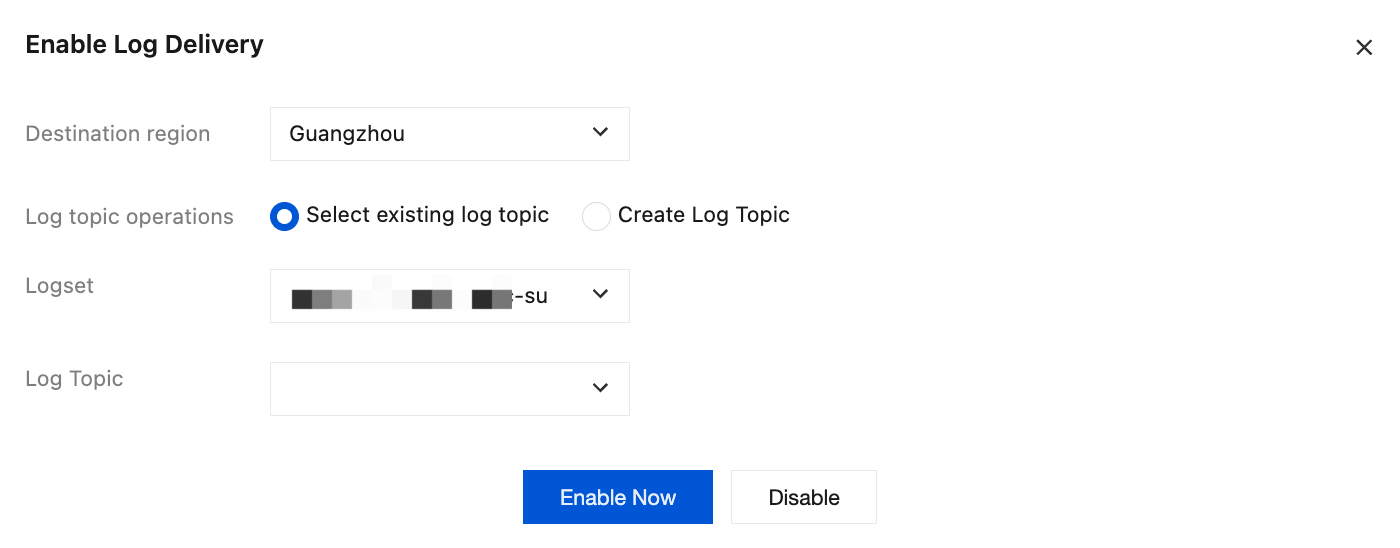
7. In the Enable Log Delivery dialog box, configure the shipped logset and log topic, and then click Enable Now.
Configuration Item | Parameter Description |
Destinationregion | The target region for audit log shipping. The system automatically associates and displays the regions supported by CLS. Logs can only be shipped to the logset and log topic under the selected region. Defaults to the region where the current instance resides. |
Log topic operations | Selects the operation mode for the log topic. Select an existing log topic: Select an existing logset and log topic in the target region from the drop-down list as the shipping destination. This option is suitable for scenarios where you have already created resources in CLS and want to reuse them. Create Log Topic: Manually enter the logset name and log topic name to create dedicated resources in the target region for storing audit logs. This option is suitable for scenarios such as initial configuration or when independent storage space is required. |
Logset | The logset that receives audit logs. When you select Select an existing log topic, choose an existing logset in the target region from the drop-down list. When you select Create Log Topic, manually enter the logset name in the input box. Note: The logset name must comply with CLS naming conventions. After creation, you can view, rename, or adjust the structure of the logset in the CLS console. |
Log Topic | The log topic that receives audit logs. When you select Select an existing log topic, choose an existing log topic from the selected logset. When you select Create Log Topic, manually enter the log topic name in the input box. |
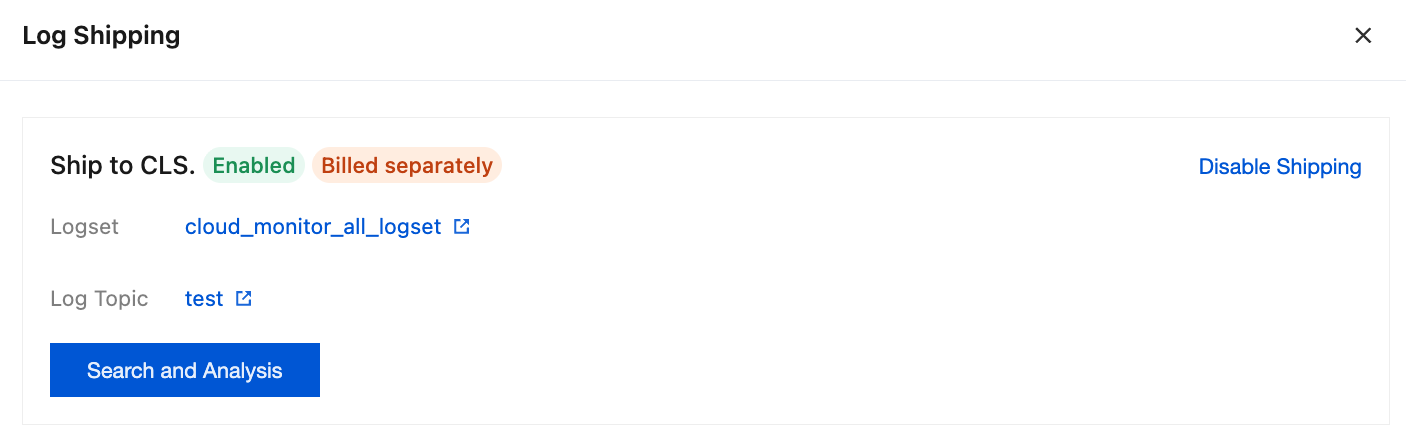
8. After successful enabling, the following page is displayed. The shipping status shows Enabled, and the title row simultaneously displays an "Independent Billing" tag (in orange), indicating that shipping to CLS involves independent billing.
Click a specific logset or log topic to navigate to its corresponding details page in the CLS console.
Click Search and Analysis to navigate to the CLS Search and Analysis page.
Subsequent Operation Steps
On the CLS Search & Analysis page, you can perform the following analysis operations on audit logs:
Configure Index: Before the first search, you must enable full-text or key-value indexing for the log fields to be searched (such as command type, client IP address, and user account). Logs can be searched and analyzed only after indexing is enabled. For specific operations, see Index Configuration.
Search Logs: Use keywords to perform full-text searches, or perform key-value searches by fields (such as command type, client IP address, and execution time) to quickly locate target log entries. For details, see Search & Analysis.
Statistical Analysis: Use SQL to perform aggregate statistics on search results, for example, grouping by command type to count execution times or grouping by client IP address to analyze access distribution. For details, see Statistical Analysis.
Visualization & Alarms: Build visual dashboards based on analysis results, or configure alarm policies to provide real-time warnings for behaviors such as high-risk command execution and abnormal access IPs. For more information, see Dashboards and Monitor & Alarm.
Disabling Log Delivery
If you no longer need to ship logs to CLS, you can disable the existing shipping task at any time. To do this, click Disable Shipping in the upper-right corner of the shipping details page. Disabling log shipping does not affect the normal operation of the audit feature itself.
FAQs
Will Enabling Log Delivery Incur Additional Fees?
The log shipping feature itself is free of charge. However, after logs are shipped to CLS, CLS usage fees will be incurred based on the actual log volume. CLS is a Tencent Cloud product billed independently. For billing details, see the CLS console or the official billing documentation. We recommend that you estimate your log volume based on your business scale and properly configure the retention period of your logset to control costs.
Does It Support Delivery to Multiple Log Sets or Log Topics?
A single instance supports only one log shipping task. If you need to distribute logs to multiple destinations, you can use the Data Processing feature in the CLS console to forward logs to other target topics.
Will Disabling Log Delivery Affect the Audit Feature Itself?
No. Log shipping is an extended feature of the audit function. Disabling log shipping does not affect the normal operation of the audit function. After it is disabled, the audit function will continue to collect and store logs according to the configured retention period. Note that logs already shipped to CLS will not be automatically deleted. If you need to clean them up, perform the corresponding operations in the CLS console.
Ajuda e Suporte
Esta página foi útil?
Você também pode entrar em contato com a Equipe de vendas ou Enviar um tíquete em caso de ajuda.
comentários