Quickly Creating an Instance
다운로드
포커스 모드
폰트 크기
Scenarios
You can quickly configure your first TencentDB for MongoDB instance as described in this document.
Prerequisites
A Tencent Cloud account has been registered with identity verification completed.
To register a Tencent Cloud account: Click here to register a Tencent Cloud account.
To complete identity verification: Click here to complete identity verification.
Regions and AZs for database instances have been planned. See Region and AZs.
Virtual Private Clouds (VPCs) and security groups for database instances have been planned. See Creating VPC and Configuring Security Group. Public network access is not supported currently.
Operation Steps
1. Log in to the TencentDB for MongoDB purchase page with a Tencent Cloud account.
2. See the table below to configure default specifications.
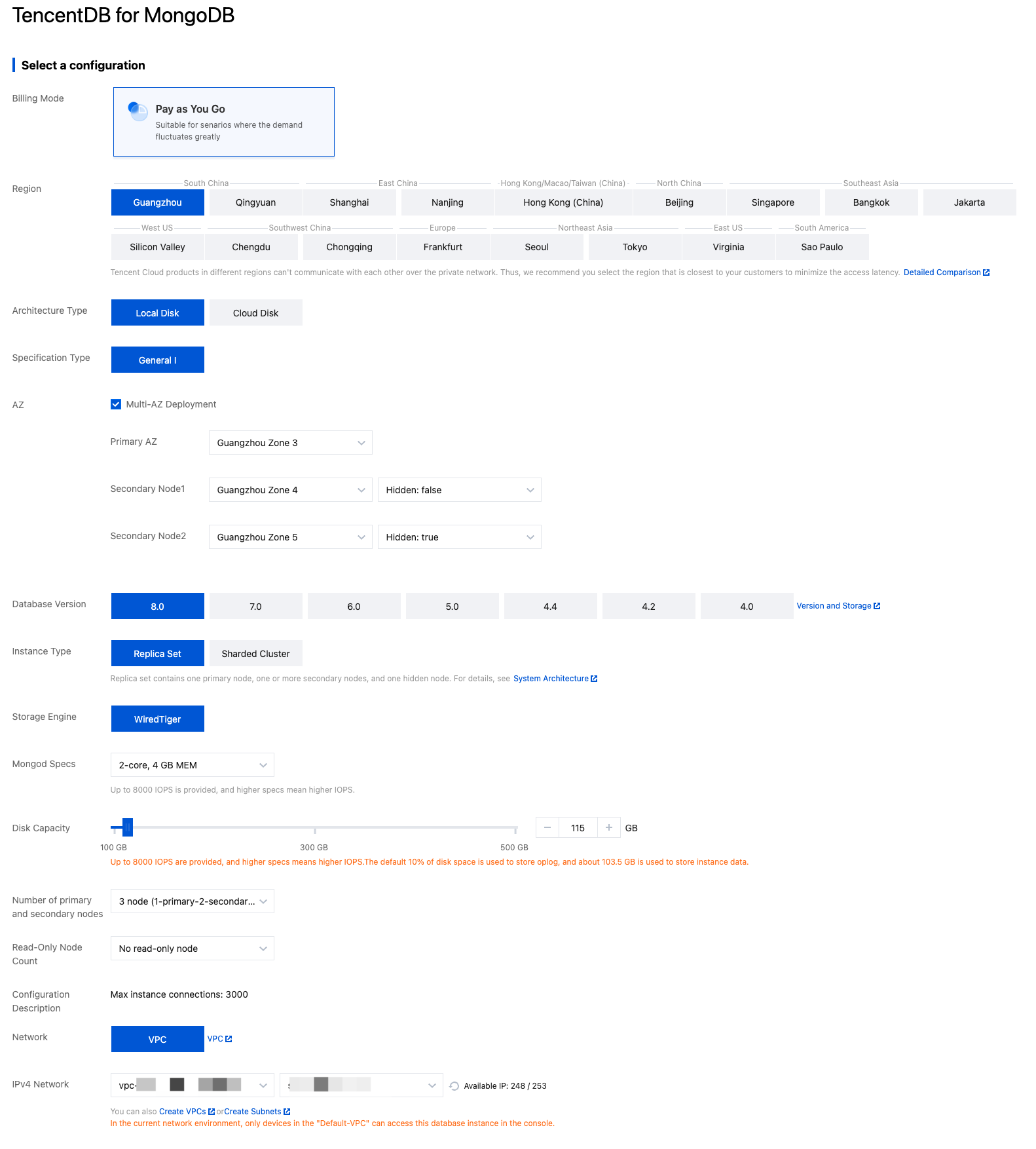
Parameter Name | Parameter Description |
Billing Mode | |
Region | Select a region for the instance. You can select the nearest region to reduce access latency. Once an instance is created successfully, the region cannot be changed. Please select the region with caution. Please select a region the same as that of Cloud Virtual Machine (CVM) instances. Otherwise, communication through a private network cannot be achieved. |
Architecture Type | Local Disk: This database service, built on local physical hard drives, delivers a high-performance, stable, reliable, low-latency, and bandwidth-sufficient managed MongoDB service. It provides an exclusive running environment for each instance, with resources allocated independently. Cloud Disk: This is a cloud-native architecture database service built on various cloud services such as Cloud Virtual Machine (CVM) and Cloud Block Storage (CBS). It fully integrates the capabilities of Tencent Cloud's underlying cloud services, supports quick adjustment of computing specifications, and provides quick backup and rollback through cloud disk snapshots, offering greater flexibility and convenience for product usage. Note: The current default rule is the general edition. If you need the cloud disk edition, you must submit a ticket to apply. |
Specification Type | General I: The General Type I product type has been added. Richer specifications: Multiple new node specifications have been added to cover mainstream configuration requirements. More competitive pricing: The overall pricing is more competitive. Ten-Gigabit High IO (To Be Discontinued):It provides higher network bandwidth and IOPS performance and is suitable for scenarios that have extremely high requirements for network performance. |
Database Version | Local Disk/General I: 8.0, 7.0, 6.0, 5.0, 4.4, 4.2, 4.0. Cloud Disk/General I: 6.0, 5.0, 4.4, 4.2, 4.0. Local Disk/Ten-Gigabit High IO: 8.0, 7.0, 6.0, 5.0, 4.4, 4.2, 4.0. After an instance is purchased, version upgrades are supported. For specific steps, see Version Upgrade. |
Architecture Type | Select Replica Set. |
Mongod Specs | Use default minimum specifications. |
Disk Capacity | Use default specifications. |
Number of primary and secondary nodes | Use the default configuration of 3 nodes (1 primary node and 2 secondary nodes). |
Network | Only VPC can be selected. |
IPv4 Network | Select a specific VPC and its subnet. |
Security Group | Set security group rules for the instance to control inbound traffic to the database. |
Parameter Template | Use the default configuration. |
Instance Name | Set an instance name. Use an easy-to-recognize name. The name can contain any characters with a length of 1 to 128 characters. |
Password | Set an access password for the instance. Password complexity requirements: The length should be between 8 and 32 characters. Allowed characters include uppercase letters A–Z, lowercase letters a–z, and digits 0–9. Allowed special characters include "!", "@", "#", "%", "^", "*", "()", and "_". The password should not consist of only letters or only digits. |
Confirm Password | Confirm the username and password again. |
3. Select Terms of Service, and click Buy Now in the bottom right corner. A purchase successful prompt is displayed. Then, click Go to the Console, wait for the instance status to become Running in the instance list. At this point, the instance can be used normally.
Subsequent Operations
Use CVM to directly access the private network address of the database instance. See Connecting to TencentDB for MongoDB Instance.
View the information in the instance list and instance details. For more information, see Viewing Instance Details.
Related APIs
API Name | API Feature |
Creating a TencentDB for MongoDB Instance (Pay-as-You-Go) |
피드백