Release Notes
Announcements
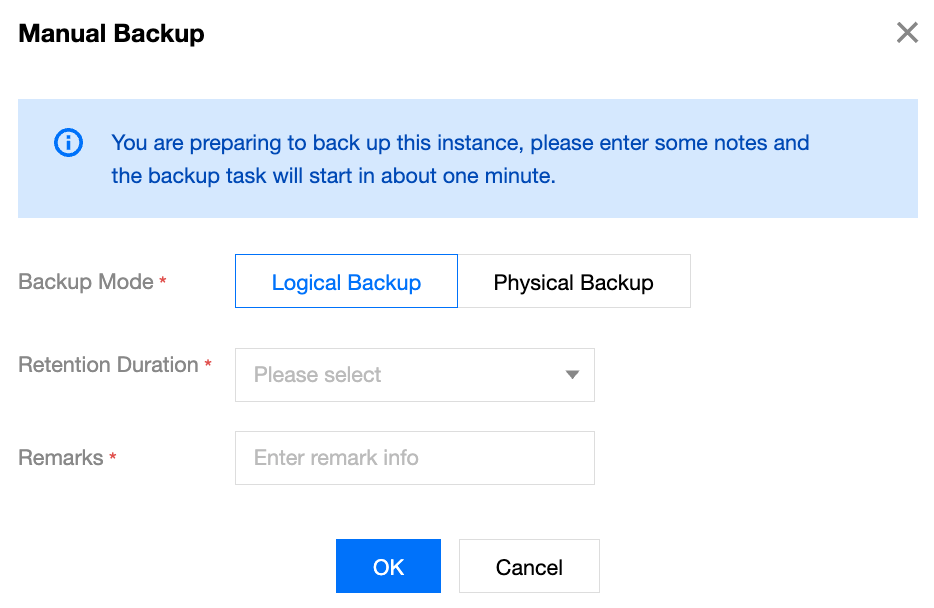
Parameter | Parameter Description | Configuration Suggestion |
Backup Mode | General edition: The options include Logical Backup and Physical Backup, and the default value is Logical backup. Cloud disk edition: The options include Snapshot Backup and Physical Backup, and the default value is Snapshot backup. | |
Retention Duration | In the drop-down list, select the retention period for manual backup files. Note: Backup Retention Period is an advanced backup feature. Instances of the general edition: After Advanced Backup is enabled for the backup service, the backup retention period can be set for manual backup files. Instances of the cloud disk edition: Backup Retention Period is not supported. Backup data is retained for seven days by default. Follow the full backup duration: The retention period of manual backup files is the same as that set for full backup files in the automatic backup policy. Long-Term retention period: The retention period of manual backup files is the same as that set for long-term backup files in the automatic backup policy. Custom retention period: Set the retention period as required in the input box. The value range is 1 to 1095 days. Set it based on actual requirements. | After the set backup retention period expires, manual backup files are deleted automatically. |
Remarks | In the input box, enter remarks of a string of 30 characters without symbols to identify the business requirements of the manual backup operation. | - |


API | Description |
Querying the Backup Task List of an Instance | |
Backing up an Instance | |
Querying Information About a Backup Download Task | |
Creating a Backup Download Task |
Was this page helpful?
You can also Contact sales or Submit a Ticket for help.
Help us improve! Rate your documentation experience in 5 mins.
Feedback