tencent cloud
プロモーション
製品
ソリューション
価格
パートナー
マーケットプレイス
詳しく知る
Prev
Next
Tencent Cloud Observability Platform
Related Agreements
Application Performance Management Service Level Agreement
APM Privacy Policy
APM Data Processing And Security Agreement
RUM Service Level Agreement
プライバシーポリシー
データ処理とセキュリティ契約
Mobile Performance Monitoring Service Level Agreement
Terminal Performance Monitoring Privacy Policy
Terminal Performance Monitoring Data Processing And Security Agreement
Cloud Automated Testing Service Level Agreement
ATTRIBUTIONS-iOS
ATTRIBUTIONS-Android
RUM Pro Privacy Policy
RUM Pro Data Processing and Security Agreement
Prometheus Service Level Agreement
TCMG Service Level Agreements
PTS Service Level Agreement
PTS Use Limits
Cloud Monitor Service Level Agreement
ドキュメント
Tencent Cloud Observability Platform
Enabling Dark Mode
ダウンロード
フォーカスモード
フォントサイズ
最終更新日: 2024-01-27 17:45:42
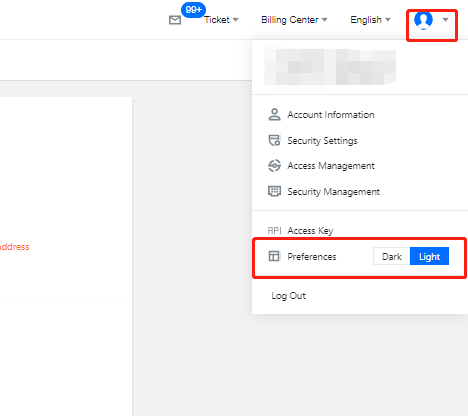
This document describes how to enable the dark mode, which uses the optimal contrast for charts, text foreground, and background. It highlights the content consistency, comfort, and legibility compared to the light mode.
Directions
1.
Log in to the
Tencent Cloud console
.
2.
Hover over the personal account icon in the top-right corner and click
Dark
in the
Preferences
settings from the drop-down list.
次の記事へ: Application Performance Management Service Level Agreement
ヘルプとサポート
この記事はお役に立ちましたか?
はい
いいえ
営業担当者に
お問い合わせ
いただくか
チケットを提出
してサポートを求めることができます。
フィードバック
キーワードで検索
Search titles only
Enter keywords to search documentation