tencent cloud
最新优惠
产品
解决方案
价格中心
合作伙伴网络
云市场
探索更多
Prev
Next
腾讯云可观测平台
动态与公告
产品动态
产品简介
产品概述
产品优势
基本功能
基本概念
应用场景
使用限制
购买指南
云产品监控
应用性能监控
终端性能监控 Pro
终端性能监控
前端性能监控
云拨测
Prometheus 监控服务
Grafana 服务
事件总线
云压测
告警短信服务
快速入门
监控概览
实例分组
云产品监控
应用性能监控
终端性能监控 Pro
云拨测
云压测
Prometheus 监控服务
Grafana 服务
创建 Dashboard
事件总线
告警服务
云产品监控
云产品监控指标
控制台操作指南
云服务器监控组件
云产品监控对接 Grafana
故障处理
实践教程
AI 工作台
AI 探索
工作面板
数字分身管理
扩展中心
服务授权
应用性能监控
应用性能监控简介
接入指南
控制台操作指南
实践教程
参考信息
常见问题
终端性能监控 Pro
终端性能监控 Pro 简介
接入指南
控制台操作指南
常见问题
终端性能监控
终端性能监控概述
控制台操作指南
接入指南
实践教程
前端性能监控
前端性能监控简介
控制台操作指南
接入指南
常见问题
云拨测
产品简介
控制台操作指南
常见问题
云压测
云压测概述
控制台操作指南
实践教程
JavaScript API 列表
常见问题
Prometheus 监控
Prometheus 监控简介
接入指南
控制台操作指南
实践教程
Terraform
常见问题
Grafana 服务
产品简介
控制台操作指南
Grafana 平台常用功能指引
常见问题
Dashboard
什么是 Dashboard
控制台操作指南
告警管理
控制台操作指南
故障处理
常见问题
事件总线
事件总线简介
控制台操作指南
实践教程
常见问题
报表管理
常见问题
腾讯云可观测平台常见问题
告警服务相关
一般性问题
监控图表相关
云服务器监控组件相关
动态阈值告警相关
云监控对接 Grafana 相关
文档阅读指南
相关协议
应用性能监控服务等级协议
APM 隐私协议
APM 数据处理和安全协议
前端性能监控服务等级协议
RUM 隐私协议
RUM 数据处理和安全协议
终端性能监控服务等级协议
终端性能监控隐私协议
终端性能监控数据处理和安全协议
云拨测服务等级协议
ATTRIBUTIONS-iOS
ATTRIBUTIONS-Android
终端性能监控 Pro 隐私协议
终端性能监控 Pro 数据处理和安全协议
Prometheus 监控服务服务等级协议
Grafana 服务服务等级协议
云压测服务等级协议
云压测使用限制
Cloud Monitor Service Level Agreement
API 文档
History
History
Introduction
API Category
API Category
Making API Requests
Making API Requests
Monitoring Data Query APIs
Alarm APIs
Alarm APIs
Legacy Alert APIs
Notification Template APIs
TMP APIs
Grafana Service APIs
Event Center APIs
TencentCloud Managed Service for Prometheus APIs
Monitoring APIs
Data Types
Error Codes
Data Types
Error Codes
词汇表
文档
腾讯云可观测平台
应用性能监控
控制台操作指南
应用监控
异常监控
异常监控
Download
聚焦模式
字号
最后更新时间: 2024-11-01 17:52:57
本文将为您介绍如何查看应用异常情况,进行异常分析。
操作前提
进入
应用性能监控控制台
,单击进入
异常监控
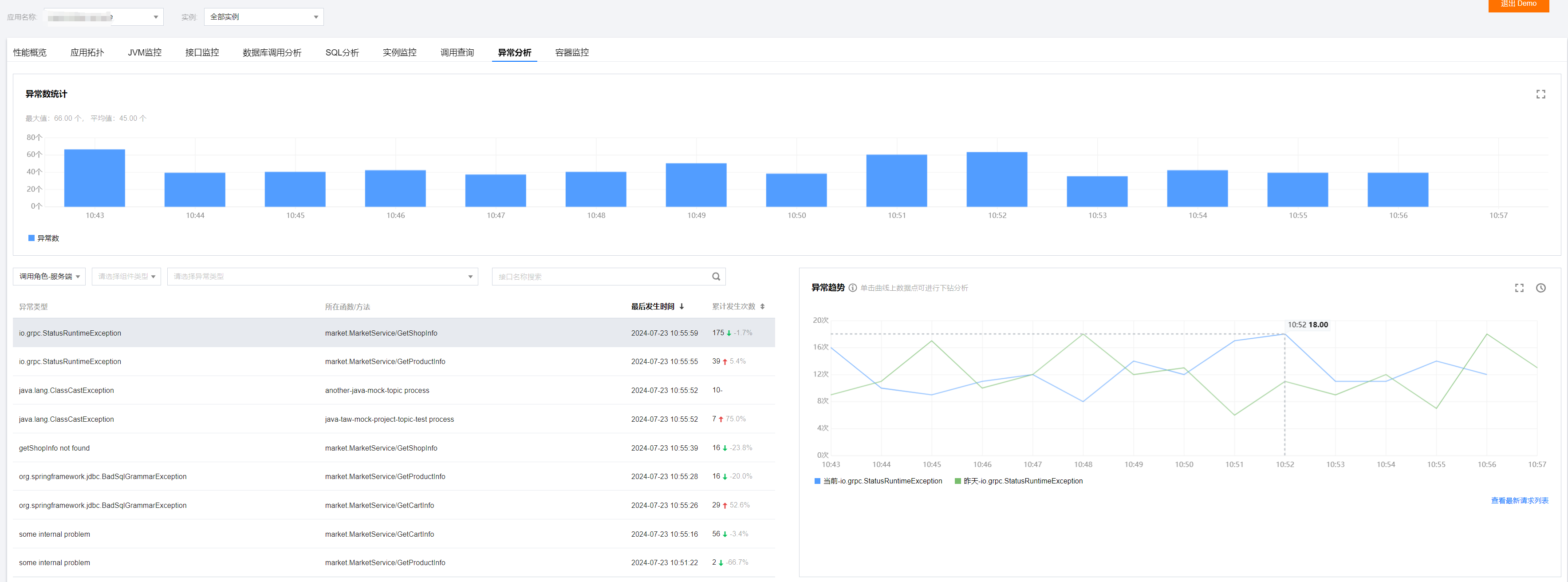
页面。如下图所示:
异常列表
在异常监控页面左侧所选时间内的所有异常,包括服务异常类型、接口、异常发生次数等信息。
异常趋势
右侧图表会显示出异常趋势,即每分钟内异常的发生次数。
异常分析
单击相关应用,在异常监控页面右侧将会展示该异常的异常次数时序曲线,以及昨日同时间段对比曲线。
说明:
您可以单击图表上方的
对比线选择
,添加一个月内特点日期的同比曲线。还可以单击曲线任意数据点,查看相关请求列表。在列表中单击
请求详情
,可以下钻到调用链路详情中分析异常。
上一篇: 接口监控
下一篇: 容器监控
帮助和支持
本页内容是否解决了您的问题?
是
否
您也可以
联系销售
或
提交工单
以寻求帮助。
填写满意度调查问卷,共创更好文档体验。
点击前往
文档反馈