Cloud Native Recording
Download
Focus Mode
Font Size
The cloud native recording service is based on Cloud Streaming Services (CSS) and Cloud Application Rendering (CAR).
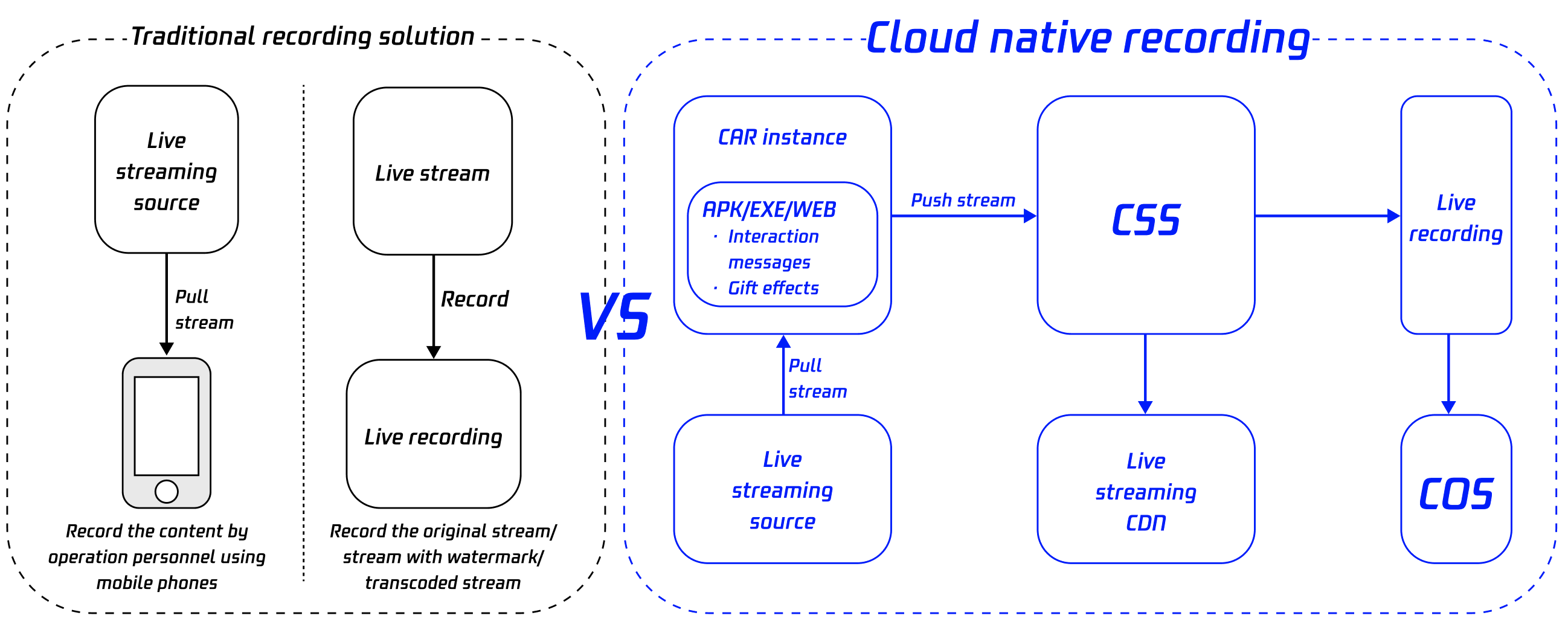
Traditional recording features can only record pure live images and cannot completely record the audio and video content of the client from the audience's perspective. To achieve "what you see is what you record", the native content on the client can be used as the recording source, and the "local screen recording" functional module on user terminals can be migrated to a Windows CAR instance or Android container. After the stream is pushed to Tencent Cloud CSS, recording files can be generated by the recording module. This is the "cloud native recording" feature. It records the screen content on terminals in the cloud to reduce the transformation and maintenance costs of the client. In addition, the APK/EXE/WEB client can be customized to implement complex features that cannot be implemented on terminals. This expands the capabilities of the APK/EXE/WEB client on the cloud and reduces the operation complexity on terminals.
Application Scenario
Recording of Interactive Live Streaming and Voice Chat Rooms
Traditional recording features can only record pure live images and cannot completely record the audio and video content for users from the audience's perspective. Cloud native recording can record not only the live streaming image but also special effects such as interactive co-anchoring and bullet screen messages that the audiences can see during live streaming. This can comprehensively enhance the immersive participation experience of the recorded video. The recorded content can serve as the UGC materials for secondary distribution and the basis for replay and review.
Online Class Recording
Online classes are an extension of the online teaching mode. They truly reproduce the interaction experience of offline classes and provide features of online Q&A, votes, and whiteboard interaction. Cloud native recording can record the complete teaching process, animated courseware, PPT documents, Q&A content, vote content, and whiteboard interaction content. The recorded videos can be used as resources for subsequent sharing and secondary dissemination. Compared with simple teaching videos, the videos containing real-time student interaction content are more popular and attractive.
Application Page Recognition and Recording
Cloud native recording can record the sound and image of web and client application pages and generate recording files containing the content of bulletin screen messages, gift effects, and interactive co-anchoring from the audience's perspective. The intelligent identification feature of Tencent Cloud Media Processing Service (MPS) can recognize and extract text content and interactive co-anchoring audio from the audience's perspective. Such content can be used as materials for LLM training and scenario analysis to improve the scenario conversion rate.
Architecture and Process
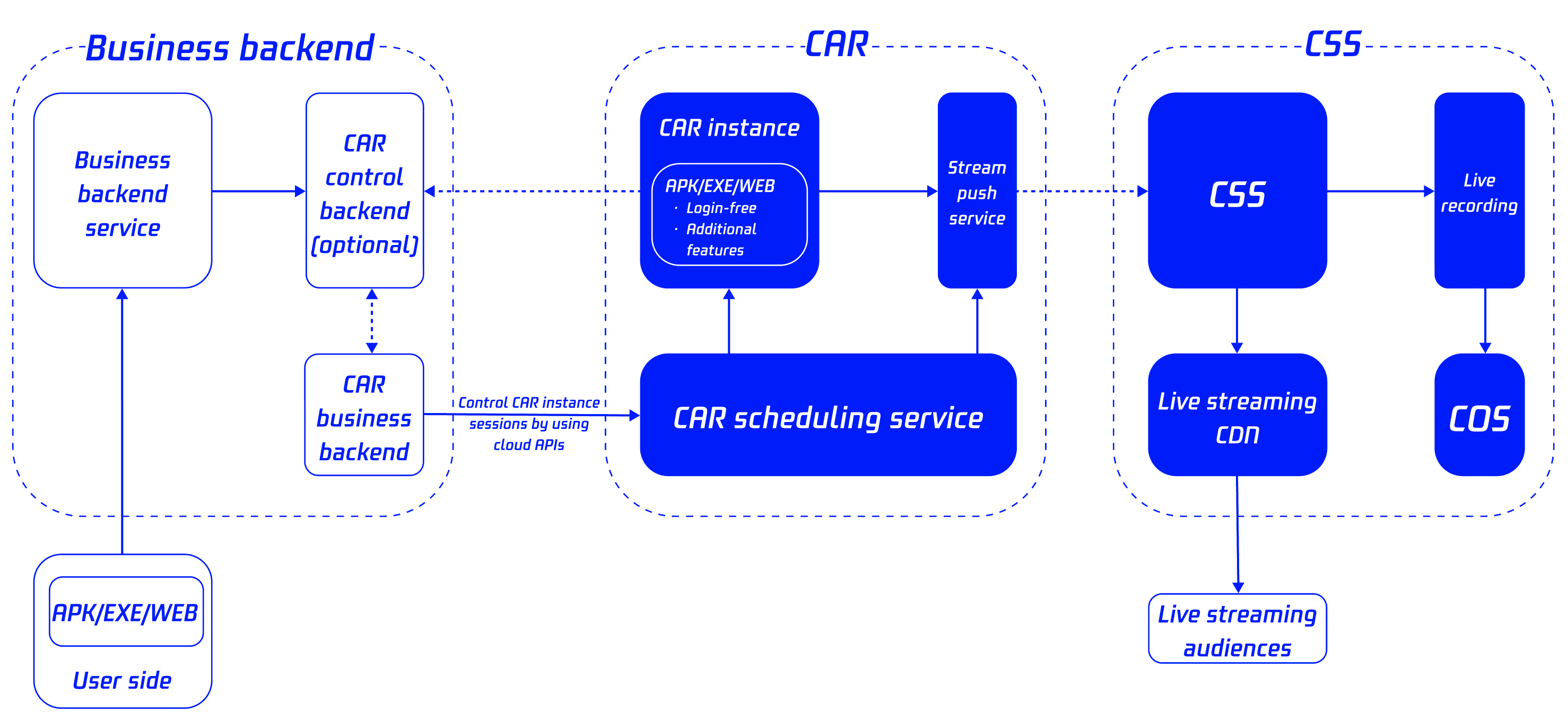
Cloud native recording uses APK/EXE/WEB content as the recorded content source to achieve a recording effect of "what you see is what you get". Users only need to start a cloud phone concurrency instance or a CAR instance, push the stream to CSS, and use the recording module to generate recording files. They can directly upload the files to VOD or COS or use them as the live streaming source to distribute the content to audiences.
Feature Strengths
Strengths | Description |
Wide range of applicable scenarios | Cloud native recording can be used in audio/video-related business scenarios such as live streaming and recording. |
Excellent reproduction effect | All external information on the client, such as special effects during games and teaching, can be recorded to 100% reproduce the actual situation. |
Low integration cost | Users do not need to integrate the SDK on the client. Instead, they can directly call the API in the business backend. |
Low transformation cost | The transformation cost of the APK/EXE/WEB client running on the cloud is low. The original APK/EXE/WEB client can be deployed directly. |
Powerful extended features | The APK/EXE/WEB client running on the cloud can be customized to implement complex features that cannot be implemented for the APK/EXE/WEB client on terminals. |
Customer Cases
Requirement Background | A country-wide popular live streaming App needs to accumulate video content of interaction features such as "anchor PK" and "voice chat room" as UGC materials for secondary distribution. |
Original Solution | Operation personnel use mobile phones to manually record the screen content during live streaming. |
Pain Points | The video stream obtained by the conventional video recording method is the original image from the individual host's perspective. Even with mixed stream recording, the animation effects of bullet screen messages cannot be recorded. In certain scenarios (such as "voice chat rooms"), the screen content can only be recorded by operation personnel using mobile phones. As a result, automated and large-scale material accumulation cannot be achieved. |
Current Solution | The cloud native recording feature of Tencent Cloud is used. The customized login-free App runs on the cloud. When the anchor starts live streaming, the customer's business backend automatically sends a message to the cloud App. After receiving the signal, the cloud App enters the specific room and plays the video. The live recording feature of Tencent Cloud is used to accumulate video content as materials. |
Prerequisites
You have activated CSS and added a stream push domain name.
You have activated CAR.
If a recording service is required, activate Video on Demand (VOD) or Cloud Object Storage (COS) in advance.
Directions
1. If the client is an EXE application, upload the EXE client file in the CAR console. If the client is a web browser, create a web application in the CAR console instead of uploading the web browser. If the client is in an APK application, contact Tencent business personnel to enable the feature of creating APK applications in the backend.
2. See User Guide of CAR to create a project, purchase a CAR concurrency package, and test and release the project.
3. Call the StartPublishStream API to push the complete stream of the client in the CAR instance to CSS.
4. Start recording in the CSS console and save the complete stream of the client as a recording file. The live stream can be used for playback and distribution. Users can also use the intelligent identification feature of MPS to recognize content such as text and audio.
Fee Description
1. The client runs in a cloud instance, which will incur CAR concurrency fees.
2. Stream push to CSS will incur CSS upstream push fees. By default, only downstream playback fees are charged. For scenarios with imbalanced upstream and downstream traffic (downstream playback:upstream push < 10:1), additional stream push fees will be charged according to the actual stream push traffic if the daily peak stream push bandwidth is greater than 100 Mbps.
3. Using the live recording feature of CSS will incur live recording fees.
Help and Support
Was this page helpful?
You can also Contact sales or Submit a Ticket for help.
Help us improve! Rate your documentation experience in 5 mins.
Feedback