tencent cloud
最新优惠
产品
解决方案
价格中心
合作伙伴网络
云市场
探索更多
Prev
Next
账号相关
产品简介
腾讯云账号概述
基本概念
腾讯云账号限制
账号管理流程
操作指南
注册腾讯云
登录腾讯云
实名认证
管理账号信息
管理登录方式
管理账号安全
常见问题
账号信息相关
实名认证相关
安全设置相关
项目管理相关
异常处理
手机收不到验证信息
邮箱收不到验证信息
文档
账号相关
操作指南
管理账号安全
下线所有登录
下线所有登录
下载
聚焦模式
字号
最后更新时间: 2025-12-05 16:26:56
操作场景
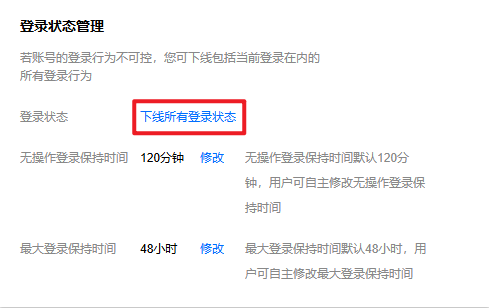
若您的账号登录行为不可控,怀疑当前账号存在登录安全风险,您可下线包括当前登录在内的所有登录行为。
注意事项
进行下线操作之前,建议您先前往
安全设置
页面更换账号密码。
操作步骤
1.
登录腾讯云控制台,进入
安全设置
页面。
2.
在
登录状态管理
栏中,单击
下线所有登录状态
。
3.
在弹出的身份验证窗口中,根据提示,完成身份验证。
说明:
如果当前身份验证方式不可用,可以单击使用备选校验方式,通过备选校验方式验证身份。
如果没有备选校验方式,请
联系我们
或
提交工单
获取支持。
4.
在弹出的提示框中,单击
立即下线
。
上一篇: 异地登录保护
下一篇: 账号注销
帮助和支持
本页内容是否解决了您的问题?
是
否
您也可以
联系销售
或
提交工单
以寻求帮助。
填写满意度调查问卷,共创更好文档体验。
点击前往
文档反馈
搜索
仅搜索标题
请输入关键词搜索文档