Enabling the Audit Service
Download
Focus Mode
Font Size
TencentDB for PostgreSQL supports Database Audit, which records database access and SQL statement execution, helping enterprises control risks and improve data security.
Use Cases
Address audit risks
Incomplete audit logs make it difficult to trace and locate security incidents.
It fails to meet the explicit requirements of Multi-Level Protection Scheme (Level 3).
It cannot meet the requirements of industry information security compliance documents.
Address management risks
Accidental operations, unauthorized operations, and privilege escalation by technical personnel compromise the secure running of business systems.
Accidental operations, malicious operations, and tampering by third-party development and maintenance personnel.
Super administrator permissions are overly broad and cannot be audited or monitored.
Address technical pain points
SQL injection into the database system can maliciously pull database and table information.
A sudden surge in database requests that is not caused by slow logs makes rapid troubleshooting difficult.
Fee Instructions
Supported Versions
Database Audit for TencentDB for PostgreSQL supports primary instances and read-only instances in dual-server high availability (one primary and one standby) deployments running PostgreSQL v11.12_r1.14, v12.7_r1.15, v13.3_r1.12, v14.2_r1.15, v15.1_r1.7, v16, or v17 and later. To enable full Database Audit for historical TencentDB for PostgreSQL instances, upgrade the minor kernel version first.
Prerequisites
Note:
Enabling or disabling the audit service requires a database restart. Please note this.
Operation Steps
1. Log in to the TencentDB for PostgreSQL console.
2. In the left sidebar, select Database Audit.
3. After selecting a region at the top, go to the Audit Instance page and click Audit Status to view the list of instances with audit enabled or disabled.
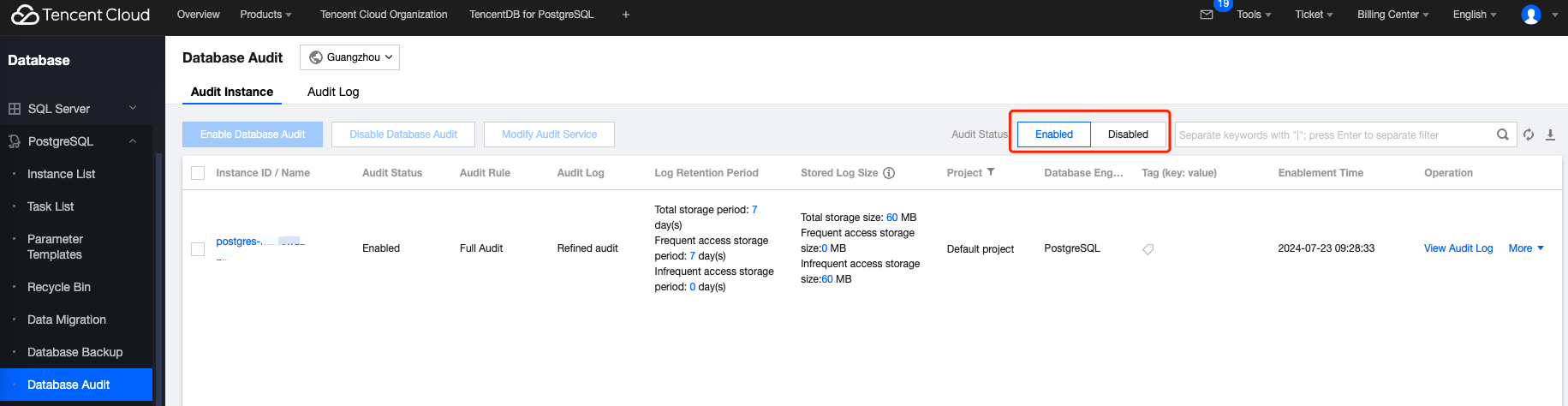
4. Locate the target instance in the audit instance list. You can also use the search box to filter by resource attributes for quick access. In the Operation column, click Enable Database Audit.
Note:
You can enable the audit service in batches. On the Audit Instance page, select multiple target instances and click Enable Database Audit at the top to go to the settings page.

5. On the Enable Database Audit page, complete Select Audit Instance, Audit Rule Settings, and Audit Service Settings in sequence. Read and select Tencent Cloud Service Agreement, and click OK.
5.1 Select Audit Instance
Under Audit Instance Selection, the system selects the instances chosen in Step 4 by default. You can modify the instance selection in this window (select other instances or multiple instances) or use the search box to quickly find target instances by instance ID or name. After completing the instance selection, go to Audit Rule Settings.
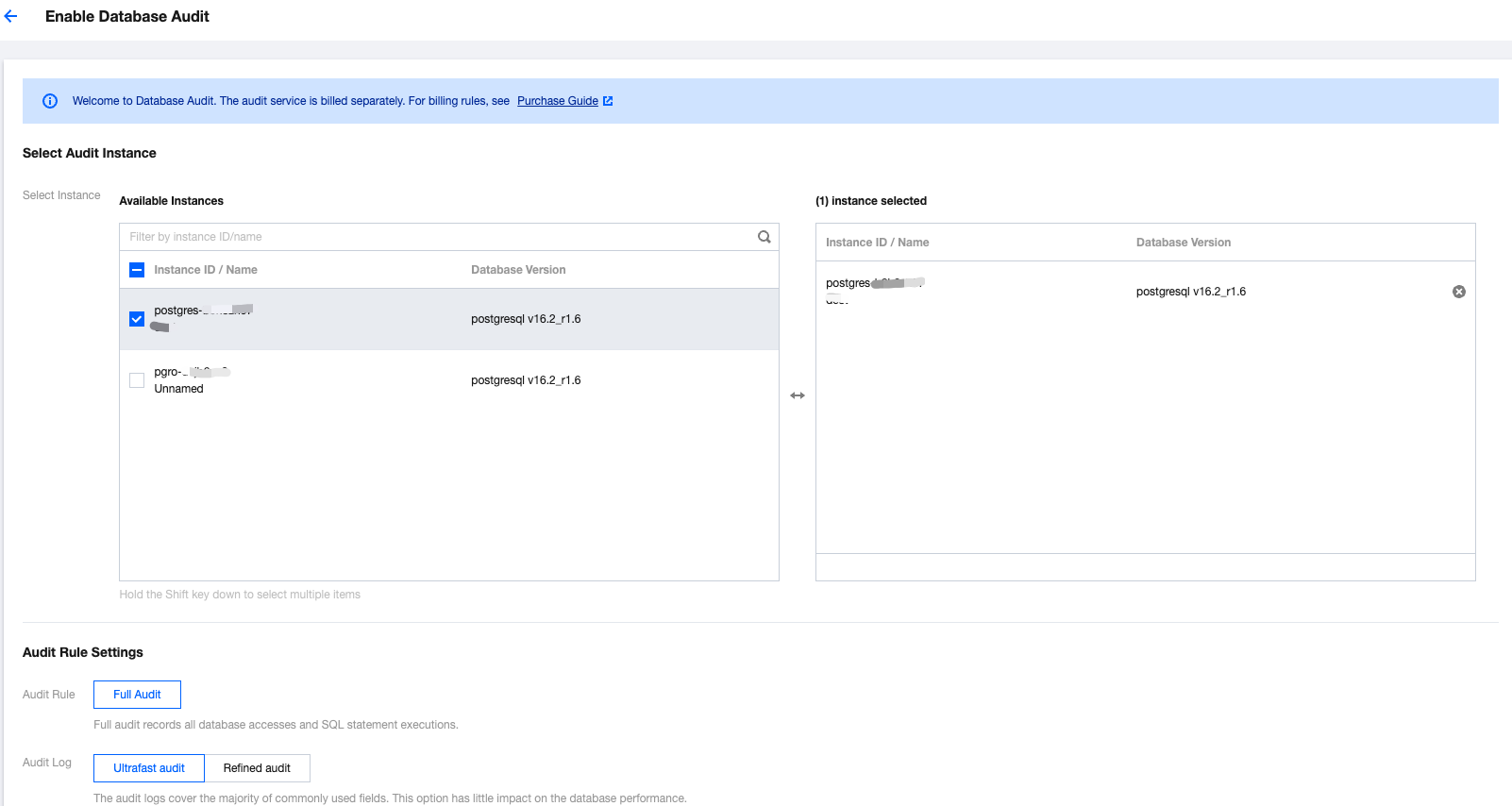
5.2 Audit Rule Settings
Under Audit Rule Settings, only Full Audit is currently supported. In full audit mode, the system records all database accesses and SQL statement executions. Audit logs support Express Audit and Detailed Audit. For more information, see Audit Service Description. After completing the audit rule settings, go to the audit service settings.
5.3 Audit Service Settings
Under Audit Service Settings, set Log Retention Period and Ultra-High-Performance Storage/Infrequent Access Storage Duration, read and select Tencent Cloud Service Agreement, and then click OK to enable the audit service.
Parameter | Description |
Log Retention Period | Set the retention period for audit logs. Unit: days. Supported values: 7, 30, 90, 180, 365, 1090, and 1825 days. |
Ultra-High-Performance Storage Duration | Ultra-high-performance storage represents an ultra high performance storage medium with the best query performance. Unit: day. After setting the Storage Duration, audit data within the specified duration will be stored in ultra-high-performance storage. When data exceeds its specified period in ultra-high-performance storage, it will automatically transition to infrequent access storage. Different storages support the same audit capabilities, only differing in performance. For example: If the Log Retention Period is set to 30 days, and the Ultra-High-Performance Storage Duration is set to 7 days, then the Infrequent Access Storage Duration defaults to 23 days. |
Help and Support
Was this page helpful?
You can also Contact sales or Submit a Ticket for help.
Help us improve! Rate your documentation experience in 5 mins.
Feedback