Upgrade Necessity
TencentDB for PostgreSQL periodically releases new kernel minor versions, bringing feature improvements and optimizations, fixing related issues, effectively avoiding potential risks, and guaranteeing database stability and security. You are recommended to reasonably plan kernel minor version upgrade time according to your own business needs and upgrade strategy to ensure the database version is the latest. This document explains the principles behind kernel minor version upgrade in detail.
Upgrade Processing Process
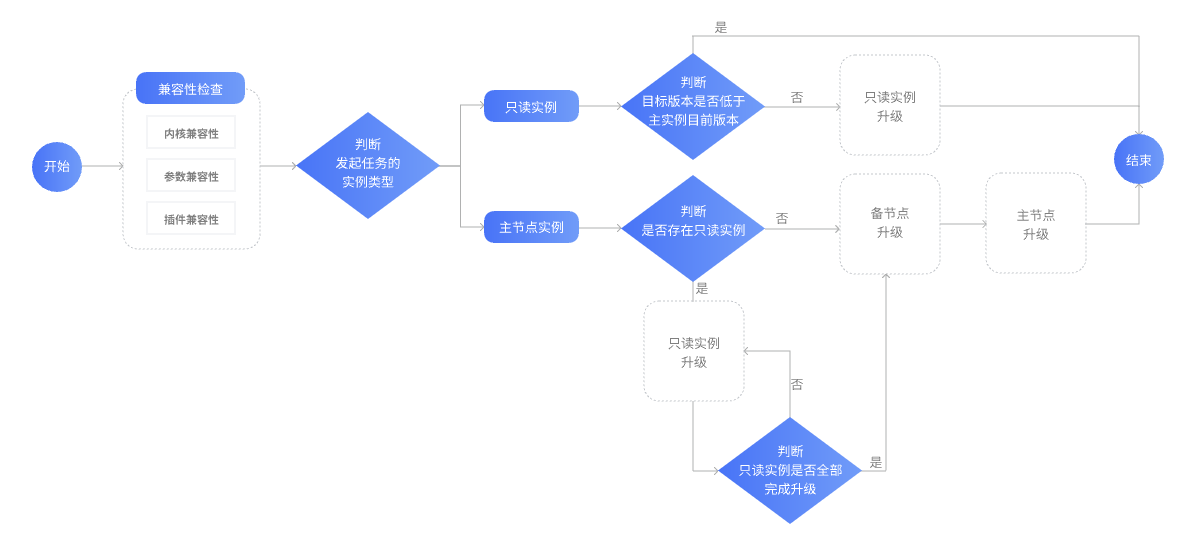
Compatibility Check
After the user initiates an upgrade task, the system first performs the following pre-check:
1. Kernel compatibility check: The system backend automatically detects the compatibility between the kernel minor version of the current database instance and the target minor version to prevent abnormal risks.
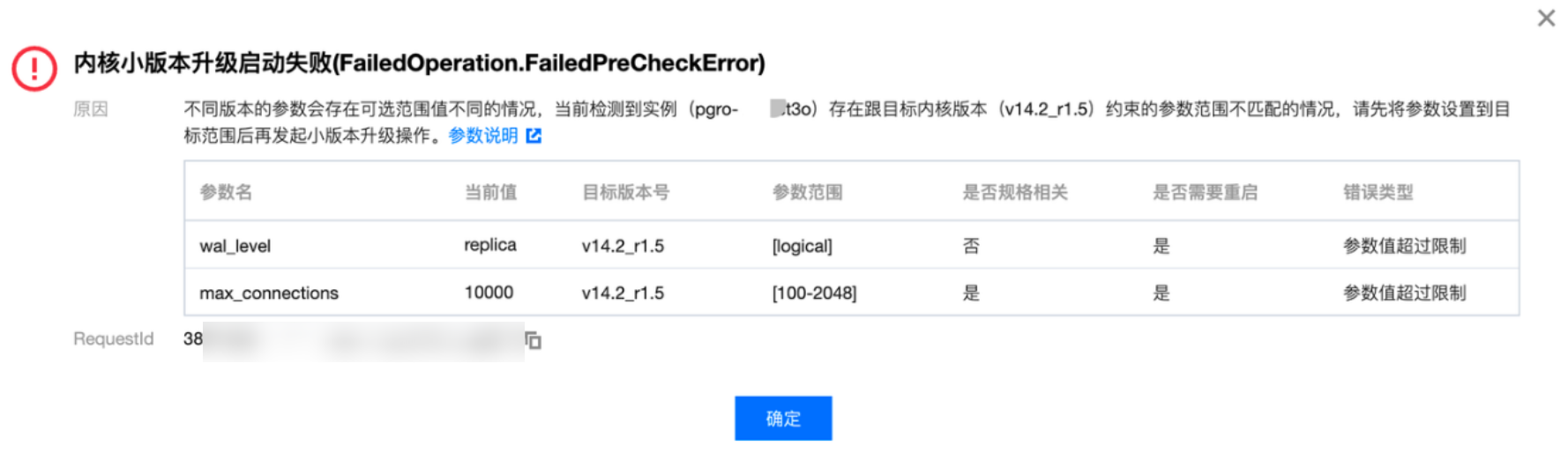
2. Parameter compatibility check: The system will detect whether user-defined parameters and system-managed parameters are compatible with the new version to prevent invalid parameters or conflicts. For user-defined parameters, if the parameter range corresponding to the target kernel version differs from that of the original kernel version, the system will provide a prompt when the parameter value exceeds the requirement of the target kernel version, allowing users to perform self-modification, as shown below.
3. Plug-in compatibility check: The system will detect whether installed plug-ins are supported by the new kernel minor version to avoid upgrade failure or feature exceptions caused by incompatible plug-ins.
Confirm Upgrade Sequence
Upgrading a Read-Only Instance
After the compatibility check is complete, the system will determine the instance type that requests the upgrade.
If the instance is read-only, directly enter the upgrade process;
If the instance is primary, start by upgrading all associated read-only instances. Once all read-only instances are upgraded, proceed with the primary instance upgrade process.
Note:
When initiating a kernel minor version upgrade task for the primary instance, all associated isolated, decommissioned but unrecovered read-only instances will also be upgraded. Both the primary and standby instances will enter the "upgrading kernel version" status. Instances in this status can still log in to use normally but are unable to perform management operations. Once an instance upgrade is complete, its status will restore to "running".
Note: If the primary node has multiple associated read-only instances, the read-only instances will be upgraded sequentially. Confirm the upgrade window in advance and ensure the business has a reconnection mechanism.
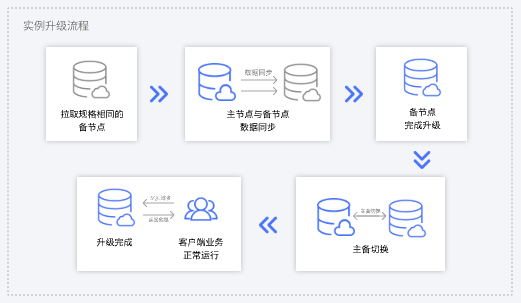
For the primary instance, to ensure high availability, the system will first upgrade the replica node. After the standby node upgrade is complete, proceed with the primary node upgrade.
Upgrading the Primary Instance
For the primary instance currently in the upgrade process, the system will pull a new secondary node with the same specification type as the original instance, sync data from the primary node to the new secondary node, and complete the upgrade on this secondary node. After the upgrade is completed, a primary/replica switch will be performed within the switch time specified by the user.
Updating Parameters at the Instance Level
During the upgrade, some parameters may be adjusted. Certain changes require restarting the database for the changes to take effect. Ensure your business has a reconnection mechanism.
Upgrade Task Completion
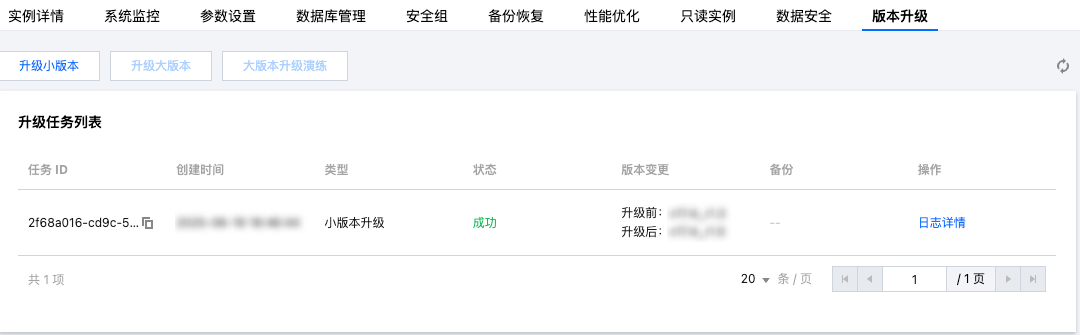
After the upgrade task ends, the upgrade task record will be displayed in version upgrading on the instance details page.
For a read-only instance, the upgrade task ends once the instance upgrade is complete.
For a primary instance, the upgrade task ends once all primary and secondary nodes are upgraded.
FAQs
Kernel Minor Version Upgrade after Downgrade Is It Possible
TencentDB for PostgreSQL does not support kernel minor version downgrade.
Impact of Upgrading Kernel Minor Version
Upgrading the minor kernel version will restart the instance and trigger a switchover. Generally, the service may experience a 30-second interruption once, with the specific time depending on the business scenario. We recommend choosing the instance maintenance time for the switchover and ensuring user applications have the automatic reconnection feature.