Read-Only Instance and Read-Only Group Practical Tutorial
Download
Focus Mode
Font Size
When your currently connected business has considerable read requests, you can use TencentDB for PostgreSQL read-only instances to alleviate the pressure of requests on the primary instance. And TencentDB for PostgreSQL offers read-only groups to support business read request load balancing with Cloud Load Balancer.
Create a read-only instance and read-only group suitable for the following scenarios:
Read-write separation architecture: The primary instance is responsible for processing write data requests, while read-only instances take on read requests, sharing the load on the primary instance and improving overall read performance and system throughput.
This article will introduce the best practice of read-only instances and read-only groups based on the Read-Only Instance Overview.
Read-only instance creation
Prerequisites
The primary instance of TencentDB for PostgreSQL has been created.
Operation Steps
1. Log in to the PostgreSQL console. In the instance list, click Instance ID or Manage in the Operation column to enter the instance management page.
2. On the instance details page, click Add Read-Only Instance in the Instance Architecture Diagram, or click Create on the Read-Only Instance page to enter the purchase page.

3. On the purchase page, select the corresponding configuration for the read-only instance, confirm that everything is correct, and click Buy Now.
Note:
Note: To unify the expiration time of the read-only instance and the primary instance, you can set the unified expiry date in the renewal management console. For specific operation steps, please refer to unified expiry date.
Designate an RO group:
Create RO group: If you purchase multiple instances at once, they will all be assigned to this RO group. The RO group only supports automatic read weight allocation by the system. Traffic for all read-only instances in the RO group will be automatically allocated based on read weights. Please refer to Create Read-Only Instance RO Group.
Existing RO group: Assign an existing RO group. If you purchase multiple instances at once, they will all be allocated to this RO group.
Note:
Configure more than one read-only instance to avoid business access failure due to a single point of failure.
A read-only instance has no high availability capability. We recommend using a read-only instance group. A read-only group with only one read-only instance has a single point of failure risk and will not be included in the overall availability calculation of the TencentDB for PostgreSQL service. A single read-only instance does not provide an availability SLA guarantee. We recommend purchasing at least two read-only instances in a read-only group to ensure its availability.
Remove delayed RO instances: After enabling the removal function, you can set a threshold for data delay size. If the threshold is exceeded, the read-only instance will be removed from the RO group. Delay size refers to the log size difference in data sync between the primary instance and read-only instance, with configuration granularity in MB.
Availability Zone: Select a marketable availability zone in the same region as the primary instance.
4. After purchase completion, return to the instance list. Once the instance status changes to running, it can be used normally.
Adjusting Read-Only Instance Specification Configuration
When business scale expansion occurs and existing RO instance resources are insufficient to support high-concurrency access, or when existing RO instance configurations are too high and cause cost waste, you can flexibly adjust the read-only instance specifications based on needs. The supported types and specifications of read-only instances are identical to those of the primary instance. For details, please refer to Instance Types and Specifications.
Operation Steps
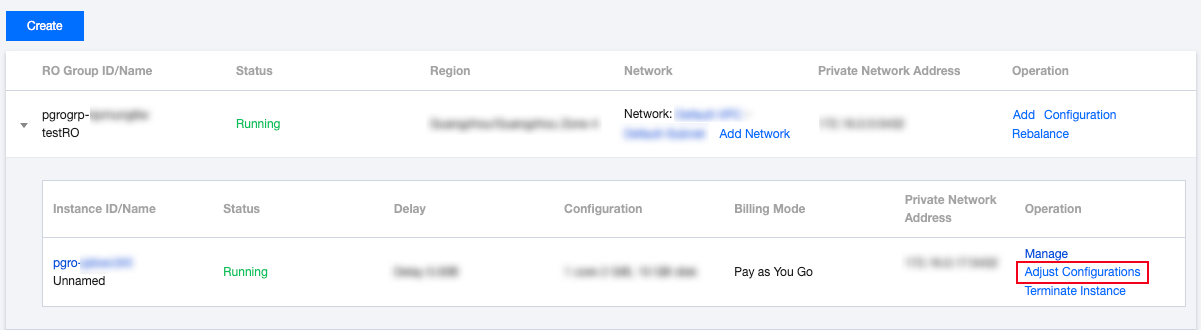
1. Log in to the TencentDB for PostgreSQL console, go to the master instance details page, click Read-Only Instance, and select the Adjust Configuration button for the read-only instance.
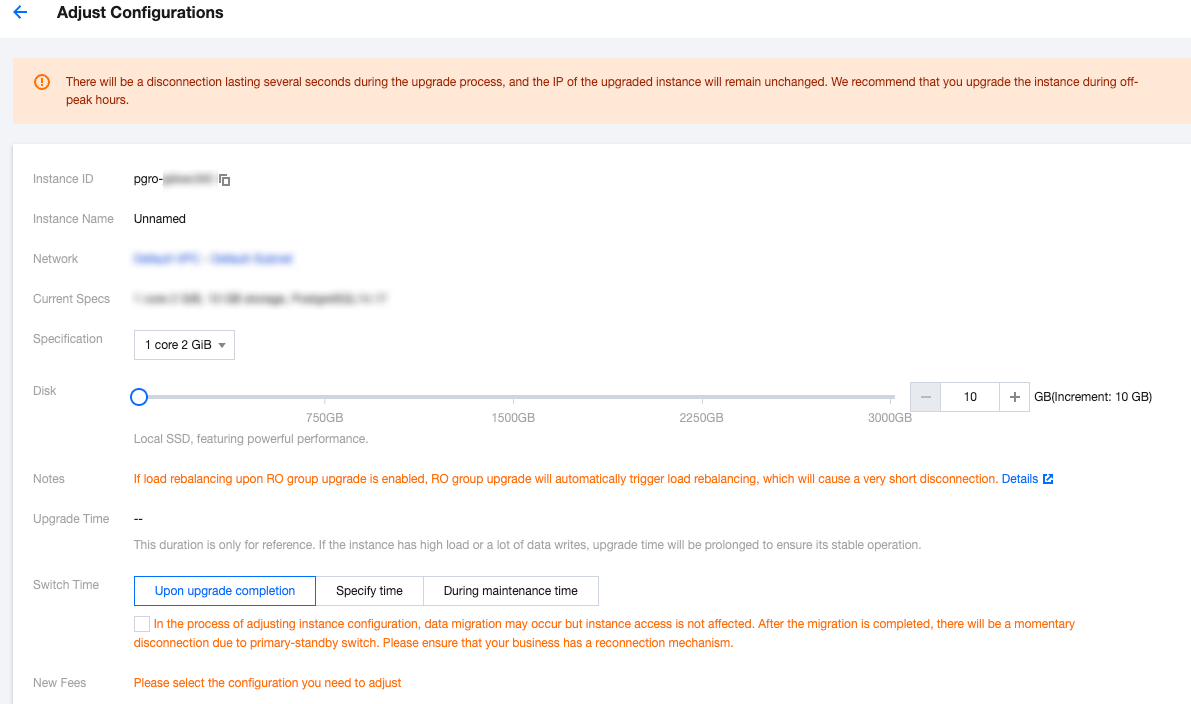
2. Adjust specifications as needed, then click Submit.
Note:
Read-only instance billing is based on the adjusted specification.
There will be a brief disconnection during the upgrade. Recommend choose maintenance time to avoid impact. Meanwhile, ensure the business has an automatic reconnection mechanism.
Read-Only Group Management
Read-Only Group Creation
A read-only group can only be created when creating a read-only instance. For details, please refer to Managing the RO Group of the Read-Only Instance.
Load Balancing
Assign two or more instances to the read-only group. The read-only group will automatically distribute read requests to each read-only instance in the group based on weight. The weight value is related to the read-only instance specification. For details, please refer to Eviction Policy and Load Balancing.
SSL Encrypted Connection Configuration
TencentDB for PostgreSQL supports enabling SSL encryption to protect business requests. It also supports downloading and installing the SSL CA certificate to application services as needed. For details, please refer to SSL Encryption Settings.
Note:
Note: To ensure the uniqueness of the server certificate signature when using the SSL connection feature, it is advisable to select the read-only group's IP as the connection address when enabling SSL encryption.
Help and Support
Was this page helpful?
You can also Contact sales or Submit a Ticket for help.
Help us improve! Rate your documentation experience in 5 mins.
Feedback