Upload Security Restriction
Documentation introduction to common issues with client upload and response plan. The following example is suitable for direct upload and client SDK upload scenarios.
The server-side code implementation uses Node.js as an example. For more languages, see Server Signature Practice.
1.Upload Size Limitation
Scenario 1: PutObject Upload, Achieved by Setting Numeric_less_than_equal Condition in Temporary Key Policy
condition: {// Uploaded files must be less than 5MB'numeric_less_than_equal': {'cos:content-length': 5 * 1024 * 1024},}
Scenario 2: PostObject Upload, Content-Length-Range Condition Can Be Achieved by Setting Signature Policy Conditions
var policy = JSON.stringify({...conditions: [['content-length-range', 1, 5 * 1024 * 1024], // Limit file size range such as 1 - 5MB],});
The example will return an error 403 for file uploads exceeding 5MB.
2.Restrict Upload File Types
Scenario 1: PutObject Upload, Can Be Achieved by Setting String_like Condition in Temporary Key Policy Via STS
condition: {// Uploaded files must be image type'string_like': {'cos:content-type': 'image/*'}}
Scenario 2: PostObject Upload, Set $Content-Type Condition Via Signature Policy Conditions
var policy = JSON.stringify({...conditions: [// Limit uploading file content-type must be image type['starts-with', '$Content-Type', 'image/*'],],});
The example will return an error 403 for non-image file uploads.
3.Prevent File Upload Overwrite
In Web or client upload scenarios, if the file name is specified by the client, there may exist risks of file overwrite upload.
The key measure to prevent file overwrite is server-side determination of the upload path.
/** Server-side generation upload path example nodejs **/// Get the file extension ext passed from the frontendconst ext = req.query.ext;const cosKey = generateCosKey(ext);function generateCosKey(ext) {const date = new Date();const m = date.getMonth() + 1;const ymd = `${date.getFullYear()}${m < 10 ? `0${m}` : m}${date.getDate()}`;const r = ('000000' + Math.random() * 1000000).slice(-6);const cosKey = `file/${ymd}/${ymd}_${r}${ext ? `.${ext}` : ''}`;return cosKey;};
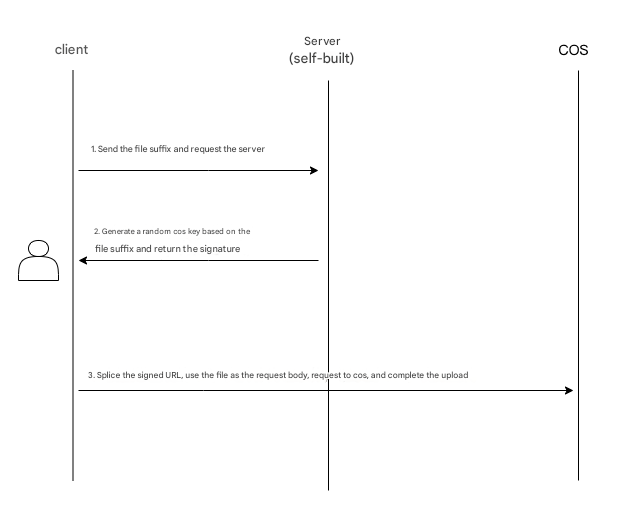
Implementation Process
1. Select a file on the client, and the client will send the suffix to the server.
2. The server generates a random COS file path with time based on the suffix, calculates the corresponding signature, and returns the URL and signature information to the client.
3. The client uses a PUT or POST request to directly upload the file to COS.
Documentation
Help and Support
Was this page helpful?
You can also Contact sales or Submit a Ticket for help.
Help us improve! Rate your documentation experience in 5 mins.
Feedback