tencent cloud

Container Network Overview
Last updated: 2025-12-31 14:09:18
Container Network Overview
Last updated: 2025-12-31 14:09:18
Tencent Kubernetes Engine (TKE) integrates various cloud service capabilities, including Kubernetes networking, Tencent Cloud Virtual Private Cloud (VPC), and Cloud Load Balancer (CLB), providing efficient and stable container networks. This document mainly describes the Container Network Interface (CNI) capability provided by TKE. By learning about these CNI solutions, you can choose an appropriate CNI plugin for your application.

Container Network Interface

The CNI plugin is a network solution for Kubernetes clusters, designed to provide flexible, scalable, and high-performance network connections. The CNI TKE plugin follows CNI specifications, enabling Kubernetes clusters to seamlessly integrate with various network solutions to meet different business and performance requirements.
The network plugin needs to meet the following constraints:
Each Pod has its own IP address, and Pods on nodes can communicate with all Pods in the cluster without using NAT.
Proxy services (such as Kubelet) on a node can communicate with all Pods on the node.
TKE provides 3 CNI plugin solutions: VPC-CNI, GlobalRouter, and Cilium-Overlay, which are introduced below in detail.

Introduction to the VPC-CNI Solution

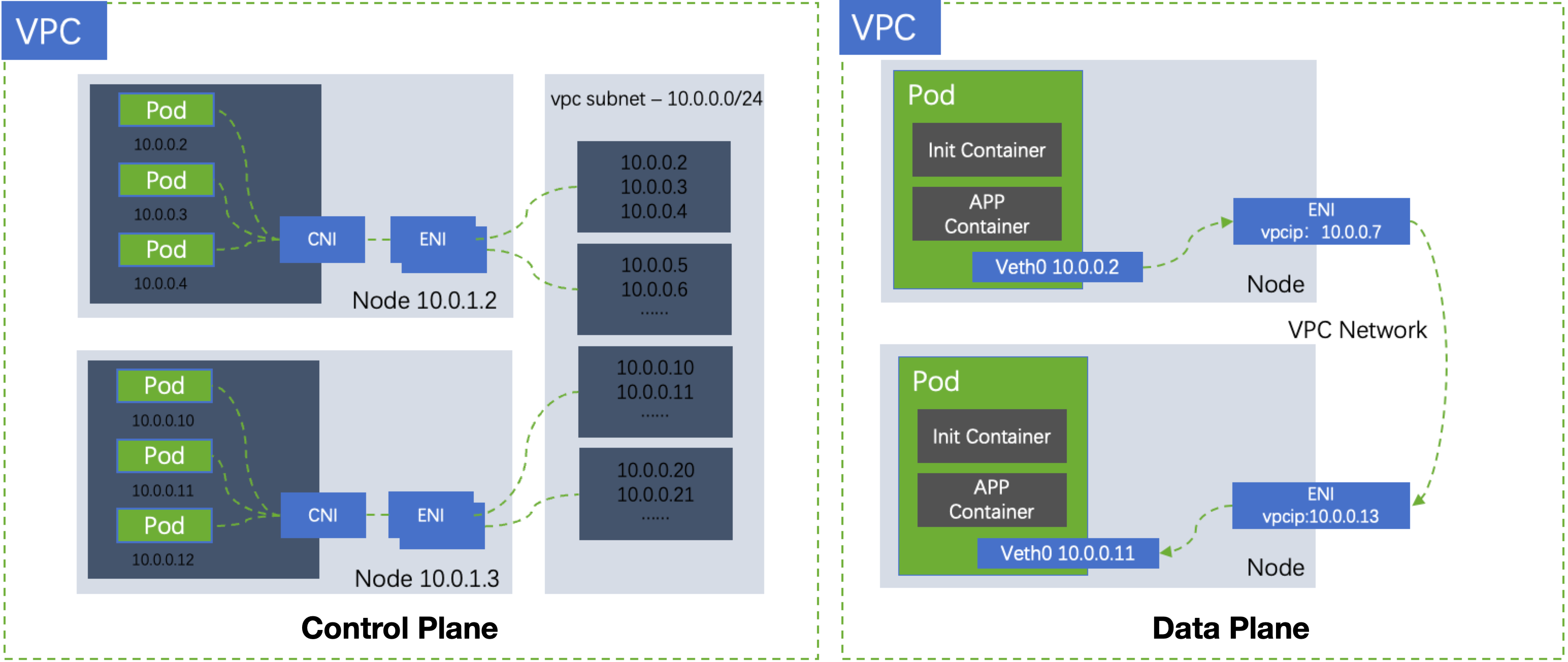
VPC-CNI, a CNI plugin implemented based on Tencent Cloud VPC, can directly assign the Elastic Network Interface (ENI) instance of VPC to Pods to realize interconnectivity between Pods. This solution fully reuses cloud network resources on VPC, with containers and nodes on the same network plane. The IP addresses of Pods are ENI IP addresses assigned by the IPAMD component of the cluster. Since network bridges on nodes and tunnel technologies such as VxLAN are not required for message encapsulation, this solution provides better support in network performance, observability, traffic throttling, and isolation, making it more suitable for public cloud scenarios.
TKE recommends using VPC-CNI as the default network solution of the cluster. VPC-CNI provides two modes: shared ENI and exclusive ENI, which are suitable for different scenarios. You can select the network mode based on your business requirements.
Shared ENI mode: Pods share one ENI instance. The IPAMD component applies for multiple IP addresses for the ENI instance and binds them to different Pods. This mode lowers the need for ENI resources and enhances Pod deployment density on nodes. The shared ENI mode supports fixed Pod IP addresses. For details, see Multiple Pods with Shared ENI Mode.
Exclusive ENI mode: Each Pod is bound to an exclusive ENI instance. This mode is suitable for scenarios with high requirements for network performance (high throughput and low latency). However, the number of ENI instances available on different nodes differs by model. The number is smaller for Pods on a single node. For details, see Pods with Exclusive ENI Mode.
The basic principle of the VPC-CNI solution is as shown in the figure below:


Strengths

Container networks and VPC subnets are on the same network plane, and the corresponding cloud networking capabilities of VPC, such as Elastic IP (EIP) and security groups, can be used.
CIDR blocks do not need to be pre-assigned by node, avoiding the waste of IP addresses in CIDR.
Data plane forwarding does not require a network bridge, which improves network forwarding performance by approximately 10%. This solution is suitable for scenarios with high requirements for network performance.
Pods can be assigned fixed IP addresses. This mode is suitable for scenarios that require containers to have fixed IP addresses.

Scenarios

Sensitive to latency:
Middleware and microservices: This solution delivers low network latency and can enhance network performance for the large-scale deployment of middleware and microservices.
Online games and live streaming applications: This solution delivers high network throughput and low network latency and can use cloud network resources on VPC to better support network-intensive businesses.
Migration of traditional architectures: While the traditional architecture is migrated to a container platform, it must be ensured that the IP address remains unchanged, and a security policy is set to restrict IP addresses.
A security group policy needs to be bound separately to the container using the exclusive ENI mode.

Must-Knows

Pods need to be assigned IP addresses from a VPC subnet. It is recommended to make this subnet exclusive to Pods and not to share it with other cloud resources, such as Cloud Virtual Machine (CVM) and CLB.
Nodes in a cluster must be in the same availability zone (AZ) as the container subnet.
The number of schedulable Pods on a node is subject to the maximum number of IP addresses that can be bound to ENI and the number of ENI instances supported by the node. Servers with higher configurations can support more ENI instances. Check the specific number in the Allocatable configuration of the node.

Introduction to the GlobalRouter Solution

Principle of the GlobalRouter Solution

The GlobalRouter solution is a CNI plugin implemented by TKE based on the global routing capability of the Tencent Cloud network. The cluster assigns a Pod CIDR to each node for assigning IP addresses to Pods on that node. The Pod CIDR is independent of the VPC CIDR, and the Pods on each node have unique and non-overlapping IP addresses. The Pod CIDR information of different nodes is distributed to VPC through global routing, enabling Pods on different nodes to access each other.
This network mode has the following features:
The container Pod CIDR block does not overlap with the VPC CIDR block and is pre-assigned to the node. Container IP addresses are obtained from the pre-assigned Pod CIDR block of the node.
Container routes are directly published to VPC. Pods on different nodes can directly access each other through global routing and forwarding.
Messages can be encapsulated without using VxLAN.

Container IP Address Assignment Mechanism

Each node in the cluster calculates the Pod CIDR block to be assigned to each node based on the configured cluster Pod CIDR and the maximum number of Pods on a node. The Pod CIDR block is used to assign IP addresses to Pods on that node.
The last CIDR address segment in the Pod CIDR of the cluster is selected based on the user-defined maximum number of Services in the cluster to assign IP addresses to Services in the cluster.
Once a node is released, the container Pod CIDR block used by the node will be released back to the IP range pool.
Scale-out nodes select available IP ranges from the container Pod CIDR block sequentially in a loop.

Strengths and Scenarios

Ease of use and quick Pod startup.
Suitable for simple business scenarios with a relatively fixed scale and no special requirements for IP address assignment and network performance.

Must-Knows

The cluster VPC CIDR and cluster Pod CIDR blocks must not overlap.
Within the same VPC network, Pod CIDR blocks of different clusters must not overlap.
When container networks and VPC routes overlap, data is forwarded in container networks first.
Fixed Pod IP addresses are not supported.

Introduction to the Cilium-Overlay Solution

Note:
The Cilium-Overlay solution only supports registered nodes and does not currently support cloud nodes. For scenarios with cloud nodes only, it is recommended to adopt the VPC-CNI solution.
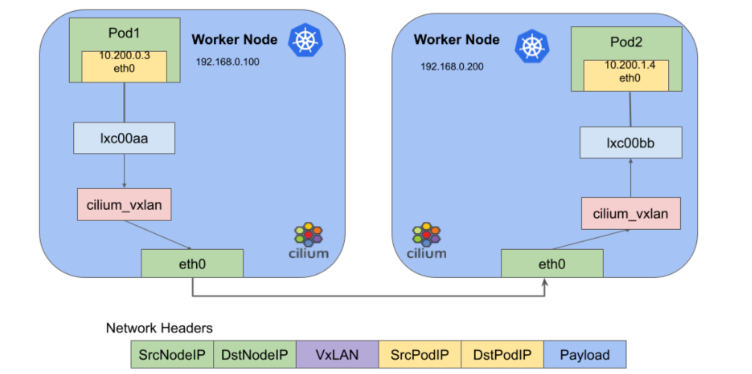
The Cilium-Overlay solution is a container network plugin implemented by TKE based on Cilium VxLAN. It meets the need for interconnectivity between cloud Pods and off-cloud Pods when users add off-cloud nodes to a TKE cluster in a distributed cloud scenario. This network mode has the following features:
Cloud nodes and off-cloud nodes share the specified container IP range.
Container IP ranges are assigned flexibly and do not overlap with other VPC CIDR blocks.
Overlay networks are built using the Cilium VxLAN tunnel encapsulation protocol.
After the cloud VPC network and the IDC network of the registered node are interconnected through Cloud Connect Network (CCN), the principle of cross-node Pod access is shown in the figure below:


Use Limits

The use of the Cilium VxLAN tunnel encapsulation protocol results in a performance overhead of less than 10%.
Pod IP addresses cannot be accessed directly outside the cluster.
2 IP addresses need to be obtained from the specified subnet to create a private network CLB instance, so that third-party nodes in the IDC can access API servers and public cloud services.
IP ranges of cluster networks and container networks cannot overlap.
Fixed Pod IP addresses are not supported.
Was this page helpful?
You can also Contact Sales or Submit a Ticket for help.
Yes
No

Feedback