Maintenance Windows and Exclusion Items
Download
Focus Mode
Font Size
Maintenance windows and exclusion items allow users to set periodic maintenance periods and upgrade-prohibited periods for clusters under their Tencent Cloud accounts. Planned upgrade tasks for cluster components will be generated based on the maintenance windows and exclusion items of clusters. Maintenance windows and exclusion items can be defined at the global and cluster levels, allowing users to configure maintenance windows and exclusion items for clusters under their accounts at different levels. This document details the features of maintenance windows and exclusion items and describes how to configure them.
Global Maintenance Windows and Exclusion Items
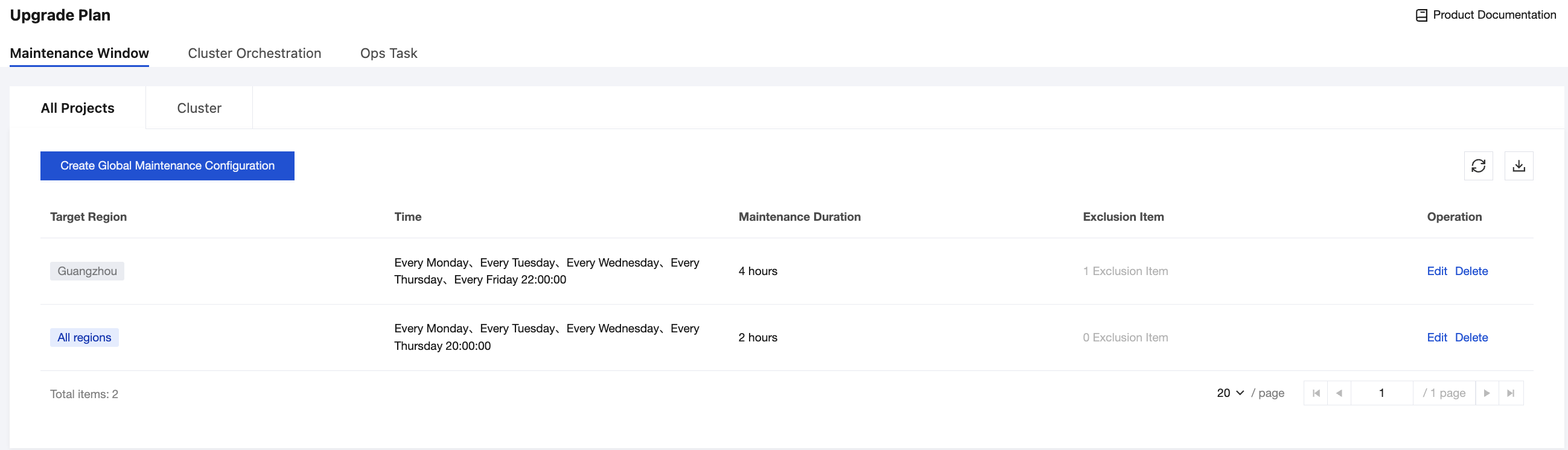
Global maintenance windows and exclusion items are region-level configurations that take effect for all clusters under a user account in specified regions. When creating global maintenance windows and exclusion items, users can set the target region to All Regions or the Specified Region (such as Guangzhou). Global maintenance windows and exclusion items support users in configuring the following maintenance time information for the region:
Maintenance Cycle: Users need to specify weekly maintenance days (such as Monday to Friday) for clusters in the region, with at least one maintenance day required.
Maintenance Start Time and Duration: Users need to configure a specific maintenance start time (such as 20:00:00, indicating that the maintenance starts at 20:00:00 on each maintenance day) and maintenance duration (such as 4 hours) for the maintenance days in the region. The maintenance duration must be no less than 2 hours and no more than 24 hours.
Exclusion Item: Users can add upgrade-prohibited time periods for all clusters in the region. Up to 3 exclusion items can be added for a single region, and the time interval between the start time and end time of each exclusion item cannot exceed 7 days. In addition, it is required to ensure that each cluster in the region has at least 4 hours of maintenance window within every 30-day cycle.
If a maintenance window configuration item with the target region set to All Regions already exists, when a maintenance window for a specified region is added, the maintenance window configuration for the specified region takes precedence over that for all regions. The exclusion items will be the combination of exclusion items from all regions and the specified region. Example:
A global maintenance window configuration already exists:
Target region: all regions
Maintenance time: 20:00:00 every Monday, Tuesday, Wednesday, Thursday, and Friday
Maintenance duration: 3 hours
Exclusion item: exclusion item 1
A new global maintenance window configuration is added:
Target region: Guangzhou
Maintenance time: 22:00:00 every Tuesday and Wednesday
Maintenance duration: 3 hours
Exclusion item: exclusion item 2
The final effective global maintenance window configuration for the Guangzhou region is as follows:
Maintenance time: 22:00:00 every Tuesday and Wednesday
Maintenance duration: 3 hours
Exclusion item: exclusion item 1 + exclusion item 2
Note that if a cluster has both region-level and cluster-level maintenance windows and exclusion items configured, the final maintenance window and exclusion item configuration for the cluster is obtained by combining the two types of maintenance window and exclusion item configurations during the planning of cluster component upgrade tasks. For details, see Cluster Maintenance Windows and Exclusion Items.
Cluster Maintenance Windows and Exclusion Items
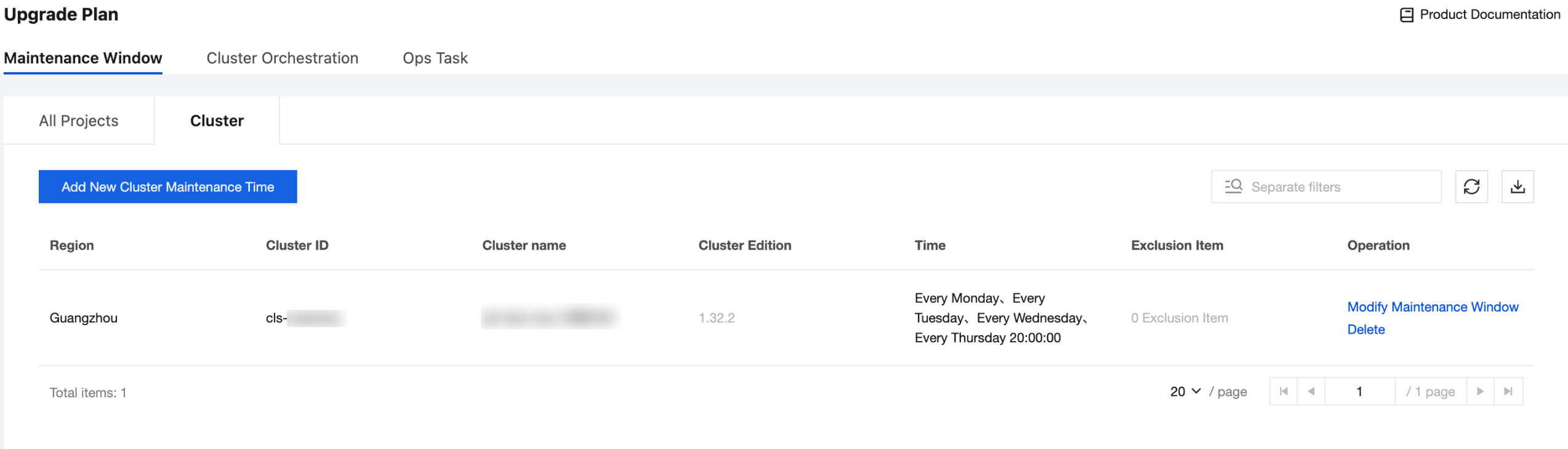
Cluster maintenance windows and exclusion items refer to the maintenance time information set by users for each cluster. Different maintenance windows and exclusion items can be configured for different clusters. Cluster maintenance windows and exclusion items support users in configuring the following maintenance time information for a cluster:
Maintenance Cycle: Users need to specify weekly maintenance days (such as Monday to Friday) for clusters, with at least one maintenance day required.
Maintenance Start Time and Duration: Users need to configure a specific maintenance start time (such as 20:00:00, indicating that the maintenance starts at 20:00:00 on each maintenance day) and maintenance duration (such as 4 hours) for the maintenance days. The maintenance duration must be no less than 2 hours and no more than 24 hours.
Exclusion Item: Users can add upgrade-prohibited time periods for clusters. Up to 3 exclusion items can be added for a single cluster, and the time interval between the start time and end time of each exclusion item cannot exceed 7 days. In addition, it is required to ensure that the cluster has at least 4 hours of maintenance window within every 30-day cycle.
If a cluster has both cluster maintenance windows and exclusion items and global maintenance windows and exclusion items configured, the final maintenance window and exclusion item configuration for the cluster is obtained based on the following rules:
Maintenance Window: Cluster maintenance windows take precedence over global maintenance windows. The final effective maintenance window for the cluster is the cluster maintenance window configuration.
Exclusion Item: The final effective exclusion items for the cluster are the combination of cluster exclusion items and global exclusion items.
Operation Steps
Configuring a Global Maintenance Window and an Exclusion Item
1. Log in to the Tencent Kubernetes Engine (TKE) console and go to the Plan Upgrade page.
2. Select the Maintenance Window tab, go to the Global configuration page, and click Create Global Maintenance Configuration:
Target Region: Select All Regions or Specified Region. If Specified Region is selected, each region can be included only in one global maintenance window configuration.
Select a Region: If the target region is set to Specified Region, you can specify multiple regions for the configuration to take effect.
Maintenance Cycle: Configure specific days of the week as the maintenance window.
Maintenance Start Time: Configure the start time for maintenance, typically during off-peak hours, such as 20:00:00. The default time zone for the maintenance start time is UTC+8. If the start time is specified in a different time zone, convert it to UTC+8.
Maintenance Duration: Configure the duration of the maintenance window. To ensure sufficient upgrade time, the maintenance duration should be at least 2 hours.
Exclusion Item: Configure time periods when upgrades are prohibited. Up to 3 exclusion items can be added for each maintenance window, and it is recommended that the duration of each exclusion item should not exceed 72 hours.
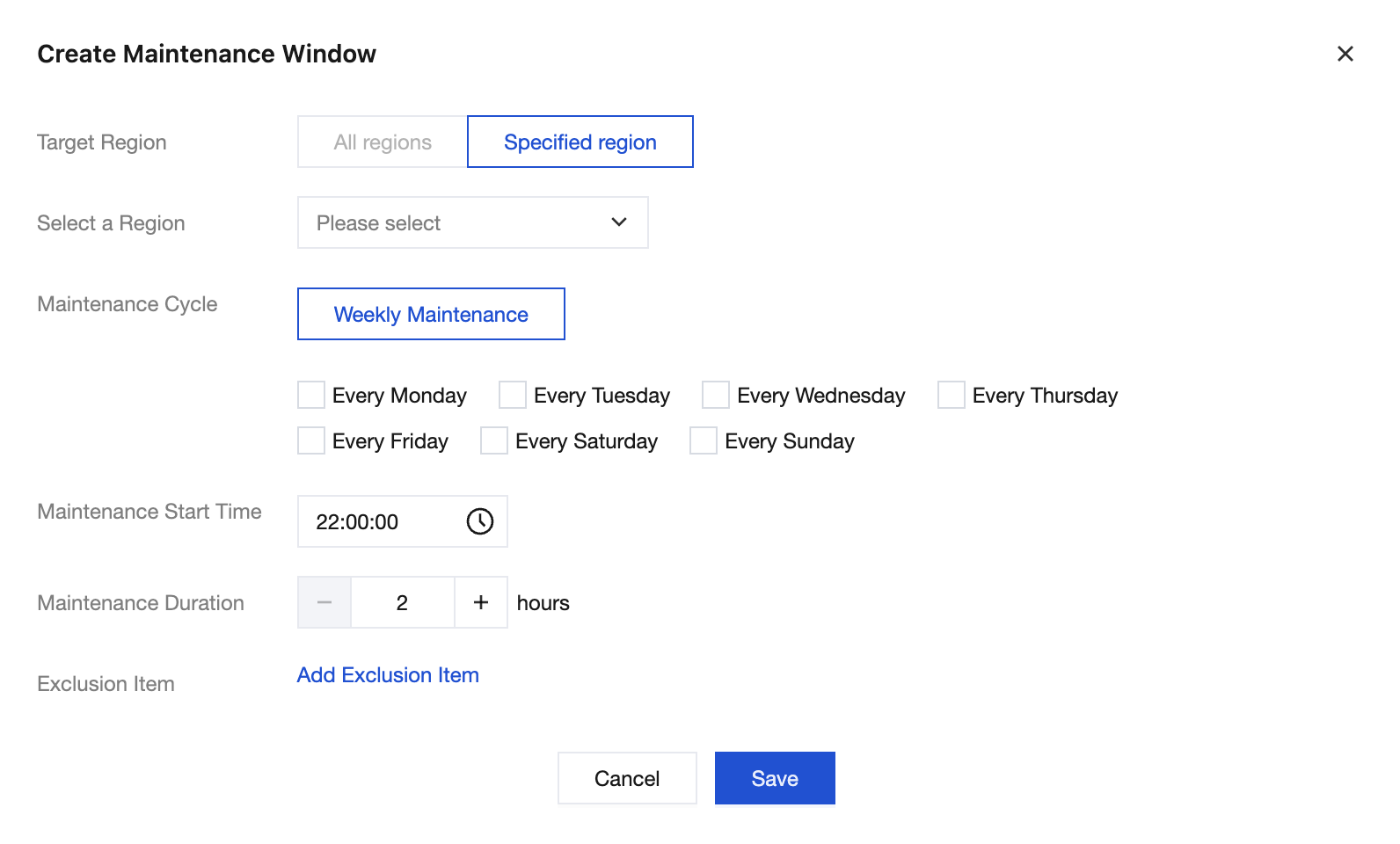
3. Click Save to create a global maintenance window.
Configuring a Cluster Maintenance Window and an Exclusion Item
1. Log in to the TKE console and go to the Plan Upgrade page.
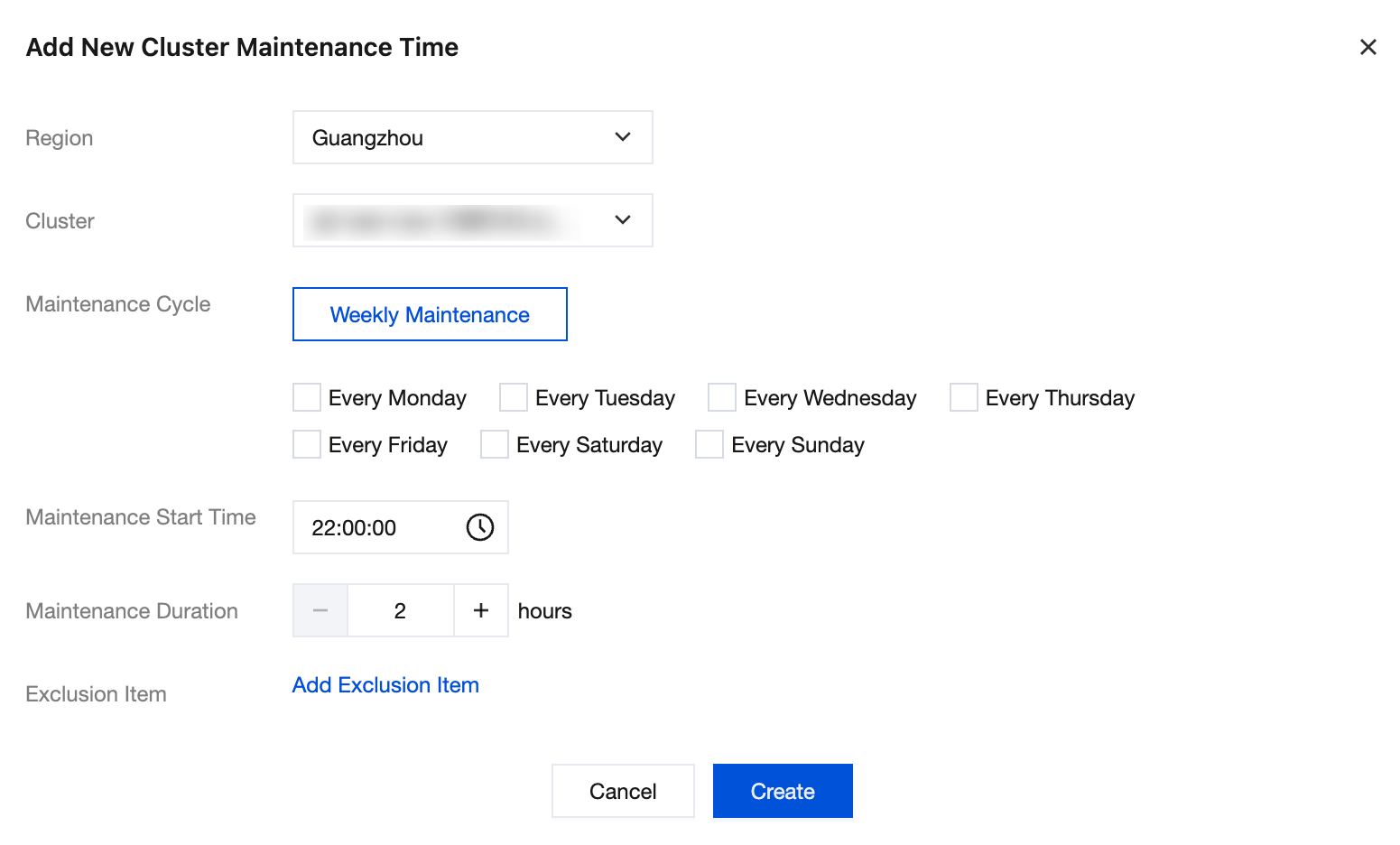
2. Select the Maintenance Window tab, go to the Cluster configuration page, and click Add Cluster Maintenance Time:
Region: Select the region where the cluster is located.
Cluster: Select the cluster that needs to be configured.
Maintenance Cycle: Configure specific days of the week as the maintenance window.
Maintenance Start Time: Configure the start time for maintenance, typically during off-peak hours, such as 20:00:00. The default time zone for the maintenance start time is UTC+8. If the start time is specified in a different time zone, convert it to UTC+8.
Maintenance Duration: Configure the duration of the maintenance window. To ensure sufficient upgrade time, the maintenance duration should be at least 2 hours.
Exclusion Item: Configure time periods when upgrades are prohibited. Up to 3 exclusion items can be added for each maintenance window, and it is recommended that the duration of each exclusion item should not exceed 72 hours.
3. Click Create to create a cluster maintenance window and an exclusion item.
Help and Support
Was this page helpful?
You can also Contact sales or Submit a Ticket for help.
Help us improve! Rate your documentation experience in 5 mins.
Feedback