在 TKE 上使用 Pod 独立安全组
下载
聚焦模式
字号
介绍
本文主要描述用户如何在 TKE 的普通节点和原生节点上,使用 Pod 独立安全组能力(SecurityGroupPolicy,简称 SGP)。
在 TKE Serverless 集群中,已经提供了 SGP 支持,详情请参见 容器服务 Pod 安全组。本次 TKE 网络组件全面升级,利用 VPC 侧提供的中继网卡(Trunking ENI)能力,通过给 Pod 单独分配中继出来的子网卡,子网卡单独绑定安全组,从而实现 Pod 绑定独立安全组 SGP 能力。
方案优势
支持 Pod 级别绑定独立安全组。
Pod 单独占用 IP,调度灵活性进一步增强,固定 IP 可在同可用区节点上任意调度。
基于中继网卡实现,单独占用配额,不占用原有的弹性网卡辅助 IP 资源以及独立网卡资源。
使用场景
减少暴露面,从而减少受到网络攻击的可能性。
通过安全组,可以让 Pod 配置其最小的暴露面,从而减少可能的攻击面,增强安全性。
最小粒度的网络安全策略控制。
Pod 绑定独立安全组实现了最小粒度的网络安全策略控制,更精准的控制每个应用的网络安全策略,从而增强集群整体安全性。
从虚拟机架构迁移到容器架构,复用应用已有的安全组。
传统虚机架构中,应用部署在虚机上,而安全组是绑定到虚拟机。从虚拟机架构迁移到容器架构后,使用 SGP 特性,这些安全组可以直接复用,从而保持原有的网络安全策略能力。
功能特性
支持与共享网卡方案共存,实现 Pod 粒度的方案设置和共存。
eniipamd 组件启用安全组功能时,Pod 设置安全组的优先级更高,其次按照 eniipamd 的安全组逻辑,继承节点的安全组设置(使用主网卡或者依照节点设置)。
同节点的 Pod 互访默认不经过安全组。
若希望同节点的 Pod 互访也经过安全组校验,请在开启组件中继网卡能力时参考 数据面方案 一节进行配置。
方案限制
节点上使用中继网卡的 Pod 数量受限于节点可绑定的中继网卡配额,目前默认为 100,最大 64C 机型支持 256。
目前仅支持 VPC-CNI 共享网卡 + 固定 IP 模式集群开启。
目前默认仅支持机型:“ITA5”、“M8”、“MA4”、“MA5”、“S8”、“S9”、“SA4”、“SA5”。其他机型添加到集群后,中继网卡配额会被赋值为0,禁止使用中继网卡独立安全组的 Pod 调度。如需使用其他机型,请 提交工单 申请网络侧支持。
使用方法
VPC 侧开启接口 client-token 白名单
注意:
若未将账号添加至 VPC client-token 白名单,使用中继网卡过程中可能有资源泄露风险。
中继网卡相关接口授权
1. 在 访问管理控制台 > 策略 中,单击新建自定义策略。
2. 选择按策略语法创建策略方式:
2.1 选择空白模板,单击下一步。
2.2 策略名称可命名为 “SubENIForIPAMD”。复制并创建以下策略:
{"statement": [{"action": ["vpc:CreateSubNetworkInterface","vpc:DeleteSubNetworkInterface","cvm:CheckNetworkInterfaceSecurityGroupReady"],"effect": "allow","resource": ["*"]}],"version": "2.0"}
3. 单击完成。
4. 创建完成后,在 访问管理控制台 > 角色 中,搜索 “IPAMDofTKE_QCSRole”。单击角色名称,在角色信息-权限中选择关联策略,勾选已创建完成的策略 “SubENIForIPAMD”,单击确定。
5. 在 访问管理控制台 > 角色 中,搜索 “TKE_QCSRole”。单击角色名称,在角色信息-权限中选择关联策略,勾选已创建完成的策略 “SubENIForIPAMD”,单击确定。
通过以上授权,赋予 TKE 及相关 tke-eni-ipamd 组件创建中继网卡和删除中继网卡接口的权限。
增量集群默认开启中继网卡功能
1. 增量集群默认开启该能力需添加白名单,请 提交工单 向容器服务申请权限。
2. 存量集群开启该能力可以参照 “存量集群开启中继网卡功能” 一节进行操作。
3. 添加白名单后,创建集群时选择 vpc-cni 共享卡多 IP 模式,并开启固定 Pod IP,则会自动开启中继网卡模式。
存量集群开启中继网卡功能
开启条件如下:
集群限制:VPC-CNI 网络模式,共享网卡,并开启固定 Pod IP。
版本限制:3.5.6 及以上版本。
操作步骤如下:
1. 登录 容器服务控制台,选择左侧导航中的集群。
2. 在集群页面,选择目标集群名称,进入集群详情页。
3. 选择左侧导航栏中的组件管理,在组件页面选择 eniipamd组件 右侧的修改全局配置,将 “vpcCni.trunkingEni.enableSubEni” 配置项改为
true,修改后保存并退出。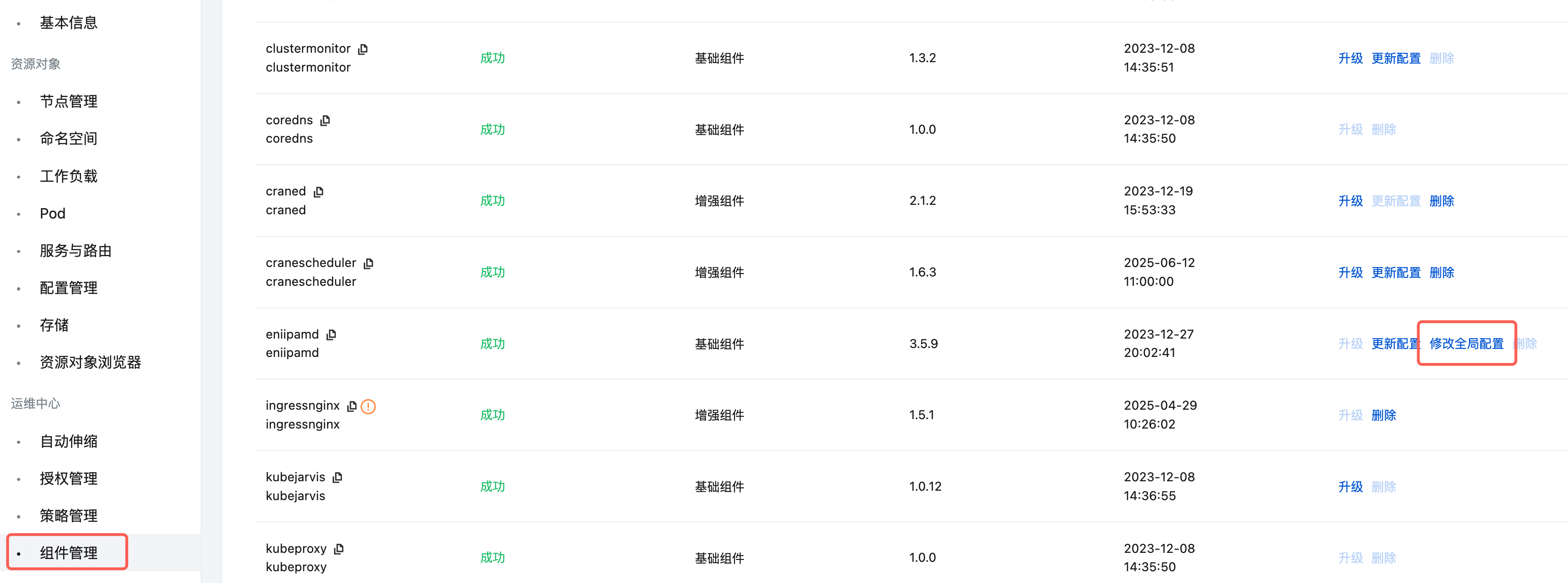
集群开启 SGP 能力
集群开启 Trunking ENI 能力后,即可在普通节点和原生节点上使用 SGP。操作步骤如下:
1. 登录 容器服务控制台,选择左侧导航中的集群。
2. 在集群页面,选择目标集群名称,进入集群详情页。
3. 选择左侧导航栏中的组件管理,在组件页面单击新建。
4. 在新建组件管理页面,勾选 SecurityGroupPolicy。如下图所示:
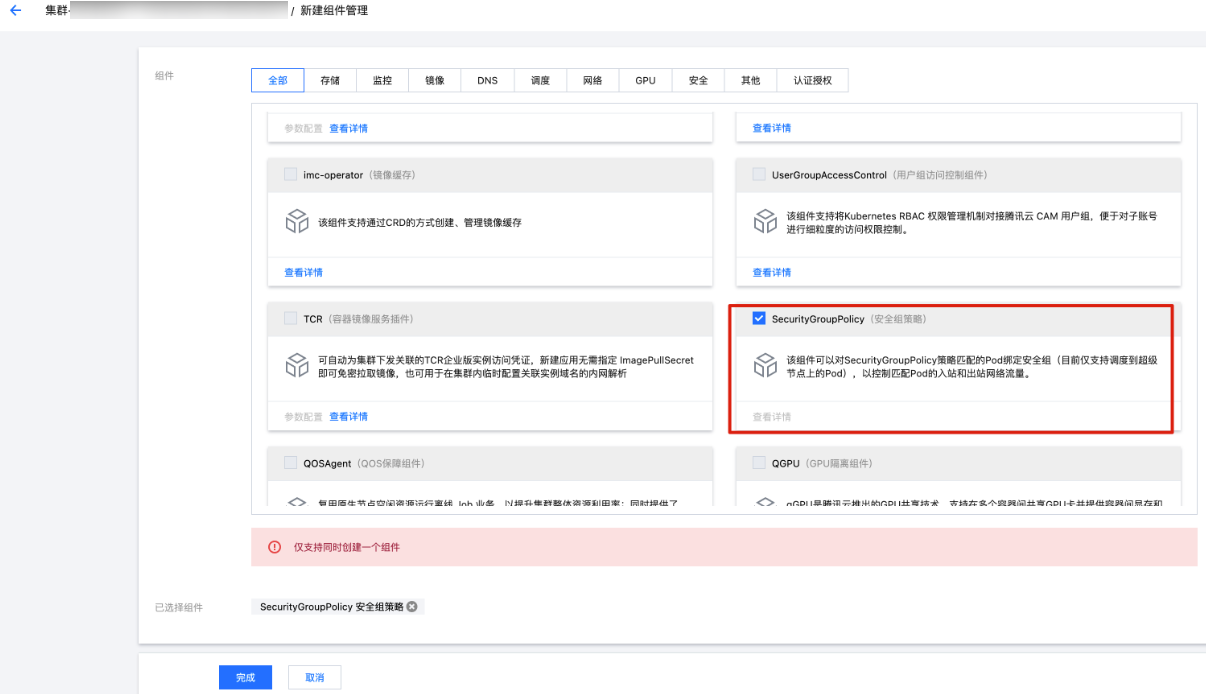
5. 单击完成。
6. 请在 安全组页面 创建 Pod 需要的安全组,例如 sg-xxxxyyyy。
7. 部署 SecurityGroupPolicy 的 CR,如下 yaml 文件。如果您更愿意根据服务账户标签选择 Pod,则可以替换 podSelector 为 serviceAccountSelector,必须指定其中一种类型的选择器。如果指定多个安全组,则所有安全组中的所有规则都会对选定的 Pod 有效,例如 yaml 文件中的 sg-xxxxyyyy。
apiVersion: vpcresources.tke.cloud.tencent.com/v1beta1kind: SecurityGroupPolicymetadata:name: my-security-group-policynamespace: my-namespacespec:podSelector:matchLabels:app: my-appsecurityGroups:groupIds:- sg-xxxxyyyy
此后所有创建的 Pod,label 包含
app: my-app,都会使用 Trunking ENI 网络能力,并绑定 sg-xxxxyyyy 的安全组。注意:
SGP 安全组策略仅对增量 Pod 生效。存量 Pod 安全组配置不会更新。如需更新存量 Pod 安全组,需要您确认存量 Pod 满足 SGP 规则后手动重建 Pod。
8. 进入 容器服务控制台,在集群的工作负载中,部署需要绑定安全组的应用,可参考如下 yaml 部署 nginx 的 deployment:
apiVersion: apps/v1kind: Deploymentmetadata:name: nginxlabels:app: my-appspec:replicas: 1selector:matchLabels:app: my-apptemplate:metadata:annotations:labels:app: my-appspec:terminationGracePeriodSeconds: 0containers:- name: nginximage: nginx:1.7.9ports:- containerPort: 80
部署成功后,可以通过
kubectl get pod -oyaml,检查 Pod 相关信息,确认已经使用 Trunking ENI 能力,并绑定对应的安全组: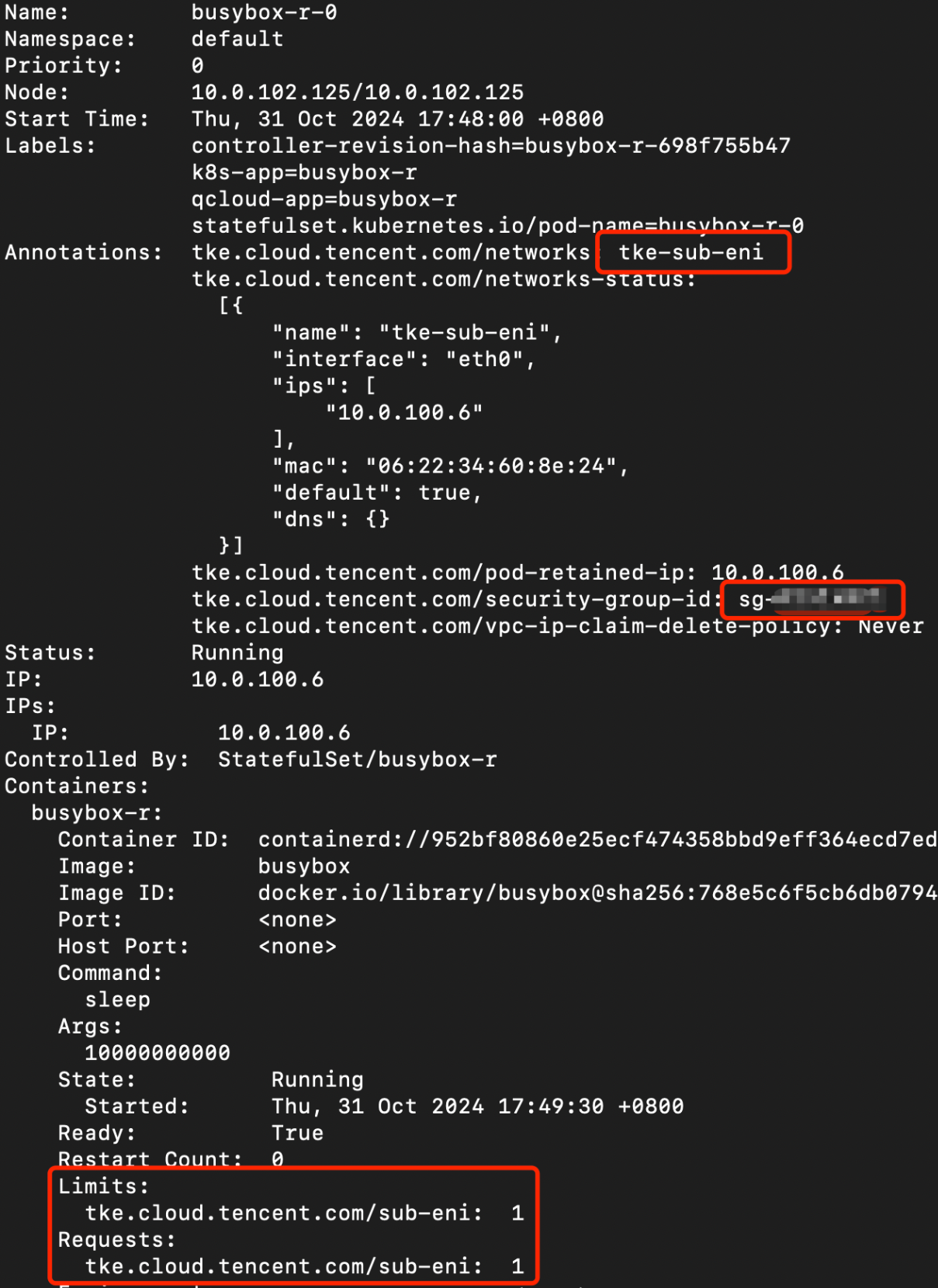
红框中关键信息说明如下:
# tke-sub-eni 表示 pod 已经使用了中继网卡tke.cloud.tencent.com/networks: "tke-sub-eni"# 表示该 pod 已经绑定了 pod 级别的安全组tke.cloud.tencent.com/security-group-id: "sg-xx1,sg-xx2"# 扩展资源,表示当前 pod 使用的 Trunking 网卡资源tke.cloud.tencent.com/sub-eni: "1"
同时检查 Pod 使用的弹性网卡所关联的安全组是否符合预期,首先通过以下的命令获取 Pod 对应的 VpcEni CR:
kubectl get vpceni -l tke.cloud.tencent.com/pod-name=<pod 名称>,tke.cloud.tencent.com/pod-namespace=<pod 命名空间>
在获取到 Pod 对应的 VpcEni 资源后,通过以下命令获取 Pod 使用的中继网卡 ID:
kubectl get vpceni <资源名称> -ojsonpath='{.status.eni.eniID}'
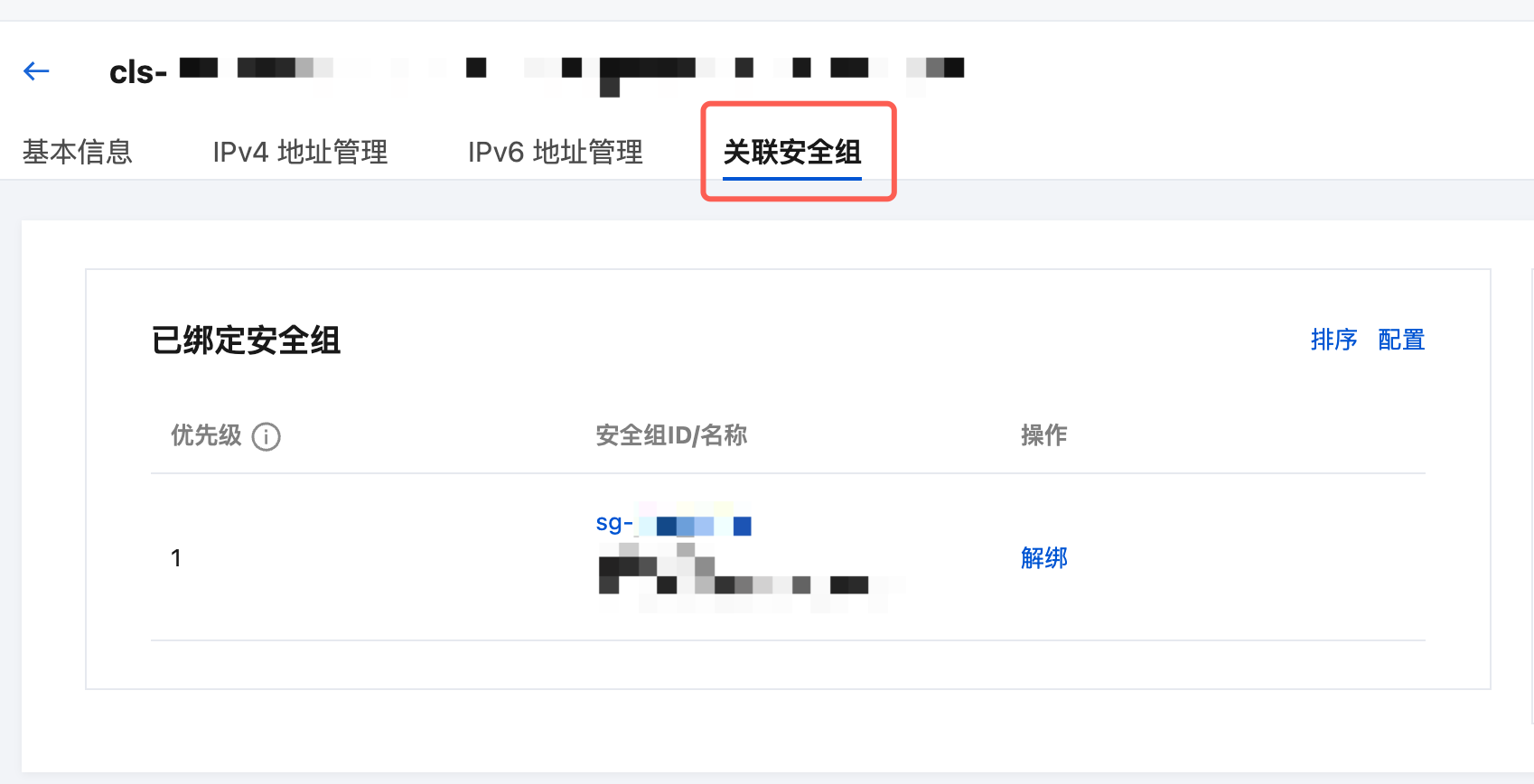
数据面方案
当前 TKE 中继网卡功能支持以下两种数据路由方案:
1. 标准路由方案(默认方案)。
2. 严格路由方案。
两种方案的功能差异以及使用限制见表格:
数据面方案 | 严格路由 | 标准路由 |
功能差异 | 同节点 Pod、以及 Pod 与所在节点互访均会经过 Pod 安全组。 跨节点 Pod 互访经过 Pod 安全组。 | 同节点 Pod、以及 Pod 与所在节点互访不会经过 Pod 安全组。 跨节点 Pod 互访经过 Pod 安全组。 |
限制 | 1. Pod 不支持 Node LocalDNS。 2. Pod 与 NetworkPolicy 规则存在不兼容情况。 3. Pod 与 IPVS 模式的集群存在不兼容情况。 4. 客户端通过类型为 NodePort 或 LoadBalancer,且 externalTrafficPolicy 为 Local 的 Service 访问严格路由模式的 Pod 时,会出现网络不通的问题。 5. 节点通过 TCP 或 UDP 协议对 Pod 进行访问时,会出现网络不通的问题,常表现为 Pod 健康探针以及存活探针失败。该问题可以通过关闭内核的 tcp_early_demux 和 udp_early_demux 来解决,具体操作详见下文。 6. Pod 出节点的流量,不能通过源网络地址转换 (SNAT),否则会出现网络不通的情况。相关确认与操作步骤见下文。 | 无 |
如何开启严格路由方案
注意:路由方案的变更仅对增量 Pod 生效,存量 Pod 若需要调整路由方案,请重建对应 Pod。
操作步骤如下:
1. 登录 容器服务控制台,选择左侧导航中的集群。
2. 在集群页面,选择目标集群名称,进入集群详情页。
3. 选择左侧导航栏中的组件管理,在组件页面选择 eniipamd 组件右侧的修改全局配置,进入配置页面后做如下的调整:
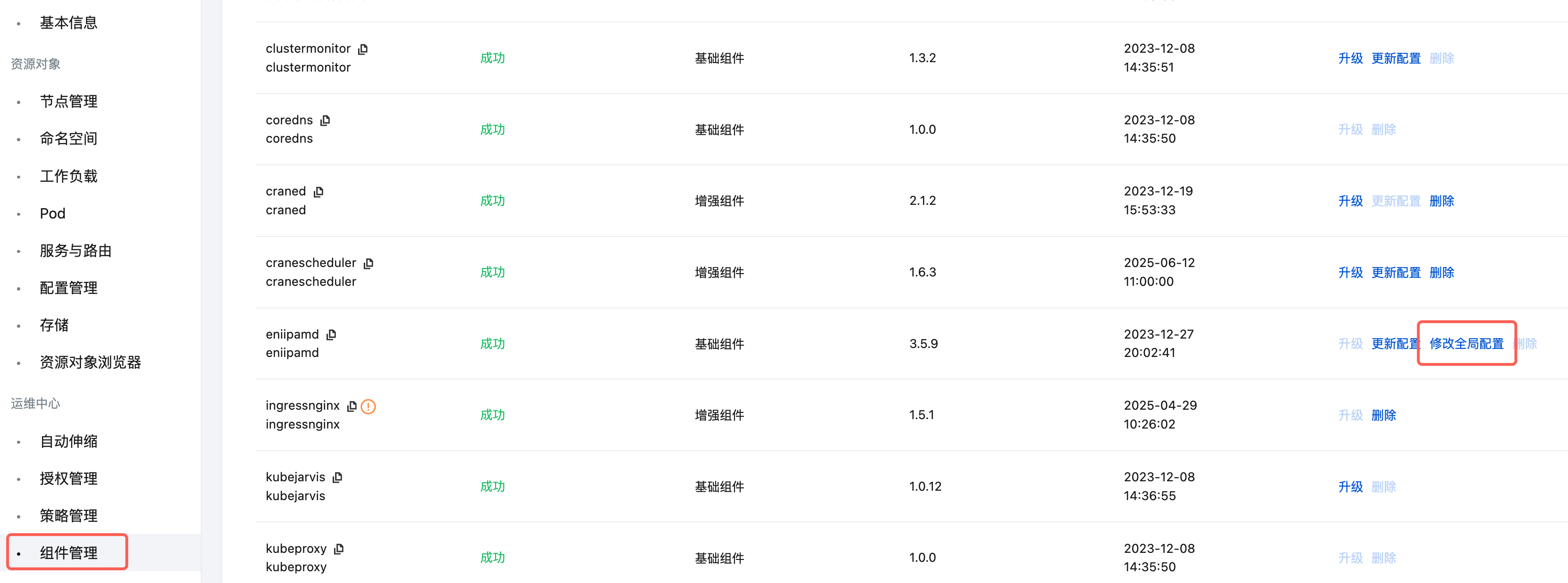
3.1 将 “vpcCni.trunkingEni.podSecurityGroupEnforcingMode” 配置项改为
strict。3.2 将 “agent.config.disableTcpEarlyDemux” 配置项改为
true,该配置项会关闭内核的 tcp_early_demux 特性。3.3 将 “agent.config.disableUdpEarlyDemux” 配置项改为
true,该配置项会关闭内核的 udp_early_demux 特性。4. 确认修改无误后点击完成并退出。
确认当前集群的 SNAT 配置
使用严格路由模式的 Pod 在访问其他服务时不能做源网络地址转换(SNAT),否则会出现网络不通的情况。
如果当前集群没有安装 ip-masq-agent 组件,则 Pod 在访问外部服务时默认不会进行源网络地址转换(SNAT)。
如果当前集群安装了 ip-masq-agent 组件,请参考 ip-masq-agent 说明 对组件 SNAT 行为进行配置,确保严格路由模式 Pod 在访问外部服务时不会进行 SNAT。
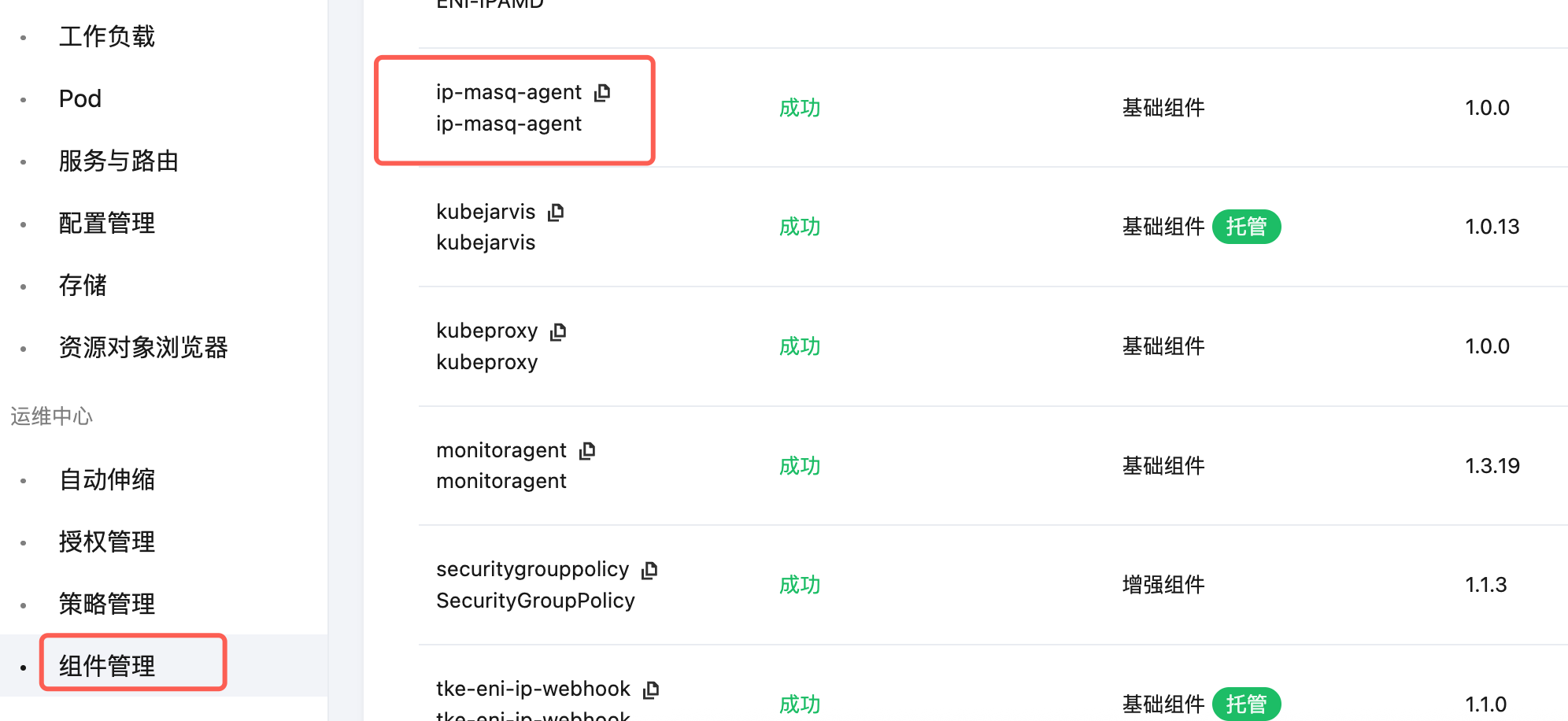
可以通过以下步骤确认当前集群是否安装了 ip-masq-agent 组件:
1. 登录 容器服务控制台,选择左侧导航中的集群。
2. 在集群页面,选择目标集群名称,进入集群详情页。
3. 选择左侧导航栏中的组件管理,查看是否存在 ip-masq-agent 组件。
文档反馈